How do I ADD a Specific Network Folder/Location to Navigation Pane?

erleyedit

New member
Local time
12:08 AM
Messages
4
I want to see my own network folder on the Navigation Pane, so it will display the folder tree in the Nav Pane and not just a link to it in the Favorites jump list. Under My PC shows several links (to C drive and 3 network locations). The folder I want to link to is in one of these locations (\\server03\Home\UserName\My Documents\My Docs). How do I do add this location (My Docs) to the Nav Pane? Thanks!
 

My Computer My Computer

Computer type
Laptop
Computer Manufacturer/Model Number
Dell/Latitude E5440
OS
Windows 7 Pro SP1 64bit SSD
CPU
Intel(R) Core(TM) i5-4300U CPU @ 1.90GHz 2.5 GHz
Memory
8 GB RAM
Antivirus
McAfee
Browser
IE 11, Firefox 40.x

My Computer My Computer

Computer type
PC/Desktop
Computer Manufacturer/Model Number
Custom Build
OS
Windows 7 Ultimate x64 SP1
CPU
AMD Phenom 2 1090T
Motherboard
Gigabyte GA-890FXA-UD5
Memory
2x8GB Kingston HyperX Fury Black 1600Mhz Unganged
Graphics Card(s)
MSI GTX 970 Gaming 4G
Sound Card
Realtek On-Board HD 7.1 Audio / Logitech G35
Monitor(s) Displays
3xAcer GD245HQ
Screen Resolution
1920x1080
Hard Drives
Samsung 850 Pro 512GB SSD - OS /
WD Caviar Black SATA 3 - 1 TBx2 - Dynamic RAID 0 /
WD Caviar Green SATA 2 - 640GBx2 - Dynamic RAID 0 /
WD Caviar Green SATA 2 - 640GB - Internal Backup /
Seagate Barracude SATA 3 - 3TB - External Backup/ Sync
PSU
HighPower 1000W
Case
Cooler Master HAF 932
Cooling
Noctua NH-D14
Keyboard
Logitech G19
Mouse
Logitech G500
Internet Speed
100/4 Mbit Cable (100GB quota)
Antivirus
ZoneAlarm Extreme Security / MBAM Pro / MBAE Free / SAS Free
Browser
IE 11 - Firefox - Chrome
Other Info
Logitech F710/ G27/ G940/ Z5500 // TrackIR 5 // Nvidia 3D Surround Vision
ADD a specific network Folder/Location to the Navigation Pane

Let me rephrase my question:
How do I place a top level icon in the Nav Pane that links to a subfolder of a mapped network drive?
The path to the folder would be: \\server\share\UserName\folder\MySubfolder
This network drive shows up in the list under My PC in the Nav Pane, but I want the subfolder to show up by itself as MySubfolder in the Nav Pane.
Goal: I want to have an expandable/collapsible active folder tree in the Nav Pane to my network subfolder.
Thanks for your feedback.
 

My Computer My Computer

Computer type
Laptop
Computer Manufacturer/Model Number
Dell/Latitude E5440
OS
Windows 7 Pro SP1 64bit SSD
CPU
Intel(R) Core(TM) i5-4300U CPU @ 1.90GHz 2.5 GHz
Memory
8 GB RAM
Antivirus
McAfee
Browser
IE 11, Firefox 40.x
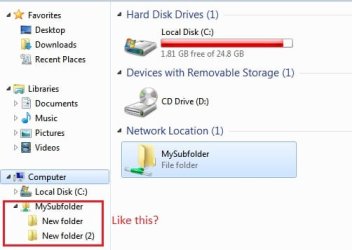
Well, Win7 doesn't have My PC, I guess you are using Win 8?

Do you mean like this?
network map.jpg
 

My Computer My Computer

Computer type
PC/Desktop
Computer Manufacturer/Model Number
Custom Build
OS
Windows 7 Ultimate x64 SP1
CPU
AMD Phenom 2 1090T
Motherboard
Gigabyte GA-890FXA-UD5
Memory
2x8GB Kingston HyperX Fury Black 1600Mhz Unganged
Graphics Card(s)
MSI GTX 970 Gaming 4G
Sound Card
Realtek On-Board HD 7.1 Audio / Logitech G35
Monitor(s) Displays
3xAcer GD245HQ
Screen Resolution
1920x1080
Hard Drives
Samsung 850 Pro 512GB SSD - OS /
WD Caviar Black SATA 3 - 1 TBx2 - Dynamic RAID 0 /
WD Caviar Green SATA 2 - 640GBx2 - Dynamic RAID 0 /
WD Caviar Green SATA 2 - 640GB - Internal Backup /
Seagate Barracude SATA 3 - 3TB - External Backup/ Sync
PSU
HighPower 1000W
Case
Cooler Master HAF 932
Cooling
Noctua NH-D14
Keyboard
Logitech G19
Mouse
Logitech G500
Internet Speed
100/4 Mbit Cable (100GB quota)
Antivirus
ZoneAlarm Extreme Security / MBAM Pro / MBAE Free / SAS Free
Browser
IE 11 - Firefox - Chrome
Other Info
Logitech F710/ G27/ G940/ Z5500 // TrackIR 5 // Nvidia 3D Surround Vision
ADD a specific network Folder/Location to the Navigation Pane

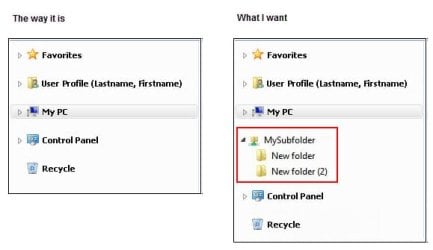
I have Windows 7; I guess I changed the name to My PC to make it shorter. But your image is correct. To get to MySubfolder, I have to click down through several levels under My PC (Computer). See attached image.
 

Attachments

  • 15-0914_Current vs Goal.jpg
    15-0914_Current vs Goal.jpg
    17.4 KB · Views: 14
  • 15-0916_The way it is expanded.jpg
    15-0916_The way it is expanded.jpg
    25 KB · Views: 9
Last edited:

My Computer My Computer

Computer type
Laptop
Computer Manufacturer/Model Number
Dell/Latitude E5440
OS
Windows 7 Pro SP1 64bit SSD
CPU
Intel(R) Core(TM) i5-4300U CPU @ 1.90GHz 2.5 GHz
Memory
8 GB RAM
Antivirus
McAfee
Browser
IE 11, Firefox 40.x
Try, in right pane of Explorer, in an empty place, right click and Network Location. I am not sure if this is any different than the tutorial, other than not assigning any letters.
 

My Computer My Computer

Computer type
PC/Desktop
Computer Manufacturer/Model Number
Custom Build
OS
Windows 7 Ultimate x64 SP1
CPU
AMD Phenom 2 1090T
Motherboard
Gigabyte GA-890FXA-UD5
Memory
2x8GB Kingston HyperX Fury Black 1600Mhz Unganged
Graphics Card(s)
MSI GTX 970 Gaming 4G
Sound Card
Realtek On-Board HD 7.1 Audio / Logitech G35
Monitor(s) Displays
3xAcer GD245HQ
Screen Resolution
1920x1080
Hard Drives
Samsung 850 Pro 512GB SSD - OS /
WD Caviar Black SATA 3 - 1 TBx2 - Dynamic RAID 0 /
WD Caviar Green SATA 2 - 640GBx2 - Dynamic RAID 0 /
WD Caviar Green SATA 2 - 640GB - Internal Backup /
Seagate Barracude SATA 3 - 3TB - External Backup/ Sync
PSU
HighPower 1000W
Case
Cooler Master HAF 932
Cooling
Noctua NH-D14
Keyboard
Logitech G19
Mouse
Logitech G500
Internet Speed
100/4 Mbit Cable (100GB quota)
Antivirus
ZoneAlarm Extreme Security / MBAM Pro / MBAE Free / SAS Free
Browser
IE 11 - Firefox - Chrome
Other Info
Logitech F710/ G27/ G940/ Z5500 // TrackIR 5 // Nvidia 3D Surround Vision
ADD a specific network Folder/Location to the Navigation Pane

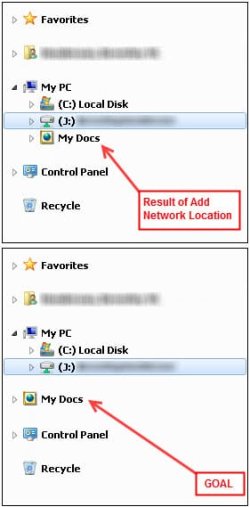
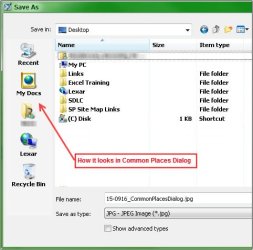
Well, this is cleaner, but it still does not place My Docs in an icon by itself in the Nav Pane. It is still under My PC (Computer). I was able to do this in the Common Places Dialog through the Group Policy Editor. (I realize that it is just a shortcut there, not an expandable/collpsible icon.) Is there no way to put My Docs in the Nav Pane as a stand-alone icon? Thanks again.
 

Attachments

  • 15-0916_NavPane_My Docs Location.jpg
    15-0916_NavPane_My Docs Location.jpg
    19.9 KB · Views: 12
  • 15-0916_My Docs in Common Places Dialog.jpg
    15-0916_My Docs in Common Places Dialog.jpg
    32.8 KB · Views: 12

My Computer My Computer

Computer type
Laptop
Computer Manufacturer/Model Number
Dell/Latitude E5440
OS
Windows 7 Pro SP1 64bit SSD
CPU
Intel(R) Core(TM) i5-4300U CPU @ 1.90GHz 2.5 GHz
Memory
8 GB RAM
Antivirus
McAfee
Browser
IE 11, Firefox 40.x

My Computer My Computer

Computer type
PC/Desktop
Computer Manufacturer/Model Number
Custom Build
OS
Windows 7 Ultimate x64 SP1
CPU
AMD Phenom 2 1090T
Motherboard
Gigabyte GA-890FXA-UD5
Memory
2x8GB Kingston HyperX Fury Black 1600Mhz Unganged
Graphics Card(s)
MSI GTX 970 Gaming 4G
Sound Card
Realtek On-Board HD 7.1 Audio / Logitech G35
Monitor(s) Displays
3xAcer GD245HQ
Screen Resolution
1920x1080
Hard Drives
Samsung 850 Pro 512GB SSD - OS /
WD Caviar Black SATA 3 - 1 TBx2 - Dynamic RAID 0 /
WD Caviar Green SATA 2 - 640GBx2 - Dynamic RAID 0 /
WD Caviar Green SATA 2 - 640GB - Internal Backup /
Seagate Barracude SATA 3 - 3TB - External Backup/ Sync
PSU
HighPower 1000W
Case
Cooler Master HAF 932
Cooling
Noctua NH-D14
Keyboard
Logitech G19
Mouse
Logitech G500
Internet Speed
100/4 Mbit Cable (100GB quota)
Antivirus
ZoneAlarm Extreme Security / MBAM Pro / MBAE Free / SAS Free
Browser
IE 11 - Firefox - Chrome
Other Info
Logitech F710/ G27/ G940/ Z5500 // TrackIR 5 // Nvidia 3D Surround Vision
Lets see if you like this, it is more of a workaround I believe?!
Using http://www.sevenforums.com/tutorials/1014-navigation-pane-automatically-expand-current-folder.html

I don't know why, desktop folders expand just like you want it to in the Explorer navigation pane. Others expand within Computer.

- I used the Add Network Place method to add a network share to Computer.
- Click Computer in Explorer, and right click the mapped folder - Send to Desktop (Create Shortcut)
- Open the folder with the desktop shortcut
- Right click empty space on Navigation pane and "Expand to current folder"
- Whenever you open the folder with this shortcut the folder will be placed as you want
- You could also create a new folder on desktop and move/copy the shortcut to it
 

My Computer My Computer

Computer type
PC/Desktop
Computer Manufacturer/Model Number
Custom Build
OS
Windows 7 Ultimate x64 SP1
CPU
AMD Phenom 2 1090T
Motherboard
Gigabyte GA-890FXA-UD5
Memory
2x8GB Kingston HyperX Fury Black 1600Mhz Unganged
Graphics Card(s)
MSI GTX 970 Gaming 4G
Sound Card
Realtek On-Board HD 7.1 Audio / Logitech G35
Monitor(s) Displays
3xAcer GD245HQ
Screen Resolution
1920x1080
Hard Drives
Samsung 850 Pro 512GB SSD - OS /
WD Caviar Black SATA 3 - 1 TBx2 - Dynamic RAID 0 /
WD Caviar Green SATA 2 - 640GBx2 - Dynamic RAID 0 /
WD Caviar Green SATA 2 - 640GB - Internal Backup /
Seagate Barracude SATA 3 - 3TB - External Backup/ Sync
PSU
HighPower 1000W
Case
Cooler Master HAF 932
Cooling
Noctua NH-D14
Keyboard
Logitech G19
Mouse
Logitech G500
Internet Speed
100/4 Mbit Cable (100GB quota)
Antivirus
ZoneAlarm Extreme Security / MBAM Pro / MBAE Free / SAS Free
Browser
IE 11 - Firefox - Chrome
Other Info
Logitech F710/ G27/ G940/ Z5500 // TrackIR 5 // Nvidia 3D Surround Vision
Back
Top