Write protected folder - USB Disk Drive

Melissa

New member
Power User
Local time
1:53 PM
Messages
394
I am just wondering as to whether you can alter the write protection in a USB drive.

Do you have to scan the folder - check for errors like in my 500GB Seagate USB external disk drive?

I am just enquirying as Seagate are saying that I must have used it with a Mac which I have not.

I just wish to put some other data on the disk and able to transfer to another computer.
 

Attachments
  • write.PNG
    write.PNG
    64.9 KB · Views: 17
  • write1.PNG
    write1.PNG
    79.7 KB · Views: 14

My Computer My Computer

Computer type
Laptop
Computer Manufacturer/Model Number
Sony VAIO / E Series VPCEB46FG
OS
Windows 7 Home Premium 64bit
CPU
Windows 7 Service Pack 1 x86 NTFS
Motherboard
AMD E-350 Processor
Memory
4 GB
Hard Drives
500GB
Other Info
1.6GHz
Go into the properties of the drive and make sure all permissions are checked, you should be able to do anything you want with the drive. Is it brand new, did the problem just start ?
 
Last edited:

My Computer My Computer

Computer type
PC/Desktop
Computer Manufacturer/Model Number
Skylake Special #666
OS
Windows 10 Pro x64
CPU
Intel Core i7 6700K
Motherboard
Asus Sabertooth Z170 Mark 1
Memory
GSkill TridentZ RGB 16GB 3600 16-16-16-36
Graphics Card(s)
EVGA GTX 980 Ti SC x2
Sound Card
Realtek High Definition
Monitor(s) Displays
AOC G2460PG
Screen Resolution
1920 x 1080 144Hz
Hard Drives
Samsung 860 Pro 256GB, Seagate Barracuda 4TB x2
PSU
EVGA 1000 P2, EVGA White Custom Braided Cables
Case
Corsair Vengeance C70 Gunmetal Black
Cooling
Corsair H100i v2, Corsair ML120 x2, Thermal Grizzly Kryonaut
Keyboard
Logitech G910 Orion Spectrum
Mouse
Logitech G700s
Internet Speed
Verizon Fios Quantum Gateway 75/75
Antivirus
Windows Defender, Malwarebytes Free 3.8.3
Browser
Chrome
Other Info
Corsair SP120 x4, LG Blu-ray Drive, Durabrand HT-395 100 Watt Dolby Digital Amp, Corsair H2100 Wireless 7.1 Headset
Thanks for your reply.

It is a generic new USB zip drive - I used it as a back up whilst my USB 500 GB Seagate External HD was playing up.

I have been instructed by the company that the software used to back up to this device that -
Hello,

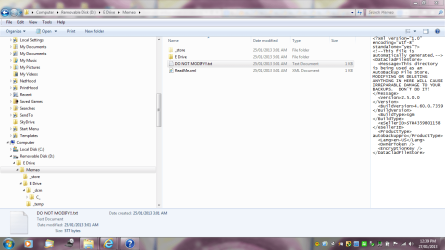
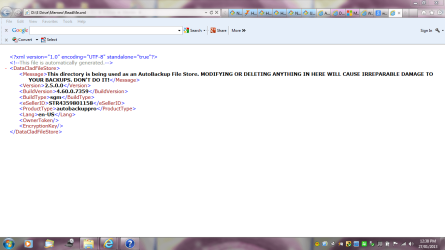
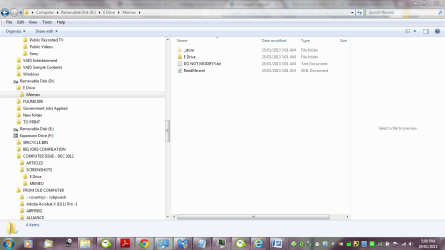
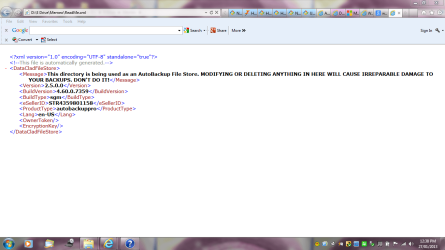
Thank you for contacting Memeo Technical Support. Our software does not make your Seagate Expansion write protected. From your screen shots, you are attempting to disconnect the D drive, which isn't your Seagate device. For any hardware issues, please contact Seagate Support. You should be able to delete any files from the Seagate device, your E drive.

Please let us know if you still need assistance.

Regards,

I am just wondering if running the Seatools would be advisable?
Would I loose my data?

Thank you for trying to assist me?
I am not computer literate
Seagate Support

Have you used the drive only with Windows or did you at any point connect it to a Mac system?

Thanks for the screen shot


Attachments

  • write.PNG
    write.PNG
    64.9 KB · Views: 2
  • write1.PNG
    write1.PNG
    79.7 KB · Views: 1
  • D DRIVE.PNG
    D DRIVE.PNG
    68 KB · Views: 5

My Computer My Computer

Computer type
Laptop
Computer Manufacturer/Model Number
Sony VAIO / E Series VPCEB46FG
OS
Windows 7 Home Premium 64bit
CPU
Windows 7 Service Pack 1 x86 NTFS
Motherboard
AMD E-350 Processor
Memory
4 GB
Hard Drives
500GB
Other Info
1.6GHz
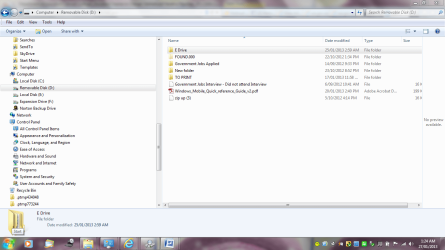
You want to make "removable disk (D:)" totally empty and use for other purposes?
 

My Computer My Computer

Computer type
Laptop
Computer Manufacturer/Model Number
ACER ASPIRE 5742G
OS
Microsoft Windows 7 Home Premium 64-bits 7601 Multiprocessor Free Service Pack 1
CPU
Intel(R) Core(TM) i3 CPU M 370 @ 2.40GHz
Motherboard
Acer Aspire 5742G
Memory
4,00 GB
Graphics Card(s)
ATI Mobility Radeon HD 5400 Series
Sound Card
(1) AMD High Definition Audio Device (2) Realtek High Defi
Screen Resolution
1366 x 768 x 32 bits (4294967296 colors) @ 60 Hz
Hard Drives
WDC WD5000BEVT-22ZAT0
After the services I received by Seagates software company for back up - I may have to put that on hold.

I have no other back up until tomorrow.

They want me to buy a cable in the US to repair something in Australia.

I have .CHK files and that is all really. I may as well count my losses.

For future reference - how do you do that?
 

My Computer My Computer

Computer type
Laptop
Computer Manufacturer/Model Number
Sony VAIO / E Series VPCEB46FG
OS
Windows 7 Home Premium 64bit
CPU
Windows 7 Service Pack 1 x86 NTFS
Motherboard
AMD E-350 Processor
Memory
4 GB
Hard Drives
500GB
Other Info
1.6GHz
To make D not readonly
in http://www.sevenforums.com/tutorials/783-elevated-command-prompt.html
Code:
diskpart
sel  disk 0
detail disk
sel disk 1
detail disk

So find the disk number with volume D on it. Be very sure to take the correct disk (although all disks should NOT be read only)! In my following commands I assume it's disk number 10

Code:
diskpart
sel disk 10
detail disk
[COLOR=red]is it readonly? if so:[/COLOR]
attributes disk clear readonly
Code:
diskpart
sel  vol  D
attrib vol
[COLOR=red]is it readonly? if so:[/COLOR]
att  vol  clear  readonly

Was the disk readonly? Was volume D readonly?
 

My Computer My Computer

Computer type
Laptop
Computer Manufacturer/Model Number
ACER ASPIRE 5742G
OS
Microsoft Windows 7 Home Premium 64-bits 7601 Multiprocessor Free Service Pack 1
CPU
Intel(R) Core(TM) i3 CPU M 370 @ 2.40GHz
Motherboard
Acer Aspire 5742G
Memory
4,00 GB
Graphics Card(s)
ATI Mobility Radeon HD 5400 Series
Sound Card
(1) AMD High Definition Audio Device (2) Realtek High Defi
Screen Resolution
1366 x 768 x 32 bits (4294967296 colors) @ 60 Hz
Hard Drives
WDC WD5000BEVT-22ZAT0
Write protected folder - USB Drive

Looks easy to me.

So will the data definately be erased and I can I use it?

I understand the screenshot.

If you are not too sure about how to do such things - then ask.

I thought that all disks came clean and read only.

Would it be the backing up that caused this issue or the format or my other USB external 500 GB drive which I must admit I swapped ports just in case it was a hardware issue.
 

Attachments

  • unable to share.PNG
    unable to share.PNG
    77 KB · Views: 5

My Computer My Computer

Computer type
Laptop
Computer Manufacturer/Model Number
Sony VAIO / E Series VPCEB46FG
OS
Windows 7 Home Premium 64bit
CPU
Windows 7 Service Pack 1 x86 NTFS
Motherboard
AMD E-350 Processor
Memory
4 GB
Hard Drives
500GB
Other Info
1.6GHz
Looks easy to me.

So will the data definately be erased and I can I use it?

I understand the screenshot.

If you are not too sure about how to do such things - then ask.

I thought that all disks came clean and read only.

Would it be the backing up that caused this issue or the format or my other USB external 500 GB drive which I must admit I swapped ports just in case it was a hardware issue.

First check with diskpart commands I gave you if it's really readonly (disk and volume).
 

My Computer My Computer

Computer type
Laptop
Computer Manufacturer/Model Number
ACER ASPIRE 5742G
OS
Microsoft Windows 7 Home Premium 64-bits 7601 Multiprocessor Free Service Pack 1
CPU
Intel(R) Core(TM) i3 CPU M 370 @ 2.40GHz
Motherboard
Acer Aspire 5742G
Memory
4,00 GB
Graphics Card(s)
ATI Mobility Radeon HD 5400 Series
Sound Card
(1) AMD High Definition Audio Device (2) Realtek High Defi
Screen Resolution
1366 x 768 x 32 bits (4294967296 colors) @ 60 Hz
Hard Drives
WDC WD5000BEVT-22ZAT0
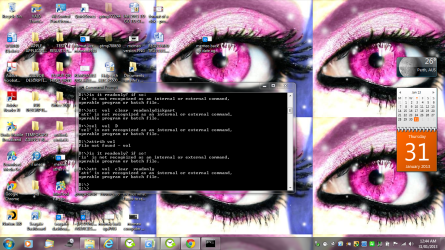
I am not that confident in going into the command prompt section.

I did the first part - I went into D: - thinking that was logical.

I will post the screen shot from what the result was - I do not know what to do next. When I unplugged it before and re-inserted the USB Disk it asked for me to Scan and fix - tried to do that but said it was - write protected.

Thanks for your assistance.
 

Attachments

  • d drive read only.PNG
    d drive read only.PNG
    1.3 MB · Views: 7

My Computer My Computer

Computer type
Laptop
Computer Manufacturer/Model Number
Sony VAIO / E Series VPCEB46FG
OS
Windows 7 Home Premium 64bit
CPU
Windows 7 Service Pack 1 x86 NTFS
Motherboard
AMD E-350 Processor
Memory
4 GB
Hard Drives
500GB
Other Info
1.6GHz
To make D not readonly
in http://www.sevenforums.com/tutorials/783-elevated-command-prompt.html
Code:
diskpart
sel  disk 0
detail disk
sel disk 1
detail disk
So find the disk number with volume D on it. Be very sure to take the correct disk (although all disks should NOT be read only)! In my following commands I assume it's disk number 10
First there's no need to change to D: in the cmd prompt these commands will work from anywhere but make sure you open a elevated-command-prompt, the link in the above quote will show you how.

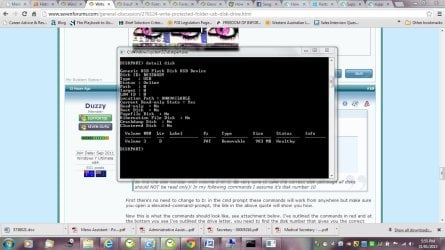
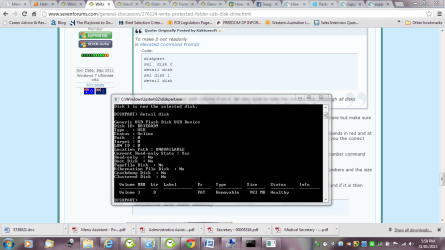
Now this is what the commands should look like, see attachment below. I've outlined the commands in red and at the bottom you see I've outlined the drive letter, you need to find the disk number that gives you the correct drive letter for the USB drive in question.

In the above code diskpart only needs to be typed once but the "sel disk" followed by a disk number command and the detail disk needs to be typed until you have found the correct drive.

Kaktussoft did not mention the "List Disk" command but it gives you an overview of the disk numbers and the size of the disks and may reduce how many disks you need to check by matching the sizes.

Once you have found the correct disk check if it's read-only which I have also outlined in red and if it is then type
Code:
attributes disk clear readonly
USBReadOnlyCheck.PNG
 

My Computer My Computer

Computer Manufacturer/Model Number
Self built
OS
Windows 7 Ultimate x64
CPU
Intel Pentium Dual Core E5200 2.5GHz (3.77GHz OC)
Motherboard
Asus P5Q-E
Memory
Corsair 4GB DDR2 (4x1GB CM2X1024-6400C4)
Graphics Card(s)
Palit GeForce GTS 250 (1024MB)
Sound Card
On Board (ADI AD2000B 8ch HD)
Monitor(s) Displays
Samsung 32in LCD TV
Screen Resolution
1360x768
Hard Drives
2 x 1TB Samsung 103SJ (Raid0)
2 x External 500GB Samsung 502IJ (NexStar 3 HD Enclosures)
PSU
550W Antec Neo HE 550
Case
Antec P180
Cooling
Xigmatex Red Scorpion CPU Cooler. 3x120mm Fans
Keyboard
Logitech MX5000 Laser (Combo)
Mouse
Logitech MX5000 Laser (Combo)
Internet Speed
ADSL2+ (avg 10 Mbps Down, 0.80 Mbps up)
Other Info
Gigabyte GN-WP01GS 54g Wireless Lan Card
I am not that confident in going into the command prompt section.

I did the first part - I went into D: - thinking that was logical.

I will post the screen shot from what the result was - I do not know what to do next. When I unplugged it before and re-inserted the USB Disk it asked for me to Scan and fix - tried to do that but said it was - write protected.

Thanks for your assistance.

You cut/paste it wrong!!
Code:
diskpart
sel  vol  D
attrib  vol
exit

Give me the output please
 
Last edited:

My Computer My Computer

Computer type
Laptop
Computer Manufacturer/Model Number
ACER ASPIRE 5742G
OS
Microsoft Windows 7 Home Premium 64-bits 7601 Multiprocessor Free Service Pack 1
CPU
Intel(R) Core(TM) i3 CPU M 370 @ 2.40GHz
Motherboard
Acer Aspire 5742G
Memory
4,00 GB
Graphics Card(s)
ATI Mobility Radeon HD 5400 Series
Sound Card
(1) AMD High Definition Audio Device (2) Realtek High Defi
Screen Resolution
1366 x 768 x 32 bits (4294967296 colors) @ 60 Hz
Hard Drives
WDC WD5000BEVT-22ZAT0
Trust me to cut and paste wrong

I just remember you telling me that I should ensure that I have the correct drive in this case D:

I will cut and paste the correct values - I am very new at doing this in this section of my computer.

Thank you again
 

My Computer My Computer

Computer type
Laptop
Computer Manufacturer/Model Number
Sony VAIO / E Series VPCEB46FG
OS
Windows 7 Home Premium 64bit
CPU
Windows 7 Service Pack 1 x86 NTFS
Motherboard
AMD E-350 Processor
Memory
4 GB
Hard Drives
500GB
Other Info
1.6GHz
Hello Melissa,

I have been reading all your posts for several days now. You are learning a lot, some things above my paygrade, LOL.

My favorite way to post screen snips is with the win7 Snipping Tool. I keep it pinned to the Taskbar. ;)
 

My Computer My Computer

Computer type
PC/Desktop
Computer Manufacturer/Model Number
Built them myself, Science Experiments !
OS
Win7 Enterprise, Win7 x86 (Ult 7600), Win7 x64 Ult 7600, TechNet RTM on AMD x64 (2.8Ghz)
CPU
AMD fx8350 4ghz, AMD-32 2400mhz, AMD-64 3200mhz, AMDx64 2.8G
Motherboard
SIS 755, ECS-K8M890M-M (Ult 7600), GigaByte & others
Memory
2gb, 4gb on the Ult 7600, 4gb on Technet RTM, 32gb on FX8350
Graphics Card(s)
Draw my own Graphics, several nVidia cards
Sound Card
on motherboard
Monitor(s) Displays
19" flat scr, 28" I-Inc widescr,22" Emprex Widescr, 23" Acer
Screen Resolution
1280 x 1024, 1440 x 900, 1920 x 1080
Hard Drives
6 pata Ide HD's & 2 Sata HD's
added 80gb external on Ult 7600 computer,
numerous extra 1tb, 2TB, 3Tb SATA HD's
A collection of ext HD Docks w/ HDs
PSU
430w, 550w, 600w, 700, 800, etc
Case
All Generic Full Towers
Cooling
Open Air & a few fans, some w/ colored LEDs
Keyboard
Compaq & Dell recycled from GoodWill
Mouse
Made in China Optical Wired Mouse
Internet Speed
Fast Cable InterNet
Antivirus
AVG Free on 24 different Desktops, NO Problems!
Browser
IE 8 is preferred, but use FireFox sometimes
Other Info
Linksys Routers, switches, & Hubs
Too Many USB Flash Drives to count, Biggest is 64GB !
Eight computers in my home network.
Sixteen computers at my business network.
Linked via TeamViewer !
Lots of old used spare computer parts everywhere!
Yep, that`s the best tool, you only show what you want to show.
 

My Computer My Computer

Computer type
PC/Desktop
Computer Manufacturer/Model Number
Skylake Special #666
OS
Windows 10 Pro x64
CPU
Intel Core i7 6700K
Motherboard
Asus Sabertooth Z170 Mark 1
Memory
GSkill TridentZ RGB 16GB 3600 16-16-16-36
Graphics Card(s)
EVGA GTX 980 Ti SC x2
Sound Card
Realtek High Definition
Monitor(s) Displays
AOC G2460PG
Screen Resolution
1920 x 1080 144Hz
Hard Drives
Samsung 860 Pro 256GB, Seagate Barracuda 4TB x2
PSU
EVGA 1000 P2, EVGA White Custom Braided Cables
Case
Corsair Vengeance C70 Gunmetal Black
Cooling
Corsair H100i v2, Corsair ML120 x2, Thermal Grizzly Kryonaut
Keyboard
Logitech G910 Orion Spectrum
Mouse
Logitech G700s
Internet Speed
Verizon Fios Quantum Gateway 75/75
Antivirus
Windows Defender, Malwarebytes Free 3.8.3
Browser
Chrome
Other Info
Corsair SP120 x4, LG Blu-ray Drive, Durabrand HT-395 100 Watt Dolby Digital Amp, Corsair H2100 Wireless 7.1 Headset
Hello Forum,

I have been through the forum and will in future mark my forums as solved - so I do not upset anyone.

I am only a beginner.

Attached is a screen shot of what I am viewing currently
 

Attachments

  • d drive cmd shot.JPG
    d drive cmd shot.JPG
    136.1 KB · Views: 2
  • d drive cmd shot1.PNG
    d drive cmd shot1.PNG
    77 KB · Views: 3

My Computer My Computer

Computer type
Laptop
Computer Manufacturer/Model Number
Sony VAIO / E Series VPCEB46FG
OS
Windows 7 Home Premium 64bit
CPU
Windows 7 Service Pack 1 x86 NTFS
Motherboard
AMD E-350 Processor
Memory
4 GB
Hard Drives
500GB
Other Info
1.6GHz
Code:
diskpart
sel  vol  D
attrib vol
exit

post output
 

My Computer My Computer

Computer type
Laptop
Computer Manufacturer/Model Number
ACER ASPIRE 5742G
OS
Microsoft Windows 7 Home Premium 64-bits 7601 Multiprocessor Free Service Pack 1
CPU
Intel(R) Core(TM) i3 CPU M 370 @ 2.40GHz
Motherboard
Acer Aspire 5742G
Memory
4,00 GB
Graphics Card(s)
ATI Mobility Radeon HD 5400 Series
Sound Card
(1) AMD High Definition Audio Device (2) Realtek High Defi
Screen Resolution
1366 x 768 x 32 bits (4294967296 colors) @ 60 Hz
Hard Drives
WDC WD5000BEVT-22ZAT0
If you have a disk that is showing a Current Read-only State of Yes, but Read-Only is set to No, this means that at the hardware level the disk is read-only and we can't fix that through Diskpart.

It is write protected because you pressed some button or switch to make it weitw protected. Any switch or button on it? Is it write protected on another machine as well? It could be a registry setting!
 

My Computer My Computer

Computer type
Laptop
Computer Manufacturer/Model Number
ACER ASPIRE 5742G
OS
Microsoft Windows 7 Home Premium 64-bits 7601 Multiprocessor Free Service Pack 1
CPU
Intel(R) Core(TM) i3 CPU M 370 @ 2.40GHz
Motherboard
Acer Aspire 5742G
Memory
4,00 GB
Graphics Card(s)
ATI Mobility Radeon HD 5400 Series
Sound Card
(1) AMD High Definition Audio Device (2) Realtek High Defi
Screen Resolution
1366 x 768 x 32 bits (4294967296 colors) @ 60 Hz
Hard Drives
WDC WD5000BEVT-22ZAT0
Thanks forum,

I am learning - still need a lot more training and guidance by patient people.

I guess I am am not so good at the snipping tool and you get more than you bargain for with my posts. Thanks for the tip.

I will see if I did what you said correctly.

Please feel free to call me an idiot or silly
 

Attachments

  • d drive command.PNG
    d drive command.PNG
    12.4 KB · Views: 9

My Computer My Computer

Computer type
Laptop
Computer Manufacturer/Model Number
Sony VAIO / E Series VPCEB46FG
OS
Windows 7 Home Premium 64bit
CPU
Windows 7 Service Pack 1 x86 NTFS
Motherboard
AMD E-350 Processor
Memory
4 GB
Hard Drives
500GB
Other Info
1.6GHz
Thanks forum,

I am learning - still need a lot more training and guidance by patient people.

I guess I am am not so good at the snipping tool and you get more than you bargain for with my posts. Thanks for the tip.

I will see if I did what you said correctly.

Please feel free to call me an idiot or silly
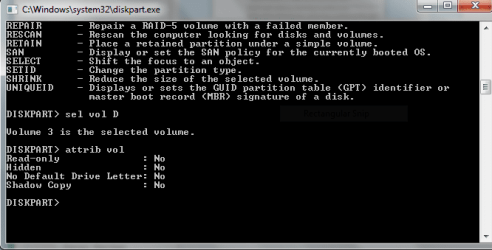
Volume D is USB stick ... Sure? It's not read only.
Disk is also not read only. But usb disk "current read only state" is yes.

Try usb stick in another system. Same problem? What brand/type is usb stick?
 

My Computer My Computer

Computer type
Laptop
Computer Manufacturer/Model Number
ACER ASPIRE 5742G
OS
Microsoft Windows 7 Home Premium 64-bits 7601 Multiprocessor Free Service Pack 1
CPU
Intel(R) Core(TM) i3 CPU M 370 @ 2.40GHz
Motherboard
Acer Aspire 5742G
Memory
4,00 GB
Graphics Card(s)
ATI Mobility Radeon HD 5400 Series
Sound Card
(1) AMD High Definition Audio Device (2) Realtek High Defi
Screen Resolution
1366 x 768 x 32 bits (4294967296 colors) @ 60 Hz
Hard Drives
WDC WD5000BEVT-22ZAT0
Yes - it is just a normal everyday Hitachi USB stick - that I thought would be able to go onto different computers.

I went onto another Computer Management for another issue and it states that it is Read Only. I do not know what happened. I certainly do not know how to change the properties
 

Attachments

  • computer management - F Drive.JPG
    computer management - F Drive.JPG
    126.6 KB · Views: 4

My Computer My Computer

Computer type
Laptop
Computer Manufacturer/Model Number
Sony VAIO / E Series VPCEB46FG
OS
Windows 7 Home Premium 64bit
CPU
Windows 7 Service Pack 1 x86 NTFS
Motherboard
AMD E-350 Processor
Memory
4 GB
Hard Drives
500GB
Other Info
1.6GHz
Back
Top