Writing and text problems

Kiwi lad

New member
Local time
2:04 PM
Messages
8
This is a odd one, I'm not sure even if I'm in the write forum.

Anyway;

When writing a letter on your email and we have "Gmail" or answering or putting on a post like I am doing now , If I leave the cursor on the page I am working on weather it be on a email or I am answering a post or even writing a post like I am doing now, When you stop writing to think about what you will say next, The text will jump to another line that you have already typed.

It's a pain in the ass if you are typing and not looking at your work as every time you stop it will jump to another line, this only started happening when we had a computer crash and had to reload windows 7 back on.

I thought of reloading gmail to see if that helps but it happens no matter what we are working on.........

I forgot to say it's good if the curser is right off the page this only happens when the curser is on the page

Need help........Please:)
 

My Computer

OS
Windows 7 ultimate 64
Hi Kiwi lad, welcome to W7F :)

You could ask one of the mods to move it here:
Browsers & Mail - Windows 7 Forums

Upper right corner, click on red triangle to report post, then ask in the text box.


Now 'bout your predicament.

What browser are you using? I have a mild symptom of what you describe, and I use Firefox (that reminds me there is a new update).
but, It doesn't happen when using gmail or when using IE8.

In the pix, see the cursor? That's the static one, the one I'm using is blinking at the word gmail, but the snip won't pick it up.

And about reloading gmail, you can't its web based, but you could try a new account.

Every once in a while I'll try searching for answer, but haven't come up with anything solid yet.
 

Attachments

  • CursorJump.JPG
    CursorJump.JPG
    21.5 KB · Views: 1

My Computer

Computer type
PC/Desktop
Computer Manufacturer/Model Number
Gateway DX4831-01e (Mid-Tower Desktop)
OS
Originally Win 7 Hm Prem x64 Ver 6.1.7600 Build 7601-SP1 | Upgraded to Windows 10 December 14, 2019
CPU
Intel i3 530 2.93GHz, 2933MHz 2 Cores 4 Logical Processors
Motherboard
Gateway H57M01 133 megahertz
Memory
6GB of 1,333MHz DDR3 SDRAM
Graphics Card(s)
32MB Intel Graphics Media Accelerator HD IGChip
Sound Card
Realtek High Definition Audio
Monitor(s) Displays
Gateway HX2000 20inch TFT active matrix TN
Screen Resolution
1600 x 900 x 59 hertz
Hard Drives
WDC WD10EADS-00M2B0 [HDD] (1000.20 GB) -- drive 0,
HL-DT-ST DVDRAM GH41N [CD-ROM dr]
Four card readers, and Four USB 2.0
PSU
300watts.
Case
Mid-Tower Desktop
Cooling
Stock from Gateway
Keyboard
Natural Ergonomic Keyboard 4000, see Other Info
Mouse
Orig. Gateway wore out now using Insignia USB wired optical
Internet Speed
Vz FIOS 10ms png 57.64Mbps down 65.53Mbps up Speedtest.org
Antivirus
Zamana Anti-logger with Anti-malware, MSE, Windows Firewall,
Browser
IE11.0.9600.19399-Upd ver11.0.135, Firefox 68.0.1 x64
Other Info
System Specs by Belarc.

BIOS: American Megatrends Inc. P01-A0 11/17/2009

Replaced the MS 'Natural' Standard PS/2 Enhanced 101-102 Keyboard with a new Natural Ergonomic Keyboard 4000 on August 1st 2014.

Canon Pixma MG3222 Printer.

Updated to IE11 on 12102015 | Fios Quantum Router g1100

Additional AV: SpywareBlaster, manual Mbam, SAS
Figured I'm going to do the update, I'll be back in a bit.
 

My Computer

Computer type
PC/Desktop
Computer Manufacturer/Model Number
Gateway DX4831-01e (Mid-Tower Desktop)
OS
Originally Win 7 Hm Prem x64 Ver 6.1.7600 Build 7601-SP1 | Upgraded to Windows 10 December 14, 2019
CPU
Intel i3 530 2.93GHz, 2933MHz 2 Cores 4 Logical Processors
Motherboard
Gateway H57M01 133 megahertz
Memory
6GB of 1,333MHz DDR3 SDRAM
Graphics Card(s)
32MB Intel Graphics Media Accelerator HD IGChip
Sound Card
Realtek High Definition Audio
Monitor(s) Displays
Gateway HX2000 20inch TFT active matrix TN
Screen Resolution
1600 x 900 x 59 hertz
Hard Drives
WDC WD10EADS-00M2B0 [HDD] (1000.20 GB) -- drive 0,
HL-DT-ST DVDRAM GH41N [CD-ROM dr]
Four card readers, and Four USB 2.0
PSU
300watts.
Case
Mid-Tower Desktop
Cooling
Stock from Gateway
Keyboard
Natural Ergonomic Keyboard 4000, see Other Info
Mouse
Orig. Gateway wore out now using Insignia USB wired optical
Internet Speed
Vz FIOS 10ms png 57.64Mbps down 65.53Mbps up Speedtest.org
Antivirus
Zamana Anti-logger with Anti-malware, MSE, Windows Firewall,
Browser
IE11.0.9600.19399-Upd ver11.0.135, Firefox 68.0.1 x64
Other Info
System Specs by Belarc.

BIOS: American Megatrends Inc. P01-A0 11/17/2009

Replaced the MS 'Natural' Standard PS/2 Enhanced 101-102 Keyboard with a new Natural Ergonomic Keyboard 4000 on August 1st 2014.

Canon Pixma MG3222 Printer.

Updated to IE11 on 12102015 | Fios Quantum Router g1100

Additional AV: SpywareBlaster, manual Mbam, SAS
I am using internet explorer and I thought it is a performance problem as this happens everytime I try to write something.
I'll try reloading gmail
 

My Computer

OS
Windows 7 ultimate 64
Do you have a touch pad?

With a mouse pad then often one accidentally brushes against the pad with the thumb, palm or even another finger.

I have lazy wrists and use a wireless mouse and also have the touchpad set to be disabled when the mouse is connected.
 

My Computer

Computer Manufacturer/Model Number
Toshiba Satellite S875D-S7239 laptop
OS
MS Windows 7 Ultimate SP1 64-bit
CPU
AMD A10-4600M
Motherboard
AMD Pumori (Socket FT1)
Memory
6.00 GB Dual-Channel DDR3 @ 798MHz (11-11-12-28)
Graphics Card(s)
AMD Radeon HD 7660G
Sound Card
High Definition Audio Device
Monitor(s) Displays
Generic PnP Monitor (1600x900@60Hz)
Screen Resolution
1600x900@60Hz
Hard Drives
SSD 119GB Corsair CSSD-V128GB2 ATA Device
Keyboard
Standard PS/2 Keyboard
Mouse
HP Wireless Optical Mobile Mouse Model FHA-3410
Internet Speed
What the local pub, local coffee shop offers.
Other Info
Optical Drive:MATSHITA BD-CMB UJ160B ATA Device


Also have an Asus ha1002xp netbook with Win 7 Ultimate installed.
Do you have a touch pad?

With a mouse pad then often one accidentally brushes against the pad with the thumb, palm or even another finger.

I have lazy wrists and use a wireless mouse and also have the touchpad set to be disabled when the mouse is connected.

I'll try anything.
How do you disable the touch pad like you I have a cordless mouse
 

My Computer

OS
Windows 7 ultimate 64
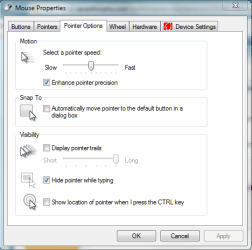
have you tried playing with the settings on this page?
 

Attachments

  • Capture.PNG
    Capture.PNG
    16 KB · Views: 1

My Computer

Computer Manufacturer/Model Number
HP dv6519tx
OS
Windows 7 Ultimate x64
CPU
1.80 GHz Intel Core 2 Duo processor T7100
Memory
3 gig ddr2
Graphics Card(s)
NVIDIA GeForce 8400M GS
Sound Card
Realtek High Definition Audio
Monitor(s) Displays
15.4” WXGA High Definition BrightView Widescreen
Screen Resolution
1280 x 800
Hard Drives
Hitachi 320 GB (5400 rpm)
PSU
90 W AC Power Adapter
Cooling
Kitchen plate under the lappy
Keyboard
101 key compatible
Mouse
Touch Pad with On/Off button and dedicated vertical Scroll
Internet Speed
Three Wireless internet prepaid using E160G USB dongle
Kiwi Lad,

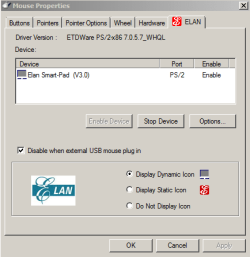
Here's a snip from my touchpad dialog.

You should have in the right-hand side of that bar at the bottom of your screen, an icon for your touchpad. Right-Click on that icon and choose Properties or whatever your touchpad calls it-I think this one calls it SmartPad Properties.

Now go to last tab. That's where you will find something about disabling the touchpad.

Later I'll be at my normal laptop and I'll send a snip or two from it.
Also, if you look at the snapshot you've received already, there is a block to check to show where the cursor is by hitting the Control key. This is very useful.
disabletouchpad.PNG
 

My Computer

Computer Manufacturer/Model Number
Toshiba Satellite S875D-S7239 laptop
OS
MS Windows 7 Ultimate SP1 64-bit
CPU
AMD A10-4600M
Motherboard
AMD Pumori (Socket FT1)
Memory
6.00 GB Dual-Channel DDR3 @ 798MHz (11-11-12-28)
Graphics Card(s)
AMD Radeon HD 7660G
Sound Card
High Definition Audio Device
Monitor(s) Displays
Generic PnP Monitor (1600x900@60Hz)
Screen Resolution
1600x900@60Hz
Hard Drives
SSD 119GB Corsair CSSD-V128GB2 ATA Device
Keyboard
Standard PS/2 Keyboard
Mouse
HP Wireless Optical Mobile Mouse Model FHA-3410
Internet Speed
What the local pub, local coffee shop offers.
Other Info
Optical Drive:MATSHITA BD-CMB UJ160B ATA Device


Also have an Asus ha1002xp netbook with Win 7 Ultimate installed.
Back
Top