
- Local time
- 7:02 AM
- Messages
- 269
Not sure if this should be posted in here so sorry if this is in the wrong location.
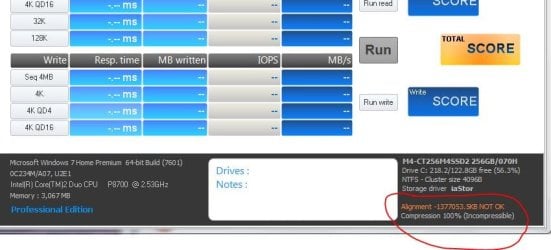
I have a friends Dell Studio 1555 laptop and their hard drive was failing badly. They have no money right now to get a new drive so I opted to help because I have 2 SSD's sitting around planned for nothing. So I had imaged the drive about 2-3 months ago and he has that. So I took the SSD and just imaged the system on to it; but I forgot about the alignment. I was able to boot in to Windows 7 and all that. It seems fine. But I said I need to wipe the SSD (Parted Magic process) and then create the alignment partition. Then I imaged the system, but this time at boot up all I can get to is I believe is the Dell Utility test. There is no way around that I can see.
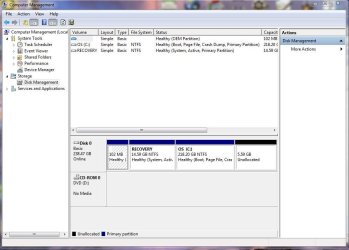
So I Parted Magic again, reloaded without the alignment and the system boots. So he needs his laptop back and to me it is running, but I know of the alignment issue. Believe me when I say he is just going to love the speed compared to what he had (which BTW the original drive had like 738 unrepairable items), but I know about the alignment issue. Here are some screenshots I attached.
So I am wondering if there is a way to fix this without having to reload from the image? That way I can give him his laptop so he can work on whatever he needs to do and I can come back a week or two later to realign it; if that is all possible.
Also, if you look at the Disk Management I am not sure why at the end there is that 5GB un-formatted section. Maybe for the SSD to utilize? Not sure.
Any inputs would be greatly appreciated. Thanks
I have a friends Dell Studio 1555 laptop and their hard drive was failing badly. They have no money right now to get a new drive so I opted to help because I have 2 SSD's sitting around planned for nothing. So I had imaged the drive about 2-3 months ago and he has that. So I took the SSD and just imaged the system on to it; but I forgot about the alignment. I was able to boot in to Windows 7 and all that. It seems fine. But I said I need to wipe the SSD (Parted Magic process) and then create the alignment partition. Then I imaged the system, but this time at boot up all I can get to is I believe is the Dell Utility test. There is no way around that I can see.
So I Parted Magic again, reloaded without the alignment and the system boots. So he needs his laptop back and to me it is running, but I know of the alignment issue. Believe me when I say he is just going to love the speed compared to what he had (which BTW the original drive had like 738 unrepairable items), but I know about the alignment issue. Here are some screenshots I attached.
So I am wondering if there is a way to fix this without having to reload from the image? That way I can give him his laptop so he can work on whatever he needs to do and I can come back a week or two later to realign it; if that is all possible.
Also, if you look at the Disk Management I am not sure why at the end there is that 5GB un-formatted section. Maybe for the SSD to utilize? Not sure.
Any inputs would be greatly appreciated. Thanks
Attachments
My Computer
At a glance
Windows 10 Pro 64-bitCore I7-67008GB Corsair DominatorAsus STRIX GTX 980Ti
- Computer type
- PC/Desktop
- Computer Manufacturer/Model Number
- Home Built
- OS
- Windows 10 Pro 64-bit
- CPU
- Core I7-6700
- Motherboard
- Asus Maximus VIII Hero
- Memory
- 8GB Corsair Dominator
- Graphics Card(s)
- Asus STRIX GTX 980Ti
- Monitor(s) Displays
- Asus PG278Q, Dell U2410
- Screen Resolution
- 2560 x 1440, 1920 x 1200
- Hard Drives
- 1 x Samsung 950 Pro 512GB
1 x 1TB HGST
- PSU
- 750W Seasonic
- Case
- Antec 900 v3
- Cooling
- Stock
- Internet Speed
- Cable Internet


