wtb hack for favorites/libraries in explorer

kenabi

New member
Local time
11:22 PM
Messages
67
so i realllllllly hate seeing this chunk of garbage over my drive tree every time i open explorer, as i won't ever use the things and want them gone.

so, anyone have any tips on killing them _without_ turning off the 'navigation pane'?
 

My Computer My Computer

Computer Manufacturer/Model Number
My Own Worst Enemy
OS
Windows 7 Enterprise (Build# 7600) x64
CPU
Intel e5400 [email protected]
Motherboard
EVGA 730i/9300
Memory
OCZ 2x1g@800, Corsair 2x512@800 / 5-6-6-15
Graphics Card(s)
EVGA 9800 GT 512
Sound Card
Realtek HD Audio
Monitor(s) Displays
LG M237WD-PM 23" LCD
Screen Resolution
1920x1080@32bit
Hard Drives
320x1, 750x1, 1TBx1
PSU
Antec Earthwatts 500w
Case
Antec Sonata III
Cooling
Xigmatek Dark Knight
Keyboard
cheap
Mouse
cheap ms optical
Internet Speed
cable
Hello Kenabi, and welcome to Seven Forums.

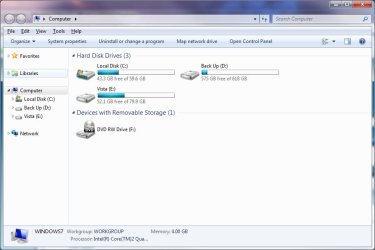
Sorry, but you cannot remove them without turning off the Navigation Pane as well, but you can unexpand them to save space though by clicking on the arrow to the left of them.

Explorer.jpg

You might change your mind though about Libraries once you get use to them. Libraries allow you to place a collection of folder shortcuts in a group that make accessing those folders and their contents easier. For example, if you have music files stored in different folders at different locations (ex: drives), then you can include these folders in a library to have them all available from one location instead.

Hope this helps,
Shawn
 

My Computer My Computer

Computer type
PC/Desktop
Computer Manufacturer/Model Number
Self built custom
OS
64-bit Windows 11 Pro for Workstations
CPU
Intel i7-8700K OC'd to 5 GHz
Motherboard
ASUS ROG Maximus XI Formula Z390
Memory
64 GB (4x16GB) G.SKILL TridentZ RGB DDR4 3600 MHz
Graphics Card(s)
ASUS ROG-STRIX-GTX1080TI-O11G-GAMING
Sound Card
Integrated
Monitor(s) Displays
2 x Samsung Odyssey G7 27"
Screen Resolution
2560x1440
Hard Drives
1TB Samsung 990 PRO M.2,
4TB Samsung 990 PRO PRO M.2,
TerraMaster F8 SSD Plus NAS
PSU
Seasonic Prime Titanium 850W
Case
Thermaltake Core P3
Cooling
Corsair Hydro H115i
Keyboard
Logitech wireless K800
Mouse
Logitech MX Master 4
Internet Speed
2 Gb/s Download and 100 Mb/s Upload
Antivirus
Malwarebyte Anti-Malware Premium
Browser
Google Chrome
Other Info
Logitech Z625 speaker system,
Logitech BRIO 4K Pro webcam,
HP Color LaserJet Pro MFP M477fdn,
APC SMART-UPS RT 1000 XL - SURT1000XLI,
Galaxy S23 Plus phone
Very true, i've got countless music/movies/documents & pics on my external HDD that would never fit on my lappy drive (40GB internal as opposed to my 250GB external with only 30GB free LOL). So far, Se7en has the best [book] keeping system i've used.
 

My Computer My Computer

Computer Manufacturer/Model Number
Compaq Desktop
OS
Windows 7 Ultimate x64
CPU
AMD Sempron Dual Core
Memory
3GB
Graphics Card(s)
NVIDIA GeForce 6150SE nForce 430
Screen Resolution
1024x768
Hard Drives
150GB Sata
meh. i can't wait till someone figures out a fix -_-

and on the topic of; trust me, if i want something that bad, i'll drop a shortcut directly to it on my toolbar and just click that =P it's all just more visual garbage that doesn't need to be setup the way it is, and it takes up space in an otherwise nifty thing. wish i could revert everything back to the lovely win2k days and still keep the awesome that is w7's speed and what not :(
 

My Computer My Computer

Computer Manufacturer/Model Number
My Own Worst Enemy
OS
Windows 7 Enterprise (Build# 7600) x64
CPU
Intel e5400 [email protected]
Motherboard
EVGA 730i/9300
Memory
OCZ 2x1g@800, Corsair 2x512@800 / 5-6-6-15
Graphics Card(s)
EVGA 9800 GT 512
Sound Card
Realtek HD Audio
Monitor(s) Displays
LG M237WD-PM 23" LCD
Screen Resolution
1920x1080@32bit
Hard Drives
320x1, 750x1, 1TBx1
PSU
Antec Earthwatts 500w
Case
Antec Sonata III
Cooling
Xigmatek Dark Knight
Keyboard
cheap
Mouse
cheap ms optical
Internet Speed
cable
I actually hated libraries at first, but once you get used to its way of thinking, you find them a very valuable asset. :)
 

My Computer My Computer

OS
XP
I actually hated libraries at first, but once you get used to its way of thinking, you find them a very valuable asset. :)

I really Hated libraries also as I got used to backing up data by VOLUMES. However once you get used to it it's fine. (More like OS-X and Linux -- you just backup say directory /Music with all it's subdirectories -- doesn't matter where the data physically resides. The file system handles it all).

My only problem is that as this is fairly new is it robust enough to rely on this completely. I trust the Linux ext3 file system as it's been working for "Donkeys Years" but this approach from Microsoft is quite new -- and I'm not yet 100% certain it won't end in tears.

As another note it seems W7 is copying a lot of ideas from OS-X (to get the mac fanboys back on board maybe).

Anyway there IS a learning curve in using Libraries on windows but if you think in Data terms rather than Disk terms then you'll get used to it (and probably like it as well).

Added -- If you really want an old app for displaying files in the traditional (volume based manner) why not install Norton Commander -- I think this still works -- it did on my VISTA PE disk so in theory it should in Windows 7. I'm actually trying my best to "Unlearn" these old ways of doing things. Whether we like it or not Windows is a GUI based system so we should take advantages of using the best features of a GUI based OS.


Cheers
jimbo
 

My Computer My Computer

Computer type
PC/Desktop
Computer Manufacturer/Model Number
Custom built, several laptops HP/ASUS
OS
Linux CENTOS 7 / various Windows OS'es and servers
CPU
Intel i7 Intel i5
Memory
8GB, 16GB
Graphics Card(s)
On Motherboard
Sound Card
Realtek HD audio
Monitor(s) Displays
Apple Cinema display, Samsung LCD
Screen Resolution
1920 X 1080
Hard Drives
4 X 1TB SATA
Mouse
Toshiba wireless laser
Internet Speed
> 20MB up
see, the problem here, is that i'm 100% minimalist. this clutter i can't use (mostly because i'm not lazy enough to bother, and i actually _prefer_ digging around, as i don't like dumbing down my interaction with my computer. and that's what would happen here..) just aggravates me with it's constant visual presence.

as far as i'm concerned, this is how explorer should look; <see attached>http://kenabi.nulani.net/doot/new/explorer.png

and it'd be great if we could arrange things to suit our own views of things, but i'd settle for just being able to regedit the things i have no use for out of the picture
 

Attachments

  • explorer.png
    explorer.png
    22.5 KB · Views: 427

My Computer My Computer

Computer Manufacturer/Model Number
My Own Worst Enemy
OS
Windows 7 Enterprise (Build# 7600) x64
CPU
Intel e5400 [email protected]
Motherboard
EVGA 730i/9300
Memory
OCZ 2x1g@800, Corsair 2x512@800 / 5-6-6-15
Graphics Card(s)
EVGA 9800 GT 512
Sound Card
Realtek HD Audio
Monitor(s) Displays
LG M237WD-PM 23" LCD
Screen Resolution
1920x1080@32bit
Hard Drives
320x1, 750x1, 1TBx1
PSU
Antec Earthwatts 500w
Case
Antec Sonata III
Cooling
Xigmatek Dark Knight
Keyboard
cheap
Mouse
cheap ms optical
Internet Speed
cable
I don't see a use for libraries, simply because I store things through folders in a library like manner already, and have been for ages.
 

My Computer My Computer

OS
7264x64/7260x86
there's little to no point for me, due to using paths to save files when i need to, C:/maindownloadfoler/sub/sub/etcfilename.ext in the save dialog, no matter the program, what it is i'm saving.

you can't exactly type in \Libraries\zomg\ and have it take you there. and you can't get to that folder via the normal path route either, as they tend to be obnoxiously locked down.
 

My Computer My Computer

Computer Manufacturer/Model Number
My Own Worst Enemy
OS
Windows 7 Enterprise (Build# 7600) x64
CPU
Intel e5400 [email protected]
Motherboard
EVGA 730i/9300
Memory
OCZ 2x1g@800, Corsair 2x512@800 / 5-6-6-15
Graphics Card(s)
EVGA 9800 GT 512
Sound Card
Realtek HD Audio
Monitor(s) Displays
LG M237WD-PM 23" LCD
Screen Resolution
1920x1080@32bit
Hard Drives
320x1, 750x1, 1TBx1
PSU
Antec Earthwatts 500w
Case
Antec Sonata III
Cooling
Xigmatek Dark Knight
Keyboard
cheap
Mouse
cheap ms optical
Internet Speed
cable
there's little to no point for me, due to using paths to save files when i need to, C:/maindownloadfoler/sub/sub/etcfilename.ext in the save dialog, no matter the program, what it is i'm saving.

you can't exactly type in \Libraries\zomg\ and have it take you there. and you can't get to that folder via the normal path route either, as they tend to be obnoxiously locked down.

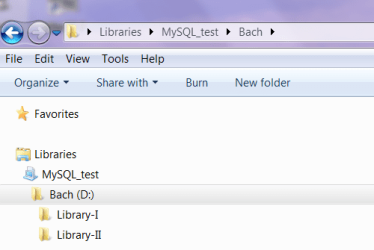
Actually you can remove most of the clutter

just remove the standard libraries (my music etc etc).
create your own library (libraries)
set windows explorer to group by libraries (attachment 1)

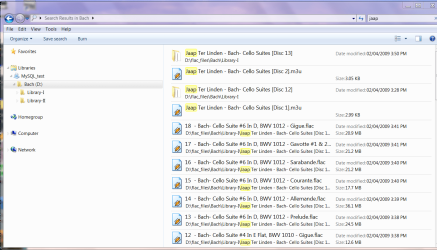
Now for search -- it's also easy
using the example above I want to search all tracks in the library with JAAP say in the name (attachment 2).

Once you get used to it it's fine and you don't have to fill the screen with clutter --I like it now much more thna the old Windows explorer on XP Pro.

Cheers
jimbo
 

Attachments

  • libraries1.png
    libraries1.png
    14 KB · Views: 87
  • libraries2.png
    libraries2.png
    90.2 KB · Views: 273

My Computer My Computer

Computer type
PC/Desktop
Computer Manufacturer/Model Number
Custom built, several laptops HP/ASUS
OS
Linux CENTOS 7 / various Windows OS'es and servers
CPU
Intel i7 Intel i5
Memory
8GB, 16GB
Graphics Card(s)
On Motherboard
Sound Card
Realtek HD audio
Monitor(s) Displays
Apple Cinema display, Samsung LCD
Screen Resolution
1920 X 1080
Hard Drives
4 X 1TB SATA
Mouse
Toshiba wireless laser
Internet Speed
> 20MB up
jimbo, can you do a tutorial on that? Or explain what you mean by "group by libraries"?

I gotta admit, I'm not exactly too fond of the Libraries feature. I store data across 4+ drives. The brief time I played around with Libraries, it seemed to easy to lose where I put something in relation to the actual volume/folder structure. Bad thing considering I remote into various machines and not each will have the same Library settings.
 

My Computer My Computer

Computer Manufacturer/Model Number
Custom
OS
Windows 7
CPU
Pentium D 2.66
Motherboard
Asus P5ND2-SLi
Memory
4 gigs DDR2
Graphics Card(s)
BFG nVidia 8600 GT OC
Sound Card
nForce 4 (realtek)
Monitor(s) Displays
Samsung 204B
Screen Resolution
1600x1200
Hard Drives
Western Digital Raptor 150
Western Digital 320 (both SATA)
PSU
BFG 600 watt
Cooling
fan
Keyboard
MS Natural
Mouse
MS Sidewinder
Internet Speed
10 mb
Back
Top