X-Fi Fatality Pro, W7 x64, no sound

golf

New member
Local time
2:06 AM
Messages
8
I have just installed Windows 7 64bit on my PC, fresh format. Everything seems to be working except that I have no sound from my X-Fi Fatality Pro.

There are no error messages. W7 thinks there are no problems. The X-Fi is the default sound device as I have disabled the onboard audio. I am running the latest drivers for the X-Fi - 2.18.15.

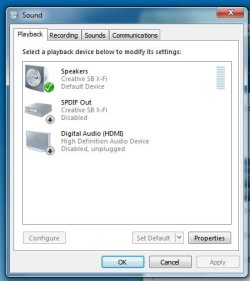
There are 3 audio devices in the "Sound" section.

1. Speakers
Creative SB X-Fi
Default Device

2. SPDIF
Creative SB X-Fi
Disabled

3. Digital Audio (HDMI)
High Definition Audio Device
Disabled, unplugged

The only noise the speakers have made since installing W7 is a faint 'click' when drivers are installed. I have read a lot of threads regarding X-Fi soundcards and poor driver support, though none have helped me.

If I try to play audio, various software programs either refuse without errors (iTunes), pretend to play audio very slowly (WMP) or pretend to play audio at normal speed (Creative Mediasource 5), although none actually output any sound whatsoever.
 

My Computer My Computer

At a glance

Windows 7 Home Premium x64Athlon XP60004GBATI Radeon 4850
OS
Windows 7 Home Premium x64
CPU
Athlon XP6000
Motherboard
Asus M2V
Memory
4GB
Graphics Card(s)
ATI Radeon 4850
Sound Card
SoundBlaster X-fi Fatality Pro
As far as you devices being shown, the HDMI one is likely the Audio device on your graphics card.
This is Ok to install if you have/use HDMI and should not affect the funton of the X-Fi.
It should show up when the driver is installed.

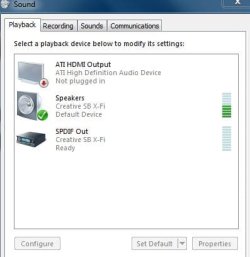
My X-Fi shows like the snip below in sound devices, so what you are decribing sounds to me at this point as normal.

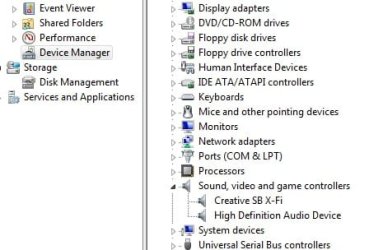
When you disbaled the onboard, how did you do it? In device manager or in the bios?

Onboard should be disabled in the bios.


If you installed Creative Software form the CD, the only thing I would recommend installing are:
1) The Volume Panel
2) THX Console

They should be installed by setting the setup.exe as Compatability mode Vista SP1 and run as admin.
The Drive, Audio Console, and all other softweare you want should be downloaded from the official site. There are Win7 x64 versions.

I too have heard all the horror stories, but fortunatly have not had any issues with my X-Fi using the official drivers/software. This is how I installed mine if it matters.
 

Attachments

  • Capture.JPG
    Capture.JPG
    24.2 KB · Views: 15

My Computer My Computer

At a glance

Windows 7 Home Premium 64bitIntel Core i7 2700k8GB Mushkin Redline Ridgebacks @1866EVGA GTX570 SC
Computer Manufacturer/Model Number
Custom (Self Build)
OS
Windows 7 Home Premium 64bit
CPU
Intel Core i7 2700k
Motherboard
eVGA P67 SLI
Memory
8GB Mushkin Redline Ridgebacks @1866
Graphics Card(s)
EVGA GTX570 SC
Sound Card
XiFi Titanium HD
Monitor(s) Displays
LG W2453V
Screen Resolution
1920x1080
Hard Drives
Intel 320 80GB -- Intel X25-V 40GB --WD Black 1TB x2 -- WD Blue 640GB
PSU
Seasonic x750
Case
Corsair 600T SE White
Cooling
eVGA Superclocked CPU Cooler
Keyboard
Saitek Cyborg
Antivirus
Kaspersky
Browser
IE
Other Info
LG BD/DVD
Thanks for the reply.

The onboard sound has been disabled via the BIOS. I haven't installed any Creative software from the CD. The drivers and software I am using are the Windows 7 64 bit versions from the Creative site.

I installed the W7 64bit drivers like I normally would install any software. Should I have installed them using Vista Compatibility mode?

My 'Sound' window looks very similar to yours. One difference is that you have some green bars at the right, whereas my 'Speaker' section only has light blue bars.
 

My Computer My Computer

At a glance

Windows 7 Home Premium x64Athlon XP60004GBATI Radeon 4850
OS
Windows 7 Home Premium x64
CPU
Athlon XP6000
Motherboard
Asus M2V
Memory
4GB
Graphics Card(s)
ATI Radeon 4850
Sound Card
SoundBlaster X-fi Fatality Pro
No need to install the drivers in compatibility mode. As you noted there are Windows 7 drivers for that card.
 

My Computer My Computer

At a glance

Windows 10 ProIntel Core i7-4770K (3.5Ghz)32 gig Corsair Dominator Platinum (4x8Gig)Sapphire Tri-X R9 Fury
Computer type
PC/Desktop
Computer Manufacturer/Model Number
Custom built by me.
OS
Windows 10 Pro
CPU
Intel Core i7-4770K (3.5Ghz)
Motherboard
Gigabyte G1 Sniper 5 (F10 Bios)
Memory
32 gig Corsair Dominator Platinum (4x8Gig)
Graphics Card(s)
Sapphire Tri-X R9 Fury
Sound Card
Soundblaster ZXR
Monitor(s) Displays
NEC PA242W 24" LCD Monitor
Screen Resolution
1920 x 1200
Hard Drives
Primary - Samsung 850 Pro (512gig), Samsung 840 Pro (256gig), 2TB WD Caviar Black.
PSU
EVGA Supernova 1000 G2
Case
Cooler Master HAF X
Cooling
Corsair H100i with Corsair Air Series SP120 Quiet Fans
Keyboard
Logitech Wireless Wave
Mouse
Logitech Performance MX
Internet Speed
High Speed Cable
Antivirus
Norton Security
Browser
IE11
Other Info
Memory Timings - 1866MHz @ 9-9-9-27-1T @ 1.5 volts
No, if you downloaded the correct drivers it should be Win7 x64 compatable.


As silly as this sounds... Have you double checked you speaker connections?
It could possibly be something that simple, and honestly quite easily overlooked.

((Mine had green bars because Zune was playing in the background when the snip was taken :) ))
 

My Computer My Computer

At a glance

Windows 7 Home Premium 64bitIntel Core i7 2700k8GB Mushkin Redline Ridgebacks @1866EVGA GTX570 SC
Computer Manufacturer/Model Number
Custom (Self Build)
OS
Windows 7 Home Premium 64bit
CPU
Intel Core i7 2700k
Motherboard
eVGA P67 SLI
Memory
8GB Mushkin Redline Ridgebacks @1866
Graphics Card(s)
EVGA GTX570 SC
Sound Card
XiFi Titanium HD
Monitor(s) Displays
LG W2453V
Screen Resolution
1920x1080
Hard Drives
Intel 320 80GB -- Intel X25-V 40GB --WD Black 1TB x2 -- WD Blue 640GB
PSU
Seasonic x750
Case
Corsair 600T SE White
Cooling
eVGA Superclocked CPU Cooler
Keyboard
Saitek Cyborg
Antivirus
Kaspersky
Browser
IE
Other Info
LG BD/DVD
I'm not sure you answered Wishmaster's question.... have you made sure the X-fi is the default soundcard as indicated by the image Wishmaster posted?

Also the speaker connections is valid as well.
 

My Computer My Computer

At a glance

Windows 10 ProIntel Core i7-4770K (3.5Ghz)32 gig Corsair Dominator Platinum (4x8Gig)Sapphire Tri-X R9 Fury
Computer type
PC/Desktop
Computer Manufacturer/Model Number
Custom built by me.
OS
Windows 10 Pro
CPU
Intel Core i7-4770K (3.5Ghz)
Motherboard
Gigabyte G1 Sniper 5 (F10 Bios)
Memory
32 gig Corsair Dominator Platinum (4x8Gig)
Graphics Card(s)
Sapphire Tri-X R9 Fury
Sound Card
Soundblaster ZXR
Monitor(s) Displays
NEC PA242W 24" LCD Monitor
Screen Resolution
1920 x 1200
Hard Drives
Primary - Samsung 850 Pro (512gig), Samsung 840 Pro (256gig), 2TB WD Caviar Black.
PSU
EVGA Supernova 1000 G2
Case
Cooler Master HAF X
Cooling
Corsair H100i with Corsair Air Series SP120 Quiet Fans
Keyboard
Logitech Wireless Wave
Mouse
Logitech Performance MX
Internet Speed
High Speed Cable
Antivirus
Norton Security
Browser
IE11
Other Info
Memory Timings - 1866MHz @ 9-9-9-27-1T @ 1.5 volts
Yes, I have checked the speaker connection. There is no sound with either my 2.0 Analog Speakers or 5.1 Analog Headphones connected to the card.

Yes, the X-Fi is the default device.
 

My Computer My Computer

At a glance

Windows 7 Home Premium x64Athlon XP60004GBATI Radeon 4850
OS
Windows 7 Home Premium x64
CPU
Athlon XP6000
Motherboard
Asus M2V
Memory
4GB
Graphics Card(s)
ATI Radeon 4850
Sound Card
SoundBlaster X-fi Fatality Pro
Specifically what X-Fi soundcard are you using?

Make sure the card is fully seated in the PCI slot.

Also, try this.... install from the CD, choosing what you want to install, then updating those items. See if the card then works.
 

My Computer My Computer

At a glance

Windows 10 ProIntel Core i7-4770K (3.5Ghz)32 gig Corsair Dominator Platinum (4x8Gig)Sapphire Tri-X R9 Fury
Computer type
PC/Desktop
Computer Manufacturer/Model Number
Custom built by me.
OS
Windows 10 Pro
CPU
Intel Core i7-4770K (3.5Ghz)
Motherboard
Gigabyte G1 Sniper 5 (F10 Bios)
Memory
32 gig Corsair Dominator Platinum (4x8Gig)
Graphics Card(s)
Sapphire Tri-X R9 Fury
Sound Card
Soundblaster ZXR
Monitor(s) Displays
NEC PA242W 24" LCD Monitor
Screen Resolution
1920 x 1200
Hard Drives
Primary - Samsung 850 Pro (512gig), Samsung 840 Pro (256gig), 2TB WD Caviar Black.
PSU
EVGA Supernova 1000 G2
Case
Cooler Master HAF X
Cooling
Corsair H100i with Corsair Air Series SP120 Quiet Fans
Keyboard
Logitech Wireless Wave
Mouse
Logitech Performance MX
Internet Speed
High Speed Cable
Antivirus
Norton Security
Browser
IE11
Other Info
Memory Timings - 1866MHz @ 9-9-9-27-1T @ 1.5 volts
I am using a SoundBlaster X-Fi ExtremeGamer Fatality Professional. PCI, not one of the later PCI-E ones.

Going to check the seating. Not sure where my original disk went, the card is a few years old now.

Thanks.
 

My Computer My Computer

At a glance

Windows 7 Home Premium x64Athlon XP60004GBATI Radeon 4850
OS
Windows 7 Home Premium x64
CPU
Athlon XP6000
Motherboard
Asus M2V
Memory
4GB
Graphics Card(s)
ATI Radeon 4850
Sound Card
SoundBlaster X-fi Fatality Pro
Card is seated fine inside case.
 

My Computer My Computer

At a glance

Windows 7 Home Premium x64Athlon XP60004GBATI Radeon 4850
OS
Windows 7 Home Premium x64
CPU
Athlon XP6000
Motherboard
Asus M2V
Memory
4GB
Graphics Card(s)
ATI Radeon 4850
Sound Card
SoundBlaster X-fi Fatality Pro

My Computer My Computer

At a glance

Windows 10 ProIntel Core i7-4770K (3.5Ghz)32 gig Corsair Dominator Platinum (4x8Gig)Sapphire Tri-X R9 Fury
Computer type
PC/Desktop
Computer Manufacturer/Model Number
Custom built by me.
OS
Windows 10 Pro
CPU
Intel Core i7-4770K (3.5Ghz)
Motherboard
Gigabyte G1 Sniper 5 (F10 Bios)
Memory
32 gig Corsair Dominator Platinum (4x8Gig)
Graphics Card(s)
Sapphire Tri-X R9 Fury
Sound Card
Soundblaster ZXR
Monitor(s) Displays
NEC PA242W 24" LCD Monitor
Screen Resolution
1920 x 1200
Hard Drives
Primary - Samsung 850 Pro (512gig), Samsung 840 Pro (256gig), 2TB WD Caviar Black.
PSU
EVGA Supernova 1000 G2
Case
Cooler Master HAF X
Cooling
Corsair H100i with Corsair Air Series SP120 Quiet Fans
Keyboard
Logitech Wireless Wave
Mouse
Logitech Performance MX
Internet Speed
High Speed Cable
Antivirus
Norton Security
Browser
IE11
Other Info
Memory Timings - 1866MHz @ 9-9-9-27-1T @ 1.5 volts
Here are the screenshots.

sound2.jpg
sound.jpg
 

My Computer My Computer

At a glance

Windows 7 Home Premium x64Athlon XP60004GBATI Radeon 4850
OS
Windows 7 Home Premium x64
CPU
Athlon XP6000
Motherboard
Asus M2V
Memory
4GB
Graphics Card(s)
ATI Radeon 4850
Sound Card
SoundBlaster X-fi Fatality Pro
Did you ever find the disk? If not, you can get all the files here.... Download (ISO) SB X Fi series# Here's the link talking about those files - Guru3D.com Forums - View Single Post - Missing Creative volume control

One other thing you might check is to see if the volume Panel is installed. Go to.... Start, Creative, Soundblaster X-Fi, if the Volume Panel is installed, check the settings. If it's not installed, install from your disk, or the disk you downloaded.

You might also want to look through this thread - http://www.sevenforums.com/sound-audio/21804-creative-sound-cards.html

Let us know.
 

My Computer My Computer

At a glance

Windows 10 ProIntel Core i7-4770K (3.5Ghz)32 gig Corsair Dominator Platinum (4x8Gig)Sapphire Tri-X R9 Fury
Computer type
PC/Desktop
Computer Manufacturer/Model Number
Custom built by me.
OS
Windows 10 Pro
CPU
Intel Core i7-4770K (3.5Ghz)
Motherboard
Gigabyte G1 Sniper 5 (F10 Bios)
Memory
32 gig Corsair Dominator Platinum (4x8Gig)
Graphics Card(s)
Sapphire Tri-X R9 Fury
Sound Card
Soundblaster ZXR
Monitor(s) Displays
NEC PA242W 24" LCD Monitor
Screen Resolution
1920 x 1200
Hard Drives
Primary - Samsung 850 Pro (512gig), Samsung 840 Pro (256gig), 2TB WD Caviar Black.
PSU
EVGA Supernova 1000 G2
Case
Cooler Master HAF X
Cooling
Corsair H100i with Corsair Air Series SP120 Quiet Fans
Keyboard
Logitech Wireless Wave
Mouse
Logitech Performance MX
Internet Speed
High Speed Cable
Antivirus
Norton Security
Browser
IE11
Other Info
Memory Timings - 1866MHz @ 9-9-9-27-1T @ 1.5 volts
Ok, problem solved. I had 4gb of ram. I removed one stick so I now have 3gb of ram. Sound now works. Not sure how to sort this situation out in the long term as part of the reason I bought 64bit W7 was to get around the ram limit of 32bit, especially for future upgrades.
 

My Computer My Computer

At a glance

Windows 7 Home Premium x64Athlon XP60004GBATI Radeon 4850
OS
Windows 7 Home Premium x64
CPU
Athlon XP6000
Motherboard
Asus M2V
Memory
4GB
Graphics Card(s)
ATI Radeon 4850
Sound Card
SoundBlaster X-fi Fatality Pro
Posting your full system specs might help us help you figure out the reason you can't run with 4gig of RAM without issue. The fact that you had to remove a RAM stick to get your problem sorted sounds like a conflict, bad RAM module(s) or motherboard issue.

In short.... that's not normal.

- Have you run any tests on your RAM?
- What RAM are you using?
- What RAM configuration are you using? (are they all the sam RAM modules)

Also....are you overclocked???
 

My Computer My Computer

At a glance

Windows 10 ProIntel Core i7-4770K (3.5Ghz)32 gig Corsair Dominator Platinum (4x8Gig)Sapphire Tri-X R9 Fury
Computer type
PC/Desktop
Computer Manufacturer/Model Number
Custom built by me.
OS
Windows 10 Pro
CPU
Intel Core i7-4770K (3.5Ghz)
Motherboard
Gigabyte G1 Sniper 5 (F10 Bios)
Memory
32 gig Corsair Dominator Platinum (4x8Gig)
Graphics Card(s)
Sapphire Tri-X R9 Fury
Sound Card
Soundblaster ZXR
Monitor(s) Displays
NEC PA242W 24" LCD Monitor
Screen Resolution
1920 x 1200
Hard Drives
Primary - Samsung 850 Pro (512gig), Samsung 840 Pro (256gig), 2TB WD Caviar Black.
PSU
EVGA Supernova 1000 G2
Case
Cooler Master HAF X
Cooling
Corsair H100i with Corsair Air Series SP120 Quiet Fans
Keyboard
Logitech Wireless Wave
Mouse
Logitech Performance MX
Internet Speed
High Speed Cable
Antivirus
Norton Security
Browser
IE11
Other Info
Memory Timings - 1866MHz @ 9-9-9-27-1T @ 1.5 volts
I have never tested my RAM.

2x1gb Corsair DDR2 & 2x1gb Kingston DDR2

I am not overclocked. Like has been said, everything worked fine on XP 32bit.

Full system specs are as follows -
Athlon Dual Core 6000+ (standard 3Ghz)
Asus M2V (no extra letters, original M2V)
4gb ram as mentioned above
ATI Radeon 4850 (not overclocked)
X-Fi ExtremeGamer Fatality Pro (PCI, not PCI-E)
750w Corsair PSU
24" monitor
Antec P182

I have found that whilst the sound does work, it will stop working after several minutes playing games (ie Fallout New Vegas). It just starts to crackle and then cuts out fully. I did read that others have had issues with X-Fi's not working with more than 4gb RAM, and that forcing windows to recognise slightly under 4gb can help.
 

My Computer My Computer

At a glance

Windows 7 Home Premium x64Athlon XP60004GBATI Radeon 4850
OS
Windows 7 Home Premium x64
CPU
Athlon XP6000
Motherboard
Asus M2V
Memory
4GB
Graphics Card(s)
ATI Radeon 4850
Sound Card
SoundBlaster X-fi Fatality Pro
It's usually not a good idea to mix RAM, especially brands. Do both sets have the same timings and voltages? If not, that could be a problem.
 

My Computer My Computer

At a glance

Windows 10 ProIntel Core i7-4770K (3.5Ghz)32 gig Corsair Dominator Platinum (4x8Gig)Sapphire Tri-X R9 Fury
Computer type
PC/Desktop
Computer Manufacturer/Model Number
Custom built by me.
OS
Windows 10 Pro
CPU
Intel Core i7-4770K (3.5Ghz)
Motherboard
Gigabyte G1 Sniper 5 (F10 Bios)
Memory
32 gig Corsair Dominator Platinum (4x8Gig)
Graphics Card(s)
Sapphire Tri-X R9 Fury
Sound Card
Soundblaster ZXR
Monitor(s) Displays
NEC PA242W 24" LCD Monitor
Screen Resolution
1920 x 1200
Hard Drives
Primary - Samsung 850 Pro (512gig), Samsung 840 Pro (256gig), 2TB WD Caviar Black.
PSU
EVGA Supernova 1000 G2
Case
Cooler Master HAF X
Cooling
Corsair H100i with Corsair Air Series SP120 Quiet Fans
Keyboard
Logitech Wireless Wave
Mouse
Logitech Performance MX
Internet Speed
High Speed Cable
Antivirus
Norton Security
Browser
IE11
Other Info
Memory Timings - 1866MHz @ 9-9-9-27-1T @ 1.5 volts
Back
Top