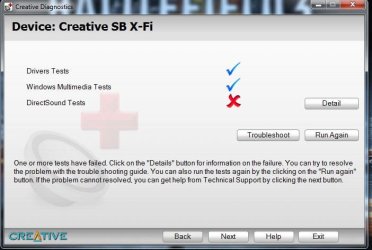
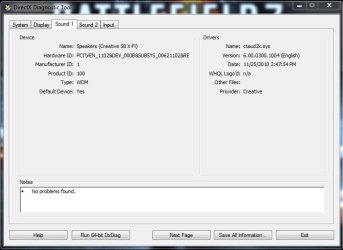
X-fi Titanium HD install nightmare. Win7 64

I just bought the card on Friday and haven't had it working yet. I did notice the WHQL thing as well..But then again. I'm running the beta driver so that might be it maybe.
 

My Computer My Computer

At a glance

Windows 7 Ultimate x64
OS
Windows 7 Ultimate x64
Here's a better shot of a previous still
 

Attachments

  • direct.jpg
    direct.jpg
    47 KB · Views: 20

My Computer My Computer

At a glance

Windows 7 Ultimate x64
OS
Windows 7 Ultimate x64
well the driver version xxx1006 is the latest beta driver. I'm going to try uninstalling and reinstalling to an older driver and see what happens.
 

My Computer My Computer

At a glance

Windows 7 Ultimate x64
OS
Windows 7 Ultimate x64
I just bought the card on Friday and haven't had it working yet. I did notice the WHQL thing as well..But then again. I'm running the beta driver so that might be it maybe.
Looking at the Creative site for the HD card, it appears that (as was pointed out) the official driver version for that card is SBRL_PCDRV_LB_3_00_1004.exe, dated February 2011... not the May 2011 version you're trying to use (which you say is a beta version).

How about uninstalling the current driver, and then installing the official February version, to see if that makes any difference?
 

My Computer My Computer

At a glance

Windows 7 Pro x64 (1), Win7 Pro X64 (2)i5-3350p 3.1Ghz/6MB-cache (1); E8400 3.0Ghz/6...8GB PC3-12800 DDR3 (1); 4GB PC3-10600 DDR3 (2)ATI HD7750 (1), (see TV cards); ATI R7 250 (2)
Computer type
PC/Desktop
Computer Manufacturer/Model Number
Home-built, two systems (1) and (2)
OS
Windows 7 Pro x64 (1), Win7 Pro X64 (2)
CPU
i5-3350p 3.1Ghz/6MB-cache (1); E8400 3.0Ghz/6MB-cache (2)
Motherboard
ASUS P8Z77-V Pro (1); ASUS P5Q3 (2)
Memory
8GB PC3-12800 DDR3 (1); 4GB PC3-10600 DDR3 (2)
Graphics Card(s)
ATI HD7750 (1), (see TV cards); ATI R7 250 (2)
Sound Card
Realtek ALC892 HD Audio (1); Realtek ALC1200 HD Audio (2)
Monitor(s) Displays
Eizo HD2441W LCD, Eizo S2433W (1); Eizo 24" S2433W (2)
Screen Resolution
1920x1200, 1920x1200 (1); 1920x1200 (2)
Hard Drives
(1) 1TB SATA-II (7200RPM), 2x2TB SATA-III (7200RPM), 250GB SATA-III (10000RPM) for OS; 2x2TB external USB 3.0

(2) 320GB SATA-II (7200RPM), 750GB SATA-II (7200RPM), 150GB SATA-II (10000RPM) for OS; 2TB external USB 3.0
PSU
Nesteq ECS-6001 600W (1); Nesteq ECS-5001 500W (2)
Case
Acousti-Case 360 (1) and (2)
Cooling
Noctua NH-U12P SE2 for CPU, 2x120mm case fans (1) and (2)
Keyboard
IBM PS/2 (1) and (2)
Mouse
Logitech MX Revolution wireless (1); Microsoft wired (2)
Internet Speed
100mbps down / 10mbps up
Antivirus
Microsoft Security Essentials; Malwarebyte Anti-Malware Pro
Browser
Firefox
Other Info
Ceton InfiniTV 4-tuner cablecard-enabled TV card as well as Hauppauge HVR-2250 OTA/ATSC 2-tuner TV card in (1), running under Win7 WMC
I'll give that a try. I uninstalled the beta but it keeps reinstalling the beta.I'll try driver sweeper and reinstall the 1004's. Thanks
 

My Computer My Computer

At a glance

Windows 7 Ultimate x64
OS
Windows 7 Ultimate x64
Same thing :huh:
 

Attachments

  • 1004.JPG
    1004.JPG
    43.2 KB · Views: 22

My Computer My Computer

At a glance

Windows 7 Ultimate x64
OS
Windows 7 Ultimate x64
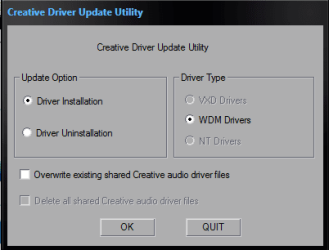
Try this if you haven't already:

Extract the driver file (SBRL_PCDRV_LB_3_00_1004.exe) using 7zip. Then go to Drivers folder and run setup.exe (Run as administrator)

Click Driver Uninstallation and check "Delete all shared Creative audio driver file" it will prompt for restart, do so. then again run the setup and install the driver. Don't forget to check "Overwrite existing shared Creative audio driver file" it will install the driver itself wait for few minutes then restart and you're done!
 

Attachments

  • Creative Driver Update Utility.PNG
    Creative Driver Update Utility.PNG
    6.2 KB · Views: 8

My Computer My Computer

At a glance

Windows 7 Ultimate x86Intel Core 2 Quad [email protected]Transcend 4GB (2x2); DDR-2 (PC2-6400); Speed:...Nvidia GeForce 8600GT, 128bits 1024MB
Computer Manufacturer/Model Number
MICRO-STAR INTERNATIONAL CO.LTD
OS
Windows 7 Ultimate x86
CPU
Intel Core 2 Quad [email protected]
Motherboard
MSI (MS-7345)
Memory
Transcend 4GB (2x2); DDR-2 (PC2-6400); Speed: 400Mhz
Graphics Card(s)
Nvidia GeForce 8600GT, 128bits 1024MB
Sound Card
Realtek High Definition Audio
Monitor(s) Displays
LG Flatron W2043T 22" Widescreen
Hard Drives
Samsung HD501LJ 500GB
Try this if you haven't already:

Extract the driver file (SBRL_PCDRV_LB_3_00_1004.exe) using 7zip. Then go to Drivers folder and run setup.exe (Run as administrator)

Click Driver Uninstallation and check "Delete all shared Creative audio driver file" it will prompt for restart, do so. then again run the setup and install the driver. Don't forget to check "Overwrite existing shared Creative audio driver file" it will install the driver itself wait for few minutes then restart and you're done!
I'm going to try that. If this works, I will piss myself lol
 

My Computer My Computer

At a glance

Windows 7 Ultimate x64
OS
Windows 7 Ultimate x64
I hope it works for you. I had the similar problem once. My windows wasn't detecting my X-fi. Tried this and worked like a charm! let us know how it goes for you.

NIR
 

My Computer My Computer

At a glance

Windows 7 Ultimate x86Intel Core 2 Quad [email protected]Transcend 4GB (2x2); DDR-2 (PC2-6400); Speed:...Nvidia GeForce 8600GT, 128bits 1024MB
Computer Manufacturer/Model Number
MICRO-STAR INTERNATIONAL CO.LTD
OS
Windows 7 Ultimate x86
CPU
Intel Core 2 Quad [email protected]
Motherboard
MSI (MS-7345)
Memory
Transcend 4GB (2x2); DDR-2 (PC2-6400); Speed: 400Mhz
Graphics Card(s)
Nvidia GeForce 8600GT, 128bits 1024MB
Sound Card
Realtek High Definition Audio
Monitor(s) Displays
LG Flatron W2043T 22" Widescreen
Hard Drives
Samsung HD501LJ 500GB
Nir,
Still getting no output device installed :(

Sent from my ADR6400L using Tapatalk
 

My Computer My Computer

At a glance

Windows 7 Ultimate x64
OS
Windows 7 Ultimate x64
wow that's a bummer. Are you sure about disabling onboard sound-card from BIOS? Seems like a serious 64bit issue, now the only option is to do all over for the last time. First uninstall the on-board soundcard driver, Creative X-Fi driver and applications. Click Here and download the latest Driver Sweeper. Install and remove all the soundcard related files.Restart, when booting press "Delete" to load the bios check the option to disable the on-board soundcard. Now turn off the PC and try changing your soundcard into another slot. Turn on your pc and you will see windows is trying to find a driver for your soundcard. Update driver will prompt : "SB X-Fi - Pending" Now install from the CD/DVD you got with soundcard.
 

My Computer My Computer

At a glance

Windows 7 Ultimate x86Intel Core 2 Quad [email protected]Transcend 4GB (2x2); DDR-2 (PC2-6400); Speed:...Nvidia GeForce 8600GT, 128bits 1024MB
Computer Manufacturer/Model Number
MICRO-STAR INTERNATIONAL CO.LTD
OS
Windows 7 Ultimate x86
CPU
Intel Core 2 Quad [email protected]
Motherboard
MSI (MS-7345)
Memory
Transcend 4GB (2x2); DDR-2 (PC2-6400); Speed: 400Mhz
Graphics Card(s)
Nvidia GeForce 8600GT, 128bits 1024MB
Sound Card
Realtek High Definition Audio
Monitor(s) Displays
LG Flatron W2043T 22" Widescreen
Hard Drives
Samsung HD501LJ 500GB
Nireagle,
Normally that should work, I finally got it figured out. I took a bare drive and loaded windows on it and the new card was working immediately with just the generics. Looks like the when uninstalling realtek originally something got wacked. I needed a format anyways since I'm going raid. Thanks everyone for your help!!!
 

My Computer My Computer

At a glance

Windows 7 Ultimate x64
OS
Windows 7 Ultimate x64
Nireagle,
Normally that should work, I finally got it figured out. I took a bare drive and loaded windows on it and the new card was working immediately with just the generics. Looks like the when uninstalling realtek originally something got wacked. I needed a format anyways since I'm going raid. Thanks everyone for your help!!!
If your new fresh install was done with the onboard Realtek chip disabled in the BIOS, whereas the original install was done with both Realtek enabled in the BIOS and X-Fi installed and then you uninstalled the Realtek driver and also disabled Realtek in the BIOS, I suppose that somewhere along the way this could have contributed to your difficulties.

Anyway, you've got it right now. It's always the right thing to do to only have the external sound card enabled and the onboard chip disabled in the BIOS before doing a new install, if that's how you plan to operate. No possibility of any problem with that setup.

Glad you finally got it sorted out.
 

My Computer My Computer

At a glance

Windows 7 Pro x64 (1), Win7 Pro X64 (2)i5-3350p 3.1Ghz/6MB-cache (1); E8400 3.0Ghz/6...8GB PC3-12800 DDR3 (1); 4GB PC3-10600 DDR3 (2)ATI HD7750 (1), (see TV cards); ATI R7 250 (2)
Computer type
PC/Desktop
Computer Manufacturer/Model Number
Home-built, two systems (1) and (2)
OS
Windows 7 Pro x64 (1), Win7 Pro X64 (2)
CPU
i5-3350p 3.1Ghz/6MB-cache (1); E8400 3.0Ghz/6MB-cache (2)
Motherboard
ASUS P8Z77-V Pro (1); ASUS P5Q3 (2)
Memory
8GB PC3-12800 DDR3 (1); 4GB PC3-10600 DDR3 (2)
Graphics Card(s)
ATI HD7750 (1), (see TV cards); ATI R7 250 (2)
Sound Card
Realtek ALC892 HD Audio (1); Realtek ALC1200 HD Audio (2)
Monitor(s) Displays
Eizo HD2441W LCD, Eizo S2433W (1); Eizo 24" S2433W (2)
Screen Resolution
1920x1200, 1920x1200 (1); 1920x1200 (2)
Hard Drives
(1) 1TB SATA-II (7200RPM), 2x2TB SATA-III (7200RPM), 250GB SATA-III (10000RPM) for OS; 2x2TB external USB 3.0

(2) 320GB SATA-II (7200RPM), 750GB SATA-II (7200RPM), 150GB SATA-II (10000RPM) for OS; 2TB external USB 3.0
PSU
Nesteq ECS-6001 600W (1); Nesteq ECS-5001 500W (2)
Case
Acousti-Case 360 (1) and (2)
Cooling
Noctua NH-U12P SE2 for CPU, 2x120mm case fans (1) and (2)
Keyboard
IBM PS/2 (1) and (2)
Mouse
Logitech MX Revolution wireless (1); Microsoft wired (2)
Internet Speed
100mbps down / 10mbps up
Antivirus
Microsoft Security Essentials; Malwarebyte Anti-Malware Pro
Browser
Firefox
Other Info
Ceton InfiniTV 4-tuner cablecard-enabled TV card as well as Hauppauge HVR-2250 OTA/ATSC 2-tuner TV card in (1), running under Win7 WMC
Lesson learned. Was a good learning experience when it comes to integrated devices. I also heard driver sweeper isn't that so great for windows 7. Maybe that might have also contributed to my dilemma.
 

My Computer My Computer

At a glance

Windows 7 Ultimate x64
OS
Windows 7 Ultimate x64
I also heard driver sweeper isn't that so great for windows 7. Maybe that might have also contributed to my dilemma.
More than likely, yes. Wouldn't be the first (and I know for a fact the last) time I have seen it do that to someone by removing more than it should, and leaves you hoping System Restore can get things back to normal, or as you found out a clean install of Windows.

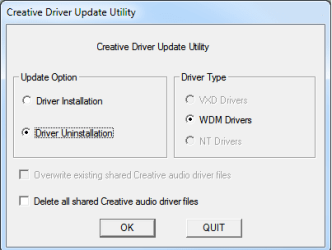
If at any time you have to uninstall the Creative drivers again, use Creative's own uninstaller that is included in the driver file you download from them (it is also likely somewhere on the driver disk as well). To find it use something like 7zip or Winrar to extract the downloaded driver file and you will find it in the,

Drivers\support

folder. The file name is ctzapxx.exe and looks like this when run,

creativeuninstall.png
 

My Computer My Computer

At a glance

Win 7 Ultimate x64FX-8350 @ 4.6 GHz so farADATA XPG V1 Series Black 8GB DDR3 1600Sapphire R9 270x Dual-X
Computer type
PC/Desktop
Computer Manufacturer/Model Number
Me
OS
Win 7 Ultimate x64
CPU
FX-8350 @ 4.6 GHz so far
Motherboard
Asus M5A97 EVO
Memory
ADATA XPG V1 Series Black 8GB DDR3 1600
Graphics Card(s)
Sapphire R9 270x Dual-X
Sound Card
Xonar DGX w/ Corsair Vengence 1300
Monitor(s) Displays
Acer S232HL Abid
Screen Resolution
1920x1080
Hard Drives
120 GB OCZ Vertex 3
500 GB Seagate 7200.12
PSU
Antec Earthwatts 650W Green
Case
Antec Three Hundred
Cooling
Cooler Master 212 EVO
Keyboard
Logitech G510
Mouse
Logitech G500s
Internet Speed
35000/3000
I also heard driver sweeper isn't that so great for windows 7. Maybe that might have also contributed to my dilemma.
More than likely, yes. Wouldn't be the first (and I know for a fact the last) time I have seen it do that to someone by removing more than it should, and leaves you hoping System Restore can get things back to normal, or as you found out a clean install of Windows.

If at any time you have to uninstall the Creative drivers again, use Creative's own uninstaller that is included in the driver file you download from them (it is also likely somewhere on the driver disk as well). To find it use something like 7zip or Winrar to extract the downloaded driver file and you will find it in the,

Drivers\support

folder. The file name is ctzapxx.exe and looks like this when run,

View attachment 170803

I've mentioned this earlier but didn't work for him. I am glad that you sorted it out. Happy listening :D
 

My Computer My Computer

At a glance

Windows 7 Ultimate x86Intel Core 2 Quad [email protected]Transcend 4GB (2x2); DDR-2 (PC2-6400); Speed:...Nvidia GeForce 8600GT, 128bits 1024MB
Computer Manufacturer/Model Number
MICRO-STAR INTERNATIONAL CO.LTD
OS
Windows 7 Ultimate x86
CPU
Intel Core 2 Quad [email protected]
Motherboard
MSI (MS-7345)
Memory
Transcend 4GB (2x2); DDR-2 (PC2-6400); Speed: 400Mhz
Graphics Card(s)
Nvidia GeForce 8600GT, 128bits 1024MB
Sound Card
Realtek High Definition Audio
Monitor(s) Displays
LG Flatron W2043T 22" Widescreen
Hard Drives
Samsung HD501LJ 500GB
Thanks guys! New card sounds amazing btw! :)
 

My Computer My Computer

At a glance

Windows 7 Ultimate x64
OS
Windows 7 Ultimate x64
Hi,

First of all sorry for this huge thread bump, but google found it as the only really relevant and I found a fix too. Should help anyone else if they also stumble on it like I did just now.:)


It happened a moment ago @ Windows10 with XFI Titanium HD.

I uninstalled every bit of XFi stuff to make sure why my chxfihlp.exe doesn't start (startup reg. command).. Anyway, then I got this HD audio detection error. It was first time I saw and I've been using win8.1 for 2-3years before, did win10 upgrade after...


The fix is,

go to device manager
uninstall that HD audio device, don't reboot
now run extracted driver located in main installer "XFRL_PCDRV_L11_3_00_2018" its in Driver folder


Run its installer, wait until it finished, reboot
now it should work properly again
 

My Computer My Computer

At a glance

Windows 10 Prointel i7 - 4770K OCDDR3 16GBNvidia GTX
Computer type
PC/Desktop
OS
Windows 10 Pro
CPU
intel i7 - 4770K OC
Motherboard
Asus
Memory
DDR3 16GB
Graphics Card(s)
Nvidia GTX
Sound Card
Creative X-FI Titanium HD
Hard Drives
SSD intel
Back
Top