X32 & X64 Browser

enigma1944

New member
Member
VIP
Local time
11:51 PM
Messages
220
Location
Pittsburgh Pa USA Dresden German
I use a HP DV7-1247CL X64 laptop.

I have downloaded IE9 and had no problems. Since I have the dual core the X86 icon appears on the start menu. I have tried to place the x64 icon on my start menu but have not had any success. Besides that, is there a way to distinguish between the 2 of them as far as the icons are concerned.

I realize many sites still function with the X86 and using the X64 on the same site does
NOT function.

Any suggestions would be appreciated.

Thanks
 

My Computer

Computer Manufacturer/Model Number
HP dv7-1247cl
OS
Windows 7 Home Premium x64
CPU
AMD TURION X2 DUAL CORE RM-72 ( 2 -CPU's ) 201 GHZ
Memory
3836 MB
Graphics Card(s)
ATI RADEON HD 3200
Sound Card
IDT HIGH DEFINITION AUDIO CODEC
Other Info
Pittsburgh, Pa
I have both the 32 and 64 bit icon on my start menu under All Programs. :huh:

Capture3.JPG

If it's not there, you can just go to - Program Files/Internet Explorer (the 64 bit version), and right click on the iexplore icon there and pin it to the start menu or make a shortcut of it.

You can rename it to 64 bit to distinguish it from the 32 bit one if you want.

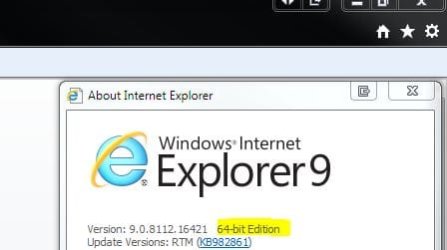
You can tell the difference between the versions by going to About Internet Explorer from the settings icon in IE when you're running it, and the 64 bit version will show you - 64 bit. The 32 bit one won't show anything.

Capture1.JPG

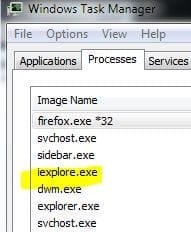
Or just look in Task Manager under Processes. It will either show you just iexplore.exe for 64 bit, and iexplore.exe *32 for the 32 bit one.

Capture2.JPG
 

My Computer

Computer type
PC/Desktop
Computer Manufacturer/Model Number
Airbot 2.0
OS
Windows 7 Ultimate x64 SP1
CPU
Core i7 920 (D0) @ 4Ghz, *26c idle *65c full load on air
Motherboard
Asus P6X58D Premium - Sata 6Gb/s - USB 3.0
Memory
12GB DDR3 Corsair Dominator -CMD12GX3M6A1600C8 at 1600MHz
Graphics Card(s)
Zotac Geforce GTX 770
Sound Card
ASUS Xonar D2X
Monitor(s) Displays
1 LG 24" Flatron W2453V-PF 1 Samsung 24" P2450H both 2ms RT
Screen Resolution
1920x1080@60hz
Hard Drives
1 Samsung 250GB 840 Evo SSD
1 OCZ Vertex2 180GB SSD
1 TB Samsung Spinpoint F1 7200RPM 32MB cache
2 500GB WD Caviar Blacks 7200RPM 32MB cache (WD5001AALS)

Pioneer DVD Burner DVR-S18M
PSU
Corsair HX1000W
Case
Cooler Master HAF 932
Cooling
Case Fans *3 230mm, *1 140mm/CPU - *Tuniq Tower 120 Extreme
Keyboard
Logitech Wireless MK700
Mouse
Logitech Wireless MK700
Internet Speed
DL 15 Mbps UL 0.98 Mbps
Antivirus
None
Browser
Firefox Nightly
Other Info
Processor-7.7 *RAM- 7.9 *Graphics-7.9 *Gaming Graphics- 7.9 *SSD- 7.8 W.E.I final score= 7.7
*Phone- LG Nexus 5

My Computer

Computer type
PC/Desktop
Computer Manufacturer/Model Number
Me
OS
Win 7 Ultimate x64
CPU
FX-8350 @ 4.6 GHz so far
Motherboard
Asus M5A97 EVO
Memory
ADATA XPG V1 Series Black 8GB DDR3 1600
Graphics Card(s)
Sapphire R9 270x Dual-X
Sound Card
Xonar DGX w/ Corsair Vengence 1300
Monitor(s) Displays
Acer S232HL Abid
Screen Resolution
1920x1080
Hard Drives
120 GB OCZ Vertex 3
500 GB Seagate 7200.12
PSU
Antec Earthwatts 650W Green
Case
Antec Three Hundred
Cooling
Cooler Master 212 EVO
Keyboard
Logitech G510
Mouse
Logitech G500s
Internet Speed
35000/3000
Back
Top