Solved XBCD drivers for Xbox 360 gamepad

so what can i do to sort it out or am i basically screwed when it comes to using a controller on cod?

I also downloaded xpadder and set it all up and still not working on the game... just on screen config
 

My Computer My Computer

At a glance

Windows 7 Home Edition 64bit
OS
Windows 7 Home Edition 64bit
does the control work in the calibration screen?
Start > Devices and printers > right click the control and select game controller settings.

using a controller on a pc FPS will never get you the same precision as a mouse and keyboard though
 

My Computer My Computer

At a glance

Windows 7Core i7 920 D0Corsair Dominator 1600Geforce GTX 275
OS
Windows 7
CPU
Core i7 920 D0
Motherboard
Rampage II Gene
Memory
Corsair Dominator 1600
Graphics Card(s)
Geforce GTX 275
Sound Card
Auzentech Prelude
Monitor(s) Displays
BenQ G2400WD
Screen Resolution
1920x1200
Hard Drives
WD AAKS 500GB
WD 1TB
Seagate 160GB
PSU
Corsair HX620
Case
NZXT Rogue
Cooling
TRUE Copper
Keyboard
Logitech G15
Internet Speed
Anywhere from 2.5 to 3.5mb
2 xbox controllers

I have 2 wired xbox controllers (not 360) and was wondering how i can get them both to work at the same time. When i plug both of them in, they keep getting detected/undetected, and that ding sound when you plug something in and out keeps going off. XBCD gives me an error saying "Check if the controller is plugged in and retry" or something. Any suggestions? It could be that I spliced them wrong, because I cut off the end of the cables and joined a USB end instead. They work perfectly if I only have 1 of them plugged in.
 

My Computer My Computer

At a glance

Windows 7 x64
OS
Windows 7 x64
if it disconnects when both are plugged in, then its a power limitation on that integrated hub.

if you have 4 ports, connect the controls to ports 1 and 3.

1 xbox control maxes out the entire 500ma on a single hub.
 

My Computer My Computer

At a glance

Windows 7Core i7 920 D0Corsair Dominator 1600Geforce GTX 275
OS
Windows 7
CPU
Core i7 920 D0
Motherboard
Rampage II Gene
Memory
Corsair Dominator 1600
Graphics Card(s)
Geforce GTX 275
Sound Card
Auzentech Prelude
Monitor(s) Displays
BenQ G2400WD
Screen Resolution
1920x1200
Hard Drives
WD AAKS 500GB
WD 1TB
Seagate 160GB
PSU
Corsair HX620
Case
NZXT Rogue
Cooling
TRUE Copper
Keyboard
Logitech G15
Internet Speed
Anywhere from 2.5 to 3.5mb
watermark. project 64+ xbcd and RE5

hey guys you know that water mark
well im using windows 7 ultimate x 64 build 7600 and i dont know how to use this thing and i dont want to risk it screwing up my computer is there any other way to remove the watermark or can someone just tell em how they did it on method one please.

oh by the way i need to use separate triggers for project 64 but resident evil 5 wont run with like xbcd for some reason and will only read the B button so is there a way in setup utility so it will read PC games then a way i can change it back so it will work with project 64? thanks
 

My Computer My Computer

At a glance

windows 7 Ultimate Service pack 1 x64intel i5 2500k8gb RamSapphire AMD 6950 2gb
Computer type
PC/Desktop
OS
windows 7 Ultimate Service pack 1 x64
CPU
intel i5 2500k
Motherboard
Asus p8z68-v motherboard
Memory
8gb Ram
Graphics Card(s)
Sapphire AMD 6950 2gb
Screen Resolution
1920x1080
Hard Drives
2x samsung hd103SJ
1x ST2000DL003-9VT166
PSU
Silverstone silver 850watt power supply (ST85F-P)
Case
silverstone raven RV02-E
Keyboard
microsoft side winder x4
Mouse
Razer death adder v2
Resident Evil 5 uses Xinput.

and is the water mark really so bad? its barely noticeable

anyway,.

get this update for xbcd
http://public.bay.livefilestore.com..._oY1lNJgOtUdt1hfIRqg/XBCD_Installer_0.2.6.exe

in Program Files (x86)\XBCD\x360ce
copy the dll files and the x360ce.ini file to the RE5 folder, then open up the ini file and replace the ???? in the

VID=0x???? #controller VID
PID=0x???? #controller PID

with those of the actua device. you can find these in device managers details tab or by opening up c:\windows\inf\xbcd.inf
 
Last edited:

My Computer My Computer

At a glance

Windows 7Core i7 920 D0Corsair Dominator 1600Geforce GTX 275
OS
Windows 7
CPU
Core i7 920 D0
Motherboard
Rampage II Gene
Memory
Corsair Dominator 1600
Graphics Card(s)
Geforce GTX 275
Sound Card
Auzentech Prelude
Monitor(s) Displays
BenQ G2400WD
Screen Resolution
1920x1200
Hard Drives
WD AAKS 500GB
WD 1TB
Seagate 160GB
PSU
Corsair HX620
Case
NZXT Rogue
Cooling
TRUE Copper
Keyboard
Logitech G15
Internet Speed
Anywhere from 2.5 to 3.5mb
hey mate i cant get that update its not a valid 32 application apparently is there any other way to get that file because i dont seem to have that x360ce file or folder and plus ive already installed xbcd 0.2.6 so can u just repost that file or something thanks
 

My Computer My Computer

At a glance

windows 7 Ultimate Service pack 1 x64intel i5 2500k8gb RamSapphire AMD 6950 2gb
Computer type
PC/Desktop
OS
windows 7 Ultimate Service pack 1 x64
CPU
intel i5 2500k
Motherboard
Asus p8z68-v motherboard
Memory
8gb Ram
Graphics Card(s)
Sapphire AMD 6950 2gb
Screen Resolution
1920x1080
Hard Drives
2x samsung hd103SJ
1x ST2000DL003-9VT166
PSU
Silverstone silver 850watt power supply (ST85F-P)
Case
silverstone raven RV02-E
Keyboard
microsoft side winder x4
Mouse
Razer death adder v2
link is fixed now.

0.2.6 is wip until i get in and make some changes to the driver or redo the setup utility as an app rather then a dll. the version up now has newer x360ce files.
 

My Computer My Computer

At a glance

Windows 7Core i7 920 D0Corsair Dominator 1600Geforce GTX 275
OS
Windows 7
CPU
Core i7 920 D0
Motherboard
Rampage II Gene
Memory
Corsair Dominator 1600
Graphics Card(s)
Geforce GTX 275
Sound Card
Auzentech Prelude
Monitor(s) Displays
BenQ G2400WD
Screen Resolution
1920x1200
Hard Drives
WD AAKS 500GB
WD 1TB
Seagate 160GB
PSU
Corsair HX620
Case
NZXT Rogue
Cooling
TRUE Copper
Keyboard
Logitech G15
Internet Speed
Anywhere from 2.5 to 3.5mb
thanks squal! it worked. it was a power problem. I plugged in one at the back and one in the front and now they both work at the same time.
 

My Computer My Computer

At a glance

Windows 7 x64
OS
Windows 7 x64
im hey im up to the x360ce part and im kidna confused on what to copy theres loads of these things and im not sure which and then theres the wired controllers and the xbox 360 controllers which one do i use? im using a wired controller for the xbox 360 so im gonna presume its the xbox 360 controller
 

My Computer My Computer

At a glance

windows 7 Ultimate Service pack 1 x64intel i5 2500k8gb RamSapphire AMD 6950 2gb
Computer type
PC/Desktop
OS
windows 7 Ultimate Service pack 1 x64
CPU
intel i5 2500k
Motherboard
Asus p8z68-v motherboard
Memory
8gb Ram
Graphics Card(s)
Sapphire AMD 6950 2gb
Screen Resolution
1920x1080
Hard Drives
2x samsung hd103SJ
1x ST2000DL003-9VT166
PSU
Silverstone silver 850watt power supply (ST85F-P)
Case
silverstone raven RV02-E
Keyboard
microsoft side winder x4
Mouse
Razer death adder v2
YES dont worry disregard my last post i found out i didnt replace it on pad 1 and i found my number through device manager now i can enjoy project 64 and resident evil 5 THANKS MAN now just to get that watermark... :D
 

My Computer My Computer

At a glance

windows 7 Ultimate Service pack 1 x64intel i5 2500k8gb RamSapphire AMD 6950 2gb
Computer type
PC/Desktop
OS
windows 7 Ultimate Service pack 1 x64
CPU
intel i5 2500k
Motherboard
Asus p8z68-v motherboard
Memory
8gb Ram
Graphics Card(s)
Sapphire AMD 6950 2gb
Screen Resolution
1920x1080
Hard Drives
2x samsung hd103SJ
1x ST2000DL003-9VT166
PSU
Silverstone silver 850watt power supply (ST85F-P)
Case
silverstone raven RV02-E
Keyboard
microsoft side winder x4
Mouse
Razer death adder v2
ok now that it seems to read all buttons i have one small problem it seems to read select as start... i think i have to edit gamepad settings in the launcher ill get back to ya on this...
 

My Computer My Computer

At a glance

windows 7 Ultimate Service pack 1 x64intel i5 2500k8gb RamSapphire AMD 6950 2gb
Computer type
PC/Desktop
OS
windows 7 Ultimate Service pack 1 x64
CPU
intel i5 2500k
Motherboard
Asus p8z68-v motherboard
Memory
8gb Ram
Graphics Card(s)
Sapphire AMD 6950 2gb
Screen Resolution
1920x1080
Hard Drives
2x samsung hd103SJ
1x ST2000DL003-9VT166
PSU
Silverstone silver 850watt power supply (ST85F-P)
Case
silverstone raven RV02-E
Keyboard
microsoft side winder x4
Mouse
Razer death adder v2
ok editing in the launcher was a bad idea and gotta reinstall im gonna try to match the launchers one with the xbce file but if this doesnt work im gonna have to find someone else to help me get this working
 

My Computer My Computer

At a glance

windows 7 Ultimate Service pack 1 x64intel i5 2500k8gb RamSapphire AMD 6950 2gb
Computer type
PC/Desktop
OS
windows 7 Ultimate Service pack 1 x64
CPU
intel i5 2500k
Motherboard
Asus p8z68-v motherboard
Memory
8gb Ram
Graphics Card(s)
Sapphire AMD 6950 2gb
Screen Resolution
1920x1080
Hard Drives
2x samsung hd103SJ
1x ST2000DL003-9VT166
PSU
Silverstone silver 850watt power supply (ST85F-P)
Case
silverstone raven RV02-E
Keyboard
microsoft side winder x4
Mouse
Razer death adder v2
yeh a few buttons seem to work but other than that the configurations are all over the place back seems to be start and i cant even fire a weapon although i can draw it out
 

My Computer My Computer

At a glance

windows 7 Ultimate Service pack 1 x64intel i5 2500k8gb RamSapphire AMD 6950 2gb
Computer type
PC/Desktop
OS
windows 7 Ultimate Service pack 1 x64
CPU
intel i5 2500k
Motherboard
Asus p8z68-v motherboard
Memory
8gb Ram
Graphics Card(s)
Sapphire AMD 6950 2gb
Screen Resolution
1920x1080
Hard Drives
2x samsung hd103SJ
1x ST2000DL003-9VT166
PSU
Silverstone silver 850watt power supply (ST85F-P)
Case
silverstone raven RV02-E
Keyboard
microsoft side winder x4
Mouse
Razer death adder v2
ok i got the game to read the triggers now i have one major problem my gun auto fires like its being slided on or something and this is the last thing thats beating me i finally got the controls working and changed and im being beaten by this damn auto fire thing how do i set the triggers as buttons?
 

My Computer My Computer

At a glance

windows 7 Ultimate Service pack 1 x64intel i5 2500k8gb RamSapphire AMD 6950 2gb
Computer type
PC/Desktop
OS
windows 7 Ultimate Service pack 1 x64
CPU
intel i5 2500k
Motherboard
Asus p8z68-v motherboard
Memory
8gb Ram
Graphics Card(s)
Sapphire AMD 6950 2gb
Screen Resolution
1920x1080
Hard Drives
2x samsung hd103SJ
1x ST2000DL003-9VT166
PSU
Silverstone silver 850watt power supply (ST85F-P)
Case
silverstone raven RV02-E
Keyboard
microsoft side winder x4
Mouse
Razer death adder v2
never mind guys i got the triggers as buttons through setup utility and whats better is that project 64 works with the triggers as buttons function too and doesn't need to load the separate triggers although that was already loaded so now i can press both triggers if want on project and play resident evil 5

thanks for your help guys
 
Last edited:

My Computer My Computer

At a glance

windows 7 Ultimate Service pack 1 x64intel i5 2500k8gb RamSapphire AMD 6950 2gb
Computer type
PC/Desktop
OS
windows 7 Ultimate Service pack 1 x64
CPU
intel i5 2500k
Motherboard
Asus p8z68-v motherboard
Memory
8gb Ram
Graphics Card(s)
Sapphire AMD 6950 2gb
Screen Resolution
1920x1080
Hard Drives
2x samsung hd103SJ
1x ST2000DL003-9VT166
PSU
Silverstone silver 850watt power supply (ST85F-P)
Case
silverstone raven RV02-E
Keyboard
microsoft side winder x4
Mouse
Razer death adder v2
broken link

hey mate just to let you know link is broken again it might help to keep it permanently up for some reason just keeps breaking
 

My Computer My Computer

At a glance

windows 7 Ultimate Service pack 1 x64intel i5 2500k8gb RamSapphire AMD 6950 2gb
Computer type
PC/Desktop
OS
windows 7 Ultimate Service pack 1 x64
CPU
intel i5 2500k
Motherboard
Asus p8z68-v motherboard
Memory
8gb Ram
Graphics Card(s)
Sapphire AMD 6950 2gb
Screen Resolution
1920x1080
Hard Drives
2x samsung hd103SJ
1x ST2000DL003-9VT166
PSU
Silverstone silver 850watt power supply (ST85F-P)
Case
silverstone raven RV02-E
Keyboard
microsoft side winder x4
Mouse
Razer death adder v2

My Computer My Computer

At a glance

Windows 7Core i7 920 D0Corsair Dominator 1600Geforce GTX 275
OS
Windows 7
CPU
Core i7 920 D0
Motherboard
Rampage II Gene
Memory
Corsair Dominator 1600
Graphics Card(s)
Geforce GTX 275
Sound Card
Auzentech Prelude
Monitor(s) Displays
BenQ G2400WD
Screen Resolution
1920x1200
Hard Drives
WD AAKS 500GB
WD 1TB
Seagate 160GB
PSU
Corsair HX620
Case
NZXT Rogue
Cooling
TRUE Copper
Keyboard
Logitech G15
Internet Speed
Anywhere from 2.5 to 3.5mb
Hello, I followed Zorlac's instructions to the T, but I still can not get the rumble feature to work!
I think my problem may be that I am using a WIRELESS 360 controller and this was written for a WIRED controller. But here's what I'm getting stuck at in case that's not the issue:
I got all the way up to going into the device manager to change the driver but I can't find "Microsoft Common Controller For Windows Class" anywhere (likely because I'm using the wireless controller) so I went into Control Panel > Hardware and Sound > Devices and Printers
Untitled-1.png


I tried updating the driver for both the controller and the receiver but XBDC doesn't show up under either of them.

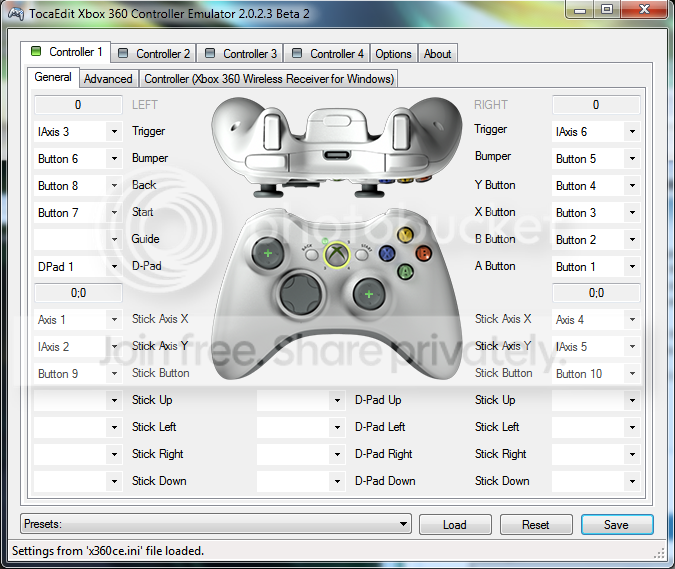
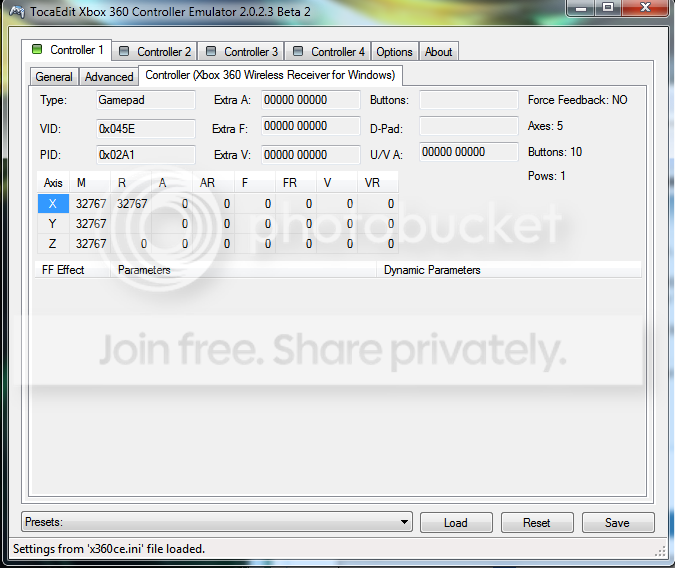
I tried launching x360ce and this is what I see
Untitled2.png


Untitled3.png


Notice that under the third tab (second pic) it says "Force Feedback: NO"

How do I fix this!!!!
I'm running Windows 7 Build 7600
 

My Computer My Computer

At a glance

Windows 7Intel1.5GbRadeon 9700
Computer Manufacturer/Model Number
Gateway
OS
Windows 7
CPU
Intel
Memory
1.5Gb
Graphics Card(s)
Radeon 9700
Device support includes

Code:
;Wired Controllers
;Xbox Controllers
%XBCD.DeviceDesc%            =Install,        USB\VID_044F&PID_0F07        ; Thrustmaster Controller 
%XBCD.DeviceDesc%            =Install,        USB\VID_045E&PID_0202        ; Microsoft Xbox Controller 
%XBCD.DeviceDesc%            =Install,        USB\VID_045E&PID_0285        ; Microsoft Xbox Controller S 
%XBCD.DeviceDesc%            =Install,        USB\VID_045E&PID_0287        ; Microsoft Xbox Controller S 
%XBCD.DeviceDesc%            =Install,        USB\VID_045E&PID_0289        ; Microsoft Xbox Controller S 
%XBCD.DeviceDesc%            =Install,        USB\VID_046D&PID_CA88        ; Logitech Thunderpad 
%XBCD.DeviceDesc%            =Install,        USB\VID_046D&PID_CA84        ; Logitech Cordless Precision 
%XBCD.DeviceDesc%            =Install,        USB\VID_05FE&PID_3030        ; Chic Controller 
%XBCD.DeviceDesc%            =Install,        USB\VID_05FE&PID_3031        ; Chic Controller 
%XBCD.DeviceDesc%            =Install,        USB\VID_06A3&PID_0201        ; Saitek Adrenalin 
%XBCD.DeviceDesc%            =Install,        USB\VID_0738&PID_4516        ; MadCatz 4516 
%XBCD.DeviceDesc%            =Install,        USB\VID_0738&PID_4520        ; MadCatz Control Pad Pro 
%XBCD.DeviceDesc%            =Install,        USB\VID_0738&PID_4526        ; MadCatz 4526 
%XBCD.DeviceDesc%            =Install,        USB\VID_0738&PID_4536        ; MadCatz Microcon Xbox Controller 
%XBCD.DeviceDesc%            =Install,        USB\VID_0738&PID_4556        ; MadCatz Lynx Wireless Controller 
%XBCD.DeviceDesc%            =Install,        USB\VID_0738&PID_4588        ; MadCatz Blaster 
%XBCD.DeviceDesc%            =Install,        USB\VID_0C12&PID_0005        ; Intec wireless 
%XBCD.DeviceDesc%            =Install,        USB\VID_0C12&PID_8801        ; Nyko Xbox Controller 
%XBCD.DeviceDesc%            =Install,        USB\VID_0C12&PID_8802        ; Nyko Air Flow 
%XBCD.DeviceDesc%            =Install,        USB\VID_0E4C&PID_3510        ; Radica Gamester 
%XBCD.DeviceDesc%            =Install,        USB\VID_0E6F&PID_0008        ; After Glow Pro Controller 
%XBCD.DeviceDesc%            =Install,        USB\VID_0F30&PID_0202        ; Big Ben XS Xbox Controller 
%XBCD.DeviceDesc%            =Install,        USB\VID_FFFF&PID_FFFF        ; PowerWave Xbox Controller 

;Xbox Steering Wheels
%XBCD_Wheel.DeviceDesc%        =Install,        USB\VID_0E8F&PID_0201        ; Gamexpert PS2/GC/Xbox Steering Wheel 
%XBCD_Wheel.DeviceDesc%        =Install,        USB\VID_044F&PID_0F00        ; Thrustmaster Wheel 
%XBCD_Wheel.DeviceDesc%        =Install,        USB\VID_044F&PID_0F03        ; Thrustmaster Wheel 
%XBCD_Wheel.DeviceDesc%        =Install,        USB\VID_044F&PID_0F10        ; Thrustmaster Modena GT 
%XBCD_Wheel.DeviceDesc%        =Install,        USB\VID_062A&PID_0033        ; Competition Pro Steering Wheel 
%XBCD_Wheel.DeviceDesc%        =Install,        USB\VID_06A3&PID_0200        ; Saitek Racingwheel 

;Foot Pads for Xbox/360
%XBCD_DDR.DeviceDesc%            =Install,        USB\VID_12AB&PID_0004        ; Konami DDR Pad 
%XBCD_DDR.DeviceDesc%            =Install,        USB\VID_12AB&PID_8809        ; Konami DDR Pad 
%XBCD_DDR.DeviceDesc%            =Install,        USB\VID_0738&PID_4540        ; MadCatz Beat Pad (w/ Handle) 
%XBCD_DDR.DeviceDesc%            =Install,        USB\VID_0738&PID_45FF        ; MadCatz Beat Pad (w/ Handle) 
%XBCD_DDR.DeviceDesc%            =Install,        USB\VID_0738&PID_4740        ; MadCatz Beat Pad 360 
%XBCD_DDR.DeviceDesc%            =Install,        USB\VID_0738&PID_4743        ; MadCatz Beat Pad Pro 
%XBCD_DDR.DeviceDesc%            =Install,        USB\VID_0738&PID_6040        ; MadCatz Beat Pad Pro 
%XBCD_DDR.DeviceDesc%            =Install,        USB\VID_0C12&PID_8809        ; RedOctane Ignition Pad 

;Xbox 360 Controllers
%XBCD_360.DeviceDesc%            =Install,        USB\VID_045E&PID_028E        ; Microsoft Xbox 360 Controller 
%XBCD_360.DeviceDesc%            =Install,        USB\VID_046D&PID_C242        ; Logitech Chillstream 
%XBCD_360.DeviceDesc%            =Install,        USB\VID_162E&PID_BEEF        ; Joytech SE for 360 
%XBCD_360.DeviceDesc%            =Install,        USB\VID_0E6F&PID_0201        ; Pelican XSZ Wired Controller (Model #PL-3601) 
%XBCD_360.DeviceDesc%            =Install,        USB\VID_0738&PID_4716        ; Madcatz Xbox 360 Controller 
%XBCD_360.DeviceDesc%            =Install,        USB\VID_0738&PID_4718        ; MadCatz Street Fighter IV Fight Stick 
%XBCD_360.DeviceDesc%            =Install,        USB\VID_0738&PID_4726        ; MadCatz Pro for Xbox 360 
%XBCD_360.DeviceDesc%            =Install,        USB\VID_0738&PID_4728        ; MadCatz Street Fighter IV 
%XBCD_360.DeviceDesc%            =Install,        USB\VID_0738&PID_4736        ; MadCatz 360 MicroCon 
%XBCD_360.DeviceDesc%            =Install,        USB\VID_0738&PID_4738        ; MadCatz Arcade Gamestick (Street Fighter IV Fightstick TE)
%XBCD_360.DeviceDesc%            =Install,        USB\VID_0738&PID_BEEF        ; Joytech NEO Se Advanced
%XBCD_360.DeviceDesc%            =Install,        USB\VID_0F0D&PID_000A        ; HORI DOA4 Stick 
%XBCD_360.DeviceDesc%            =Install,        USB\VID_0F0D&PID_000C        ; HORI Pad EX Turbo 
%XBCD_360.DeviceDesc%            =Install,        USB\VID_0F0D&PID_000D        ; HORI EX2 Fighter Stick
%XBCD_360.DeviceDesc%            =Install,        USB\VID_1BAD&PID_F016        ; Mad Catz Xbox 360 GamePad

;Xbox 360 Steering Wheels
%XBCD_360_Wheel.DeviceDesc%        =Install,        USB\VID_046D&PID_CAA3        ; Logitech DriveFX Wheel 

;Foot Pads for Xbox 360
;%XBCD_360_DDR.DeviceDesc%        =Install,        USB\VID_????&PID_????        ; (NAME)

;Xbox 360 Guitar Controller
%XBCD_360_Guitar.DeviceDesc%        =Install,         USB\VID_1430&PID_4748         ; RedOctane X-plorer Guitar

; Currently unsupported
; ------------------------------------
;Wireless Controllers
 

My Computer My Computer

At a glance

Windows 7Core i7 920 D0Corsair Dominator 1600Geforce GTX 275
OS
Windows 7
CPU
Core i7 920 D0
Motherboard
Rampage II Gene
Memory
Corsair Dominator 1600
Graphics Card(s)
Geforce GTX 275
Sound Card
Auzentech Prelude
Monitor(s) Displays
BenQ G2400WD
Screen Resolution
1920x1200
Hard Drives
WD AAKS 500GB
WD 1TB
Seagate 160GB
PSU
Corsair HX620
Case
NZXT Rogue
Cooling
TRUE Copper
Keyboard
Logitech G15
Internet Speed
Anywhere from 2.5 to 3.5mb
Back
Top