Hi mossflower,
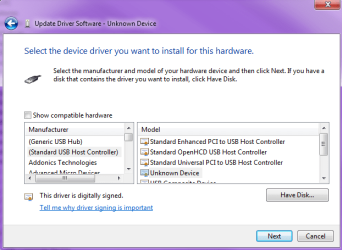
Try the instructions I found here: Wireless Xbox 360 Controller Receiver For Windows Not Detecting/Working
Let me know if that helps at all. Good luck!http://www.dealextreme.com/forums/Forums.dx/Forum.31881~threadid.504450
Right click on Computer
Go to Properties
Click on Device Manager
Right click on the Unidentified Device
Go to Properties
Go to the Drive tab
Click on Update Driver…
Browse my computer for driver software
Let me pick from a list of device drivers on my computer
Windows Common Controller for Window Class
Xbox 360 Wireless Receiver for Windows Version: 2.1.0.1349 [8/13/2009]
Update Driver Warning
Click Yes
Cheers,
Walker
Windows Outreach Team
It doesn't come up with 'Windows common controller for windows class'
It shows up as 'Microsoft Windows common controller for windows class' so look out for that instead! Hope that helps

My Computer
At a glance
Windows 7 Home PremiumAMD Athlon 64 'San Diego' 3700+ @ 2.21GHz1GB Dual Channel Swissbit (2 x 512MB)NVidia GeForce 6600GT
- Computer Manufacturer/Model Number
- Custom Built
- OS
- Windows 7 Home Premium
- CPU
- AMD Athlon 64 'San Diego' 3700+ @ 2.21GHz
- Motherboard
- DFI LanParty nF4 DLI
- Memory
- 1GB Dual Channel Swissbit (2 x 512MB)
- Graphics Card(s)
- NVidia GeForce 6600GT
- Sound Card
- Karajan Audio Module
- Monitor(s) Displays
- 37" LG HD LCD TV
- Hard Drives
- 1 x 200GB Seagate Barracuda (C:\)
1 x 200GB Seagate Barracuda (D:\)
1 x 1TB Western Digital Caviar (Y:\)
1 x 1TB Western Digital Caviar (Z:\)
- PSU
- 550 AlphaPower
- Case
- Random one
- Cooling
- Fans. Not watercooled yet, but in progress.