Xbox 360 wireless receiver for windows 7 - cant connect remote!

Jantnues

New member
Local time
4:56 PM
Messages
10
Hi. First of all, i must say i've read all the old topics about the issue around here. I have windows 7 and i've tried everything you guys said before in other topics but I believe I still have a problem.

Im not sure which drivers I have installed or if I even have drivers right now.

The mini-disk that came with the device allways says something like "program is blocked due to compatibility issues". I press "look for online solutions" and guess what, no online solutions found.

After that, I used our good friend google and this forum seemed to be by far the best help. So I did what you were sugesting, went to the device management, right click on the "unknow usb device" etc. etc. Right now when I plug my device, the green light goes on, there's no "unknown" problems and in device management it reads as "Microsoft common controler for Windows". Still, I start a controller, try to connect it... and nothing happens. I've tried it with batteries, with the play & charge kit, every way possible, with lots of controllers (seriously, like 5 or 6) and I can never connect them.

Any guesses?

Thank you in advance :D


EDIT: I thought I shall mention i have a Asus N53SV - ASUSTeK Computer Inc. - Notebooks- ASUS N53SV
 
Last edited:

My Computer My Computer

At a glance

windows 7 64bit
OS
windows 7 64bit
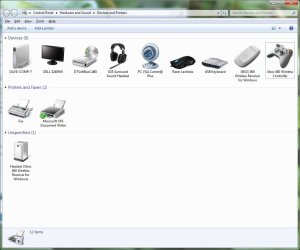
does the controller or receiver show in your devices and printers list? should look like this:
devices2.jpg
 

My Computer My Computer

At a glance

Windows 7 Ultimate x64 SP1Intel Q6600 @ 2.6Ghz4Gb DDR2 Corsair Dominator @ 800Mhz 5-5-5-15EVGA 560 GTX SC FTW 1GB
Computer type
PC/Desktop
Computer Manufacturer/Model Number
Custom Build
OS
Windows 7 Ultimate x64 SP1
CPU
Intel Q6600 @ 2.6Ghz
Motherboard
Evga NF78-CK-132-A 3-Way SLI
Memory
4Gb DDR2 Corsair Dominator @ 800Mhz 5-5-5-15
Graphics Card(s)
EVGA 560 GTX SC FTW 1GB
Sound Card
Realtek HD 7.1 Audio, Plantronics GameCom780 7.1 Headset
Monitor(s) Displays
Dell S2409W
Screen Resolution
1920 x 1080
Hard Drives
SanDisk SDSSDHII-120G-G25 120GB SSD
Samsung 7200RPM 750Gb SATA
Samsung 850 EVO 120GB SSD
Western Digital Green 1TB 7200RPM
PSU
Xigmatek 750W Quad sli quad core 80% eff
Case
Antec 900 Gaming Case
Cooling
Zalman CNPS9700-NT NVIDIA Tritium
Keyboard
Logitech generic keyboard, MS wireless keyboard
Mouse
Razor Lachesis Banshee V2 Blue, 4000DPI, MS wireless mouse
Internet Speed
152Mb Virgin Media Fibre Optic
Antivirus
Microsoft Security Essentials
Browser
Google Chrome
Other Info
Wireless Gaming Receiver for Windows, Wireless Xbox 360 Pad
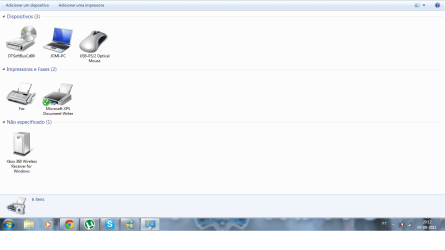
xbox360 receiver.png

I have tht. So, it's unspecified...
 

My Computer My Computer

At a glance

windows 7 64bit
OS
windows 7 64bit

My Computer My Computer

At a glance

Windows 7 Ultimate x64 SP1Intel Q6600 @ 2.6Ghz4Gb DDR2 Corsair Dominator @ 800Mhz 5-5-5-15EVGA 560 GTX SC FTW 1GB
Computer type
PC/Desktop
Computer Manufacturer/Model Number
Custom Build
OS
Windows 7 Ultimate x64 SP1
CPU
Intel Q6600 @ 2.6Ghz
Motherboard
Evga NF78-CK-132-A 3-Way SLI
Memory
4Gb DDR2 Corsair Dominator @ 800Mhz 5-5-5-15
Graphics Card(s)
EVGA 560 GTX SC FTW 1GB
Sound Card
Realtek HD 7.1 Audio, Plantronics GameCom780 7.1 Headset
Monitor(s) Displays
Dell S2409W
Screen Resolution
1920 x 1080
Hard Drives
SanDisk SDSSDHII-120G-G25 120GB SSD
Samsung 7200RPM 750Gb SATA
Samsung 850 EVO 120GB SSD
Western Digital Green 1TB 7200RPM
PSU
Xigmatek 750W Quad sli quad core 80% eff
Case
Antec 900 Gaming Case
Cooling
Zalman CNPS9700-NT NVIDIA Tritium
Keyboard
Logitech generic keyboard, MS wireless keyboard
Mouse
Razor Lachesis Banshee V2 Blue, 4000DPI, MS wireless mouse
Internet Speed
152Mb Virgin Media Fibre Optic
Antivirus
Microsoft Security Essentials
Browser
Google Chrome
Other Info
Wireless Gaming Receiver for Windows, Wireless Xbox 360 Pad
There are no updates.

I done what you said and it still appears as unspecified. :confused:
 

My Computer My Computer

At a glance

windows 7 64bit
OS
windows 7 64bit
Hmm, very strange, sounds like a signature fault on your system, its usually unspecified if the driver signing isn't available or the driver is bugged.

Looks like a restore is needed to before you installed the device, i hope it wasn't long before you got it.

MrNeeds
 

My Computer My Computer

At a glance

Windows 7 Ultimate x64 SP1Intel Q6600 @ 2.6Ghz4Gb DDR2 Corsair Dominator @ 800Mhz 5-5-5-15EVGA 560 GTX SC FTW 1GB
Computer type
PC/Desktop
Computer Manufacturer/Model Number
Custom Build
OS
Windows 7 Ultimate x64 SP1
CPU
Intel Q6600 @ 2.6Ghz
Motherboard
Evga NF78-CK-132-A 3-Way SLI
Memory
4Gb DDR2 Corsair Dominator @ 800Mhz 5-5-5-15
Graphics Card(s)
EVGA 560 GTX SC FTW 1GB
Sound Card
Realtek HD 7.1 Audio, Plantronics GameCom780 7.1 Headset
Monitor(s) Displays
Dell S2409W
Screen Resolution
1920 x 1080
Hard Drives
SanDisk SDSSDHII-120G-G25 120GB SSD
Samsung 7200RPM 750Gb SATA
Samsung 850 EVO 120GB SSD
Western Digital Green 1TB 7200RPM
PSU
Xigmatek 750W Quad sli quad core 80% eff
Case
Antec 900 Gaming Case
Cooling
Zalman CNPS9700-NT NVIDIA Tritium
Keyboard
Logitech generic keyboard, MS wireless keyboard
Mouse
Razor Lachesis Banshee V2 Blue, 4000DPI, MS wireless mouse
Internet Speed
152Mb Virgin Media Fibre Optic
Antivirus
Microsoft Security Essentials
Browser
Google Chrome
Other Info
Wireless Gaming Receiver for Windows, Wireless Xbox 360 Pad
I really didn't get the last part. If you could please re-explain. You mean I need to do a restore?
 

My Computer My Computer

At a glance

windows 7 64bit
OS
windows 7 64bit
System restore yes, it will roll back to before you installed the drivers for your wireless receiver, hopefully then you can install from windows update rather than the disc that is supplied with the device

MrNeeds
 

My Computer My Computer

At a glance

Windows 7 Ultimate x64 SP1Intel Q6600 @ 2.6Ghz4Gb DDR2 Corsair Dominator @ 800Mhz 5-5-5-15EVGA 560 GTX SC FTW 1GB
Computer type
PC/Desktop
Computer Manufacturer/Model Number
Custom Build
OS
Windows 7 Ultimate x64 SP1
CPU
Intel Q6600 @ 2.6Ghz
Motherboard
Evga NF78-CK-132-A 3-Way SLI
Memory
4Gb DDR2 Corsair Dominator @ 800Mhz 5-5-5-15
Graphics Card(s)
EVGA 560 GTX SC FTW 1GB
Sound Card
Realtek HD 7.1 Audio, Plantronics GameCom780 7.1 Headset
Monitor(s) Displays
Dell S2409W
Screen Resolution
1920 x 1080
Hard Drives
SanDisk SDSSDHII-120G-G25 120GB SSD
Samsung 7200RPM 750Gb SATA
Samsung 850 EVO 120GB SSD
Western Digital Green 1TB 7200RPM
PSU
Xigmatek 750W Quad sli quad core 80% eff
Case
Antec 900 Gaming Case
Cooling
Zalman CNPS9700-NT NVIDIA Tritium
Keyboard
Logitech generic keyboard, MS wireless keyboard
Mouse
Razor Lachesis Banshee V2 Blue, 4000DPI, MS wireless mouse
Internet Speed
152Mb Virgin Media Fibre Optic
Antivirus
Microsoft Security Essentials
Browser
Google Chrome
Other Info
Wireless Gaming Receiver for Windows, Wireless Xbox 360 Pad
Sure there isn't other way? Wasn't really fancing a restore now...

Oh, and I never managed to install the drivers with the disc. I always downloaded them from the site, like it said in the other topics.
 

My Computer My Computer

At a glance

windows 7 64bit
OS
windows 7 64bit
OK, so now I was trying to do the system restore, and I found out that due to the fact that my disk is almost full, my most recent system restore point is the 4th of September. So that won't do it...
 

My Computer My Computer

At a glance

windows 7 64bit
OS
windows 7 64bit

My Computer My Computer

At a glance

Windows 7 Ultimate 64 RetailI7-9604 X 4 GB Kingston DDR3-1600Gigabyte GTX670
Computer type
PC/Desktop
Computer Manufacturer/Model Number
Black Trooper Rampage
OS
Windows 7 Ultimate 64 Retail
CPU
I7-960
Motherboard
Asus Rampage III Extreme
Memory
4 X 4 GB Kingston DDR3-1600
Graphics Card(s)
Gigabyte GTX670
Sound Card
X-Fi Titanium Fatality Champion
Monitor(s) Displays
Dell U2412M
Screen Resolution
1920 X 1200
Hard Drives
2 X Samsung 830 256 GB
Velociraptor 1TB
2 x 2 TB WD Caviar Black
Seagate Barrcuda 2 TB
PSU
Cooler Master Silent Pro Gold 1000 W
Case
Cooler Master Trooper
Keyboard
Logitech G19
Mouse
Logitech G9x
Internet Speed
30 MBPS +/- VDSL
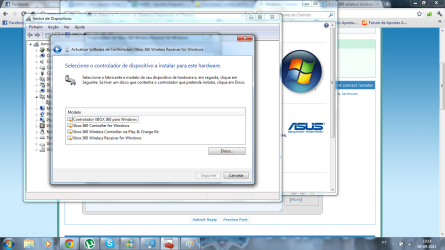
I've done that and, as I said, it doesn't work. And when I get to the part of choosing the
drivers I can't choose the "Xbox 360 Wireless Receiver for Windows Version: 2.1.0.1349 [8/13/2009]"

I'll show you

As you can see, I don't have the option of the driver. Altough I have the drivers in my computer.
 

Attachments

  • wireless controler problems.png
    wireless controler problems.png
    117.7 KB · Views: 231

My Computer My Computer

At a glance

windows 7 64bit
OS
windows 7 64bit
You might have done this already also but I figure it can't harm to mention it
Have you tried right click on the unknown device in Devices and printers then Troubleshoot?
 

My Computer My Computer

At a glance

Windows 7 Ultimate 64 RetailI7-9604 X 4 GB Kingston DDR3-1600Gigabyte GTX670
Computer type
PC/Desktop
Computer Manufacturer/Model Number
Black Trooper Rampage
OS
Windows 7 Ultimate 64 Retail
CPU
I7-960
Motherboard
Asus Rampage III Extreme
Memory
4 X 4 GB Kingston DDR3-1600
Graphics Card(s)
Gigabyte GTX670
Sound Card
X-Fi Titanium Fatality Champion
Monitor(s) Displays
Dell U2412M
Screen Resolution
1920 X 1200
Hard Drives
2 X Samsung 830 256 GB
Velociraptor 1TB
2 x 2 TB WD Caviar Black
Seagate Barrcuda 2 TB
PSU
Cooler Master Silent Pro Gold 1000 W
Case
Cooler Master Trooper
Keyboard
Logitech G19
Mouse
Logitech G9x
Internet Speed
30 MBPS +/- VDSL
Tried it now... no solution
 

My Computer My Computer

At a glance

windows 7 64bit
OS
windows 7 64bit
Well, since anyone including I could not find a solution, can someone maybe tell me how I can completely uninstall the drivers for the receiver?

Without using system restore...
 

My Computer My Computer

At a glance

windows 7 64bit
OS
windows 7 64bit
If that receiver came with a driver disk and says "XBOX 360" on it instead of "Microsoft" then you have one of the knock-off chinese versions that are a pain to get to work right with Windows 7.
There are a couple of threads that address this model. The Official Microsoft one requires no driver CD and automatically installs in Windows.
here is one thread,
http://www.sevenforums.com/drivers/64905-xbox-360-pc-wireless-gaming-receiver.html
 

My Computer My Computer

At a glance

Windows 7 Ultimate 64bitIntel i7 3770K16GB DDR3 1333 Corsair XMS3XFX HD6950 2GB EyeFinity
Computer Manufacturer/Model Number
HAL-9000
OS
Windows 7 Ultimate 64bit
CPU
Intel i7 3770K
Motherboard
Asus Sabertooth Z77
Memory
16GB DDR3 1333 Corsair XMS3
Graphics Card(s)
XFX HD6950 2GB EyeFinity
Sound Card
Logitech G35 & Sennheiser PC135 & VIA HD
Monitor(s) Displays
23" HP 2310e, 23" Samsung B2230, 21.5" Viewsonic
Screen Resolution
5760x1080
Hard Drives
16TB of Storage
128GB & 256GB Crucial M4 SSD's, 2X 1TB WD Black, 3x 2TB WD, 3x 2TB Samsung F4, 1.5TB Seagate, WD 500GB,
PSU
Antec True Power New 650watt
Case
Cooler Master HAF-932
Cooling
Corsair H60 Hydro Cooler, 3x 230mm Fans, 2x120mm Fan
Keyboard
Logitech G15 and G13
Mouse
Logitech G700 Gaming Mouse
Internet Speed
50/10 Mbit
Other Info
Speakers : Alesis M1 Active Mk2 Studio Monitors , APC RS 1200 UPS, HP 4500DN Color Laser, HP P1006 mono Laser, Kodak 8500 Dye-Sub, Epson 1280 inkjet, Epson Worforce 610 MFC
Yes it says so. Thank you. I will try the things on the other topic and will give you further information about the problem then. ;)
 

My Computer My Computer

At a glance

windows 7 64bit
OS
windows 7 64bit
Back
Top