
Xcopy - properties of destination and source aren't identical

Odelot

New member
Local time
3:16 AM
Messages
12
I'm copying some files off an HDD (which is in an enclosure) to a WD external drive. I've tried Xcopy and to verify that the source and destination are the same (to ensure the copy was successful), I right click, select properties and check that the size and # of files in the source and destination is the same. However, this time when I did a copy, the destination shows a greater size and more files than the source. How do I go about verifying that everything copied OK?
 

Attachments
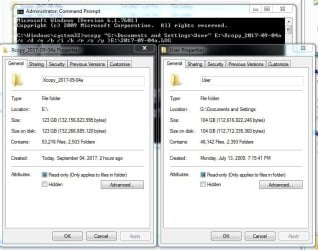
  • source_vs_destination_don't_match.JPG
    source_vs_destination_don't_match.JPG
    69.2 KB · Views: 0

My Computer My Computer

At a glance

Windows7
Computer type
PC/Desktop
OS
Windows7
There are a lot of files missing my guess is its a users profile so some files are locked as you dont have rights on them. If you use built in robocopy its faster and got more options than xcopy and it will give you a report at the end
 

My Computer My Computer

At a glance

win 8 32 bit
Computer type
PC/Desktop
OS
win 8 32 bit
You have two very similar threads, please pick one and stay with that one :)
 

My Computer My Computer

At a glance

Windows 7 Professional 64-bitDesktop i5; Acers i5 & i7desktop 16GB; 1 Acer 8GB & 1 Acer 16GB
Computer type
PC/Desktop
Computer Manufacturer/Model Number
Antec desktop; Acer Aspire laptops
OS
Windows 7 Professional 64-bit
CPU
Desktop i5; Acers i5 & i7
Memory
desktop 16GB; 1 Acer 8GB & 1 Acer 16GB
Hard Drives
1TB split into 2 equal partitions [OS and data] usable by RJS
Internet Speed
AT&T DSL
Browser
FF, GChrome, msIE
Other Info
Windows 7 Firewall, Emsisoft AM/AV, MSE [scan-only], SpywareBlaster, Ruiware/BillP combine
Back
Top