XFX Radeon HD4670, no signal on monitor when used.

InfernoRogue

New member
Member
Local time
12:57 PM
Messages
28
Location
California
Hey guys. I recently put together a new computer, and my situation with my graphics card has left me completely stumped at this point. I have a XFX Radeon HD4670 ( http://www.newegg.com/Product/Prod [...] 6814150450 ) for my graphics card, and the MS-7525 ( http://h20000.www2.hp.com/bizsuppo [...] peId=12454 ) for my motherboard. Also, my power supply is here: http://www.newegg.com/Product/Prod [...] 6817159045

My problem is that whenever I connect my monitor to my graphics card, the monitor will read "no signal". Also happens if I have the card in with the monitor plugged into the motherboard. The fan does indeed spin on the graphics card. I can only access the graphics if I take out the graphics card completely and use the onboard graphics. I have tried to disable the onboard graphics and changing my graphics settings in my bios to PCI-E rather than onboard or just PCI.
Also, if I turn the computer on with the graphics card in, not only will I get no signal, but I will not be able to turn off the computer with the power button.

Thanks for reading, appreciate any help I can get.
 

My Computer My Computer

At a glance

Windows 7 Home Premium 64bitIntel Pentium E5300 Dual Core 2.6ghz4 GBXFX Radeon HD4670
Computer Manufacturer/Model Number
Custom Built
OS
Windows 7 Home Premium 64bit
CPU
Intel Pentium E5300 Dual Core 2.6ghz
Motherboard
MS-7525 (Boston)
Memory
4 GB
Graphics Card(s)
XFX Radeon HD4670
Monitor(s) Displays
Westinghouse L1920NW
Screen Resolution
1366x768
Hard Drives
Seagate Barracuda ST1000DM003 1TB
PSU
COOLMAX V-400 400W ATX v2.01 Power Supply
Case
COUGAR Solution Black Steel ATX Mid Tower Computer Case
Keyboard
KB555U Levetron USB Gaming Keyboard
What type of cable are you using to connect monitor to PC? From the links you've given, are you using the stock PSU from the slimline or the PSU from newegg? Have you installed the driver for the GPU? I see no mention of driver installation.
 

My Computer My Computer

At a glance

Windows 7 Ultimate 64 bitAMD Phenom II X4 965 Black EditionGSkill 4 X 2 GB PC 8500XFX Radeon HD 6790 D
Computer Manufacturer/Model Number
Custom built
OS
Windows 7 Ultimate 64 bit
CPU
AMD Phenom II X4 965 Black Edition
Motherboard
Gigabyte GA-MA790X-DS4
Memory
GSkill 4 X 2 GB PC 8500
Graphics Card(s)
XFX Radeon HD 6790 D
Sound Card
On board RealTek HD
Monitor(s) Displays
Dual monitors:Samsung SyncMaster S20B300
Screen Resolution
1600 X 900
Hard Drives
Seagate Barracuda 1TB (primary)
Seagate Barracuda 2 X 320 GB
PSU
Ultra X4 750 watt fully modular
Case
Thermaltake Overseer RX 1 full tower
Cooling
Core-Contact 92 mm CPU Cooler
Keyboard
Logitech G510
Mouse
Razor DeathAdder
Internet Speed
50/5 Mbps UL/DL
Other Info
Optical: Super Muliti DVD burner w/lightscribe, Hauppauge WinTV HVR-1800
I believe it is an RGB cable, thanks for the quick reply.
 

My Computer My Computer

At a glance

Windows 7 Home Premium 64bitIntel Pentium E5300 Dual Core 2.6ghz4 GBXFX Radeon HD4670
Computer Manufacturer/Model Number
Custom Built
OS
Windows 7 Home Premium 64bit
CPU
Intel Pentium E5300 Dual Core 2.6ghz
Motherboard
MS-7525 (Boston)
Memory
4 GB
Graphics Card(s)
XFX Radeon HD4670
Monitor(s) Displays
Westinghouse L1920NW
Screen Resolution
1366x768
Hard Drives
Seagate Barracuda ST1000DM003 1TB
PSU
COOLMAX V-400 400W ATX v2.01 Power Supply
Case
COUGAR Solution Black Steel ATX Mid Tower Computer Case
Keyboard
KB555U Levetron USB Gaming Keyboard
well from your links you provided the gpu shows 2 DVI ports and a S-video, so that might be a problem right there. Next, have you downloaded and installed the driver for that GPU?
 

My Computer My Computer

At a glance

Windows 7 Ultimate 64 bitAMD Phenom II X4 965 Black EditionGSkill 4 X 2 GB PC 8500XFX Radeon HD 6790 D
Computer Manufacturer/Model Number
Custom built
OS
Windows 7 Ultimate 64 bit
CPU
AMD Phenom II X4 965 Black Edition
Motherboard
Gigabyte GA-MA790X-DS4
Memory
GSkill 4 X 2 GB PC 8500
Graphics Card(s)
XFX Radeon HD 6790 D
Sound Card
On board RealTek HD
Monitor(s) Displays
Dual monitors:Samsung SyncMaster S20B300
Screen Resolution
1600 X 900
Hard Drives
Seagate Barracuda 1TB (primary)
Seagate Barracuda 2 X 320 GB
PSU
Ultra X4 750 watt fully modular
Case
Thermaltake Overseer RX 1 full tower
Cooling
Core-Contact 92 mm CPU Cooler
Keyboard
Logitech G510
Mouse
Razor DeathAdder
Internet Speed
50/5 Mbps UL/DL
Other Info
Optical: Super Muliti DVD burner w/lightscribe, Hauppauge WinTV HVR-1800
Sorry, I'm a little new to the whole computer building deal, so you'll have to pardon my lack of knowledge in some areas, but I think the cable is actually a VGA, as that is what I've been plugging the cable into on both the motherboard and the graphics card (one of my friends misinformed me, I apologize). I'm using the PSU from newegg (COOLMAX V-400 400W ATX v2.01 Power Supply). I don't believe I've installed any drivers for the GPU.
 

My Computer My Computer

At a glance

Windows 7 Home Premium 64bitIntel Pentium E5300 Dual Core 2.6ghz4 GBXFX Radeon HD4670
Computer Manufacturer/Model Number
Custom Built
OS
Windows 7 Home Premium 64bit
CPU
Intel Pentium E5300 Dual Core 2.6ghz
Motherboard
MS-7525 (Boston)
Memory
4 GB
Graphics Card(s)
XFX Radeon HD4670
Monitor(s) Displays
Westinghouse L1920NW
Screen Resolution
1366x768
Hard Drives
Seagate Barracuda ST1000DM003 1TB
PSU
COOLMAX V-400 400W ATX v2.01 Power Supply
Case
COUGAR Solution Black Steel ATX Mid Tower Computer Case
Keyboard
KB555U Levetron USB Gaming Keyboard

My Computer My Computer

At a glance

Windows 7 Ultimate 64 bitAMD Phenom II X4 965 Black EditionGSkill 4 X 2 GB PC 8500XFX Radeon HD 6790 D
Computer Manufacturer/Model Number
Custom built
OS
Windows 7 Ultimate 64 bit
CPU
AMD Phenom II X4 965 Black Edition
Motherboard
Gigabyte GA-MA790X-DS4
Memory
GSkill 4 X 2 GB PC 8500
Graphics Card(s)
XFX Radeon HD 6790 D
Sound Card
On board RealTek HD
Monitor(s) Displays
Dual monitors:Samsung SyncMaster S20B300
Screen Resolution
1600 X 900
Hard Drives
Seagate Barracuda 1TB (primary)
Seagate Barracuda 2 X 320 GB
PSU
Ultra X4 750 watt fully modular
Case
Thermaltake Overseer RX 1 full tower
Cooling
Core-Contact 92 mm CPU Cooler
Keyboard
Logitech G510
Mouse
Razor DeathAdder
Internet Speed
50/5 Mbps UL/DL
Other Info
Optical: Super Muliti DVD burner w/lightscribe, Hauppauge WinTV HVR-1800
what type of monitor are you using?
 

My Computer My Computer

At a glance

Windows 7 Ultimate 64 bitAMD Phenom II X4 965 Black EditionGSkill 4 X 2 GB PC 8500XFX Radeon HD 6790 D
Computer Manufacturer/Model Number
Custom built
OS
Windows 7 Ultimate 64 bit
CPU
AMD Phenom II X4 965 Black Edition
Motherboard
Gigabyte GA-MA790X-DS4
Memory
GSkill 4 X 2 GB PC 8500
Graphics Card(s)
XFX Radeon HD 6790 D
Sound Card
On board RealTek HD
Monitor(s) Displays
Dual monitors:Samsung SyncMaster S20B300
Screen Resolution
1600 X 900
Hard Drives
Seagate Barracuda 1TB (primary)
Seagate Barracuda 2 X 320 GB
PSU
Ultra X4 750 watt fully modular
Case
Thermaltake Overseer RX 1 full tower
Cooling
Core-Contact 92 mm CPU Cooler
Keyboard
Logitech G510
Mouse
Razor DeathAdder
Internet Speed
50/5 Mbps UL/DL
Other Info
Optical: Super Muliti DVD burner w/lightscribe, Hauppauge WinTV HVR-1800

My Computer My Computer

At a glance

Windows 7 Home Premium 64bitIntel Pentium E5300 Dual Core 2.6ghz4 GBXFX Radeon HD4670
Computer Manufacturer/Model Number
Custom Built
OS
Windows 7 Home Premium 64bit
CPU
Intel Pentium E5300 Dual Core 2.6ghz
Motherboard
MS-7525 (Boston)
Memory
4 GB
Graphics Card(s)
XFX Radeon HD4670
Monitor(s) Displays
Westinghouse L1920NW
Screen Resolution
1366x768
Hard Drives
Seagate Barracuda ST1000DM003 1TB
PSU
COOLMAX V-400 400W ATX v2.01 Power Supply
Case
COUGAR Solution Black Steel ATX Mid Tower Computer Case
Keyboard
KB555U Levetron USB Gaming Keyboard
I installed the drivers. No luck.
 

My Computer My Computer

At a glance

Windows 7 Home Premium 64bitIntel Pentium E5300 Dual Core 2.6ghz4 GBXFX Radeon HD4670
Computer Manufacturer/Model Number
Custom Built
OS
Windows 7 Home Premium 64bit
CPU
Intel Pentium E5300 Dual Core 2.6ghz
Motherboard
MS-7525 (Boston)
Memory
4 GB
Graphics Card(s)
XFX Radeon HD4670
Monitor(s) Displays
Westinghouse L1920NW
Screen Resolution
1366x768
Hard Drives
Seagate Barracuda ST1000DM003 1TB
PSU
COOLMAX V-400 400W ATX v2.01 Power Supply
Case
COUGAR Solution Black Steel ATX Mid Tower Computer Case
Keyboard
KB555U Levetron USB Gaming Keyboard
Seeing as the onboard video only has a VGA connection, I am assuming you are using a DVI-VGA adapter when connecting to the new card. If so try using the other DVI port on the card, as only one of the DVI ports supports VGA/analogue via adapter.

Alternatively seeing as that monitor also has a DVI port on it, you could use a DVI cable instead of a VGA cable.
 

My Computer My Computer

At a glance

Win 7 Ultimate x64FX-8350 @ 4.6 GHz so farADATA XPG V1 Series Black 8GB DDR3 1600Sapphire R9 270x Dual-X
Computer type
PC/Desktop
Computer Manufacturer/Model Number
Me
OS
Win 7 Ultimate x64
CPU
FX-8350 @ 4.6 GHz so far
Motherboard
Asus M5A97 EVO
Memory
ADATA XPG V1 Series Black 8GB DDR3 1600
Graphics Card(s)
Sapphire R9 270x Dual-X
Sound Card
Xonar DGX w/ Corsair Vengence 1300
Monitor(s) Displays
Acer S232HL Abid
Screen Resolution
1920x1080
Hard Drives
120 GB OCZ Vertex 3
500 GB Seagate 7200.12
PSU
Antec Earthwatts 650W Green
Case
Antec Three Hundred
Cooling
Cooler Master 212 EVO
Keyboard
Logitech G510
Mouse
Logitech G500s
Internet Speed
35000/3000
Seeing as the onboard video only has a VGA connection, I am assuming you are using a DVI-VGA adapter when connecting to the new card. If so try using the other DVI port on the card, as only one of the DVI ports supports VGA/analogue via adapter.

Alternatively seeing as that monitor also has a DVI port on it, you could use a DVI cable instead of a VGA cable.

I've attached some images to help me explain. I'm not using any sort of adapter, just the VGA cable that came with the monitor (in fact it was the only cable to come with the monitor). The graphics card itself does have a VGA port, which I have been connecting the cable into.

First attachment is the back of the monitor where I plug in the VGA into. Second is the available ports on the graphics card. If you guys need any more images, let me know.

(Sorry if the pictures are upside down or sideways; I took them on my phone)
 

Attachments

  • IMG_0248[1].jpg
    IMG_0248[1].jpg
    368.9 KB · Views: 8
  • IMG_0250[1].JPG
    IMG_0250[1].JPG
    220.8 KB · Views: 7

My Computer My Computer

At a glance

Windows 7 Home Premium 64bitIntel Pentium E5300 Dual Core 2.6ghz4 GBXFX Radeon HD4670
Computer Manufacturer/Model Number
Custom Built
OS
Windows 7 Home Premium 64bit
CPU
Intel Pentium E5300 Dual Core 2.6ghz
Motherboard
MS-7525 (Boston)
Memory
4 GB
Graphics Card(s)
XFX Radeon HD4670
Monitor(s) Displays
Westinghouse L1920NW
Screen Resolution
1366x768
Hard Drives
Seagate Barracuda ST1000DM003 1TB
PSU
COOLMAX V-400 400W ATX v2.01 Power Supply
Case
COUGAR Solution Black Steel ATX Mid Tower Computer Case
Keyboard
KB555U Levetron USB Gaming Keyboard
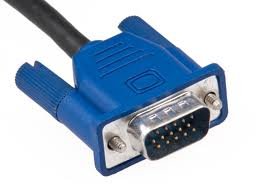
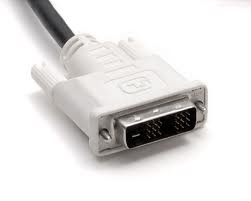
To make the difference, for you, between DVI and VGA that we are talking about here are the 2 pictures: left is VGA, right DVI. VGA use old monitors (CRT), DVI is often used on the newer monitors (TFT).
 

Attachments

  • VGA.jpg
    VGA.jpg
    6.2 KB · Views: 37
  • DVI.jpg
    DVI.jpg
    3.7 KB · Views: 38

My Computer My Computer

At a glance

Windows 7 x86 UltimateIntel Pentium 4 (3.2GHz) @3.6GHz3 GB DDR2 (2GB @800MHz + 1GB @533MHz)-3 inuvi...ATI Radeon HD 5450 1GB DDR3
Computer Manufacturer/Model Number
Me, Myself and I (:
OS
Windows 7 x86 Ultimate
CPU
Intel Pentium 4 (3.2GHz) @3.6GHz
Motherboard
Asus P5N-D SLI
Memory
3 GB DDR2 (2GB @800MHz + 1GB @533MHz)-3 inuvidual sticks
Graphics Card(s)
ATI Radeon HD 5450 1GB DDR3
Sound Card
Realtek HD Audio
Monitor(s) Displays
Philips Brilliance 170p 17" DVI/VGA
Screen Resolution
1280x1024 @60 Hz
Hard Drives
WDC WD400BD-08LRAO 40 GB Blue Caviar-Sata II
PSU
LC-Power LC6480S Scorpio-480W 18A@ +12V
Cooling
CPU~Arctic Freezer 7 Pro; 2 92mm case fans; HDD fan;
Keyboard
Logitec Usb
Mouse
Dell optical mouse Usb
Internet Speed
2 Mb/s
Other Info
SOLD MY PC 6 MONTHS AGO IN ORDER TO BUY A MOTORCYCLE :D I don't need a PC :D
To make the difference, for you, between DVI and VGA that we are talking about here are the 2 pictures: left is VGA, right DVI. VGA use old monitors (CRT), DVI is often used on the newer monitors (TFT).

Thanks. My monitor is a TFT, but no DVI cable came with it (at least as far as my memory goes)
Westinghouse L1920NW Specs (LCD monitor - 18.5") - LCD Monitors - CNET Reviews also says it came with just one VGA cable, yet says it has a DVI-D interface under "Connectivity". I'm not sure if it even has a DVI, because in that attachment of the back of the monitor, there isn't really anything there for plug-in where the monitor says DVI.

I have little to no confidence in my computer knowledge (this is the first computer that I have built) and I may not immediately get something that might be obvious to you guys, so once again, pardon my un-intelligence in this regard. :o
 

My Computer My Computer

At a glance

Windows 7 Home Premium 64bitIntel Pentium E5300 Dual Core 2.6ghz4 GBXFX Radeon HD4670
Computer Manufacturer/Model Number
Custom Built
OS
Windows 7 Home Premium 64bit
CPU
Intel Pentium E5300 Dual Core 2.6ghz
Motherboard
MS-7525 (Boston)
Memory
4 GB
Graphics Card(s)
XFX Radeon HD4670
Monitor(s) Displays
Westinghouse L1920NW
Screen Resolution
1366x768
Hard Drives
Seagate Barracuda ST1000DM003 1TB
PSU
COOLMAX V-400 400W ATX v2.01 Power Supply
Case
COUGAR Solution Black Steel ATX Mid Tower Computer Case
Keyboard
KB555U Levetron USB Gaming Keyboard
That rules out the DVI-VGA adapter. The pictures help as the one you linked too has 2 DVI ports, and not one of each.

Now with that said it is entirely possible that the power supply isn't up to running the card, and the reason why you get no signal when using it. Can't find any reviews on the one you have but found this on the next step up, the V-500,

Coolmax V-500 Power Supply Review | Hardware Secrets

with the conclusion saying it all,

The Coolmax V-500 is a textbook example of why you should not buy a USD 20 power supply. Its inability of delivering its labeled wattage is not its worst problem. It presents lousy efficiency between 66.8% and 77.1%, its voltages are out of range, and noise and ripple levels are above the maximum allowed. A perfect weapon of mass destruction. Stay away.

If that is what it is then you need to look at replacing that power supply with a decent quality one. Something like this while still a 400 W power supply,

Newegg.com - Antec NEO ECO 400C 400W Continuous Power ATX12V 2.3 / EPS12V 80 PLUS Certified Active PFC Power Supply

is far superior to what you have now.

It could also possibly be a bad card, but you would have to try it in another computer (with sufficient power supply) to test it without returning it.
 

My Computer My Computer

At a glance

Win 7 Ultimate x64FX-8350 @ 4.6 GHz so farADATA XPG V1 Series Black 8GB DDR3 1600Sapphire R9 270x Dual-X
Computer type
PC/Desktop
Computer Manufacturer/Model Number
Me
OS
Win 7 Ultimate x64
CPU
FX-8350 @ 4.6 GHz so far
Motherboard
Asus M5A97 EVO
Memory
ADATA XPG V1 Series Black 8GB DDR3 1600
Graphics Card(s)
Sapphire R9 270x Dual-X
Sound Card
Xonar DGX w/ Corsair Vengence 1300
Monitor(s) Displays
Acer S232HL Abid
Screen Resolution
1920x1080
Hard Drives
120 GB OCZ Vertex 3
500 GB Seagate 7200.12
PSU
Antec Earthwatts 650W Green
Case
Antec Three Hundred
Cooling
Cooler Master 212 EVO
Keyboard
Logitech G510
Mouse
Logitech G500s
Internet Speed
35000/3000
Seeing as the onboard video only has a VGA connection, I am assuming you are using a DVI-VGA adapter when connecting to the new card. If so try using the other DVI port on the card, as only one of the DVI ports supports VGA/analogue via adapter.

Alternatively seeing as that monitor also has a DVI port on it, you could use a DVI cable instead of a VGA cable.

I've attached some images to help me explain. I'm not using any sort of adapter, just the VGA cable that came with the monitor (in fact it was the only cable to come with the monitor). The graphics card itself does have a VGA port, which I have been connecting the cable into.

First attachment is the back of the monitor where I plug in the VGA into. Second is the available ports on the graphics card. If you guys need any more images, let me know.

(Sorry if the pictures are upside down or sideways; I took them on my phone)

I had the same problem when i was instaling my HD5450 in my old pc.
Same simptoms like you have! In the end, i figured out that the problem was the motherboard (it didn't support the 1 GB GPU).
First, i had a 310w psu and i thought that was the problem. After replacing it with a 480w one, same situation! Then i replaced the motherboard and the problem was gone.
Now im on my mobile phone, so maybe i made a mistake, forgive me :O
 

My Computer My Computer

At a glance

Windows 7 x86 UltimateIntel Pentium 4 (3.2GHz) @3.6GHz3 GB DDR2 (2GB @800MHz + 1GB @533MHz)-3 inuvi...ATI Radeon HD 5450 1GB DDR3
Computer Manufacturer/Model Number
Me, Myself and I (:
OS
Windows 7 x86 Ultimate
CPU
Intel Pentium 4 (3.2GHz) @3.6GHz
Motherboard
Asus P5N-D SLI
Memory
3 GB DDR2 (2GB @800MHz + 1GB @533MHz)-3 inuvidual sticks
Graphics Card(s)
ATI Radeon HD 5450 1GB DDR3
Sound Card
Realtek HD Audio
Monitor(s) Displays
Philips Brilliance 170p 17" DVI/VGA
Screen Resolution
1280x1024 @60 Hz
Hard Drives
WDC WD400BD-08LRAO 40 GB Blue Caviar-Sata II
PSU
LC-Power LC6480S Scorpio-480W 18A@ +12V
Cooling
CPU~Arctic Freezer 7 Pro; 2 92mm case fans; HDD fan;
Keyboard
Logitec Usb
Mouse
Dell optical mouse Usb
Internet Speed
2 Mb/s
Other Info
SOLD MY PC 6 MONTHS AGO IN ORDER TO BUY A MOTORCYCLE :D I don't need a PC :D
I think the card isn't seated correctly when put on the MB. Even without drivers windows should run it.
 

My Computer My Computer

At a glance

Microsoft Windows 7 Home Premium 64-bit 7601 ...AMD Phenom(tm) II X4 965 Processor8.0 GBNVIDIA GeForce GTX 560 Ti
Computer type
PC/Desktop
Computer Manufacturer/Model Number
Custom Build
OS
Microsoft Windows 7 Home Premium 64-bit 7601 Multiprocessor Free Service Pack 1
CPU
AMD Phenom(tm) II X4 965 Processor
Motherboard
ASUSTeK Computer INC. M4A785-M
Memory
8.0 GB
Graphics Card(s)
NVIDIA GeForce GTX 560 Ti
Sound Card
(1) NVIDIA High Definition Audio (2) NVIDIA High Definitio
Monitor(s) Displays
Samsung SyncMaster T220G
Screen Resolution
1680 x 1050 x 32 bits (4294967296 colors) @ 59 Hz
Hard Drives
WDC WD7500AADS-00M2B0
PSU
650 Watt
Case
Cooler Master HAF XM
Cooling
Air
Keyboard
CompUSA SK-6200
Mouse
Logitech M-510
Internet Speed
Comcast
Antivirus
MSE
Browser
Firefox 27.0 IE 11
Other Info
Belkin Hub To Go F5U706
That rules out the DVI-VGA adapter. The pictures help as the one you linked too has 2 DVI ports, and not one of each.

Now with that said it is entirely possible that the power supply isn't up to running the card, and the reason why you get no signal when using it. Can't find any reviews on the one you have but found this on the next step up, the V-500,

Coolmax V-500 Power Supply Review | Hardware Secrets

with the conclusion saying it all,

The Coolmax V-500 is a textbook example of why you should not buy a USD 20 power supply. Its inability of delivering its labeled wattage is not its worst problem. It presents lousy efficiency between 66.8% and 77.1%, its voltages are out of range, and noise and ripple levels are above the maximum allowed. A perfect weapon of mass destruction. Stay away.

If that is what it is then you need to look at replacing that power supply with a decent quality one. Something like this while still a 400 W power supply,

Newegg.com - Antec NEO ECO 400C 400W Continuous Power ATX12V 2.3 / EPS12V 80 PLUS Certified Active PFC Power Supply

is far superior to what you have now.

It could also possibly be a bad card, but you would have to try it in another computer (with sufficient power supply) to test it without returning it.

Your spot right on that! Newegg says that the 4670 needs a minimum of 400W PSU (quality one, not some shen-siya-cha mark)

http://www.newegg.com/Product/Product.aspx?Item=N82E16814150449
 

My Computer My Computer

At a glance

Windows 7 x86 UltimateIntel Pentium 4 (3.2GHz) @3.6GHz3 GB DDR2 (2GB @800MHz + 1GB @533MHz)-3 inuvi...ATI Radeon HD 5450 1GB DDR3
Computer Manufacturer/Model Number
Me, Myself and I (:
OS
Windows 7 x86 Ultimate
CPU
Intel Pentium 4 (3.2GHz) @3.6GHz
Motherboard
Asus P5N-D SLI
Memory
3 GB DDR2 (2GB @800MHz + 1GB @533MHz)-3 inuvidual sticks
Graphics Card(s)
ATI Radeon HD 5450 1GB DDR3
Sound Card
Realtek HD Audio
Monitor(s) Displays
Philips Brilliance 170p 17" DVI/VGA
Screen Resolution
1280x1024 @60 Hz
Hard Drives
WDC WD400BD-08LRAO 40 GB Blue Caviar-Sata II
PSU
LC-Power LC6480S Scorpio-480W 18A@ +12V
Cooling
CPU~Arctic Freezer 7 Pro; 2 92mm case fans; HDD fan;
Keyboard
Logitec Usb
Mouse
Dell optical mouse Usb
Internet Speed
2 Mb/s
Other Info
SOLD MY PC 6 MONTHS AGO IN ORDER TO BUY A MOTORCYCLE :D I don't need a PC :D
It isn't a Windows problem if you don't get a signal as soon as you turn on the computer as Windows hasn't even started to load at that time. The computer has to load the bios and detect all hardware first before Windows begins to load. It is a hardware problem (either power supply or the card itself or motherboard as mentioned above), and not a driver problem.
 

My Computer My Computer

At a glance

Win 7 Ultimate x64FX-8350 @ 4.6 GHz so farADATA XPG V1 Series Black 8GB DDR3 1600Sapphire R9 270x Dual-X
Computer type
PC/Desktop
Computer Manufacturer/Model Number
Me
OS
Win 7 Ultimate x64
CPU
FX-8350 @ 4.6 GHz so far
Motherboard
Asus M5A97 EVO
Memory
ADATA XPG V1 Series Black 8GB DDR3 1600
Graphics Card(s)
Sapphire R9 270x Dual-X
Sound Card
Xonar DGX w/ Corsair Vengence 1300
Monitor(s) Displays
Acer S232HL Abid
Screen Resolution
1920x1080
Hard Drives
120 GB OCZ Vertex 3
500 GB Seagate 7200.12
PSU
Antec Earthwatts 650W Green
Case
Antec Three Hundred
Cooling
Cooler Master 212 EVO
Keyboard
Logitech G510
Mouse
Logitech G500s
Internet Speed
35000/3000
I had a suspicion about the power supply, but a lot of my more tech-savvy friends have told me that they are sure it's not the problem. I thought it would be the PSU as the power button will turn the computer on (when the graphics card is secured in the motherboard) but it will not turn the computer back off. I haven't heard any beeping noises, and I obtained the graphics card and my motherboard from my friend who assured me that they both worked without a problem before they were given to me.

If the general consensus is that I need a better PSU, then I'll be looking to purchase that one you linked me to.

Edit: They keep telling me that it's not that the PSU isn't supplying enough power since the graphics card is one that just has to be seated in the MB and not connected directly to the PSU, and therefore it's the motherboard powering the PSU. Yet if I'm right the power supply powers the motherboard, so it just indirectly powers the card. I don't know, you can take this with a grain of sand if you wish, I think you guys know your stuff better than a few of my friends, lol
 

My Computer My Computer

At a glance

Windows 7 Home Premium 64bitIntel Pentium E5300 Dual Core 2.6ghz4 GBXFX Radeon HD4670
Computer Manufacturer/Model Number
Custom Built
OS
Windows 7 Home Premium 64bit
CPU
Intel Pentium E5300 Dual Core 2.6ghz
Motherboard
MS-7525 (Boston)
Memory
4 GB
Graphics Card(s)
XFX Radeon HD4670
Monitor(s) Displays
Westinghouse L1920NW
Screen Resolution
1366x768
Hard Drives
Seagate Barracuda ST1000DM003 1TB
PSU
COOLMAX V-400 400W ATX v2.01 Power Supply
Case
COUGAR Solution Black Steel ATX Mid Tower Computer Case
Keyboard
KB555U Levetron USB Gaming Keyboard
It isn't a Windows problem if you don't get a signal as soon as you turn on the computer as Windows hasn't even started to load at that time. The computer has to load the bios and detect all hardware first before Windows begins to load. It is a hardware problem (either power supply or the card itself or motherboard as mentioned above), and not a driver problem.


Softwear aint the problem. Maybe that you didn't place the card in the slot, the mobo doesnt support the card... Did you screw in the 2 litle screws that hold the cable in the GPU??? Maybe the contact isn't good...
 

My Computer My Computer

At a glance

Windows 7 x86 UltimateIntel Pentium 4 (3.2GHz) @3.6GHz3 GB DDR2 (2GB @800MHz + 1GB @533MHz)-3 inuvi...ATI Radeon HD 5450 1GB DDR3
Computer Manufacturer/Model Number
Me, Myself and I (:
OS
Windows 7 x86 Ultimate
CPU
Intel Pentium 4 (3.2GHz) @3.6GHz
Motherboard
Asus P5N-D SLI
Memory
3 GB DDR2 (2GB @800MHz + 1GB @533MHz)-3 inuvidual sticks
Graphics Card(s)
ATI Radeon HD 5450 1GB DDR3
Sound Card
Realtek HD Audio
Monitor(s) Displays
Philips Brilliance 170p 17" DVI/VGA
Screen Resolution
1280x1024 @60 Hz
Hard Drives
WDC WD400BD-08LRAO 40 GB Blue Caviar-Sata II
PSU
LC-Power LC6480S Scorpio-480W 18A@ +12V
Cooling
CPU~Arctic Freezer 7 Pro; 2 92mm case fans; HDD fan;
Keyboard
Logitec Usb
Mouse
Dell optical mouse Usb
Internet Speed
2 Mb/s
Other Info
SOLD MY PC 6 MONTHS AGO IN ORDER TO BUY A MOTORCYCLE :D I don't need a PC :D
Back
Top