XP Mode - Can't Connect to Internet

Mitch047

New member
Local time
9:29 PM
Messages
19
XP Mode / Virtual PC + an older XP productivity program loaded/work flawlessly. However, I can't connect to the internet using either Internet Explorer v.8 or FireFox v.3.6. Screen message shows: "Unable to Connect to Server".

Windows 7 connects to the internet via Explorer v.8 with no problem using a router DSL ethernet cable. I'm probably overlooking something very basic here, but this one has me stumped :confused:

Any help appreciated.
 

My Computer

Computer Manufacturer/Model Number
Dell 430 Vostro Mini Tower
OS
Windows 7 Ultimate 64 bit
CPU
Intel Quad Core i7-860 (8 MB Cache,2.8 GHz)
Memory
8GB Dual Channel DDR3 SDRAM 1333MHz-4DIMMs
Graphics Card(s)
nVidia GeForce GTS240 GDDR3
Sound Card
Soundblaster X-Fi Xtreme Audio
Monitor(s) Displays
Dell SP2309W
Screen Resolution
2048 x 1152 Dual-XGA
Hard Drives
750GB Serial ATA (7200 RPM) w/DataBurst Cache
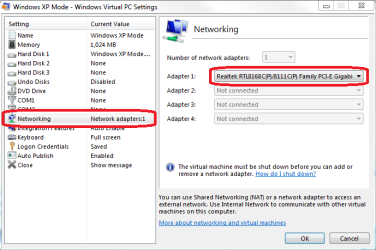
Open XP Mode settings, click Networking, choose your host computers NIC from drop-down list. Click OK, reboot XPM.

Should work now.

Kari
 

Attachments

  • XPM_network.png
    XPM_network.png
    19.4 KB · Views: 884

My Computer

Computer type
Laptop
Computer Manufacturer/Model Number
HP ENVY 17-1150eg
OS
Windows 10 Pro x64 EN-GB
CPU
1.6 GHz Intel Core i7-720QM Processor
Memory
6 GB
Graphics Card(s)
ATI Mobility Radeon HD 5850 Graphics
Sound Card
Beats sound system with integrated subwoofer
Monitor(s) Displays
17" laptop display, 22" LED and 32" Full HD TV through HDMI
Screen Resolution
1600*900 (1), 1920*1080 (2&3)
Hard Drives
Internal: 2 x 500 GB SATA Hard Disk Drive 7200 rpm
External: 2TB for backups, 3TB USB3 network drive for media
Cooling
As Envy runs a bit warm, I have it on a Cooler Master pad
Keyboard
Logitech diNovo Media Desktop Laser (bluetooth)
Mouse
Logitech Performance Mouse MX
Internet Speed
50/10 Mbps VDSL
Antivirus
Windows Defender 4.3.9431.0
Browser
Maxthon 3.5.2., IE11
Yoiu have to toy around with the Network and sharing settings in some cases. If you select the set up a new connection wizard that will by default create a dial-up type connection. Selection of Home, Work, is generally set to Home Network.

The type of connection you are specifying is "router DSL ethernet cable"? Is this a combination modem/router or a router added onto a cable or dsl modem?

With a cable modem here the connection to the pc is by way of a nic card added into a pci slot for cable internet. Other DSL types as well as cable modems will often use a usb cord instead. The nic card and connecttion are immediately detected and established on the XP Mode as well as other VMs here while usb connections...??? (one reason besides 64bit Windows the ISP saw a change here!)
 

My Computers

System One System Two

  • Computer type
    PC/Desktop
    Computer Manufacturer/Model Number
    Custom builds = 2
    OS
    W7 Ultimate x64/W10 Pro x64/W11 Pro Triple Boot - Main PC W7 Remote PC Micro ATX W7 Pro x64/W11 Pro
    CPU
    AMD Phenom II X4 975 Deneb 3.6ghz - 965 2nd remote pc
    Motherboard
    Gigabyte GA-790XTA-UD4-Gigabyte GA-880GM-D2H remote pc
    Memory
    Kingston Hyper X DDR3 1600 1.5v 16gb - Hyper X Fury 8gb 2nd
    Graphics Card(s)
    MSI HD Radeon 5750 1gb - MSI HD Radeon 6450 on mini tower
    Sound Card
    Creative Labs X-Fi Xtreme Audio P - Realtek onooard 2nd case
    Monitor(s) Displays
    ASUS VW199T-P 19" HP 2082a Main-HP 2082a 20" remote pc
    Screen Resolution
    Asus 1440x900 - HP 1600x900
    Hard Drives
    WD Black 1TB HD per OS W7, W10, and pending W11 presently on 500gb OS Drive - Pending Triple 1TB HDs for Spanned Storage/backup volume
    Single 2TB external USB enclosure, single 1TB System 7 Host/Boot drive, Pending 8TB external HD for system image b
    PSU
    Corsair 750TX - primary / Corsair CX600 - second
    Case
    Antec 900-2 - SSD compatible / NZXT Vulcan mini tower
    Cooling
    Zalman CNPS9900A
    Keyboard
    AZIO L70 Backlit Letters Gaming - ONN Cordless/USB
    Mouse
    MSI DS200 Programmable, Logitech Cordless
    Internet Speed
    30mbps upgrade - primary hard wired - mini tower usb WiFi
    Antivirus
    GFI VIPRE Internet Security 2014 on W7 2016 beta on W10,
    Browser
    Cyberfox, WaterFox 64bit FF variants, FireFox x64, Pale Moon
    Other Info
    Accomdata fan cooled usb 2.0 PIDE/Sata II, III external enclosure.
    Sambient usb/eSata PATA/Sata II, III external enclosure.
  • Computer type
    PC/Desktop
    System Manufacturer/Model Number
    CUSTOM ASSEMBLY
    OS
    W7 Pro x64/W11 Pro
    CPU
    AMD Deneb 3.6ghz - 965
    Motherboard
    Gigabyte GA-880GM-D2H remote pc
    Memory
    Kingston Hyper X Fury 8gb
    Graphics Card(s)
    MSI HD Radeon 6450 DVI Output
    Sound Card
    Realtek onooard Creative or Other separate PENDING
    Monitor(s) Displays
    VIZIO 32" LCD TV Separate LCD Pending
    Screen Resolution
    1600x1080
    Hard Drives
    WD 500GB OS Host/Boot WD Green 1TB Storage/Backup
    PSU
    Corsair 600W - THERMALTAKE 600W spare case
    Case
    NZXT Vulcan mini tower
    Cooling
    Twin 120mm Top Fans - 240mm Side Cover
    Keyboard
    ONN Cordless/USB Logitech Cordless
    Mouse
    ONN USB/Cordless - Logitech Cordless
    Internet Speed
    DSL 5G
    Browser
    MS Edge, FireFox, WaterFox x64, FireFox Nightly
    Other Info
    OS Testing-Remote Access to Main TeamViewer
I'm not off to a very good start here - can't find "Wireless XP Mode", "XP Mode Settings", "Networking Interface Controller" (NIC).

The XP Mode Control Panel, Network Connections shows Local Area Connection Connected "Intel 21140-Based PCI Fast Ethernet" (100.0 Mbps) and that the device "Is Working Properly".

<<The type of connection you are specifying is "router DSL ethernet cable"? Is this a combination modem/router or a router added onto a cable or dsl modem?>>

Ah, ... there is a 8Mbps DSL line connecting to an AT&T "2Wire" Router. The ethernet cable connects between the AT&T router and my Windows 7 Dell Vostro 430 Desktop. Unsure of the correct terminology. This setup works fine, as I mentioned, with the Dell 430 W7 plus works fine wirelessly with my Dell Inspiron Laptop and HP6500 OfficeJet Printer (both machines).

Very much appreciate your willingness to help :confused:

Mitch
 

My Computer

Computer Manufacturer/Model Number
Dell 430 Vostro Mini Tower
OS
Windows 7 Ultimate 64 bit
CPU
Intel Quad Core i7-860 (8 MB Cache,2.8 GHz)
Memory
8GB Dual Channel DDR3 SDRAM 1333MHz-4DIMMs
Graphics Card(s)
nVidia GeForce GTS240 GDDR3
Sound Card
Soundblaster X-Fi Xtreme Audio
Monitor(s) Displays
Dell SP2309W
Screen Resolution
2048 x 1152 Dual-XGA
Hard Drives
750GB Serial ATA (7200 RPM) w/DataBurst Cache
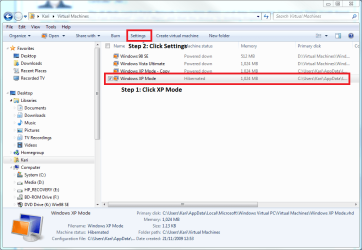
The easiest way to connect XP Mode to Internet is what I told you above.

This screenshot shows how to enter XP Mode settings. Just open C:\Users\Your_Username\Virtual Machines folder and click XP Mode, then Settings:

XPM_settings.png

Kari
 

My Computer

Computer type
Laptop
Computer Manufacturer/Model Number
HP ENVY 17-1150eg
OS
Windows 10 Pro x64 EN-GB
CPU
1.6 GHz Intel Core i7-720QM Processor
Memory
6 GB
Graphics Card(s)
ATI Mobility Radeon HD 5850 Graphics
Sound Card
Beats sound system with integrated subwoofer
Monitor(s) Displays
17" laptop display, 22" LED and 32" Full HD TV through HDMI
Screen Resolution
1600*900 (1), 1920*1080 (2&3)
Hard Drives
Internal: 2 x 500 GB SATA Hard Disk Drive 7200 rpm
External: 2TB for backups, 3TB USB3 network drive for media
Cooling
As Envy runs a bit warm, I have it on a Cooler Master pad
Keyboard
Logitech diNovo Media Desktop Laser (bluetooth)
Mouse
Logitech Performance Mouse MX
Internet Speed
50/10 Mbps VDSL
Antivirus
Windows Defender 4.3.9431.0
Browser
Maxthon 3.5.2., IE11
I think "wireless" is the main problem to start with there. The connection seen here is with the "hard wired" being readily detected immediately. The one thing that helped see 7 installed on a vhd connect on the Virtual PC that might help you is looking at the "network adapter" item in the XP Mode's own device manager to see if more then one item for adapter is listed. If by chance a second one is present try disabling the present default.

Even in the host Windows multiple adapters will conflict where one has to be default with the other disabled if unable to configure all. The XP Mode is still run through the VPC being a thought there.
 

My Computers

System One System Two

  • Computer type
    PC/Desktop
    Computer Manufacturer/Model Number
    Custom builds = 2
    OS
    W7 Ultimate x64/W10 Pro x64/W11 Pro Triple Boot - Main PC W7 Remote PC Micro ATX W7 Pro x64/W11 Pro
    CPU
    AMD Phenom II X4 975 Deneb 3.6ghz - 965 2nd remote pc
    Motherboard
    Gigabyte GA-790XTA-UD4-Gigabyte GA-880GM-D2H remote pc
    Memory
    Kingston Hyper X DDR3 1600 1.5v 16gb - Hyper X Fury 8gb 2nd
    Graphics Card(s)
    MSI HD Radeon 5750 1gb - MSI HD Radeon 6450 on mini tower
    Sound Card
    Creative Labs X-Fi Xtreme Audio P - Realtek onooard 2nd case
    Monitor(s) Displays
    ASUS VW199T-P 19" HP 2082a Main-HP 2082a 20" remote pc
    Screen Resolution
    Asus 1440x900 - HP 1600x900
    Hard Drives
    WD Black 1TB HD per OS W7, W10, and pending W11 presently on 500gb OS Drive - Pending Triple 1TB HDs for Spanned Storage/backup volume
    Single 2TB external USB enclosure, single 1TB System 7 Host/Boot drive, Pending 8TB external HD for system image b
    PSU
    Corsair 750TX - primary / Corsair CX600 - second
    Case
    Antec 900-2 - SSD compatible / NZXT Vulcan mini tower
    Cooling
    Zalman CNPS9900A
    Keyboard
    AZIO L70 Backlit Letters Gaming - ONN Cordless/USB
    Mouse
    MSI DS200 Programmable, Logitech Cordless
    Internet Speed
    30mbps upgrade - primary hard wired - mini tower usb WiFi
    Antivirus
    GFI VIPRE Internet Security 2014 on W7 2016 beta on W10,
    Browser
    Cyberfox, WaterFox 64bit FF variants, FireFox x64, Pale Moon
    Other Info
    Accomdata fan cooled usb 2.0 PIDE/Sata II, III external enclosure.
    Sambient usb/eSata PATA/Sata II, III external enclosure.
  • Computer type
    PC/Desktop
    System Manufacturer/Model Number
    CUSTOM ASSEMBLY
    OS
    W7 Pro x64/W11 Pro
    CPU
    AMD Deneb 3.6ghz - 965
    Motherboard
    Gigabyte GA-880GM-D2H remote pc
    Memory
    Kingston Hyper X Fury 8gb
    Graphics Card(s)
    MSI HD Radeon 6450 DVI Output
    Sound Card
    Realtek onooard Creative or Other separate PENDING
    Monitor(s) Displays
    VIZIO 32" LCD TV Separate LCD Pending
    Screen Resolution
    1600x1080
    Hard Drives
    WD 500GB OS Host/Boot WD Green 1TB Storage/Backup
    PSU
    Corsair 600W - THERMALTAKE 600W spare case
    Case
    NZXT Vulcan mini tower
    Cooling
    Twin 120mm Top Fans - 240mm Side Cover
    Keyboard
    ONN Cordless/USB Logitech Cordless
    Mouse
    ONN USB/Cordless - Logitech Cordless
    Internet Speed
    DSL 5G
    Browser
    MS Edge, FireFox, WaterFox x64, FireFox Nightly
    Other Info
    OS Testing-Remote Access to Main TeamViewer
Making Some Progress

<< Just open C:\Users\Your_Username\Virtual Machines folder and click XP Mode, then Settings>>

Oops! I was trying to find this command on the Virtual Machine instead of Windows 7 OS C:\.

The default screen response I get from the host computer drop down list is: Shared Networking (NAT). The only other possible dropdown Networking responses are: Not Connected, Internal Network and Broadcom Netlink Gigabit Ethernet.

What do I do next?

Thanks for your continued input :p

Mitch
 

My Computer

Computer Manufacturer/Model Number
Dell 430 Vostro Mini Tower
OS
Windows 7 Ultimate 64 bit
CPU
Intel Quad Core i7-860 (8 MB Cache,2.8 GHz)
Memory
8GB Dual Channel DDR3 SDRAM 1333MHz-4DIMMs
Graphics Card(s)
nVidia GeForce GTS240 GDDR3
Sound Card
Soundblaster X-Fi Xtreme Audio
Monitor(s) Displays
Dell SP2309W
Screen Resolution
2048 x 1152 Dual-XGA
Hard Drives
750GB Serial ATA (7200 RPM) w/DataBurst Cache
Broadcom Netlink Gigabit Ethernet seems to be your host's NIC (Network Interface Controller). Choose it.

Please come back to tell if you got the net on XP Mode.

Kari
 

My Computer

Computer type
Laptop
Computer Manufacturer/Model Number
HP ENVY 17-1150eg
OS
Windows 10 Pro x64 EN-GB
CPU
1.6 GHz Intel Core i7-720QM Processor
Memory
6 GB
Graphics Card(s)
ATI Mobility Radeon HD 5850 Graphics
Sound Card
Beats sound system with integrated subwoofer
Monitor(s) Displays
17" laptop display, 22" LED and 32" Full HD TV through HDMI
Screen Resolution
1600*900 (1), 1920*1080 (2&3)
Hard Drives
Internal: 2 x 500 GB SATA Hard Disk Drive 7200 rpm
External: 2TB for backups, 3TB USB3 network drive for media
Cooling
As Envy runs a bit warm, I have it on a Cooler Master pad
Keyboard
Logitech diNovo Media Desktop Laser (bluetooth)
Mouse
Logitech Performance Mouse MX
Internet Speed
50/10 Mbps VDSL
Antivirus
Windows Defender 4.3.9431.0
Browser
Maxthon 3.5.2., IE11
<< Broadcom Netlink Gigabit Ethernet seems to be your host's NIC (Network Interface Controller). Choose it. >>

Kari,

YES :D Thanks Heaps !!
 

My Computer

Computer Manufacturer/Model Number
Dell 430 Vostro Mini Tower
OS
Windows 7 Ultimate 64 bit
CPU
Intel Quad Core i7-860 (8 MB Cache,2.8 GHz)
Memory
8GB Dual Channel DDR3 SDRAM 1333MHz-4DIMMs
Graphics Card(s)
nVidia GeForce GTS240 GDDR3
Sound Card
Soundblaster X-Fi Xtreme Audio
Monitor(s) Displays
Dell SP2309W
Screen Resolution
2048 x 1152 Dual-XGA
Hard Drives
750GB Serial ATA (7200 RPM) w/DataBurst Cache
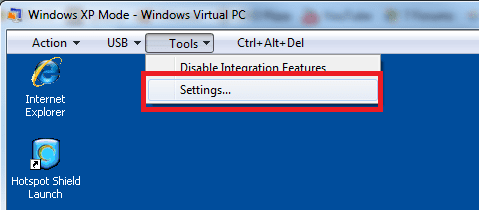
Good to hear it works. For future reference, here's another method to enter XP Mode settings:

XPM_settings2.png

Kari
 

My Computer

Computer type
Laptop
Computer Manufacturer/Model Number
HP ENVY 17-1150eg
OS
Windows 10 Pro x64 EN-GB
CPU
1.6 GHz Intel Core i7-720QM Processor
Memory
6 GB
Graphics Card(s)
ATI Mobility Radeon HD 5850 Graphics
Sound Card
Beats sound system with integrated subwoofer
Monitor(s) Displays
17" laptop display, 22" LED and 32" Full HD TV through HDMI
Screen Resolution
1600*900 (1), 1920*1080 (2&3)
Hard Drives
Internal: 2 x 500 GB SATA Hard Disk Drive 7200 rpm
External: 2TB for backups, 3TB USB3 network drive for media
Cooling
As Envy runs a bit warm, I have it on a Cooler Master pad
Keyboard
Logitech diNovo Media Desktop Laser (bluetooth)
Mouse
Logitech Performance Mouse MX
Internet Speed
50/10 Mbps VDSL
Antivirus
Windows Defender 4.3.9431.0
Browser
Maxthon 3.5.2., IE11
Just to add my two cents...I changed my network adapter to the actual one that is in my machine from the "shared NAT" one it had selected and I lost connection so I just changed it back.
 

My Computer

Computer Manufacturer/Model Number
Custom Asus
OS
Win7 64
CPU
AMD Phenom X4 9950 2.6ghz
Motherboard
Asus Crosshair
Memory
8 gigs Corsair
Graphics Card(s)
2 X Nvidia Geforce 8800 GTS (G92) 512 in SLI
Sound Card
Onboard
Monitor(s) Displays
Samsung 22 inch
Screen Resolution
1920 X 1080
Hard Drives
WD 1 TB, WD 500 Gig, WD 320 Gig
PSU
Thermaltake 850 watt
Case
Raidmax
Cooling
Zalman 9700
Keyboard
Microsoft
Mouse
Logitech MX 518
Internet Speed
25 mbps
Most of the time the XP Mode is typically automatic depending on the host connection type. With cable internet here running from modem to nic card even a live Linux distro as well as any other vhd or VMs will readily connect except the custom 7 install on the VPC where a network adapter change was required.
 

My Computers

System One System Two

  • Computer type
    PC/Desktop
    Computer Manufacturer/Model Number
    Custom builds = 2
    OS
    W7 Ultimate x64/W10 Pro x64/W11 Pro Triple Boot - Main PC W7 Remote PC Micro ATX W7 Pro x64/W11 Pro
    CPU
    AMD Phenom II X4 975 Deneb 3.6ghz - 965 2nd remote pc
    Motherboard
    Gigabyte GA-790XTA-UD4-Gigabyte GA-880GM-D2H remote pc
    Memory
    Kingston Hyper X DDR3 1600 1.5v 16gb - Hyper X Fury 8gb 2nd
    Graphics Card(s)
    MSI HD Radeon 5750 1gb - MSI HD Radeon 6450 on mini tower
    Sound Card
    Creative Labs X-Fi Xtreme Audio P - Realtek onooard 2nd case
    Monitor(s) Displays
    ASUS VW199T-P 19" HP 2082a Main-HP 2082a 20" remote pc
    Screen Resolution
    Asus 1440x900 - HP 1600x900
    Hard Drives
    WD Black 1TB HD per OS W7, W10, and pending W11 presently on 500gb OS Drive - Pending Triple 1TB HDs for Spanned Storage/backup volume
    Single 2TB external USB enclosure, single 1TB System 7 Host/Boot drive, Pending 8TB external HD for system image b
    PSU
    Corsair 750TX - primary / Corsair CX600 - second
    Case
    Antec 900-2 - SSD compatible / NZXT Vulcan mini tower
    Cooling
    Zalman CNPS9900A
    Keyboard
    AZIO L70 Backlit Letters Gaming - ONN Cordless/USB
    Mouse
    MSI DS200 Programmable, Logitech Cordless
    Internet Speed
    30mbps upgrade - primary hard wired - mini tower usb WiFi
    Antivirus
    GFI VIPRE Internet Security 2014 on W7 2016 beta on W10,
    Browser
    Cyberfox, WaterFox 64bit FF variants, FireFox x64, Pale Moon
    Other Info
    Accomdata fan cooled usb 2.0 PIDE/Sata II, III external enclosure.
    Sambient usb/eSata PATA/Sata II, III external enclosure.
  • Computer type
    PC/Desktop
    System Manufacturer/Model Number
    CUSTOM ASSEMBLY
    OS
    W7 Pro x64/W11 Pro
    CPU
    AMD Deneb 3.6ghz - 965
    Motherboard
    Gigabyte GA-880GM-D2H remote pc
    Memory
    Kingston Hyper X Fury 8gb
    Graphics Card(s)
    MSI HD Radeon 6450 DVI Output
    Sound Card
    Realtek onooard Creative or Other separate PENDING
    Monitor(s) Displays
    VIZIO 32" LCD TV Separate LCD Pending
    Screen Resolution
    1600x1080
    Hard Drives
    WD 500GB OS Host/Boot WD Green 1TB Storage/Backup
    PSU
    Corsair 600W - THERMALTAKE 600W spare case
    Case
    NZXT Vulcan mini tower
    Cooling
    Twin 120mm Top Fans - 240mm Side Cover
    Keyboard
    ONN Cordless/USB Logitech Cordless
    Mouse
    ONN USB/Cordless - Logitech Cordless
    Internet Speed
    DSL 5G
    Browser
    MS Edge, FireFox, WaterFox x64, FireFox Nightly
    Other Info
    OS Testing-Remote Access to Main TeamViewer
Win7Pro - XPMode - Can't connect via Wireless adapter

Hi - I followed this thread because I have a brand new XPS Studio and am not able to connect to the internet in XPM.

My desktop has a wireless adapter instead of an NIC, and according to the specs, I need to select NAT for the XPM network settings.

NAT was already selected by default, but I still cannot connect to the internet inside of my XPM.

(My host system Does connect to the internet, so my wireless adapter and router are working)

I checked my XPM device manager and see this under "Network Adapters":
Intel 21140-Based PCI Fast Ethernet Adapter (Generic)
I tried disabling this to see if it would fix my problem but it doesn't.

Do you have any suggestions other than purchasing an NIC? :-) Your help will be greatly appreciated.
 

My Computer

Computer Manufacturer/Model Number
Dell XPS Studio 8100
OS
Windows 7 Pro 64bit
CPU
Intel core i5 / 750 @ 2.67 Ghz 2.67 Ghz
Memory
6 GB
Graphics Card(s)
ATI Radeon HD 5450
Sound Card
ATI HD Audio / Realteck HD Audio
Monitor(s) Displays
Dell 18.5"
Hard Drives
700 GB Internal HDD
Hi Rex, welcome to the Seven Forums.

Wireless is also a NIC, Network Interface Controller. Normally XP Mode, or any other Virtual PC virtual machine, is easiest to connect to network and Internet using the the host machine's NIC, in your case your WiFi adapter.

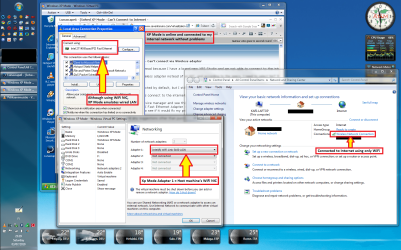
Here's (a bit confusing?) screenshot. I intentionally disabled my LAN connection, using WiFi only. I then changed XP Mode's settings, so it was using host machine's Wifi adapter as adapter 1. The screenshot clearly shows that my host is connected to Internet using WiFi only, and that XP Mode also is connected to network using host's WiFi adapter only.

XPM_WiFi.png

One more important thing the screenshot shows is that because all virtual machines, including XP Mode, are using emulated hardware, the devices and device names can and quite often do differ from those of the host. For instance, the NIC XP Mode emulates is the one you tried to disable, Intel 21140-Based PCI Fast Ethernet Adapter. Please do not disable it, without it enabled and working you can not connect to network.

This is a good example of what hardware emulation means. Although the XP Mode is de facto connected using the network adapter (WiFi or LAN) of the host machine, XP Mode always thinks it's using Intel 21140-Based PCI Fast Ethernet Adapter. This also means that although I in this example am connected only using WiFi, XP Mode thinks it's using a wired LAN connection.

Kari
 

My Computer

Computer type
Laptop
Computer Manufacturer/Model Number
HP ENVY 17-1150eg
OS
Windows 10 Pro x64 EN-GB
CPU
1.6 GHz Intel Core i7-720QM Processor
Memory
6 GB
Graphics Card(s)
ATI Mobility Radeon HD 5850 Graphics
Sound Card
Beats sound system with integrated subwoofer
Monitor(s) Displays
17" laptop display, 22" LED and 32" Full HD TV through HDMI
Screen Resolution
1600*900 (1), 1920*1080 (2&3)
Hard Drives
Internal: 2 x 500 GB SATA Hard Disk Drive 7200 rpm
External: 2TB for backups, 3TB USB3 network drive for media
Cooling
As Envy runs a bit warm, I have it on a Cooler Master pad
Keyboard
Logitech diNovo Media Desktop Laser (bluetooth)
Mouse
Logitech Performance Mouse MX
Internet Speed
50/10 Mbps VDSL
Antivirus
Windows Defender 4.3.9431.0
Browser
Maxthon 3.5.2., IE11
Ah -- the light comes on :-)

It does make sense that XPM is emulating the hardware.

Per your attached image, I changed the network setting to be a "WLAN PCIe" card and presto - I have an internet connection!

Thanks for the explanations!

Different question -- I'm setting up XPM while logged in as an admin. However, I want to make the XPM available to other users on the computer (my kids).

Is there a "nice" way to do allow them access to this under their user accounts?
 

My Computer

Computer Manufacturer/Model Number
Dell XPS Studio 8100
OS
Windows 7 Pro 64bit
CPU
Intel core i5 / 750 @ 2.67 Ghz 2.67 Ghz
Memory
6 GB
Graphics Card(s)
ATI Radeon HD 5450
Sound Card
ATI HD Audio / Realteck HD Audio
Monitor(s) Displays
Dell 18.5"
Hard Drives
700 GB Internal HDD
Thanks to everyone for their comments/help!

BTW - I wanted to make sure I thanked EVERYONE for their comments/suggestions. All insight is always welcome! :-)
 

My Computer

Computer Manufacturer/Model Number
Dell XPS Studio 8100
OS
Windows 7 Pro 64bit
CPU
Intel core i5 / 750 @ 2.67 Ghz 2.67 Ghz
Memory
6 GB
Graphics Card(s)
ATI Radeon HD 5450
Sound Card
ATI HD Audio / Realteck HD Audio
Monitor(s) Displays
Dell 18.5"
Hard Drives
700 GB Internal HDD
By default, XP Mode is available to all users, to be found in each user account's Start Menu. Each user has an independent XP Mode, so if you install an application to Host machine User A > XP Mode, it have to be separately installed to Host machine User B > XP Mode if that user also needs the said application.

XP Mode has by default two vhd's (virtual hard disk), a base vhd file called XP Mode base.vhd (C:\Program Files\Windows XP Mode\Xp Mode base.vhd), which contains the base, files needed for XP Mode to run, and the so called differencing, changeable vhd XP Mode.vhd (C:\Users\Your_Username\AppData\Local\Microsoft\Windows Virtual PC\Virtual Machines\XP Mode.vhd). This latter vhd file is where all your installed applications, modifications and personal files are stored.

To learn more, and to find out how to allow all users to use one common XP Mode, please read these two posts:
http://www.sevenforums.com/virtualization/59287-xp-mode-where-does-hard-disk-come.html#post535646
http://www.sevenforums.com/virtualization/80378-backup-xp-mode-2.html#post751417

Kari
 
Last edited:

My Computer

Computer type
Laptop
Computer Manufacturer/Model Number
HP ENVY 17-1150eg
OS
Windows 10 Pro x64 EN-GB
CPU
1.6 GHz Intel Core i7-720QM Processor
Memory
6 GB
Graphics Card(s)
ATI Mobility Radeon HD 5850 Graphics
Sound Card
Beats sound system with integrated subwoofer
Monitor(s) Displays
17" laptop display, 22" LED and 32" Full HD TV through HDMI
Screen Resolution
1600*900 (1), 1920*1080 (2&3)
Hard Drives
Internal: 2 x 500 GB SATA Hard Disk Drive 7200 rpm
External: 2TB for backups, 3TB USB3 network drive for media
Cooling
As Envy runs a bit warm, I have it on a Cooler Master pad
Keyboard
Logitech diNovo Media Desktop Laser (bluetooth)
Mouse
Logitech Performance Mouse MX
Internet Speed
50/10 Mbps VDSL
Antivirus
Windows Defender 4.3.9431.0
Browser
Maxthon 3.5.2., IE11
Unable to connect internet in Windows XP mode virtual PC

Hi,

I am using the windows 7 professional
I have installed the windows XP mode virtual PC.
This is working fine.
I am able to browse the webpages through internet in windows 7.
But unable to connect internet in the XP mode.
I have did the XP mode --> settings ---> Selected the NIC used by my windows 7.
Even then internet is not working.
Please anyone help me to solve the issue.
 

My Computer

OS
windows 7 professional
Back
Top