
toolman59
New member
I have some legacy applications which run in "XP mode", after I close these Apps. the desktop graphics change colour and have a shadow effect. The next time I reboot everything is back to normal as per attached screen shots. Refreshing the the screen does not clear the effect.
Is there a setting some where that eliminates this change?
This is a minor irritation, but I would be interested to know how to clear it when "XP mode " is no longer running.
Is there a setting some where that eliminates this change?
This is a minor irritation, but I would be interested to know how to clear it when "XP mode " is no longer running.
Attachments
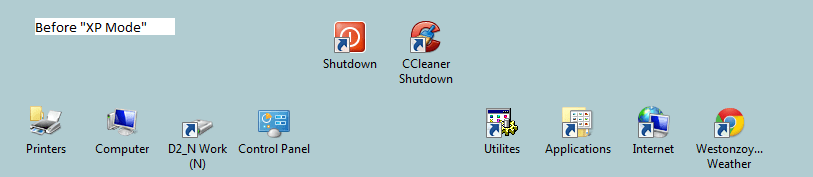
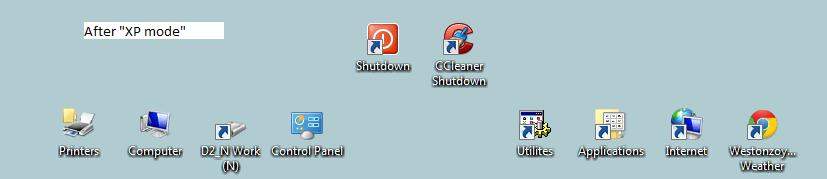
My Computer
- Computer type
- PC/Desktop
- Computer Manufacturer/Model Number
- Self build
- OS
- Windows 7 Ultimate 64 bit SP1
- CPU
- AMD FX-8350 Eight Core
- Motherboard
- Gigabyte GA-990FXA-UD3
- Memory
- Corsair Vengeance 16GB DDR3
- Graphics Card(s)
- XFX HD6870 1GB DDR5
- Sound Card
- None Onboard sound
- Monitor(s) Displays
- LG Flatron Wide 20"
- Screen Resolution
- 1680x1050
- Hard Drives
- WD1002FAEX Caviar Black SATA3 1TB
Hitachi 500GB PATA
Hitachi 320GB PATA
M4-CT256M4SSD2 ATA Device SSD Sata 3 250GB
2 off Seagate 2TB ST2000DM 001-1ER164 SATA Disks
- PSU
- OCZ Modxstream Pro 600W Silent
- Case
- Fractal R3
- Cooling
- Artic Cooling Freezer 7 Pro Rev 2
- Keyboard
- Logitech K800
- Mouse
- Logitech Trackman Wheel
- Internet Speed
- 12.5Mbits
- Antivirus
- AVG 2015 Free Edition
- Browser
- Google Chrome, Opera, Firefox
- Other Info
- Sky Hub router

