
Solved xp mode on premium version

drmax

New member
Hello and have searched here a bit. I googled this and it did show there was a way to install xp mode on premium version, but wanted to ask here 1st, before I rack my brain. Is it possible? If so, there are 2 different files I can download from ms site, unsure which to choose. Thx, DM
 

My Computer

OS
W7 premium 64
CPU
amd a8-3850
Motherboard
asus f1-a75v pro
Memory
8G g-skill
Graphics Card(s)
asus gt-520 silent
Monitor(s) Displays
LED viewsonic 24"
Hard Drives
seagate sata 120
wd 2T green
PSU
cool master 600W silent pro (80+bronze)
Hello Max,

I'm afraid that XP Mode can only be installed on the Windows 7 Professional, Ultimate, or Enterprise editions.
However, if you have a XP product key and XP ISO file, then you could install it to a virtual machine using a free program like VMware Player or VirtualBox.

Hope this helps, :)
Shawn
 

My Computer

Computer type
PC/Desktop
Computer Manufacturer/Model Number
Self built custom
OS
64-bit Windows 11 Pro for Workstations
CPU
Intel i7-8700K OC'd to 5 GHz
Motherboard
ASUS ROG Maximus XI Formula Z390
Memory
64 GB (4x16GB) G.SKILL TridentZ RGB DDR4 3600 MHz
Graphics Card(s)
ASUS ROG-STRIX-GTX1080TI-O11G-GAMING
Sound Card
Integrated
Monitor(s) Displays
2 x Samsung Odyssey G7 27"
Screen Resolution
2560x1440
Hard Drives
1TB Samsung 990 PRO M.2,
4TB Samsung 990 PRO PRO M.2,
TerraMaster F8 SSD Plus NAS
PSU
Seasonic Prime Titanium 850W
Case
Thermaltake Core P3
Cooling
Corsair Hydro H115i
Keyboard
Logitech wireless K800
Mouse
Logitech MX Master 4
Internet Speed
2 Gb/s Download and 100 Mb/s Upload
Antivirus
Malwarebyte Anti-Malware Premium
Browser
Google Chrome
Other Info
Logitech Z625 speaker system,
Logitech BRIO 4K Pro webcam,
HP Color LaserJet Pro MFP M477fdn,
APC SMART-UPS RT 1000 XL - SURT1000XLI,
Galaxy S23 Plus phone
Last edited by a moderator:

My Computer

Computer type
Laptop
Computer Manufacturer/Model Number
HP ENVY 17-1150eg
OS
Windows 10 Pro x64 EN-GB
CPU
1.6 GHz Intel Core i7-720QM Processor
Memory
6 GB
Graphics Card(s)
ATI Mobility Radeon HD 5850 Graphics
Sound Card
Beats sound system with integrated subwoofer
Monitor(s) Displays
17" laptop display, 22" LED and 32" Full HD TV through HDMI
Screen Resolution
1600*900 (1), 1920*1080 (2&3)
Hard Drives
Internal: 2 x 500 GB SATA Hard Disk Drive 7200 rpm
External: 2TB for backups, 3TB USB3 network drive for media
Cooling
As Envy runs a bit warm, I have it on a Cooler Master pad
Keyboard
Logitech diNovo Media Desktop Laser (bluetooth)
Mouse
Logitech Performance Mouse MX
Internet Speed
50/10 Mbps VDSL
Antivirus
Windows Defender 4.3.9431.0
Browser
Maxthon 3.5.2., IE11
I do have xp disk with key
 

My Computer

OS
W7 premium 64
CPU
amd a8-3850
Motherboard
asus f1-a75v pro
Memory
8G g-skill
Graphics Card(s)
asus gt-520 silent
Monitor(s) Displays
LED viewsonic 24"
Hard Drives
seagate sata 120
wd 2T green
PSU
cool master 600W silent pro (80+bronze)

My Computer

Computer type
PC/Desktop
Computer Manufacturer/Model Number
Self built custom
OS
64-bit Windows 11 Pro for Workstations
CPU
Intel i7-8700K OC'd to 5 GHz
Motherboard
ASUS ROG Maximus XI Formula Z390
Memory
64 GB (4x16GB) G.SKILL TridentZ RGB DDR4 3600 MHz
Graphics Card(s)
ASUS ROG-STRIX-GTX1080TI-O11G-GAMING
Sound Card
Integrated
Monitor(s) Displays
2 x Samsung Odyssey G7 27"
Screen Resolution
2560x1440
Hard Drives
1TB Samsung 990 PRO M.2,
4TB Samsung 990 PRO PRO M.2,
TerraMaster F8 SSD Plus NAS
PSU
Seasonic Prime Titanium 850W
Case
Thermaltake Core P3
Cooling
Corsair Hydro H115i
Keyboard
Logitech wireless K800
Mouse
Logitech MX Master 4
Internet Speed
2 Gb/s Download and 100 Mb/s Upload
Antivirus
Malwarebyte Anti-Malware Premium
Browser
Google Chrome
Other Info
Logitech Z625 speaker system,
Logitech BRIO 4K Pro webcam,
HP Color LaserJet Pro MFP M477fdn,
APC SMART-UPS RT 1000 XL - SURT1000XLI,
Galaxy S23 Plus phone
any specifics of how to put this iso file into this program, once the cd is burned? if there is a guide here, I can probably find it. Thx for the help. DM
 

My Computer

OS
W7 premium 64
CPU
amd a8-3850
Motherboard
asus f1-a75v pro
Memory
8G g-skill
Graphics Card(s)
asus gt-520 silent
Monitor(s) Displays
LED viewsonic 24"
Hard Drives
seagate sata 120
wd 2T green
PSU
cool master 600W silent pro (80+bronze)
I do not know VMware but at least on VirtualBox and Virtual PC you can install your XP to a virtual machine directly from the CD or DVD, you do not need to create an ISO file.

Just select your virtualization program and follow respective instructions in creating a new virtual machine.

Kari
 

My Computer

Computer type
Laptop
Computer Manufacturer/Model Number
HP ENVY 17-1150eg
OS
Windows 10 Pro x64 EN-GB
CPU
1.6 GHz Intel Core i7-720QM Processor
Memory
6 GB
Graphics Card(s)
ATI Mobility Radeon HD 5850 Graphics
Sound Card
Beats sound system with integrated subwoofer
Monitor(s) Displays
17" laptop display, 22" LED and 32" Full HD TV through HDMI
Screen Resolution
1600*900 (1), 1920*1080 (2&3)
Hard Drives
Internal: 2 x 500 GB SATA Hard Disk Drive 7200 rpm
External: 2TB for backups, 3TB USB3 network drive for media
Cooling
As Envy runs a bit warm, I have it on a Cooler Master pad
Keyboard
Logitech diNovo Media Desktop Laser (bluetooth)
Mouse
Logitech Performance Mouse MX
Internet Speed
50/10 Mbps VDSL
Antivirus
Windows Defender 4.3.9431.0
Browser
Maxthon 3.5.2., IE11
I do not know VMware but at least on VirtualBox and Virtual PC you can install your XP to a virtual machine directly from the CD or DVD, you do not need to create an ISO file.

Just select your virtualization program and follow respective instructions in creating a new virtual machine.

Kari
NICE! Didn't want to have to burn a CD (I'm out) I'll give this a whirl this weekend. Thx, DM
 

My Computer

OS
W7 premium 64
CPU
amd a8-3850
Motherboard
asus f1-a75v pro
Memory
8G g-skill
Graphics Card(s)
asus gt-520 silent
Monitor(s) Displays
LED viewsonic 24"
Hard Drives
seagate sata 120
wd 2T green
PSU
cool master 600W silent pro (80+bronze)
so I downloaded the 64 bit virtual pc, for my 64 bit machine. It installed, I restarted. When I click on the only icon that is there, a folder opens with a file named....desktop.ini

Wut up with that? Thx DM
 

My Computer

OS
W7 premium 64
CPU
amd a8-3850
Motherboard
asus f1-a75v pro
Memory
8G g-skill
Graphics Card(s)
asus gt-520 silent
Monitor(s) Displays
LED viewsonic 24"
Hard Drives
seagate sata 120
wd 2T green
PSU
cool master 600W silent pro (80+bronze)

My Computer

Computer type
Laptop
Computer Manufacturer/Model Number
HP ENVY 17-1150eg
OS
Windows 10 Pro x64 EN-GB
CPU
1.6 GHz Intel Core i7-720QM Processor
Memory
6 GB
Graphics Card(s)
ATI Mobility Radeon HD 5850 Graphics
Sound Card
Beats sound system with integrated subwoofer
Monitor(s) Displays
17" laptop display, 22" LED and 32" Full HD TV through HDMI
Screen Resolution
1600*900 (1), 1920*1080 (2&3)
Hard Drives
Internal: 2 x 500 GB SATA Hard Disk Drive 7200 rpm
External: 2TB for backups, 3TB USB3 network drive for media
Cooling
As Envy runs a bit warm, I have it on a Cooler Master pad
Keyboard
Logitech diNovo Media Desktop Laser (bluetooth)
Mouse
Logitech Performance Mouse MX
Internet Speed
50/10 Mbps VDSL
Antivirus
Windows Defender 4.3.9431.0
Browser
Maxthon 3.5.2., IE11
Read this tutorial to see how to use Virtual PC and create a virtual machine: http://www.sevenforums.com/tutorials/8254-windows-virtual-pc-create-virtual-machine.html

Start from step 4 (steps 1 to 3 describe how to download and install VPC).

Kari
Kari, thx but virtual machine is not listed in that tutorial, on my pc. All I have is Windows Virtual PC and Windows XP mode.Unless I needed to download the 86 version, but I ck'd and my os states 64.
I for some reason, have that same desktop.ini file on my desktop. Says it was created back Aug 19th this year. No idea how that had happened. I think that may be causing this issue.

Should I look for a restore point prior to that date?
 

My Computer

OS
W7 premium 64
CPU
amd a8-3850
Motherboard
asus f1-a75v pro
Memory
8G g-skill
Graphics Card(s)
asus gt-520 silent
Monitor(s) Displays
LED viewsonic 24"
Hard Drives
seagate sata 120
wd 2T green
PSU
cool master 600W silent pro (80+bronze)
Tutorial, Step 4: Open the Virtual PC folder
Step 5: Click on the Create Virtual Machine

And so on. Follow the steps to create your XP virtual machine. Steps 13 and 14 tell you how to insert your install media, an ISO file (step 13) or a CD / DVD (step14).

If you have installed Windows Virtual PC as told in the tutorial (steps 1 to 3) or on the Virtual PC download page, you simply follow tutorial's instructions to create a virtual machine for your Windows XP.

Brink is The Man when it comes to write instructional tutorials, I cannot explain the procedure any simpler than his tutorial does.

Kari
 

My Computer

Computer type
Laptop
Computer Manufacturer/Model Number
HP ENVY 17-1150eg
OS
Windows 10 Pro x64 EN-GB
CPU
1.6 GHz Intel Core i7-720QM Processor
Memory
6 GB
Graphics Card(s)
ATI Mobility Radeon HD 5850 Graphics
Sound Card
Beats sound system with integrated subwoofer
Monitor(s) Displays
17" laptop display, 22" LED and 32" Full HD TV through HDMI
Screen Resolution
1600*900 (1), 1920*1080 (2&3)
Hard Drives
Internal: 2 x 500 GB SATA Hard Disk Drive 7200 rpm
External: 2TB for backups, 3TB USB3 network drive for media
Cooling
As Envy runs a bit warm, I have it on a Cooler Master pad
Keyboard
Logitech diNovo Media Desktop Laser (bluetooth)
Mouse
Logitech Performance Mouse MX
Internet Speed
50/10 Mbps VDSL
Antivirus
Windows Defender 4.3.9431.0
Browser
Maxthon 3.5.2., IE11
Tutorial, Step 4: Open the Virtual PC folder
Step 5: Click on the Create Virtual Machine

And so on. Follow the steps to create your XP virtual machine. Steps 13 and 14 tell you how to insert your install media, an ISO file (step 13) or a CD / DVD (step14).

If you have installed Windows Virtual PC as told in the tutorial (steps 1 to 3) or on the Virtual PC download page, you simply follow tutorial's instructions to create a virtual machine for your Windows XP.

Brink is The Man when it comes to write instructional tutorials, I cannot explain the procedure any simpler than his tutorial does.

Kari
I have my xp on a copied disk and is legit with a key. I also have this "slipstream sp3" disk I had made in 2009. Which do I choose? Thx and before, the stuff on my machine was not exactly as the tutorial, so I was concerned of doing it correctly. Thx for the help. DM
 

My Computer

OS
W7 premium 64
CPU
amd a8-3850
Motherboard
asus f1-a75v pro
Memory
8G g-skill
Graphics Card(s)
asus gt-520 silent
Monitor(s) Displays
LED viewsonic 24"
Hard Drives
seagate sata 120
wd 2T green
PSU
cool master 600W silent pro (80+bronze)
If your own SP3 version is valid and works, and if your valid product key can be used to activate it, use it. Virtual PC does not care, it can use any valid install media.
 

My Computer

Computer type
Laptop
Computer Manufacturer/Model Number
HP ENVY 17-1150eg
OS
Windows 10 Pro x64 EN-GB
CPU
1.6 GHz Intel Core i7-720QM Processor
Memory
6 GB
Graphics Card(s)
ATI Mobility Radeon HD 5850 Graphics
Sound Card
Beats sound system with integrated subwoofer
Monitor(s) Displays
17" laptop display, 22" LED and 32" Full HD TV through HDMI
Screen Resolution
1600*900 (1), 1920*1080 (2&3)
Hard Drives
Internal: 2 x 500 GB SATA Hard Disk Drive 7200 rpm
External: 2TB for backups, 3TB USB3 network drive for media
Cooling
As Envy runs a bit warm, I have it on a Cooler Master pad
Keyboard
Logitech diNovo Media Desktop Laser (bluetooth)
Mouse
Logitech Performance Mouse MX
Internet Speed
50/10 Mbps VDSL
Antivirus
Windows Defender 4.3.9431.0
Browser
Maxthon 3.5.2., IE11
If your own SP3 version is valid and works, and if your valid product key can be used to activate it, use it. Virtual PC does not care, it can use any valid install media.
And also, just to mention...I'm doing this all because I need xp to run this small simulator program that requires XP. This is the only reason (as of now) that I'm installing some sort of program.
 

My Computer

OS
W7 premium 64
CPU
amd a8-3850
Motherboard
asus f1-a75v pro
Memory
8G g-skill
Graphics Card(s)
asus gt-520 silent
Monitor(s) Displays
LED viewsonic 24"
Hard Drives
seagate sata 120
wd 2T green
PSU
cool master 600W silent pro (80+bronze)
I put in either disk and no iso file found.
 

My Computer

OS
W7 premium 64
CPU
amd a8-3850
Motherboard
asus f1-a75v pro
Memory
8G g-skill
Graphics Card(s)
asus gt-520 silent
Monitor(s) Displays
LED viewsonic 24"
Hard Drives
seagate sata 120
wd 2T green
PSU
cool master 600W silent pro (80+bronze)
Calm down, have a soda or beer or whatever and check the tutorial once again. You are not using an ISO file so naturally the Virtual PC does not find any; you need to tell the Virtual PC you are using a CD / DVD instead.

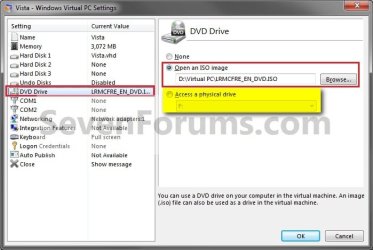
See the screenshot on tutorial in question, step 13, the right pane of that window. I copied it here and highlighted with yellow color the selection you have to make:

9353d1241175768-windows-virtual-pc-create-virtual-machine-step8.jpg

Select Access a physical drive, and using the drop down menu select the CD / DVD drive that contains your XP install media.

Kari
 

My Computer

Computer type
Laptop
Computer Manufacturer/Model Number
HP ENVY 17-1150eg
OS
Windows 10 Pro x64 EN-GB
CPU
1.6 GHz Intel Core i7-720QM Processor
Memory
6 GB
Graphics Card(s)
ATI Mobility Radeon HD 5850 Graphics
Sound Card
Beats sound system with integrated subwoofer
Monitor(s) Displays
17" laptop display, 22" LED and 32" Full HD TV through HDMI
Screen Resolution
1600*900 (1), 1920*1080 (2&3)
Hard Drives
Internal: 2 x 500 GB SATA Hard Disk Drive 7200 rpm
External: 2TB for backups, 3TB USB3 network drive for media
Cooling
As Envy runs a bit warm, I have it on a Cooler Master pad
Keyboard
Logitech diNovo Media Desktop Laser (bluetooth)
Mouse
Logitech Performance Mouse MX
Internet Speed
50/10 Mbps VDSL
Antivirus
Windows Defender 4.3.9431.0
Browser
Maxthon 3.5.2., IE11
Calm down, have a soda or beer or whatever and check the tutorial once again. You are not using an ISO file so naturally the Virtual PC does not find any; you need to tell the Virtual PC you are using a CD / DVD instead.

See the screenshot on tutorial in question, step 13, the right pane of that window. I copied it here and highlighted with yellow color the selection you have to make:
Select Access a physical drive, and using the drop down menu select the CD / DVD drive that contains your XP install media.

Kari
I am calm (but a beer would be nice....but gotta head for work in a bit) I did look in my selected drive and it did not find and iso file. I restarted pc and will have another go. Wonder if it's because it's a copied (my copy) of CD? Give me a minute.......
 

My Computer

OS
W7 premium 64
CPU
amd a8-3850
Motherboard
asus f1-a75v pro
Memory
8G g-skill
Graphics Card(s)
asus gt-520 silent
Monitor(s) Displays
LED viewsonic 24"
Hard Drives
seagate sata 120
wd 2T green
PSU
cool master 600W silent pro (80+bronze)
Please read this with thought:
  • If you want to install from an ISO file, read again Brink's post #5 in this thread to see how to create one from your XP CD and then install your XP virtual machine using the ISO
  • If however you are installing from the Windows XP CD / DVD, forget the ISO file. ISO and CD are two different things, installing from a CD or a DVD you do not need an ISO file. In this case, insert the XP CD to your CD drive and read my previous post again
 

My Computer

Computer type
Laptop
Computer Manufacturer/Model Number
HP ENVY 17-1150eg
OS
Windows 10 Pro x64 EN-GB
CPU
1.6 GHz Intel Core i7-720QM Processor
Memory
6 GB
Graphics Card(s)
ATI Mobility Radeon HD 5850 Graphics
Sound Card
Beats sound system with integrated subwoofer
Monitor(s) Displays
17" laptop display, 22" LED and 32" Full HD TV through HDMI
Screen Resolution
1600*900 (1), 1920*1080 (2&3)
Hard Drives
Internal: 2 x 500 GB SATA Hard Disk Drive 7200 rpm
External: 2TB for backups, 3TB USB3 network drive for media
Cooling
As Envy runs a bit warm, I have it on a Cooler Master pad
Keyboard
Logitech diNovo Media Desktop Laser (bluetooth)
Mouse
Logitech Performance Mouse MX
Internet Speed
50/10 Mbps VDSL
Antivirus
Windows Defender 4.3.9431.0
Browser
Maxthon 3.5.2., IE11
either of my 2 drives is not picking up either disk
 

My Computer

OS
W7 premium 64
CPU
amd a8-3850
Motherboard
asus f1-a75v pro
Memory
8G g-skill
Graphics Card(s)
asus gt-520 silent
Monitor(s) Displays
LED viewsonic 24"
Hard Drives
seagate sata 120
wd 2T green
PSU
cool master 600W silent pro (80+bronze)
Back
Top