
XP Mode Screen Resolution Issues

JWA

New member
Running Win7 Pro 64 Bit, have installed Virtual PC and XP Mode, all is running just as needed except for inability to downward adjust screen resolution---its locked in at 1920x1078. When in Display > Settings the Advanced Settings box is gray'd out.

What have I done incorrectly to cause this?

TIA---great site BTW!
 

My Computer

Computer type
PC/Desktop
Computer Manufacturer/Model Number
Unknown
OS
Win7 Pro 64 Bit
CPU
AMD Phenom(tm) II X4 970 Processor
Motherboard
ASUSTeK Computer INC. M4N68T-M-V2
Memory
8.00 GB
Graphics Card(s)
(1) LogMeIn Mirror Driver (2) ASUS EAH6450 Series
Sound Card
(1) VIA High Definition Audio (2) AMD High Definition Audi
Hi JWA, welcome to the Seven Forums.

When the Virtual PC Integration Features are enabled the resolution settings on virtual machines are disabled because you change the resolution of a virtual machine (including XP Mode) simply by resizing the vm window. See this post: http://www.sevenforums.com/virtualization/144070-display.html#post1236858.

To be able to use the resolution settings inside the vm, in your case the XP Mode, the Virtual PC Integration Features must be disabled.

Kari
 

My Computer

Computer type
Laptop
Computer Manufacturer/Model Number
HP ENVY 17-1150eg
OS
Windows 10 Pro x64 EN-GB
CPU
1.6 GHz Intel Core i7-720QM Processor
Memory
6 GB
Graphics Card(s)
ATI Mobility Radeon HD 5850 Graphics
Sound Card
Beats sound system with integrated subwoofer
Monitor(s) Displays
17" laptop display, 22" LED and 32" Full HD TV through HDMI
Screen Resolution
1600*900 (1), 1920*1080 (2&3)
Hard Drives
Internal: 2 x 500 GB SATA Hard Disk Drive 7200 rpm
External: 2TB for backups, 3TB USB3 network drive for media
Cooling
As Envy runs a bit warm, I have it on a Cooler Master pad
Keyboard
Logitech diNovo Media Desktop Laser (bluetooth)
Mouse
Logitech Performance Mouse MX
Internet Speed
50/10 Mbps VDSL
Antivirus
Windows Defender 4.3.9431.0
Browser
Maxthon 3.5.2., IE11
Thanks Kari----that did the trick for me! :D

It seems screen resolution cannot be a dual mode situation where in XPM I have one screen resolution and in Win7 there would be another. Unless I'm missing another step or feature?
 

My Computer

Computer type
PC/Desktop
Computer Manufacturer/Model Number
Unknown
OS
Win7 Pro 64 Bit
CPU
AMD Phenom(tm) II X4 970 Processor
Motherboard
ASUSTeK Computer INC. M4N68T-M-V2
Memory
8.00 GB
Graphics Card(s)
(1) LogMeIn Mirror Driver (2) ASUS EAH6450 Series
Sound Card
(1) VIA High Definition Audio (2) AMD High Definition Audi
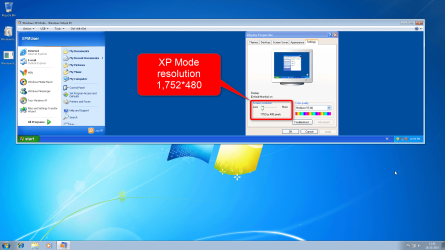
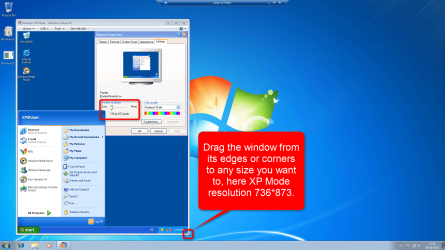
In XP Mode with integration enabled you can have any resolution you want to because the XP Mode window when not in full screen mode is fully scalable. Just drag from the corner and resize it to any size you want to.

For example you can have XP Mode resolution 666*444 on the host computer's 1920*1080 screen, the XP Mode with integration enabled scales to any size you want to, not only the classical Windows resolutions like 800*600, 1024*768 or 1600*900.
 

My Computer

Computer type
Laptop
Computer Manufacturer/Model Number
HP ENVY 17-1150eg
OS
Windows 10 Pro x64 EN-GB
CPU
1.6 GHz Intel Core i7-720QM Processor
Memory
6 GB
Graphics Card(s)
ATI Mobility Radeon HD 5850 Graphics
Sound Card
Beats sound system with integrated subwoofer
Monitor(s) Displays
17" laptop display, 22" LED and 32" Full HD TV through HDMI
Screen Resolution
1600*900 (1), 1920*1080 (2&3)
Hard Drives
Internal: 2 x 500 GB SATA Hard Disk Drive 7200 rpm
External: 2TB for backups, 3TB USB3 network drive for media
Cooling
As Envy runs a bit warm, I have it on a Cooler Master pad
Keyboard
Logitech diNovo Media Desktop Laser (bluetooth)
Mouse
Logitech Performance Mouse MX
Internet Speed
50/10 Mbps VDSL
Antivirus
Windows Defender 4.3.9431.0
Browser
Maxthon 3.5.2., IE11
Just to clarify my last post, see these two screenshots:

2014-10-18_12h54_14.png

2014-10-18_12h59_51.png
 

My Computer

Computer type
Laptop
Computer Manufacturer/Model Number
HP ENVY 17-1150eg
OS
Windows 10 Pro x64 EN-GB
CPU
1.6 GHz Intel Core i7-720QM Processor
Memory
6 GB
Graphics Card(s)
ATI Mobility Radeon HD 5850 Graphics
Sound Card
Beats sound system with integrated subwoofer
Monitor(s) Displays
17" laptop display, 22" LED and 32" Full HD TV through HDMI
Screen Resolution
1600*900 (1), 1920*1080 (2&3)
Hard Drives
Internal: 2 x 500 GB SATA Hard Disk Drive 7200 rpm
External: 2TB for backups, 3TB USB3 network drive for media
Cooling
As Envy runs a bit warm, I have it on a Cooler Master pad
Keyboard
Logitech diNovo Media Desktop Laser (bluetooth)
Mouse
Logitech Performance Mouse MX
Internet Speed
50/10 Mbps VDSL
Antivirus
Windows Defender 4.3.9431.0
Browser
Maxthon 3.5.2., IE11
Kari those suggestions helped me understand and set my resolution as needed---thanks once again.

Now the question I can't get XP Mode to print a document even though the host computer still functions perfectly. Is there one more setting I've failed to find and correctly set? (I've run the troubleshooter even going to Command Prompt--nothing happens even then.
 

My Computer

Computer type
PC/Desktop
Computer Manufacturer/Model Number
Unknown
OS
Win7 Pro 64 Bit
CPU
AMD Phenom(tm) II X4 970 Processor
Motherboard
ASUSTeK Computer INC. M4N68T-M-V2
Memory
8.00 GB
Graphics Card(s)
(1) LogMeIn Mirror Driver (2) ASUS EAH6450 Series
Sound Card
(1) VIA High Definition Audio (2) AMD High Definition Audi
Is your printer a network printer, local printer connected to your Windows 7 host system or a local shared printer connected to another PC?
 

My Computer

Computer type
Laptop
Computer Manufacturer/Model Number
HP ENVY 17-1150eg
OS
Windows 10 Pro x64 EN-GB
CPU
1.6 GHz Intel Core i7-720QM Processor
Memory
6 GB
Graphics Card(s)
ATI Mobility Radeon HD 5850 Graphics
Sound Card
Beats sound system with integrated subwoofer
Monitor(s) Displays
17" laptop display, 22" LED and 32" Full HD TV through HDMI
Screen Resolution
1600*900 (1), 1920*1080 (2&3)
Hard Drives
Internal: 2 x 500 GB SATA Hard Disk Drive 7200 rpm
External: 2TB for backups, 3TB USB3 network drive for media
Cooling
As Envy runs a bit warm, I have it on a Cooler Master pad
Keyboard
Logitech diNovo Media Desktop Laser (bluetooth)
Mouse
Logitech Performance Mouse MX
Internet Speed
50/10 Mbps VDSL
Antivirus
Windows Defender 4.3.9431.0
Browser
Maxthon 3.5.2., IE11
The printer in question (HP DeskJet 842C) is connected only to my host computer running Win 7 Pro.

I have a separate computer running XP Pro that is used only as a stand alone machine---the HP printer runs just fine when connected to it.
 

My Computer

Computer type
PC/Desktop
Computer Manufacturer/Model Number
Unknown
OS
Win7 Pro 64 Bit
CPU
AMD Phenom(tm) II X4 970 Processor
Motherboard
ASUSTeK Computer INC. M4N68T-M-V2
Memory
8.00 GB
Graphics Card(s)
(1) LogMeIn Mirror Driver (2) ASUS EAH6450 Series
Sound Card
(1) VIA High Definition Audio (2) AMD High Definition Audi
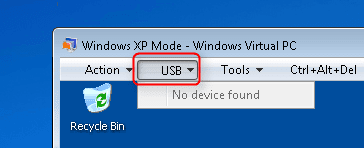
First of course you need to install printer drivers for your HP printer in XP Mode. When done, turn the printer on and open XP Mode's USB menu:

2014-10-18_23h22_36.png

It lists all active USB devices connected to your host system. (List in above screenshot is empty because I installed XP Mode on a Windows 7 virtual machine running on Windows 10 to get screenshots for you, in your case the list will show all USB devices including the printer). Select the printer and it will be connected to XP Mode.
 

My Computer

Computer type
Laptop
Computer Manufacturer/Model Number
HP ENVY 17-1150eg
OS
Windows 10 Pro x64 EN-GB
CPU
1.6 GHz Intel Core i7-720QM Processor
Memory
6 GB
Graphics Card(s)
ATI Mobility Radeon HD 5850 Graphics
Sound Card
Beats sound system with integrated subwoofer
Monitor(s) Displays
17" laptop display, 22" LED and 32" Full HD TV through HDMI
Screen Resolution
1600*900 (1), 1920*1080 (2&3)
Hard Drives
Internal: 2 x 500 GB SATA Hard Disk Drive 7200 rpm
External: 2TB for backups, 3TB USB3 network drive for media
Cooling
As Envy runs a bit warm, I have it on a Cooler Master pad
Keyboard
Logitech diNovo Media Desktop Laser (bluetooth)
Mouse
Logitech Performance Mouse MX
Internet Speed
50/10 Mbps VDSL
Antivirus
Windows Defender 4.3.9431.0
Browser
Maxthon 3.5.2., IE11
Ahh but my printer is old enough to still require the larger printer cable, connected to the motherboard multi-pin port. Currently my USB option as you show seems to work just fine, showing a flash drive used to transport documents.
 

My Computer

Computer type
PC/Desktop
Computer Manufacturer/Model Number
Unknown
OS
Win7 Pro 64 Bit
CPU
AMD Phenom(tm) II X4 970 Processor
Motherboard
ASUSTeK Computer INC. M4N68T-M-V2
Memory
8.00 GB
Graphics Card(s)
(1) LogMeIn Mirror Driver (2) ASUS EAH6450 Series
Sound Card
(1) VIA High Definition Audio (2) AMD High Definition Audi
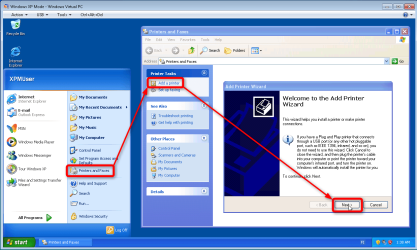
OK, so you have a bit older printer. Virtual PC cannot use LPT ports on host, so you need to install it as a shared printer in XP Mode.

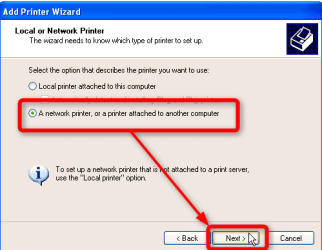
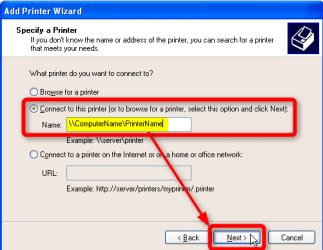
When you have installed the printer drivers in XP Mode and enabled sharing in Windows 7, do this:

  • Step 1:

    2014-10-19_01h39_09.png
  • Step 2:

    2014-10-19_01h40_31.png
  • Step 3:

    2014-10-19_01h42_24.png
    (Example: Windows 7 computer name is MyRig, printer is MyHP-Printer, you need to use here \\MyRig\MyHP-Printer)​
  • Continue following on-screen prompts and instructions
 

My Computer

Computer type
Laptop
Computer Manufacturer/Model Number
HP ENVY 17-1150eg
OS
Windows 10 Pro x64 EN-GB
CPU
1.6 GHz Intel Core i7-720QM Processor
Memory
6 GB
Graphics Card(s)
ATI Mobility Radeon HD 5850 Graphics
Sound Card
Beats sound system with integrated subwoofer
Monitor(s) Displays
17" laptop display, 22" LED and 32" Full HD TV through HDMI
Screen Resolution
1600*900 (1), 1920*1080 (2&3)
Hard Drives
Internal: 2 x 500 GB SATA Hard Disk Drive 7200 rpm
External: 2TB for backups, 3TB USB3 network drive for media
Cooling
As Envy runs a bit warm, I have it on a Cooler Master pad
Keyboard
Logitech diNovo Media Desktop Laser (bluetooth)
Mouse
Logitech Performance Mouse MX
Internet Speed
50/10 Mbps VDSL
Antivirus
Windows Defender 4.3.9431.0
Browser
Maxthon 3.5.2., IE11
BTW, according to HP User's Guide for your printer it can also be connected with USB (http://h10032.www1.hp.com/ctg/Manual/bpd07483.pdf, page 14).

I recommend you get a USB cable, connect the printer to Windows 7 with it and attach it to XP Mode as told in post #9 in this thread..
 

My Computer

Computer type
Laptop
Computer Manufacturer/Model Number
HP ENVY 17-1150eg
OS
Windows 10 Pro x64 EN-GB
CPU
1.6 GHz Intel Core i7-720QM Processor
Memory
6 GB
Graphics Card(s)
ATI Mobility Radeon HD 5850 Graphics
Sound Card
Beats sound system with integrated subwoofer
Monitor(s) Displays
17" laptop display, 22" LED and 32" Full HD TV through HDMI
Screen Resolution
1600*900 (1), 1920*1080 (2&3)
Hard Drives
Internal: 2 x 500 GB SATA Hard Disk Drive 7200 rpm
External: 2TB for backups, 3TB USB3 network drive for media
Cooling
As Envy runs a bit warm, I have it on a Cooler Master pad
Keyboard
Logitech diNovo Media Desktop Laser (bluetooth)
Mouse
Logitech Performance Mouse MX
Internet Speed
50/10 Mbps VDSL
Antivirus
Windows Defender 4.3.9431.0
Browser
Maxthon 3.5.2., IE11
Kari et al----have been away from this thread for a bit but will follow up as soon as time permits me going forward with all this. So far the advice has been flawless. :)

Didn't want to just abandon such a helpful thread.
 

My Computer

Computer type
PC/Desktop
Computer Manufacturer/Model Number
Unknown
OS
Win7 Pro 64 Bit
CPU
AMD Phenom(tm) II X4 970 Processor
Motherboard
ASUSTeK Computer INC. M4N68T-M-V2
Memory
8.00 GB
Graphics Card(s)
(1) LogMeIn Mirror Driver (2) ASUS EAH6450 Series
Sound Card
(1) VIA High Definition Audio (2) AMD High Definition Audi
It's always good to hear from OP, to learn if the issue has been solved or not. Thanks for the "status report" :).
 

My Computer

Computer type
Laptop
Computer Manufacturer/Model Number
HP ENVY 17-1150eg
OS
Windows 10 Pro x64 EN-GB
CPU
1.6 GHz Intel Core i7-720QM Processor
Memory
6 GB
Graphics Card(s)
ATI Mobility Radeon HD 5850 Graphics
Sound Card
Beats sound system with integrated subwoofer
Monitor(s) Displays
17" laptop display, 22" LED and 32" Full HD TV through HDMI
Screen Resolution
1600*900 (1), 1920*1080 (2&3)
Hard Drives
Internal: 2 x 500 GB SATA Hard Disk Drive 7200 rpm
External: 2TB for backups, 3TB USB3 network drive for media
Cooling
As Envy runs a bit warm, I have it on a Cooler Master pad
Keyboard
Logitech diNovo Media Desktop Laser (bluetooth)
Mouse
Logitech Performance Mouse MX
Internet Speed
50/10 Mbps VDSL
Antivirus
Windows Defender 4.3.9431.0
Browser
Maxthon 3.5.2., IE11
Another update and one quick question about file sharing between Win7 > XP Mode.......

Ordered the USB cable for the printer--should be here within a few days. If I understand how this works XPMode will recognize the printer as a USB device and allow me to access it from XPM.

I'm only running one CAD program in XPMode so keep a separate file folder for saved drawings; Win7 doesn't recognize this older software anyway. As such do I really need to establish any file sharing between the two modes in order to print a hard copy of generated or edited drawings?
 

My Computer

Computer type
PC/Desktop
Computer Manufacturer/Model Number
Unknown
OS
Win7 Pro 64 Bit
CPU
AMD Phenom(tm) II X4 970 Processor
Motherboard
ASUSTeK Computer INC. M4N68T-M-V2
Memory
8.00 GB
Graphics Card(s)
(1) LogMeIn Mirror Driver (2) ASUS EAH6450 Series
Sound Card
(1) VIA High Definition Audio (2) AMD High Definition Audi
No, you don't need to setup file sharing. If you want to share the Windows 7 host printer then you need to allow sharing (not the same thing as setting up file sharing) on it because the file and printer sharing are enabled / disabled using the same setting in Network and Sharing Center > Change advanced sharing settings:

2014-10-27_11h38_39.png

In your case if you connect the printer to your host using a USB cable and then attach it to XP Mode from the USB menu, you do not need share or allow anything.
 

My Computer

Computer type
Laptop
Computer Manufacturer/Model Number
HP ENVY 17-1150eg
OS
Windows 10 Pro x64 EN-GB
CPU
1.6 GHz Intel Core i7-720QM Processor
Memory
6 GB
Graphics Card(s)
ATI Mobility Radeon HD 5850 Graphics
Sound Card
Beats sound system with integrated subwoofer
Monitor(s) Displays
17" laptop display, 22" LED and 32" Full HD TV through HDMI
Screen Resolution
1600*900 (1), 1920*1080 (2&3)
Hard Drives
Internal: 2 x 500 GB SATA Hard Disk Drive 7200 rpm
External: 2TB for backups, 3TB USB3 network drive for media
Cooling
As Envy runs a bit warm, I have it on a Cooler Master pad
Keyboard
Logitech diNovo Media Desktop Laser (bluetooth)
Mouse
Logitech Performance Mouse MX
Internet Speed
50/10 Mbps VDSL
Antivirus
Windows Defender 4.3.9431.0
Browser
Maxthon 3.5.2., IE11
Perfect-----I now only have to wait for the cables ordered online to show up! :)
 

My Computer

Computer type
PC/Desktop
Computer Manufacturer/Model Number
Unknown
OS
Win7 Pro 64 Bit
CPU
AMD Phenom(tm) II X4 970 Processor
Motherboard
ASUSTeK Computer INC. M4N68T-M-V2
Memory
8.00 GB
Graphics Card(s)
(1) LogMeIn Mirror Driver (2) ASUS EAH6450 Series
Sound Card
(1) VIA High Definition Audio (2) AMD High Definition Audi
Success!

Finally received, installed and fully integrated my older printer, Win7 OS and the WMC XP Mode all in one package---great thanks to Kari's help here. Very much appreciated.

I'm now able to create and print CAD drawings from an older but massively useful CAD software package originally purchased in the early '90's, AutoDesk QuickCAD Release 7. Honestly if it weren't for that single program XP Mode wouldn't be necessary---its that good IMHO.

The only remaining issue is somewhat slight but would be nice to fix. Upon restarting XP Mode the user interface with QuickCAD needs to be reset to my preferred settings. This is most likely something to do with how its set up currently but with an authentic XP-Pro OS my preferences would "stick", never have to reset them each session.

All in all this has worked out well; I'm very very glad Sevenforums exists!
 

My Computer

Computer type
PC/Desktop
Computer Manufacturer/Model Number
Unknown
OS
Win7 Pro 64 Bit
CPU
AMD Phenom(tm) II X4 970 Processor
Motherboard
ASUSTeK Computer INC. M4N68T-M-V2
Memory
8.00 GB
Graphics Card(s)
(1) LogMeIn Mirror Driver (2) ASUS EAH6450 Series
Sound Card
(1) VIA High Definition Audio (2) AMD High Definition Audi
Good to know you got printer working, too :).

As I don't know the CAD program you use. my only tip for your remaining issue is a kind of workaround, not a solution: when closing XP Mode don't shut down XP Mode but instead only hibernate it when you finish working with it.

At least you could check if your Close action in XP Mode Settings (left pane, last item) is now set to Shutdown. If so, change it to Hibernate.

70771d1272867595-windows-xp-mode-install-setup-shut-down.jpg

(Screenshot from Seven Forums tutorial http://www.sevenforums.com/tutorials/8247-windows-xp-mode-install-setup.html,)​
If you are using the the Close > Prompt for action, select Hibernate always when closing. The hibernation should remember your settings at the same time effectively closing the XP Mode. Closing with hibernate takes a bit longer than shutdown but then again when XP Mode is launched next time it starts faster. You can even let your CAD program remain open, not close it before hibernating the XP Mode.
 

My Computer

Computer type
Laptop
Computer Manufacturer/Model Number
HP ENVY 17-1150eg
OS
Windows 10 Pro x64 EN-GB
CPU
1.6 GHz Intel Core i7-720QM Processor
Memory
6 GB
Graphics Card(s)
ATI Mobility Radeon HD 5850 Graphics
Sound Card
Beats sound system with integrated subwoofer
Monitor(s) Displays
17" laptop display, 22" LED and 32" Full HD TV through HDMI
Screen Resolution
1600*900 (1), 1920*1080 (2&3)
Hard Drives
Internal: 2 x 500 GB SATA Hard Disk Drive 7200 rpm
External: 2TB for backups, 3TB USB3 network drive for media
Cooling
As Envy runs a bit warm, I have it on a Cooler Master pad
Keyboard
Logitech diNovo Media Desktop Laser (bluetooth)
Mouse
Logitech Performance Mouse MX
Internet Speed
50/10 Mbps VDSL
Antivirus
Windows Defender 4.3.9431.0
Browser
Maxthon 3.5.2., IE11
That's quite logical Kari----I'll give that a try and see if it's a solution to an otherwise minor problem. :D

Another question: can I disable XPMode's ability to connect to the internet even if the host machine running Win7 is connected?


Thanks again
 

My Computer

Computer type
PC/Desktop
Computer Manufacturer/Model Number
Unknown
OS
Win7 Pro 64 Bit
CPU
AMD Phenom(tm) II X4 970 Processor
Motherboard
ASUSTeK Computer INC. M4N68T-M-V2
Memory
8.00 GB
Graphics Card(s)
(1) LogMeIn Mirror Driver (2) ASUS EAH6450 Series
Sound Card
(1) VIA High Definition Audio (2) AMD High Definition Audi

Back
Top