
XP Mode - Virtual PC - "User does not have sufficient access rights"

Dick Jagger

New member
Member
Local time
11:09 AM
Messages
74
XP Mode - Virtual PC - "User does not have sufficient access rights"

Can no longer run XPMode. Had it running fine for 5 months or so, then the other day I tried to start it and it the machine could no longer be found. I restored the vhd files from last month's back up but now every time I try to run it or edit the settings of the machine, I get the error message:

"The virtual machine configuration could not be created. User does not have sufficient access rights"
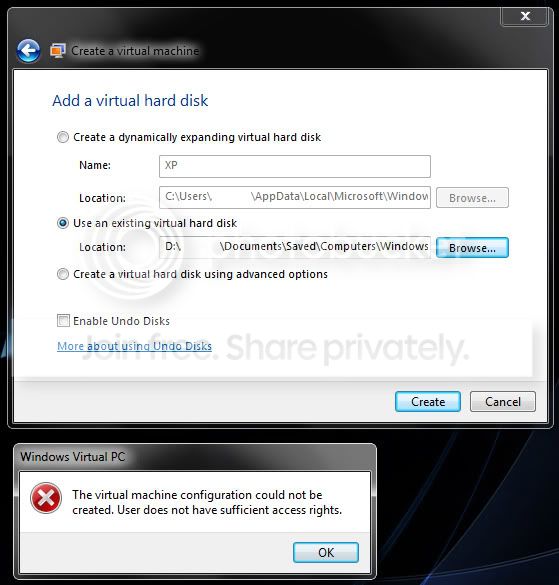
VPCaccessrights.jpg


I have tried disabling Virtual Pc under the Windows Features, then restarting, enabling it and restarting but same error and no XP mode anymore. Has anyone seen this before?
 

My Computer My Computer

At a glance

Windows 7 UltimateIntel Pentium Dual CPU T3400 @ 2.16GHz4.0GB Dual-Channel DDR2 @ 332MHzMobile Intel(R) 4 Series Express Chipset Fami...
Computer Manufacturer/Model Number
Acer Aspire 4730Z
OS
Windows 7 Ultimate
CPU
Intel Pentium Dual CPU T3400 @ 2.16GHz
Motherboard
Acer Aspire 4730Z V1.22 GL40
Memory
4.0GB Dual-Channel DDR2 @ 332MHz
Graphics Card(s)
Mobile Intel(R) 4 Series Express Chipset Family 1309 MB
Sound Card
Realtek High Definition Audio
Monitor(s) Displays
AOC 2795V
Screen Resolution
1920 x 1080
Hard Drives
500GB Hitachi HTS545050B9A300 ATA Travelstar
You could try this:
  • Delete (if exists) Your_Userfolder\Virtual Machines\Windows XP Mode.vmcx and all XP Mode files in Your_Userfoder\AppData\Local\Microsoft\Windows Virtual PC\Virtual Machines\
  • Delete also the base vhd C:\Program Files\Windows XP Mode\Windows XP Mode base.vhd
  • Restore both vhd's needed for XP Mode to run from your backup, the Windows XP Mode.vhd to its default location Your_Userfoder\AppData\Local\Microsoft\Windows Virtual PC\Virtual Machines\, and the base vhd to C:\Program Files\Windows XP Mode\
  • Go to Your_Username\Virtual Machines\ and create a new virtual machine
  • Select Use an existing virtual hard disk when asked, browse to the restored vhd (not the base), select it and follow instructions on screen. Setup adds the base vhd automatically

Kari
 

My Computer My Computer

At a glance

Windows 10 Pro x64 EN-GB1.6 GHz Intel Core i7-720QM Processor6 GBATI Mobility Radeon HD 5850 Graphics
Computer type
Laptop
Computer Manufacturer/Model Number
HP ENVY 17-1150eg
OS
Windows 10 Pro x64 EN-GB
CPU
1.6 GHz Intel Core i7-720QM Processor
Memory
6 GB
Graphics Card(s)
ATI Mobility Radeon HD 5850 Graphics
Sound Card
Beats sound system with integrated subwoofer
Monitor(s) Displays
17" laptop display, 22" LED and 32" Full HD TV through HDMI
Screen Resolution
1600*900 (1), 1920*1080 (2&3)
Hard Drives
Internal: 2 x 500 GB SATA Hard Disk Drive 7200 rpm
External: 2TB for backups, 3TB USB3 network drive for media
Cooling
As Envy runs a bit warm, I have it on a Cooler Master pad
Keyboard
Logitech diNovo Media Desktop Laser (bluetooth)
Mouse
Logitech Performance Mouse MX
Internet Speed
50/10 Mbps VDSL
Antivirus
Windows Defender 4.3.9431.0
Browser
Maxthon 3.5.2., IE11
Thanks - I just ran through all of the steps you listed and got the same user access rights error message. Not sure what else to try here... Thanks for the input though.
 

My Computer My Computer

At a glance

Windows 7 UltimateIntel Pentium Dual CPU T3400 @ 2.16GHz4.0GB Dual-Channel DDR2 @ 332MHzMobile Intel(R) 4 Series Express Chipset Fami...
Computer Manufacturer/Model Number
Acer Aspire 4730Z
OS
Windows 7 Ultimate
CPU
Intel Pentium Dual CPU T3400 @ 2.16GHz
Motherboard
Acer Aspire 4730Z V1.22 GL40
Memory
4.0GB Dual-Channel DDR2 @ 332MHz
Graphics Card(s)
Mobile Intel(R) 4 Series Express Chipset Family 1309 MB
Sound Card
Realtek High Definition Audio
Monitor(s) Displays
AOC 2795V
Screen Resolution
1920 x 1080
Hard Drives
500GB Hitachi HTS545050B9A300 ATA Travelstar

My Computer My Computer

At a glance

Windows 10 Pro x64 EN-GB1.6 GHz Intel Core i7-720QM Processor6 GBATI Mobility Radeon HD 5850 Graphics
Computer type
Laptop
Computer Manufacturer/Model Number
HP ENVY 17-1150eg
OS
Windows 10 Pro x64 EN-GB
CPU
1.6 GHz Intel Core i7-720QM Processor
Memory
6 GB
Graphics Card(s)
ATI Mobility Radeon HD 5850 Graphics
Sound Card
Beats sound system with integrated subwoofer
Monitor(s) Displays
17" laptop display, 22" LED and 32" Full HD TV through HDMI
Screen Resolution
1600*900 (1), 1920*1080 (2&3)
Hard Drives
Internal: 2 x 500 GB SATA Hard Disk Drive 7200 rpm
External: 2TB for backups, 3TB USB3 network drive for media
Cooling
As Envy runs a bit warm, I have it on a Cooler Master pad
Keyboard
Logitech diNovo Media Desktop Laser (bluetooth)
Mouse
Logitech Performance Mouse MX
Internet Speed
50/10 Mbps VDSL
Antivirus
Windows Defender 4.3.9431.0
Browser
Maxthon 3.5.2., IE11
No luck at all with getting xp mode to run... virtual PC keeps giving the same access right error. I took ownership of every file that I restored. but nothing seems to work. I just went ahead and installed Virtual Box and (ahem) got a copy of XP pro... which is up and runnng OK right now. I just liked how simple it was before to use the XP mode, then suddenly, nothing at all...

Thanks anyway.
 

My Computer My Computer

At a glance

Windows 7 UltimateIntel Pentium Dual CPU T3400 @ 2.16GHz4.0GB Dual-Channel DDR2 @ 332MHzMobile Intel(R) 4 Series Express Chipset Fami...
Computer Manufacturer/Model Number
Acer Aspire 4730Z
OS
Windows 7 Ultimate
CPU
Intel Pentium Dual CPU T3400 @ 2.16GHz
Motherboard
Acer Aspire 4730Z V1.22 GL40
Memory
4.0GB Dual-Channel DDR2 @ 332MHz
Graphics Card(s)
Mobile Intel(R) 4 Series Express Chipset Family 1309 MB
Sound Card
Realtek High Definition Audio
Monitor(s) Displays
AOC 2795V
Screen Resolution
1920 x 1080
Hard Drives
500GB Hitachi HTS545050B9A300 ATA Travelstar
One, the last option would of course be to re-install VPC and XPM? But, main thing is you got XP running.

Kari
 

My Computer My Computer

At a glance

Windows 10 Pro x64 EN-GB1.6 GHz Intel Core i7-720QM Processor6 GBATI Mobility Radeon HD 5850 Graphics
Computer type
Laptop
Computer Manufacturer/Model Number
HP ENVY 17-1150eg
OS
Windows 10 Pro x64 EN-GB
CPU
1.6 GHz Intel Core i7-720QM Processor
Memory
6 GB
Graphics Card(s)
ATI Mobility Radeon HD 5850 Graphics
Sound Card
Beats sound system with integrated subwoofer
Monitor(s) Displays
17" laptop display, 22" LED and 32" Full HD TV through HDMI
Screen Resolution
1600*900 (1), 1920*1080 (2&3)
Hard Drives
Internal: 2 x 500 GB SATA Hard Disk Drive 7200 rpm
External: 2TB for backups, 3TB USB3 network drive for media
Cooling
As Envy runs a bit warm, I have it on a Cooler Master pad
Keyboard
Logitech diNovo Media Desktop Laser (bluetooth)
Mouse
Logitech Performance Mouse MX
Internet Speed
50/10 Mbps VDSL
Antivirus
Windows Defender 4.3.9431.0
Browser
Maxthon 3.5.2., IE11
Same problem? fixed

I came here because i had the same problem,

solution here was to disable the UAC:

  • (configurations, user accounts and paren..., user accounts
  • -- new window pops out --
  • select the last option (Change user account settings)(or something like that)
  • -- new window pops out --
  • pull slider down to last option (never display any...)

--now you might have to reboot--

now try again to create your virtual machine.

P.S. you should probably set the UAC settings back for safety.
 

My Computer My Computer

At a glance

Win 7 x64i7 9406GbGeForce 9800GX2
OS
Win 7 x64
CPU
i7 940
Motherboard
ASUS something
Memory
6Gb
Graphics Card(s)
GeForce 9800GX2
Monitor(s) Displays
24" samsung + 24" HP
Hard Drives
4inside total 3,5TB
3outside total 5TB
NAS 2x1TB (RAID)
Add the "everyone" group to the D: security tab
 

My Computer My Computer

At a glance

7 Pro
OS
7 Pro
Back
Top