XP-only driver/device in Virtual XP Mode ? Possible ?

ghost301

New member
Member
Local time
1:24 PM
Messages
16
I got a Canon Printer which have no Vista support from official site which I wish to use it in W7. I know it's an old AIO printer but sometimes the scanner comes in handy, but problem is I only get hold of XP driver for it. I tried installed the Virtual XP mode beta and I try to setup my printer, but my driver setup won't go through, it said it can't detect my printer.

So just want to ask is it actually possible to install XP-only device in Virtual XP mode so I can use the device in W7 environment ? I didn't use much of Virtual PC so I am not quite sure. Thanks for any help !
smile.gif
 

My Computer

OS
Windows 7 7137 x64
Tell me the name of the driver file and let's see if we can force an install in Win7/Vista. Better yet, just send it to me.

I am new to vmachines, but it seems reasonable that the vmachine cannot use a device that the host cannot attach.
 
It's a canon MPC190 driver.

imageCLASS MPC190 MultiPASS Suite Ver.440a for Windows 98/2000/Me/XP XP Driver

imageCLASS MPC190 MultiPASS Suite Ver.440a Updater for Windows XP SP2 & later Update for XPSP2

Thing is because it need to install the MultiPASS thingy where it will check for the printer connection. I wonder if we can just extract the driver and do force install. I been googling it quite some time but seems no one able to make it work in Vista/7, at least not in a comprehensive way. Driver is downloadable from the links provided, see what you can do about it. Thanks !
 

My Computer

OS
Windows 7 7137 x64
Shoot an email to canon support. I've been hunting down drivers and a few have test drivers hanging around they never released.
 

My Computer

OS
7264x64/7260x86
Canon BJC-55 with IS-12 Cartridge

Gateway Laptop 32 bit without Hardware Virtualization. Opsys new with Vista upgraded to Win7

I also really like the Canon IS-12 scanner and can not get it to work except on XP. XP is on my desktop. If anyone has a way to get the scanner to work on Win7 or Win7 XP Mode I would love to know how.

I do have some info to contribute, I hope it helps someone.

The printer will work on XP, Vista, Virtual PC - XP Machine, Win7, Win7 XP Mode. The scanner will only work on XP. Microsoft techs in the Phillipines gave up trying to get the scanner to work on Win7 XP Mode. At the onset they thought that any XP device would work on Win7 XP Mode. They took over my computer and tried for 3 hours and then gave up.

How did they get the printer to work on Win7 and Win7 XP Mode ?? I do not know. I asked the man because my aunt also has a BJC-55. He said, "Have her call me, it can be different for each situation"

So, go to MS Support for Win7 answer the 5-6 questions, the computer gives you a case number, write it down, then call the 800 number. Then Albert & Jayson will get giggy wit it in the Phillipines.

Virtual PC vs XP Mode
The way I read the info on the website, XP Mode is a machine within Virtual PC. But the MS techs say that these are two different and incompatable programs.

I got the printer to work on Virtual PC - XP Machine by setting the printer as a network printer. The scanner would not work. When the MS techs took over my machine they uninstalled Virtual PC and installed XP Mode using a patch that is not yet available on the website. They said that XP Mode is much better than Virtual PC. So far I agree.
 

My Computer

Computer Manufacturer/Model Number
Gateway
OS
windows 7
BJC-55 printer w/ IS-12 scanner cartridge.

I had Virtual PC installed on my machine when I upgraded to Win7. I then followed the MS instructions to add XP Mode. Well that caused a problem that took 6 hours over two days to fix. MS fixed it no charge. They said this problem only happens to a few people. So, make a back up disc.

After MS fixed my machine:
The printer will function on Win7.
The scanner will function on Win7 only after changing the compatibility to Windows XP (Service Pack 2) in the Properties.

Start, All Programs, folder IS Scan Plus, program IS Scan Plus, Properties, Compatibility, Windows XP Mode, Apply, OK

The printer will function on Win7 XP Mode
THe scanner will NOT function on Win7 XP Mode. Windows XP (Service Pack 2) is NOT an option on the compatibility menu in XP Mode.

The scanner not functioning in XP Mode is no problem at all. You open the Scanner software in Win7, scan your document, save the scan, open the document from a program. Which ever OPSys the program is in it will open the scanned document.
 

My Computer

Computer Manufacturer/Model Number
Gateway
OS
windows 7
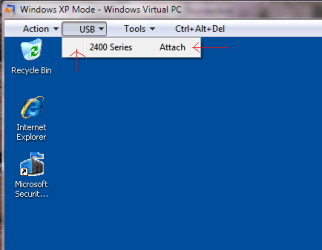
With the AIO hooked up to your computer and XP Mode running, did you first hit the USB tab at the top, then select the device to attach it first? Once you attach the printer, XP mode should give you a message that it detected new hardware and is searching for the drivers. You then should be able to stop the search and install the drivers you downloaded.
 

Attachments

  • usbmode.png
    usbmode.png
    11.6 KB · Views: 20

My Computer

Computer Manufacturer/Model Number
Rig 1
OS
Windows 7 Ultimate x64
CPU
AMD Phenom II X4 940 Black Edition @ 3.4GHz (AM2+)
Motherboard
Gigabyte GA-MA790X-UD4P (AM2+)
Memory
Corsair CM2X4096-8500C5 (4 X 2GB)
Graphics Card(s)
XFX Radeon HD 5770 / Diamond Radeon HD 5770 CrossFireX
Sound Card
Asus Xonar DS (PCI)
Monitor(s) Displays
Samsung SyncMaster 932bw+ (3)
Screen Resolution
4320x900
Hard Drives
OCZ Vertex 2 80 GB - Windows 7 System --
WD Caviar Black 1TB - Music, Movies, Vids, Pics --
WD Caviar Black 640GB - User Profiles & Games --
WD My Book 320GB external
PSU
Corsair CMPSU-750TX
Case
Cooler Master HAF 932
Cooling
Corsair Hydro Series H50
Keyboard
Logitech Desktop Wave
Mouse
Logitech LX8 Laser
Internet Speed
20 down / 2 up
Other Info
LG GGC-H20L Blu-Ray / HDDVD combo --
Hauppauge HVR-1250 --
Silverstone MFP-51 --
Logitech Webcam C600
Back
Top