XPMode in Windows 7,Now Ubuntu in Windows 7

raj11650

New member
Pro User
VIP
Local time
7:09 PM
Messages
851
Location
India ,Chennai
XPMode in Windows 7,Now Ubuntu in Windows 7

Well i guess most of the members here Prefer Windows over Ubuntu
still for those few members who got ubuntu as secondary boot,Now can port Ubuntu in Windows 7.

Free application Portable Ubuntu for Windows runs an entire Linux operating system as a Windows application. As if that weren't cool enough, it's portable, so you can carry it on your thumb drive.

So you have heard of Linux and one of its most popular flavors (Ubuntu) and want to try it out on your Windows system. (Most people probably don’t know what Linuxis and where it came from.) So, if you are new to Linux I just wanted to quickly mention that the name is derived from Linus Torvalds (the creator of Linux) a kick-ass Software Engineer and Computer Scientist from Finland.

To make a long story short Ubuntu is a community developed operating system that is perfect for laptops, desktops and servers. Whether you use it at home, at school or at work Ubuntu contains all the applications you’ll ever need, from word processing and email applications, to web server software and programming tools.

Ubuntu is and always will be free of charge. You do not pay any licensing fees. You can download, use and share Ubuntu with your friends, family, school or business for absolutely nothing.
Source1
Source2
 

My Computer My Computer

At a glance

win 7 build 7600.16385 x64AMD Athlon Dual core 7750 2.7GHz4GB 800MhzATI HD 3200 IGP
Computer Manufacturer/Model Number
Custom Build
OS
win 7 build 7600.16385 x64
CPU
AMD Athlon Dual core 7750 2.7GHz
Motherboard
Gigabyte GA78MA s2h
Memory
4GB 800Mhz
Graphics Card(s)
ATI HD 3200 IGP
Monitor(s) Displays
Acer 15 inch
Screen Resolution
1280x720
Hard Drives
Seagate 1 TB
Keyboard
Logitech
Mouse
Logitech
Internet Speed
Airtel DSL 2Mbps
Wow, what will they think of next? How did they develop this so quickly? Wasn't XP Mode pretty much hush-hush until like 1 or 2 weeks ago?
 

My Computer My Computer

At a glance

Windows 7 x64 / SameIntel Core 2 Duo T7250 / Intel Core i7 9304GB / 6GBNVIDIA GeForce 8400M GS / ASUS 1GB
Computer Manufacturer/Model Number
Dell Inspiron 1520 (Laptop)/ Home (Desktop)
OS
Windows 7 x64 / Same
CPU
Intel Core 2 Duo T7250 / Intel Core i7 930
Motherboard
Intel 945 / Asus P6X58D-E
Memory
4GB / 6GB
Graphics Card(s)
NVIDIA GeForce 8400M GS / ASUS 1GB
Sound Card
Whatever Dell gave me :-( / Onboard
Monitor(s) Displays
15.4" LCD / Crappy CRT
Hard Drives
Seagate 500GB SATA; 7200 RPM / Seagate 1TB SATA; 7200 RPM
PSU
N/A / OCZ Fatal1ty 550W Modular
Case
N/A / Antec 900
Cooling
Air
Mouse
Microsoft Presenter (Bluetooth)
That's OLD news -- you can run most OS's in a Virtual Machine --- even Windows 3.0 if you want to and almost ANY Linux distro -- and this has been available for AGES and AGES..

The Reverse is true as well -- it's easy running any version of Windows in a Linux box on a virtual machine.

VBOX runs on Linux (free) so does vmware.

If you re a bit adventurous you can even try XEN -- this is the Hypervisor Microsft is talking about in it's "Virtualisation" for LARGE enterprises.

What's slightly different about the "XP compatability Mode" is the much tighter integration of XP from within the main OS. Unlike "Classical VM's" the XP virtual machine can use a lot of "Native Windows Kernel" code itself.

Of course this has its own downside as well -- if the "VM" gets contaminated in any way then it *could* effect the Host. A True classical VM has much less opportunity to infect the host (unless it's done via networking in the way as networked physical machines can transmit infections).

Cheers
jimbo
 

My Computer My Computer

At a glance

Linux CENTOS 7 / various Windows OS'es and se...Intel i7 Intel i58GB, 16GBOn Motherboard
Computer type
PC/Desktop
Computer Manufacturer/Model Number
Custom built, several laptops HP/ASUS
OS
Linux CENTOS 7 / various Windows OS'es and servers
CPU
Intel i7 Intel i5
Memory
8GB, 16GB
Graphics Card(s)
On Motherboard
Sound Card
Realtek HD audio
Monitor(s) Displays
Apple Cinema display, Samsung LCD
Screen Resolution
1920 X 1080
Hard Drives
4 X 1TB SATA
Mouse
Toshiba wireless laser
Internet Speed
> 20MB up
Ive ran every version of windows in virtual pc in the past. Its fun to explore old systems. Its also a good way to try out linux if your curious about the dark side.
 

My Computer My Computer

At a glance

Windows 7 Professional 64-bitIntel E8400 3GHzKingston PC3-10700H 4GbXFX Radeon HD 5850 BlackEd.
Computer Manufacturer/Model Number
self built
OS
Windows 7 Professional 64-bit
CPU
Intel E8400 3GHz
Motherboard
Intel DX48BT2
Memory
Kingston PC3-10700H 4Gb
Graphics Card(s)
XFX Radeon HD 5850 BlackEd.
Sound Card
Asus Xonar DG
Monitor(s) Displays
2x Samsung SM-T220HD 22"
Screen Resolution
1680x1050 on two monitors
Hard Drives
OCZ Vertex 2 120gb 3.5" (OS)
Seagate Momentus XT 500gb
Samsung F3 1Tb (games)
2x Samsung F1 1Tb
PSU
Thermaltake ToughPower 850w
Case
Thermaltake Armor
Cooling
Scythe Mugen II
Keyboard
Microsoft Comfort Curve USB
Mouse
Razer Diamondback 3G
Internet Speed
8128/443
That's OLD news -- you can run most OS's in a Virtual Machine --- even Windows 3.0 if you want to and almost ANY Linux distro -- and this has been available for AGES and AGES..

The Reverse is true as well -- it's easy running any version of Windows in a Linux box on a virtual machine.

VBOX runs on Linux (free) so does vmware.

If you re a bit adventurous you can even try XEN -- this is the Hypervisor Microsft is talking about in it's "Virtualisation" for LARGE enterprises.

What's slightly different about the "XP compatability Mode" is the much tighter integration of XP from within the main OS. Unlike "Classical VM's" the XP virtual machine can use a lot of "Native Windows Kernel" code itself.

Of course this has its own downside as well -- if the "VM" gets contaminated in any way then it *could* effect the Host. A True classical VM has much less opportunity to infect the host (unless it's done via networking in the way as networked physical machines can transmit infections).

Cheers
jimbo

True...but I didn't see any mention of VM software...
 

My Computer My Computer

At a glance

Windows 7 x64 / SameIntel Core 2 Duo T7250 / Intel Core i7 9304GB / 6GBNVIDIA GeForce 8400M GS / ASUS 1GB
Computer Manufacturer/Model Number
Dell Inspiron 1520 (Laptop)/ Home (Desktop)
OS
Windows 7 x64 / Same
CPU
Intel Core 2 Duo T7250 / Intel Core i7 930
Motherboard
Intel 945 / Asus P6X58D-E
Memory
4GB / 6GB
Graphics Card(s)
NVIDIA GeForce 8400M GS / ASUS 1GB
Sound Card
Whatever Dell gave me :-( / Onboard
Monitor(s) Displays
15.4" LCD / Crappy CRT
Hard Drives
Seagate 500GB SATA; 7200 RPM / Seagate 1TB SATA; 7200 RPM
PSU
N/A / OCZ Fatal1ty 550W Modular
Case
N/A / Antec 900
Cooling
Air
Mouse
Microsoft Presenter (Bluetooth)
That's OLD news -- you can run most OS's in a Virtual Machine --- even Windows 3.0 if you want to and almost ANY Linux distro -- and this has been available for AGES and AGES..

The Reverse is true as well -- it's easy running any version of Windows in a Linux box on a virtual machine.

VBOX runs on Linux (free) so does vmware.

If you re a bit adventurous you can even try XEN -- this is the Hypervisor Microsft is talking about in it's "Virtualisation" for LARGE enterprises.

What's slightly different about the "XP compatability Mode" is the much tighter integration of XP from within the main OS. Unlike "Classical VM's" the XP virtual machine can use a lot of "Native Windows Kernel" code itself.

Of course this has its own downside as well -- if the "VM" gets contaminated in any way then it *could* effect the Host. A True classical VM has much less opportunity to infect the host (unless it's done via networking in the way as networked physical machines can transmit infections).

Cheers
jimbo

oh i thought the virtual ubuntu is new but its only windows seven is new :oand not the VM ubuntu!!!;)
 

My Computer My Computer

At a glance

win 7 build 7600.16385 x64AMD Athlon Dual core 7750 2.7GHz4GB 800MhzATI HD 3200 IGP
Computer Manufacturer/Model Number
Custom Build
OS
win 7 build 7600.16385 x64
CPU
AMD Athlon Dual core 7750 2.7GHz
Motherboard
Gigabyte GA78MA s2h
Memory
4GB 800Mhz
Graphics Card(s)
ATI HD 3200 IGP
Monitor(s) Displays
Acer 15 inch
Screen Resolution
1280x720
Hard Drives
Seagate 1 TB
Keyboard
Logitech
Mouse
Logitech
Internet Speed
Airtel DSL 2Mbps
That's OLD news -- you can run most OS's in a Virtual Machine --- even Windows 3.0 if you want to and almost ANY Linux distro -- and this has been available for AGES and AGES..

Theres been a few projects like this one out for a few years now :p
KDE on Windows - Vista Forums

What's slightly different about the "XP compatability Mode" is the much tighter integration of XP from within the main OS. Unlike "Classical VM's" the XP virtual machine can use a lot of "Native Windows Kernel" code itself.

Of course this has its own downside as well -- if the "VM" gets contaminated in any way then it *could* effect the Host. A True classical VM has much less opportunity to infect the host (unless it's done via networking in the way as networked physical machines can transmit infections).

Applications running from the VM environment are instanced via COM object (salaxhost) and they themselves can not communicate with the host, the VM handles negotiation between the application and the Host via this activeX instance. This separation causes virtualized applications to become less responsive than they would when normally run on the VM's desktop but this maintains separation to keep the VM environment separated from the Host environment and prevents automatic infections of both desktops unless you execute a virus in both environments via your communication settings like Networking, Serial, WiFi, DVD, USB, Internet, Email ... and other devices or applications you execute on either environment ;)

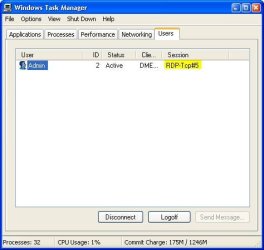
If you have Windows Search installed on the VM you can open an instace of Explorer and browse C:\WINDOWS\system32\taskmgr.exe , the session tab shows the connected user as RDP#<sessionnumber>

RDP_Session.JPG

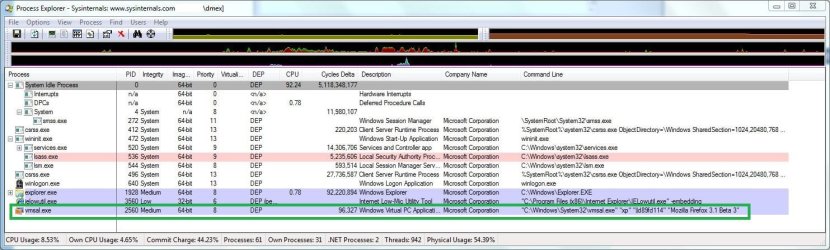
Looking at the process list shows an application instance of Firefox running from the VM using the process called vmsal.exe, your Antivirus just couldn't protect you from infection while you where using any application running from the virtualized desktop because it couldnt protect the environment the application is originating/created from and thats from the VM's Operating System.

FirefoxInstance.JPG

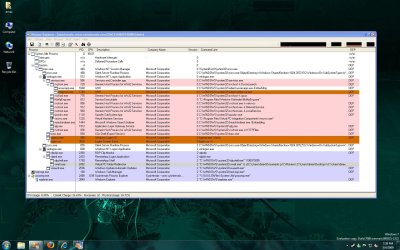
Procmon shows the process's rdpinit.exe, rdpshell.exe and wfar.exe as handling VM Process's being called by vmsal.exe on the Host ;)
ProcList.JPG
 
What's slightly different about the "XP compatability Mode" is the much tighter integration of XP from within the main OS. Unlike "Classical VM's" the XP virtual machine can use a lot of "Native Windows Kernel" code itself.


There's nothing like this in XP Mode

XP mode is just a virtualPC with "Application publishing" and "Remote application" feature via RDP.
All of this can be done manually without XP Mode, but XP mode allow you to do it in some clics

Windows XP Mode Internals – Part 2 (Application Publishing Magic) - Within Windows
 

My Computer My Computer

At a glance

Vista H.P. SP1 x32 Seven RC x64Q6600 @ 3.4Ghz4Go PC2-64008500GT @ 700/500
OS
Vista H.P. SP1 x32 Seven RC x64
CPU
Q6600 @ 3.4Ghz
Motherboard
GA-EP45-DS3L
Memory
4Go PC2-6400
Graphics Card(s)
8500GT @ 700/500
Sound Card
Audigy Platinium
Monitor(s) Displays
Mitsubishi Diamond Pro 920 + Mitsubishi Diamond Pro 720
Screen Resolution
1600x1200 twice
Hard Drives
Hitachi 160Go
Maxtor 160Go (system drive)
Maxtor 200Go in Antec MX-1 EC external box (eSATA-USB2.0)
PSU
Corsair VX550W
Case
Thermaltake Xaser III
Cooling
Watercooling (CPU, GPU, HDD, NB)
Keyboard
MS Wireless Multimedia 6000 V2.0
Mouse
IntellEye Explorer 3.0
Internet Speed
ADSL 18Mbit/s/1Mbit/s
XPMode in Windows 7,Now Ubuntu in Windows 7

Well i guess most of the members here Prefer Windows over Ubuntu
still for those few members who got ubuntu as secondary boot,Now can port Ubuntu in Windows 7.
Downloaded, installed(*), nothing happens. Would like to try. What am I doing wrong?

(*)
- extracted to C:/users/kari/downloads/portable_ubuntu
- opened command prompt as administrator
- gave command CD C:\Users\Kari\Downloads\Portable_Ubuntu
- gave command run_ubuntu_portable
- HD runs about 20 seconds, then nothing
 

My Computer My Computer

At a glance

Windows 10 Pro x64 EN-GB1.6 GHz Intel Core i7-720QM Processor6 GBATI Mobility Radeon HD 5850 Graphics
Computer type
Laptop
Computer Manufacturer/Model Number
HP ENVY 17-1150eg
OS
Windows 10 Pro x64 EN-GB
CPU
1.6 GHz Intel Core i7-720QM Processor
Memory
6 GB
Graphics Card(s)
ATI Mobility Radeon HD 5850 Graphics
Sound Card
Beats sound system with integrated subwoofer
Monitor(s) Displays
17" laptop display, 22" LED and 32" Full HD TV through HDMI
Screen Resolution
1600*900 (1), 1920*1080 (2&3)
Hard Drives
Internal: 2 x 500 GB SATA Hard Disk Drive 7200 rpm
External: 2TB for backups, 3TB USB3 network drive for media
Cooling
As Envy runs a bit warm, I have it on a Cooler Master pad
Keyboard
Logitech diNovo Media Desktop Laser (bluetooth)
Mouse
Logitech Performance Mouse MX
Internet Speed
50/10 Mbps VDSL
Antivirus
Windows Defender 4.3.9431.0
Browser
Maxthon 3.5.2., IE11
Back
Top