Solved XtremeMusic PCI Card No Sound After Reboot

Raillex

New member
Member
Local time
11:48 PM
Messages
66
I've been experiencing a weird problem with my SB XtremeMusic card recently and am at wit's end trying to fix it.

About every fourth or fifth reboot, I lose sound. The card still appears in device manager (with Windows reporting the device status as working properly) and the speaker icon still appears in my taskbar as it always does. The "Sound" tab in Control Panel shows everything configured exactly as it was before the reboot, and yet the card will still not output sound. The card worked fine for a couple of years and only started acting up a couple of months ago.

Installing the latest and older Windows 7 drivers from Creative doesn't fix the problem, and the only way I've been able to get sound to output again is by uninstalling the card in device manager and letting Windows redetect the card and automatically reinstall the software. The card works fine for several boot cycles, and then inexplicably stops working again. I'm getting real tired of this uninstall/reinstall routine, and was wondering if anyone has a solution.

Thanks in advance for your help.
 

My Computer My Computer

At a glance

Windows 7 Home 64bitIntel Core i7-2600K16GB CORSAIR Vengeance DDR3 RAMMSI Twin Frozr II Radeon HD 6870
OS
Windows 7 Home 64bit
CPU
Intel Core i7-2600K
Motherboard
ASUS P8Z68-V PRO
Memory
16GB CORSAIR Vengeance DDR3 RAM
Graphics Card(s)
MSI Twin Frozr II Radeon HD 6870
Sound Card
Creative X-Fi XtremeMusic
Monitor(s) Displays
ASUS VE276Q
Hard Drives
Crucial M4 CT128M4SSD2 SSD /
Western Digital Caviar Black WD2002FAEX
PSU
CORSAIR HX850 PSU
Case
LIAN LI PC-K9B
Cooling
ZALMAN CNPS9900MAX
Raillex I know you have probably tried but try reseating the card and look at my ditty here I mainly use for RAM slots but the same principle applies - before you reseat the card

SLOTCLEANING

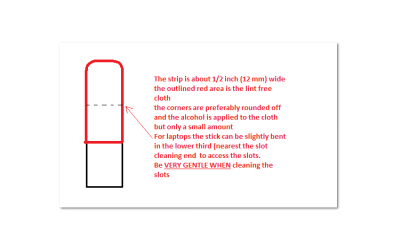
Now as for the slotsto clean them use a strip of old credit card about 1/2 inch wide nip thecorners off one end - preferably round them off hold a piece of thin lint free clothover the end dab on some form of alcohol - iso propyl alcohol (what we swab theskin with before an injection) is good and GENTLYswipe along the slots.

This can also be donefor the GPU slot/s.
 

Attachments

  • STICK.PNG
    STICK.PNG
    6 KB · Views: 0

My Computer My Computer

At a glance

Desk1 7 Home Prem / Desk2 10 Pro / Main lap A...Desk1 i5 3750K / Laptop i7 GTX 860M / Desk2 i...Desk1 8GB (1866) / Desk2 16GB (1333) / Laptop...Desk 1& 2NVidia GTX 650 & Laptops on board Intel
Computer type
PC/Desktop
Computer Manufacturer/Model Number
Own build (new) Desk1 / Asus ROG Win 7 / Desk2 1st build
OS
Desk1 7 Home Prem / Desk2 10 Pro / Main lap Asus ROG 10 Pro 2 laptop Toshiba 7 Pro Asus P2520 7 & 10
CPU
Desk1 i5 3750K / Laptop i7 GTX 860M / Desk2 i5 2500
Motherboard
Desk1 Asus P877-V / Desk2 Gigabyte H67 UD3H / Laptop ?
Memory
Desk1 8GB (1866) / Desk2 16GB (1333) / Laptop 8Gb DDR3
Graphics Card(s)
Desk 1& 2NVidia GTX 650 & Laptops on board Intel
Sound Card
Desk 1 & 2 -XONAR DG Realtek High Def audio Laptop
Monitor(s) Displays
Desk 1 Benq HD 2450 / Desk2 Philips 24" / Laptop 17.5"
Screen Resolution
1920x1080 D1 & D2 & Laptop 1
Hard Drives
Desk1 Samsung 120GB 830 SSD
Asus ROG 256GB 850 Pro SSD
Desk2 Samsung 840 256 SSD
Toshiba 120GB EVO
PSU
Desk 1 Corsair HX 1050/ Laptop ? / Desk 2 Corsair HX 650
Case
Desk 1 Cooler HAF XM ? Toshiba laptop / Desk2 Coolermaster
Cooling
Fans on all Desk1 -2 Desk2 - all Coolermasters 5 Laptop ?
Keyboard
Desk 1 MS Sidewinder X6 Desk 2 MS Sidewinder X 4
Mouse
Desk 1&2 - Gigabyte MS 900 gamer - laptop - Logitec wireless
Internet Speed
ADSL2+
Other Info
One other Desktop (tester) and spare Toshba laptop both with SSD's
Running Kaspersky 2016 ISS on all machines config'd identically
Logitec audio stereo systems on each machine (x3)
Canon MG5250MFC
Router/modem TP-Link running WPA2SK
Do you have the on-board (on the motherboard) Sound disabled in the BIOS? It needs to be disabled or there can be potential conflicts with other sound cards, and could potentiall cause the problem you are having
 

My Computer My Computer

At a glance

Windows 10 64 bitIntel i7 6700K16GB Corsair DominatorIntel CPU Graphics
Computer type
PC/Desktop
Computer Manufacturer/Model Number
My Own Build
OS
Windows 10 64 bit
CPU
Intel i7 6700K
Motherboard
ASUS ROG Maximus VIII Hero
Memory
16GB Corsair Dominator
Graphics Card(s)
Intel CPU Graphics
Sound Card
RealTek
Monitor(s) Displays
27" Dell S2719dgf
Screen Resolution
2560X1440
Hard Drives
1 TB Samsung 850 EVO SSD for Win 10 Pro
500GB Samsung 850 EVO SSD for Win 10 Insider
2 TB drive for backup
PSU
EVGA Supernova 750G2
Case
BeQuiet Silent Base 600
Cooling
Deepcool Captain 120EX
Keyboard
Microsoft Wireless 2000
Mouse
Microsoft wireless
Internet Speed
100 MB/sec (Cable)
Antivirus
Microsoft Defender and Malwarebytes
Browser
Edge/Firefox
Other Info
Cakewalk (Sonar) by BandLab and Studio One 4.1 Pro recording studio software. MOTU 896Mk3 Hybrid recording interface, Frontier Tranzport wireless control unit, Behringer X-Touch Control Surface.
Five USB connected optical drives for CD Audio production using Nero BurningROM
ICit2lol - I did try reseating the card when this first started happening with no luck. I'm pretty sure the PCI slot was clean as I used an air compressor to clean out the dust from my mobo and wiped the gold fingers on the sound card with alcohol when this first started happening, but I'll try your credit card method and see what happens.

firebird - Yes, the on board sound is both disabled in bios and absent in device manager. The only other entry under "Sound, video and game controllers" is AMD High Definition Audio Device. My graphics card is an AMD HD 7870. You don't think there's some sort of conflict between the two, do you?

Edit: I disabled the AMD HDAD entry in Device Manager for kicks and we'll see what happens. I don't use the card's HDMI port anyway, so this would be a good trade off if it works.
 
Last edited:

My Computer My Computer

At a glance

Windows 7 Home 64bitIntel Core i7-2600K16GB CORSAIR Vengeance DDR3 RAMMSI Twin Frozr II Radeon HD 6870
OS
Windows 7 Home 64bit
CPU
Intel Core i7-2600K
Motherboard
ASUS P8Z68-V PRO
Memory
16GB CORSAIR Vengeance DDR3 RAM
Graphics Card(s)
MSI Twin Frozr II Radeon HD 6870
Sound Card
Creative X-Fi XtremeMusic
Monitor(s) Displays
ASUS VE276Q
Hard Drives
Crucial M4 CT128M4SSD2 SSD /
Western Digital Caviar Black WD2002FAEX
PSU
CORSAIR HX850 PSU
Case
LIAN LI PC-K9B
Cooling
ZALMAN CNPS9900MAX
I doubt that the HDMI audio will affect it.
 

My Computer My Computer

At a glance

Windows 10 64 bitIntel i7 6700K16GB Corsair DominatorIntel CPU Graphics
Computer type
PC/Desktop
Computer Manufacturer/Model Number
My Own Build
OS
Windows 10 64 bit
CPU
Intel i7 6700K
Motherboard
ASUS ROG Maximus VIII Hero
Memory
16GB Corsair Dominator
Graphics Card(s)
Intel CPU Graphics
Sound Card
RealTek
Monitor(s) Displays
27" Dell S2719dgf
Screen Resolution
2560X1440
Hard Drives
1 TB Samsung 850 EVO SSD for Win 10 Pro
500GB Samsung 850 EVO SSD for Win 10 Insider
2 TB drive for backup
PSU
EVGA Supernova 750G2
Case
BeQuiet Silent Base 600
Cooling
Deepcool Captain 120EX
Keyboard
Microsoft Wireless 2000
Mouse
Microsoft wireless
Internet Speed
100 MB/sec (Cable)
Antivirus
Microsoft Defender and Malwarebytes
Browser
Edge/Firefox
Other Info
Cakewalk (Sonar) by BandLab and Studio One 4.1 Pro recording studio software. MOTU 896Mk3 Hybrid recording interface, Frontier Tranzport wireless control unit, Behringer X-Touch Control Surface.
Five USB connected optical drives for CD Audio production using Nero BurningROM
You're right. It only made it worse. Disabling HDMI caused me to lose sound on every reboot instead of every third or fourth.

Still stumped.
 

My Computer My Computer

At a glance

Windows 7 Home 64bitIntel Core i7-2600K16GB CORSAIR Vengeance DDR3 RAMMSI Twin Frozr II Radeon HD 6870
OS
Windows 7 Home 64bit
CPU
Intel Core i7-2600K
Motherboard
ASUS P8Z68-V PRO
Memory
16GB CORSAIR Vengeance DDR3 RAM
Graphics Card(s)
MSI Twin Frozr II Radeon HD 6870
Sound Card
Creative X-Fi XtremeMusic
Monitor(s) Displays
ASUS VE276Q
Hard Drives
Crucial M4 CT128M4SSD2 SSD /
Western Digital Caviar Black WD2002FAEX
PSU
CORSAIR HX850 PSU
Case
LIAN LI PC-K9B
Cooling
ZALMAN CNPS9900MAX
If disabling the HDMI audio caused loss of sound, there is some conflict. HDMI should have no affect on "Speakers" (the SoundBlaster). HDMI affecting sound with a PCIe sound card suggests some type of problem or conflict on the PCIe bus??
 

My Computer My Computer

At a glance

Windows 10 64 bitIntel i7 6700K16GB Corsair DominatorIntel CPU Graphics
Computer type
PC/Desktop
Computer Manufacturer/Model Number
My Own Build
OS
Windows 10 64 bit
CPU
Intel i7 6700K
Motherboard
ASUS ROG Maximus VIII Hero
Memory
16GB Corsair Dominator
Graphics Card(s)
Intel CPU Graphics
Sound Card
RealTek
Monitor(s) Displays
27" Dell S2719dgf
Screen Resolution
2560X1440
Hard Drives
1 TB Samsung 850 EVO SSD for Win 10 Pro
500GB Samsung 850 EVO SSD for Win 10 Insider
2 TB drive for backup
PSU
EVGA Supernova 750G2
Case
BeQuiet Silent Base 600
Cooling
Deepcool Captain 120EX
Keyboard
Microsoft Wireless 2000
Mouse
Microsoft wireless
Internet Speed
100 MB/sec (Cable)
Antivirus
Microsoft Defender and Malwarebytes
Browser
Edge/Firefox
Other Info
Cakewalk (Sonar) by BandLab and Studio One 4.1 Pro recording studio software. MOTU 896Mk3 Hybrid recording interface, Frontier Tranzport wireless control unit, Behringer X-Touch Control Surface.
Five USB connected optical drives for CD Audio production using Nero BurningROM
That's exactly what I was thinking. However, Windows isn't reporting any resource conflicts after a "soundless" reboot. My mobo (an Asus M4A89GTD Pro/USB) only has one PCI slot, so switching the card to another slot isn't an option.
 

My Computer My Computer

At a glance

Windows 7 Home 64bitIntel Core i7-2600K16GB CORSAIR Vengeance DDR3 RAMMSI Twin Frozr II Radeon HD 6870
OS
Windows 7 Home 64bit
CPU
Intel Core i7-2600K
Motherboard
ASUS P8Z68-V PRO
Memory
16GB CORSAIR Vengeance DDR3 RAM
Graphics Card(s)
MSI Twin Frozr II Radeon HD 6870
Sound Card
Creative X-Fi XtremeMusic
Monitor(s) Displays
ASUS VE276Q
Hard Drives
Crucial M4 CT128M4SSD2 SSD /
Western Digital Caviar Black WD2002FAEX
PSU
CORSAIR HX850 PSU
Case
LIAN LI PC-K9B
Cooling
ZALMAN CNPS9900MAX
I had a similar problem about a year ago with my Diamond Xtreme 5.1 PCI card and two ASRock 880-GMLE mobos.

Out of the box, the first ASRock board would sometimes see the card and load drivers, other times, the sound would just stop and Device Manager wouldn't see the card. I RMA'd the mobo for an identical replacement. Everything went fine for 18 months until the problem started again. I swapped slots but that didn't help. I replaced the sound card and everything worked fine for one month until this problem again surfaced.

At that point my only option was to replace the mobo, so I put the Diamond card into a new Gigabyte board. No problems since June 2013.
 

My Computer My Computer

At a glance

Win10 Pro 64-bitAMD Ryzen 7 3800X32 GB Kingston DDR4-2666MSI nVidia GT 710 (2GB)
Computer type
PC/Desktop
Computer Manufacturer/Model Number
Self-Built
OS
Win10 Pro 64-bit
CPU
AMD Ryzen 7 3800X
Motherboard
Gigabyte X570 UD
Memory
32 GB Kingston DDR4-2666
Graphics Card(s)
MSI nVidia GT 710 (2GB)
Sound Card
Creative Audigy FX 5.1
Monitor(s) Displays
ViewSonic VG2439Smh 24"
Screen Resolution
1920x1080
Hard Drives
3xWD1TB; 1xSeagate 1TB... all spinning rust
PSU
EVGA 100-W1-0500-KR (500w)
Case
SilverStone PS10 (modified)
Cooling
CPU:AMD Wraith Prism. Case:3x Noctua 120mm
Keyboard
Compaq Professional PS/2
Mouse
Microsoft Basic Optical Mouse 2.0
Internet Speed
Fiber 1Gbit/sec down/up
Antivirus
Avast Free
Browser
FF, Chrome
Other Info
2x LG GH24NSC0 DVD burners, Mackie CR3 monitor speakers
Aha! I see the issue (finally). You have a PCI sound card. The PCI slots on most new motherboards is not a true PCI slot, but merely a "bridged" PCI slot to the PCIe bus. Many PCI devices will either not work or not work correctly in a bridged PCI slot.

If you want to use a separate sound card, rather than the one built on the motherboard, best bet is a PCIe type sound card.

The bridged PCI slot is a major issue on the audio recording studio forums I visit.
 

My Computer My Computer

At a glance

Windows 10 64 bitIntel i7 6700K16GB Corsair DominatorIntel CPU Graphics
Computer type
PC/Desktop
Computer Manufacturer/Model Number
My Own Build
OS
Windows 10 64 bit
CPU
Intel i7 6700K
Motherboard
ASUS ROG Maximus VIII Hero
Memory
16GB Corsair Dominator
Graphics Card(s)
Intel CPU Graphics
Sound Card
RealTek
Monitor(s) Displays
27" Dell S2719dgf
Screen Resolution
2560X1440
Hard Drives
1 TB Samsung 850 EVO SSD for Win 10 Pro
500GB Samsung 850 EVO SSD for Win 10 Insider
2 TB drive for backup
PSU
EVGA Supernova 750G2
Case
BeQuiet Silent Base 600
Cooling
Deepcool Captain 120EX
Keyboard
Microsoft Wireless 2000
Mouse
Microsoft wireless
Internet Speed
100 MB/sec (Cable)
Antivirus
Microsoft Defender and Malwarebytes
Browser
Edge/Firefox
Other Info
Cakewalk (Sonar) by BandLab and Studio One 4.1 Pro recording studio software. MOTU 896Mk3 Hybrid recording interface, Frontier Tranzport wireless control unit, Behringer X-Touch Control Surface.
Five USB connected optical drives for CD Audio production using Nero BurningROM
After Googling for a solution for several hours, I finally stumbled upon the (not very well articulated) fix. Here it is:

1. Open Creative Console Launcher and switch to Audio Creation Mode.

2. Click the "save" icon in the top right hand corner and enter a description for your existing configuration.

3. Open the 'Snapshot" tab and click on the name you just entered.

4. Close the Console Launcher.

5. Open the Windows 7 Shutdown menu and click on Sleep.

6. Wake your machine from sleep.

7. Shut the machine completely down, and the X-Fi will output sound on your next and subsequent reboots.

I've now gone through half a dozen shutdowns and cold boots without losing sound. Worked for me, and will hopefully work for you.
 

My Computer My Computer

At a glance

Windows 7 Home 64bitIntel Core i7-2600K16GB CORSAIR Vengeance DDR3 RAMMSI Twin Frozr II Radeon HD 6870
OS
Windows 7 Home 64bit
CPU
Intel Core i7-2600K
Motherboard
ASUS P8Z68-V PRO
Memory
16GB CORSAIR Vengeance DDR3 RAM
Graphics Card(s)
MSI Twin Frozr II Radeon HD 6870
Sound Card
Creative X-Fi XtremeMusic
Monitor(s) Displays
ASUS VE276Q
Hard Drives
Crucial M4 CT128M4SSD2 SSD /
Western Digital Caviar Black WD2002FAEX
PSU
CORSAIR HX850 PSU
Case
LIAN LI PC-K9B
Cooling
ZALMAN CNPS9900MAX
You are lucky, many are not this fortunate with a "bridged" PCI slot motherboard and finally have to replace the PCI sound card with a PCIe model.
 

My Computer My Computer

At a glance

Windows 10 64 bitIntel i7 6700K16GB Corsair DominatorIntel CPU Graphics
Computer type
PC/Desktop
Computer Manufacturer/Model Number
My Own Build
OS
Windows 10 64 bit
CPU
Intel i7 6700K
Motherboard
ASUS ROG Maximus VIII Hero
Memory
16GB Corsair Dominator
Graphics Card(s)
Intel CPU Graphics
Sound Card
RealTek
Monitor(s) Displays
27" Dell S2719dgf
Screen Resolution
2560X1440
Hard Drives
1 TB Samsung 850 EVO SSD for Win 10 Pro
500GB Samsung 850 EVO SSD for Win 10 Insider
2 TB drive for backup
PSU
EVGA Supernova 750G2
Case
BeQuiet Silent Base 600
Cooling
Deepcool Captain 120EX
Keyboard
Microsoft Wireless 2000
Mouse
Microsoft wireless
Internet Speed
100 MB/sec (Cable)
Antivirus
Microsoft Defender and Malwarebytes
Browser
Edge/Firefox
Other Info
Cakewalk (Sonar) by BandLab and Studio One 4.1 Pro recording studio software. MOTU 896Mk3 Hybrid recording interface, Frontier Tranzport wireless control unit, Behringer X-Touch Control Surface.
Five USB connected optical drives for CD Audio production using Nero BurningROM
Glad to see it fixed :)
 

My Computer My Computer

At a glance

Desk1 7 Home Prem / Desk2 10 Pro / Main lap A...Desk1 i5 3750K / Laptop i7 GTX 860M / Desk2 i...Desk1 8GB (1866) / Desk2 16GB (1333) / Laptop...Desk 1& 2NVidia GTX 650 & Laptops on board Intel
Computer type
PC/Desktop
Computer Manufacturer/Model Number
Own build (new) Desk1 / Asus ROG Win 7 / Desk2 1st build
OS
Desk1 7 Home Prem / Desk2 10 Pro / Main lap Asus ROG 10 Pro 2 laptop Toshiba 7 Pro Asus P2520 7 & 10
CPU
Desk1 i5 3750K / Laptop i7 GTX 860M / Desk2 i5 2500
Motherboard
Desk1 Asus P877-V / Desk2 Gigabyte H67 UD3H / Laptop ?
Memory
Desk1 8GB (1866) / Desk2 16GB (1333) / Laptop 8Gb DDR3
Graphics Card(s)
Desk 1& 2NVidia GTX 650 & Laptops on board Intel
Sound Card
Desk 1 & 2 -XONAR DG Realtek High Def audio Laptop
Monitor(s) Displays
Desk 1 Benq HD 2450 / Desk2 Philips 24" / Laptop 17.5"
Screen Resolution
1920x1080 D1 & D2 & Laptop 1
Hard Drives
Desk1 Samsung 120GB 830 SSD
Asus ROG 256GB 850 Pro SSD
Desk2 Samsung 840 256 SSD
Toshiba 120GB EVO
PSU
Desk 1 Corsair HX 1050/ Laptop ? / Desk 2 Corsair HX 650
Case
Desk 1 Cooler HAF XM ? Toshiba laptop / Desk2 Coolermaster
Cooling
Fans on all Desk1 -2 Desk2 - all Coolermasters 5 Laptop ?
Keyboard
Desk 1 MS Sidewinder X6 Desk 2 MS Sidewinder X 4
Mouse
Desk 1&2 - Gigabyte MS 900 gamer - laptop - Logitec wireless
Internet Speed
ADSL2+
Other Info
One other Desktop (tester) and spare Toshba laptop both with SSD's
Running Kaspersky 2016 ISS on all machines config'd identically
Logitec audio stereo systems on each machine (x3)
Canon MG5250MFC
Router/modem TP-Link running WPA2SK
Back
Top