
Years long copy (numerous small files)

sweiller

New member
Local time
10:32 PM
Messages
3
Hi all,


look at the picture
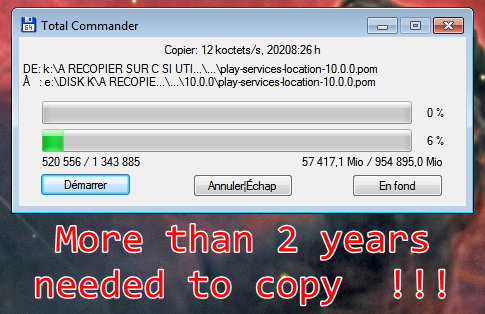
YearsToCopy.jpg


I am making a backup of lots of small files (Android, Genie_timeline, PC systems, etc ...) from one internal hard disk to another one USB3. If I transfer large files the speed is about 150 MB/sec !!
Here with small files it changes from a few KB/sec, sometimes bit more ... I cannot wait 20 000 hours ~ 2 years !!!!
I use TotalCommander but TeraCopy is no better !
I tried to make grouped Zip files but this also will take a very very very long time !


Is there a known way to copy small files faster or not ?
Would Linux do better ?


BR
 

My Computer My Computer

At a glance

Win7x64I7 950 @3.07G18GBATI Radeon HD 5700 Series
Computer type
PC/Desktop
OS
Win7x64
CPU
I7 950 @3.07G
Motherboard
ASUS P6x58D-E
Memory
18GB
Graphics Card(s)
ATI Radeon HD 5700 Series
Monitor(s) Displays
2
Screen Resolution
1920 x 1080 3D / 1920 x 1200
Hard Drives
Disk0 1863GB RAID0
Disk1 1863GB (2TO)
Disk2 1863GB (2TO)
Disk3 232 GB SSD BOOT & SYSTEM
Disk4 5589 GB (6TB / USB3)
Case
Cooler Master
Cooling
HYPER FAN
Keyboard
RAPOO
Mouse
Logitech
Internet Speed
20 Mb/sec
Antivirus
Avast
Browser
Chrome & Firefox

My Computer My Computer

At a glance

W7 home premium 32bit/W7HP 64bit/w10 tp insid...E5300 dual core3gbNvidia Geforce 7100 Nforce 630i
Computer type
PC/Desktop
Computer Manufacturer/Model Number
medionl/Aspire 6930G/acer x55a
OS
W7 home premium 32bit/W7HP 64bit/w10 tp insider ring
CPU
E5300 dual core
Motherboard
medion MS7366
Memory
3gb
Graphics Card(s)
Nvidia Geforce 7100 Nforce 630i
Monitor(s) Displays
avixc
Internet Speed
n (isp resticted to 72)
Antivirus
mse/pands
Browser
palemoon
Other Info
Belkin Fd7050 n USB using Railink RT2870 drivers, more upto date
Hi,
Tried Xcopy /S /C /Y /D K:\ E:\DISK-K\
Was working - I don't know how fast - but stopped with error :
Insufficient memory
48473 file(s) copied


??
BR
 

My Computer My Computer

At a glance

Win7x64I7 950 @3.07G18GBATI Radeon HD 5700 Series
Computer type
PC/Desktop
OS
Win7x64
CPU
I7 950 @3.07G
Motherboard
ASUS P6x58D-E
Memory
18GB
Graphics Card(s)
ATI Radeon HD 5700 Series
Monitor(s) Displays
2
Screen Resolution
1920 x 1080 3D / 1920 x 1200
Hard Drives
Disk0 1863GB RAID0
Disk1 1863GB (2TO)
Disk2 1863GB (2TO)
Disk3 232 GB SSD BOOT & SYSTEM
Disk4 5589 GB (6TB / USB3)
Case
Cooler Master
Cooling
HYPER FAN
Keyboard
RAPOO
Mouse
Logitech
Internet Speed
20 Mb/sec
Antivirus
Avast
Browser
Chrome & Firefox

My Computer My Computer

At a glance

W7 home premium 32bit/W7HP 64bit/w10 tp insid...E5300 dual core3gbNvidia Geforce 7100 Nforce 630i
Computer type
PC/Desktop
Computer Manufacturer/Model Number
medionl/Aspire 6930G/acer x55a
OS
W7 home premium 32bit/W7HP 64bit/w10 tp insider ring
CPU
E5300 dual core
Motherboard
medion MS7366
Memory
3gb
Graphics Card(s)
Nvidia Geforce 7100 Nforce 630i
Monitor(s) Displays
avixc
Internet Speed
n (isp resticted to 72)
Antivirus
mse/pands
Browser
palemoon
Other Info
Belkin Fd7050 n USB using Railink RT2870 drivers, more upto date
This is absolutely normal and expected, as your use case is among the worst possible situation for an operating system. Root problem is that the OS must ensure that the file system is consistent after each individual file, which means not only writing the file itself but also the system areas where files are indexed.

With large files, the data itself dominates the copy time, the drive bandwidth being the limiting factor. But with tons of tiny files, the bureaucracy of the filesystem produces lots of random writes (instead of sequential) which are much slower than writing a large block. Constantly going back and forth among those tasks noticeably slows the whole thing down, basically wasting the drive speed.
It's an inevitable fact that such operation will take a lot of time.

How many files are we talking about? Of what approximate size?
Using another tool may give a small boost and probably a better estimate (Windows Explorer is widely known for its non-sense time estimations). You could give some Linux a try at this, but I doubt that it could do noticeably better, the same problem still exists there.
 

My Computer My Computer

At a glance

Windows 7 Ultimate x64Intel Core i7-740QM8 GB DDR3NVIDIA GeForce 330GT
Computer type
Laptop
Computer Manufacturer/Model Number
Toshiba Sattelite A665-S6092
OS
Windows 7 Ultimate x64
CPU
Intel Core i7-740QM
Memory
8 GB DDR3
Graphics Card(s)
NVIDIA GeForce 330GT
Screen Resolution
1366x768
Hard Drives
Samsung 840 SSD 500GB
1TB USB3 external HD
Cooling
Coolermaster Notepal U3 notebook cooling pad
Internet Speed
3mbps ASDL
Antivirus
ClamWin 0.98.7
Browser
Opera 12.17 x86 (main), Firefox 38 (sec), IE11 (last resort)
English is the official language here. Most here won't know what to make of that screenshot. You might try putting the files in a archive using either windows explorer, winrar, or 7z.
 

My Computers My Computers

  • At a glance

    Windows 7 pro/Windows 10 ProIntel i7 860 Quad core 2.8 ghz8 gbATI Radeon HD 5770 1 gb ram
    Computer type
    PC/Desktop
    Computer Manufacturer/Model Number
    HP Pavillion Elite HPE-250f
    OS
    Windows 7 pro/Windows 10 Pro
    CPU
    Intel i7 860 Quad core 2.8 ghz
    Memory
    8 gb
    Graphics Card(s)
    ATI Radeon HD 5770 1 gb ram
    Monitor(s) Displays
    Alienware 25 AW2521HF & Viewsonic
    Screen Resolution
    1920 x1080 & 1680x1050
    Hard Drives
    WD blue 1 tb & 500 gb.
    Browser
    FF of course.
    Other Info
    https://www.bestbuy.com/site/hp-pavilion-elite-desktop-intel-core-i7-processor-8gb-memory-1tb-hard-drive/9921493.p?skuId=9921493
  • At a glance

    Windows 2012 R2 Data center/Linux Minti3 9100 3.6GHz, 8M cache, 4C/4T8GB 2666MT/s DDR4 ECC UDIMM
    Computer type
    PC/Desktop
    System Manufacturer/Model Number
    Dell Poweredge T140
    OS
    Windows 2012 R2 Data center/Linux Mint
    CPU
    i3 9100 3.6GHz, 8M cache, 4C/4T
    Memory
    8GB 2666MT/s DDR4 ECC UDIMM
    Monitor(s) Displays
    Viewsonic
    Screen Resolution
    1680x1050
    Hard Drives
    1 TB & 750 GB
    Other Info
    https://www.dell.com/en-us/work/shop/productdetailstxn/poweredge-t140?~ck=bt
Hi all,
Thanks.
I see there are no real fancy solutions.
Maybe will give another try to robocopy.
Making archives take also as I said a very long time.
 

My Computer My Computer

At a glance

Win7x64I7 950 @3.07G18GBATI Radeon HD 5700 Series
Computer type
PC/Desktop
OS
Win7x64
CPU
I7 950 @3.07G
Motherboard
ASUS P6x58D-E
Memory
18GB
Graphics Card(s)
ATI Radeon HD 5700 Series
Monitor(s) Displays
2
Screen Resolution
1920 x 1080 3D / 1920 x 1200
Hard Drives
Disk0 1863GB RAID0
Disk1 1863GB (2TO)
Disk2 1863GB (2TO)
Disk3 232 GB SSD BOOT & SYSTEM
Disk4 5589 GB (6TB / USB3)
Case
Cooler Master
Cooling
HYPER FAN
Keyboard
RAPOO
Mouse
Logitech
Internet Speed
20 Mb/sec
Antivirus
Avast
Browser
Chrome & Firefox
You might try doing a few folders at a time.
 

My Computers My Computers

  • At a glance

    Windows 7 pro/Windows 10 ProIntel i7 860 Quad core 2.8 ghz8 gbATI Radeon HD 5770 1 gb ram
    Computer type
    PC/Desktop
    Computer Manufacturer/Model Number
    HP Pavillion Elite HPE-250f
    OS
    Windows 7 pro/Windows 10 Pro
    CPU
    Intel i7 860 Quad core 2.8 ghz
    Memory
    8 gb
    Graphics Card(s)
    ATI Radeon HD 5770 1 gb ram
    Monitor(s) Displays
    Alienware 25 AW2521HF & Viewsonic
    Screen Resolution
    1920 x1080 & 1680x1050
    Hard Drives
    WD blue 1 tb & 500 gb.
    Browser
    FF of course.
    Other Info
    https://www.bestbuy.com/site/hp-pavilion-elite-desktop-intel-core-i7-processor-8gb-memory-1tb-hard-drive/9921493.p?skuId=9921493
  • At a glance

    Windows 2012 R2 Data center/Linux Minti3 9100 3.6GHz, 8M cache, 4C/4T8GB 2666MT/s DDR4 ECC UDIMM
    Computer type
    PC/Desktop
    System Manufacturer/Model Number
    Dell Poweredge T140
    OS
    Windows 2012 R2 Data center/Linux Mint
    CPU
    i3 9100 3.6GHz, 8M cache, 4C/4T
    Memory
    8GB 2666MT/s DDR4 ECC UDIMM
    Monitor(s) Displays
    Viewsonic
    Screen Resolution
    1680x1050
    Hard Drives
    1 TB & 750 GB
    Other Info
    https://www.dell.com/en-us/work/shop/productdetailstxn/poweredge-t140?~ck=bt
If possible remove HD from case and connect internally, should be sata drive, so if you have a sata cable and a spare power connection in your pc case ...
 

My Computer My Computer

At a glance

win 7 ultimate 32bit
Computer type
PC/Desktop
OS
win 7 ultimate 32bit
Back
Top