
"¥" instead "\" when System locale is setting to Japanese
Well, its my first post here and my english is not good, Hi all!
I've installed win7 ultimate 64bit yesterday and Iam having a annoying problem when System locale is setting to Japanese:
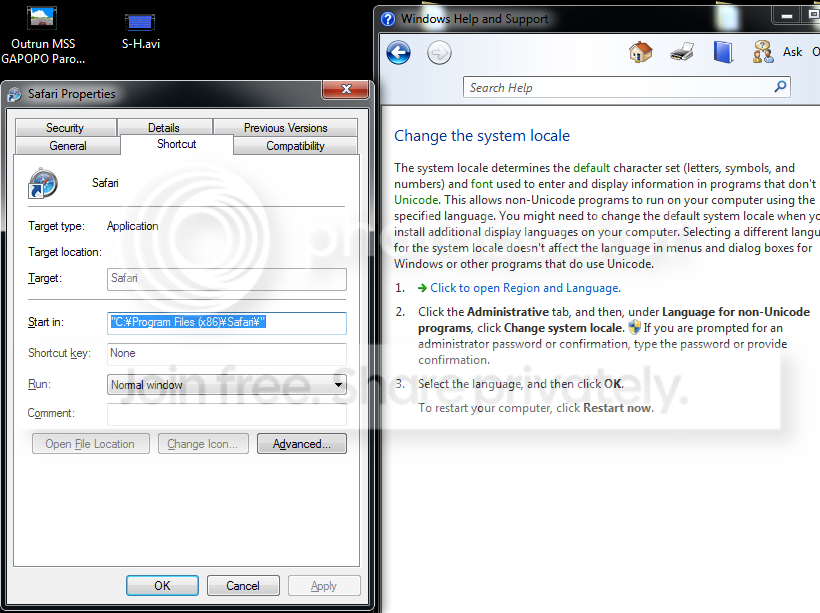
The standard "\" character in shortcut dialog box, for example was replaced with yen symbol (¥)
Windows help said that it dont affect the language in menus or dialog boxes for windows or other programs that do use Unicode (see image below), then i dont understand why its changing this character, and well, I know that its visual only but i preffer my windows without this yen symbol and yet, being able to show correct characters in japanese applications
Well, its my first post here and my english is not good, Hi all!
I've installed win7 ultimate 64bit yesterday and Iam having a annoying problem when System locale is setting to Japanese:
The standard "\" character in shortcut dialog box, for example was replaced with yen symbol (¥)
Windows help said that it dont affect the language in menus or dialog boxes for windows or other programs that do use Unicode (see image below), then i dont understand why its changing this character, and well, I know that its visual only but i preffer my windows without this yen symbol and yet, being able to show correct characters in japanese applications
My Computer
At a glance
Windows 7 Ultimate 64bitIntel Core2Duo E8400 - 3GHz3gb kingstonNvidia 9600GT (1GB)
- OS
- Windows 7 Ultimate 64bit
- CPU
- Intel Core2Duo E8400 - 3GHz
- Motherboard
- pw945gcx
- Memory
- 3gb kingston
- Graphics Card(s)
- Nvidia 9600GT (1GB)

