Yet again a driver problem

RedTornado

New member
Local time
6:51 PM
Messages
4
Location
Irving, Texas, USA
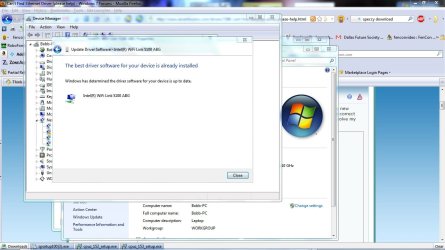
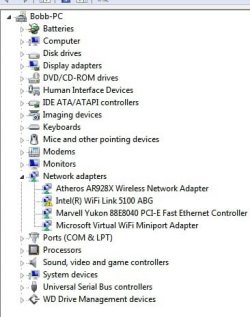
I've been tearing what hair I have left, (Think Larry of the 3 Stooges) with Device Manager showing an WIFI link not working correctly.
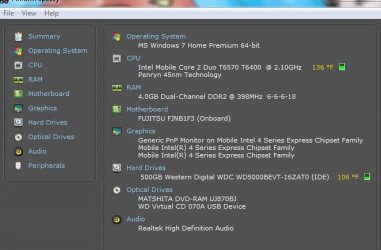
I'm attaching a few screen shots of the problem. I have had no luck with Fujitsu, or Intel help. I would really appreciate it is someone here can help, and or tell me to ignore the whole thing.
Here are a few screen shots, as you can see I tried to give enough that someone might catch something I have not:
 

Attachments
  • missing Driver.jpg
    missing Driver.jpg
    27 KB · Views: 13
  • driver working.jpg
    driver working.jpg
    103.2 KB · Views: 32
  • WiFI Link 5100 working or not.jpg
    WiFI Link 5100 working or not.jpg
    118.6 KB · Views: 34
  • system.jpg
    system.jpg
    34.5 KB · Views: 23

My Computer

Computer Manufacturer/Model Number
Fujitsu A1130
OS
Windows 7 Home Premium x64
CPU
Intel Mobile Core 2 Duo T6570 T6400 2.10GHz Penryn 45nm Tech
Motherboard
Fujitsu FJNB1F3 (Onboard)
Memory
4.0GB Dual-Channel DDR2 @ 398MHz 6-6-6-18
Graphics Card(s)
Intel 4 Series Express Chipset
Sound Card
Realtek High Definition Audio
Monitor(s) Displays
Generic PnP Monitor (15.4) on Mobile Intel 4 Series Express
Screen Resolution
1366 x 768
Hard Drives
WD 500BEVT
Seagate Free Agent 500GB (USB)
WD My Passport 300GB (USB)
Case
Fujitsu Lifebook A1130
Cooling
Internal (?)
Keyboard
Standard PS/2
Mouse
Logitech M305/Alp Pointing-device
Internet Speed
25Down/15 Up
Other Info
Built in USB 2.0 Digital Camera/Scanner
Last edited:

My Computer

Computer Manufacturer/Model Number
Self Built
OS
Windows 7 ultimate 64 bit / XP Home sp3
CPU
intel Core 2 Duo E8400 3.0ghz
Motherboard
Asus P5ND bios 1401
Memory
8 gigs 1066 OCZ Fata1ty
Graphics Card(s)
EVGA GTX 580 Call of Duty Black Ops Edition
Sound Card
Creative Soundblaster Audigy 2zs
Monitor(s) Displays
Asus 24in LCD's 2MS X2
Screen Resolution
1920x1080p @60Hz
Hard Drives
WD Caviar 500 Black/ WD Caviar 200 Blue
PSU
OCZ 700W GameXtreme
Case
NZXT Apollo
Cooling
Corsair H50 CPU/120mm x3 /60mm x2 /Corsair Dominator Ram
Keyboard
Logitech Bluetooth Wireless MX5000
Mouse
Logitech Bluetooth Wireless MX1000
Internet Speed
Download 19.83 Upload 0.97
Other Info
Logitech Z2300 Speakers/ Bose Noise Cancelling Headphones/Avermedia PCI-e Hybrid TV Bravo/Epson NX415 all in one/ 4 Port Powered USB Hub/ LG 10x Bluray Burner /TSST Corp DVDRW External
Same driver here - go to Intel and let it autoupdate. Simple.
 

My Computer

Computer Manufacturer/Model Number
Sony Vaio Z46GDU
OS
Windows 7 Ultimate x86-64
CPU
[email protected] 1066MHz FSB
Motherboard
Sony branded
Memory
6GB DDR3 1066MHz
Graphics Card(s)
9300M GS 256MB Dedicated (Speed) + Intel4500MHD (Stamina)
Sound Card
Realtek HD Audio
Monitor(s) Displays
13.1' WXGA
Screen Resolution
1600x900
Hard Drives
320GB 7200RPM w/ 16MB cache
Internet Speed
1MB/s
Thanks for all the suggestions. I have tried all the advice,and appropriate driver. (Both Fujitsu & Intel) And whether in Safe Mode or in Regular boot up I keep getting an error 31. I have even tried disabling the device, and reinstalling it as well.
I am going to look further into the links that
Frostmourne posted as well.

Thanks!
 

My Computer

Computer Manufacturer/Model Number
Fujitsu A1130
OS
Windows 7 Home Premium x64
CPU
Intel Mobile Core 2 Duo T6570 T6400 2.10GHz Penryn 45nm Tech
Motherboard
Fujitsu FJNB1F3 (Onboard)
Memory
4.0GB Dual-Channel DDR2 @ 398MHz 6-6-6-18
Graphics Card(s)
Intel 4 Series Express Chipset
Sound Card
Realtek High Definition Audio
Monitor(s) Displays
Generic PnP Monitor (15.4) on Mobile Intel 4 Series Express
Screen Resolution
1366 x 768
Hard Drives
WD 500BEVT
Seagate Free Agent 500GB (USB)
WD My Passport 300GB (USB)
Case
Fujitsu Lifebook A1130
Cooling
Internal (?)
Keyboard
Standard PS/2
Mouse
Logitech M305/Alp Pointing-device
Internet Speed
25Down/15 Up
Other Info
Built in USB 2.0 Digital Camera/Scanner
Says for some reason can't find location of driver therefore

Device manager > problem wifi device
go to "update driver" button and force an update - ie go into the section "let me choose a driver" and 'untick' the tick to reveal available drivers. Force it to accept a driver. See what happens.

Hope you understand.
 

My Computer

Computer type
PC/Desktop
Computer Manufacturer/Model Number
D.I.Y.
OS
WIN7 Ultimate 64bit
CPU
AMD FX8150/Trinity A10-5700
Motherboard
Asus Sabertooth v.1 /Asus F2A85-M Pro
Memory
G-Skill 2400 x2 @ 1866 (both pc's)
Graphics Card(s)
Sapphire (factory OC version) AMD 7770
Sound Card
onboard
Monitor(s) Displays
T260 Samsung
Screen Resolution
1920x1080
Hard Drives
Western Digital Sata 2TB/1TB Caviar Blacks
Buffalo 1TB usb (excellent drive)
PSU
Be-Quiet 700W E-9/Be-Quiet 550W E-9(E-9 = built by FSP)
Case
Antec P183/Antec P180mini
Cooling
x2 Xigmatek SXHH7-U01 + C-Master R4-EXBB-20PK-R0 120mm Fans
Keyboard
Cherry
Mouse
MS Explorer 3.0
Other Info
LG Blu ray combo
Pioneer 207D/208 Blu ray burners
neo101,
Thanks however I have tried this many time, and still no luck.

Bobb
 

My Computer

Computer Manufacturer/Model Number
Fujitsu A1130
OS
Windows 7 Home Premium x64
CPU
Intel Mobile Core 2 Duo T6570 T6400 2.10GHz Penryn 45nm Tech
Motherboard
Fujitsu FJNB1F3 (Onboard)
Memory
4.0GB Dual-Channel DDR2 @ 398MHz 6-6-6-18
Graphics Card(s)
Intel 4 Series Express Chipset
Sound Card
Realtek High Definition Audio
Monitor(s) Displays
Generic PnP Monitor (15.4) on Mobile Intel 4 Series Express
Screen Resolution
1366 x 768
Hard Drives
WD 500BEVT
Seagate Free Agent 500GB (USB)
WD My Passport 300GB (USB)
Case
Fujitsu Lifebook A1130
Cooling
Internal (?)
Keyboard
Standard PS/2
Mouse
Logitech M305/Alp Pointing-device
Internet Speed
25Down/15 Up
Other Info
Built in USB 2.0 Digital Camera/Scanner

My Computer

Computer Manufacturer/Model Number
Sony Vaio Z46GDU
OS
Windows 7 Ultimate x86-64
CPU
[email protected] 1066MHz FSB
Motherboard
Sony branded
Memory
6GB DDR3 1066MHz
Graphics Card(s)
9300M GS 256MB Dedicated (Speed) + Intel4500MHD (Stamina)
Sound Card
Realtek HD Audio
Monitor(s) Displays
13.1' WXGA
Screen Resolution
1600x900
Hard Drives
320GB 7200RPM w/ 16MB cache
Internet Speed
1MB/s
I've tried Intel's, and Fujitsu's sites. The error keeps showing up on installation. I am probably just going to disable it since when I do I don't notice any change to the way my system runs.
 

My Computer

Computer Manufacturer/Model Number
Fujitsu A1130
OS
Windows 7 Home Premium x64
CPU
Intel Mobile Core 2 Duo T6570 T6400 2.10GHz Penryn 45nm Tech
Motherboard
Fujitsu FJNB1F3 (Onboard)
Memory
4.0GB Dual-Channel DDR2 @ 398MHz 6-6-6-18
Graphics Card(s)
Intel 4 Series Express Chipset
Sound Card
Realtek High Definition Audio
Monitor(s) Displays
Generic PnP Monitor (15.4) on Mobile Intel 4 Series Express
Screen Resolution
1366 x 768
Hard Drives
WD 500BEVT
Seagate Free Agent 500GB (USB)
WD My Passport 300GB (USB)
Case
Fujitsu Lifebook A1130
Cooling
Internal (?)
Keyboard
Standard PS/2
Mouse
Logitech M305/Alp Pointing-device
Internet Speed
25Down/15 Up
Other Info
Built in USB 2.0 Digital Camera/Scanner
I've tried Intel's, and Fujitsu's sites. The error keeps showing up on installation. I am probably just going to disable it since when I do I don't notice any change to the way my system runs.

What error? Intel should download an activex control, then present the download, then install it.
 

My Computer

Computer Manufacturer/Model Number
Sony Vaio Z46GDU
OS
Windows 7 Ultimate x86-64
CPU
[email protected] 1066MHz FSB
Motherboard
Sony branded
Memory
6GB DDR3 1066MHz
Graphics Card(s)
9300M GS 256MB Dedicated (Speed) + Intel4500MHD (Stamina)
Sound Card
Realtek HD Audio
Monitor(s) Displays
13.1' WXGA
Screen Resolution
1600x900
Hard Drives
320GB 7200RPM w/ 16MB cache
Internet Speed
1MB/s
Back
Top