

RedTornado
New member
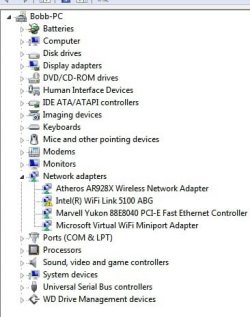
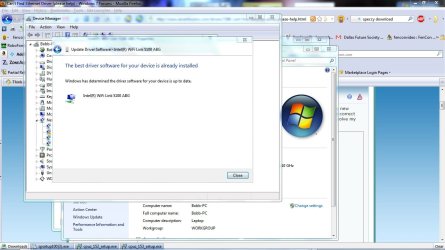
I've been tearing what hair I have left, (Think Larry of the 3 Stooges) with Device Manager showing an WIFI link not working correctly.
I'm attaching a few screen shots of the problem. I have had no luck with Fujitsu, or Intel help. I would really appreciate it is someone here can help, and or tell me to ignore the whole thing.
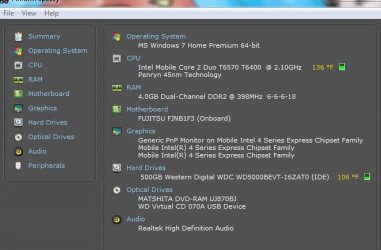
Here are a few screen shots, as you can see I tried to give enough that someone might catch something I have not:
I'm attaching a few screen shots of the problem. I have had no luck with Fujitsu, or Intel help. I would really appreciate it is someone here can help, and or tell me to ignore the whole thing.
Here are a few screen shots, as you can see I tried to give enough that someone might catch something I have not:
Attachments

My Computer
- Computer Manufacturer/Model Number
- Fujitsu A1130
- OS
- Windows 7 Home Premium x64
- CPU
- Intel Mobile Core 2 Duo T6570 T6400 2.10GHz Penryn 45nm Tech
- Motherboard
- Fujitsu FJNB1F3 (Onboard)
- Memory
- 4.0GB Dual-Channel DDR2 @ 398MHz 6-6-6-18
- Graphics Card(s)
- Intel 4 Series Express Chipset
- Sound Card
- Realtek High Definition Audio
- Monitor(s) Displays
- Generic PnP Monitor (15.4) on Mobile Intel 4 Series Express
- Screen Resolution
- 1366 x 768
- Hard Drives
- WD 500BEVT
Seagate Free Agent 500GB (USB)
WD My Passport 300GB (USB)
- Case
- Fujitsu Lifebook A1130
- Cooling
- Internal (?)
- Keyboard
- Standard PS/2
- Mouse
- Logitech M305/Alp Pointing-device
- Internet Speed
- 25Down/15 Up
- Other Info
- Built in USB 2.0 Digital Camera/Scanner

