
Hi,
didn't wanted to start another similar thread
I am having strange problem, I've win 7 ultimate in my laptop, its running norton antivirus for a year almost and is virus free IMHO.
I am logged in as admin, and have most windows updates installed.
proper motherboard drivers from manufacturer, Laptop is under a year old and initially didn't had this problem.
But when i connect any USD Device, and click on green icon in system tray, it doesn't extends menu, I don't see any menu no matter how many times i try it, Having this issue since a few months now, Every time I go to my computer and right click on usb drives and selected eject.
But Recently I purchased a WD Element usb HDD, although i was in habit of going to my computer to eject USB Disk but this time its a shocker
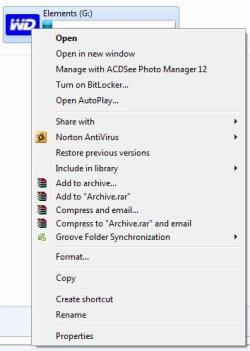
WD drive doesn't even shows a EJECT option in my computer even.
Here's a screenshot
I don't wanna FRY my external HDD by hot un-plug, as I just spent last night, pulling data from a bad 500GB Internal 3.5inch SATA II HDD, and yeah for those who don't believe the frozen drive recovery method, it works dude, I pulled more than 120GB last night after freezing the drive and then attaching it as secondary drive on my Desktop
I am now running SFC to verify only on laptop, lets see what the logs have for me.
any suggestion much appreciated
didn't wanted to start another similar thread
I am having strange problem, I've win 7 ultimate in my laptop, its running norton antivirus for a year almost and is virus free IMHO.
I am logged in as admin, and have most windows updates installed.
proper motherboard drivers from manufacturer, Laptop is under a year old and initially didn't had this problem.
But when i connect any USD Device, and click on green icon in system tray, it doesn't extends menu, I don't see any menu no matter how many times i try it, Having this issue since a few months now, Every time I go to my computer and right click on usb drives and selected eject.
But Recently I purchased a WD Element usb HDD, although i was in habit of going to my computer to eject USB Disk but this time its a shocker
WD drive doesn't even shows a EJECT option in my computer even.
Here's a screenshot
I don't wanna FRY my external HDD by hot un-plug, as I just spent last night, pulling data from a bad 500GB Internal 3.5inch SATA II HDD, and yeah for those who don't believe the frozen drive recovery method, it works dude, I pulled more than 120GB last night after freezing the drive and then attaching it as secondary drive on my Desktop
I am now running SFC to verify only on laptop, lets see what the logs have for me.
any suggestion much appreciated
My Computer
At a glance
Windows 7 Ultimate x64Core2duo E7500,2.93GHz4GB DD3Ge Force 9400GT
- OS
- Windows 7 Ultimate x64
- CPU
- Core2duo E7500,2.93GHz
- Motherboard
- Intel
- Memory
- 4GB DD3
- Graphics Card(s)
- Ge Force 9400GT
- Monitor(s) Displays
- Samsung 22 Inch 2233
- Screen Resolution
- 1920x1080
- Hard Drives
- 1TB Seagate Barracuda
- PSU
- 450W
- Cooling
- Custom, Fans only
- Keyboard
- Microsoft
- Mouse
- Wireless
- Internet Speed
- 2mbps

 rb: Type services into the search for programs box, Click on Services when it appears in the list, scroll down to Bluetooth support and double click on it and ensure it is set to Automatic click Apply and then Start and eventually on OK. Then close all windows that have opened and try to eject your device again.
 .
.
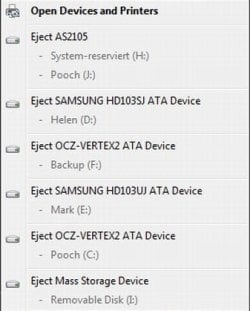
 important thing tho is that it now works
