yet another USB Eject Problem

ghpk

New member
Local time
5:35 PM
Messages
4
Location
India
Hi,
didn't wanted to start another similar thread
I am having strange problem, I've win 7 ultimate in my laptop, its running norton antivirus for a year almost and is virus free IMHO.
I am logged in as admin, and have most windows updates installed.
proper motherboard drivers from manufacturer, Laptop is under a year old and initially didn't had this problem.

But when i connect any USD Device, and click on green icon in system tray, it doesn't extends menu, I don't see any menu no matter how many times i try it, Having this issue since a few months now, Every time I go to my computer and right click on usb drives and selected eject.

But Recently I purchased a WD Element usb HDD, although i was in habit of going to my computer to eject USB Disk but this time its a shocker
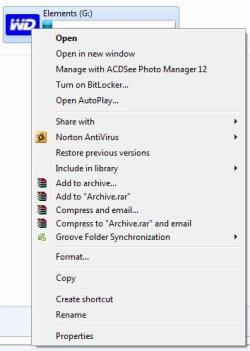
WD drive doesn't even shows a EJECT option in my computer even.

Here's a screenshot
no_eject.jpg

I don't wanna FRY my external HDD by hot un-plug, as I just spent last night, pulling data from a bad 500GB Internal 3.5inch SATA II HDD, and yeah for those who don't believe the frozen drive recovery method, it works dude, I pulled more than 120GB last night after freezing the drive and then attaching it as secondary drive on my Desktop

I am now running SFC to verify only on laptop, lets see what the logs have for me.

any suggestion much appreciated
 

My Computer

OS
Windows 7 Ultimate x64
CPU
Core2duo E7500,2.93GHz
Motherboard
Intel
Memory
4GB DD3
Graphics Card(s)
Ge Force 9400GT
Monitor(s) Displays
Samsung 22 Inch 2233
Screen Resolution
1920x1080
Hard Drives
1TB Seagate Barracuda
PSU
450W
Cooling
Custom, Fans only
Keyboard
Microsoft
Mouse
Wireless
Internet Speed
2mbps
Hello ghpk, welcome to the forum

click on start orb :orb: Type services into the search for programs box, Click on Services when it appears in the list, scroll down to Bluetooth support and double click on it and ensure it is set to Automatic click Apply and then Start and eventually on OK. Then close all windows that have opened and try to eject your device again.
Let me know how you get on.
 

My Computer

Computer Manufacturer/Model Number
Something I threw together
OS
Windows 7 Ultimate x64
CPU
Intel Core i7-2600K
Motherboard
Asus P8P67
Memory
16 GB G Skill F3-10666 CL9D-4GBRL
Graphics Card(s)
ATI Radeon HD 6870
Sound Card
ATI Radeon HDMI / Realtek ALC892
Monitor(s) Displays
2 x 22" standard monitors / LG32LC56v TV to watch films
Screen Resolution
1920 x1080
Hard Drives
2 x OCZ Vertex2 111.79GB
3 x Samsung103SJ
1 x Samsung103UJ
1 x WD3200BEVT
1 x Hitachi5K320-160
PSU
Thermaltake Toughpower Cable Management 750W
Case
Antec 300
Cooling
Noctua NH-U12P SE2 and 5 120mm Case fans
Keyboard
Microsoft Comfort Curve Keyboard 2000
Mouse
Hama M3110 / Logitech M305
Internet Speed
16000
Other Info
I have also used Fedora, Suse, Ubuntu Linux
And all other Windows from 95 to date except ME
External Hard Drives don't show the eject option, Windows only shows those for other removable storage.
 

My Computer

Computer Manufacturer/Model Number
HP Pavilion dv6-2020ev
OS
Ubuntu 12.10
CPU
Intel Core i7 720QM
Motherboard
Its a HP secret...
Memory
4GB RAM
Graphics Card(s)
NVIDIA GeForce 230M
Sound Card
IDT
Screen Resolution
1366x768
Hard Drives
500 GB
Mouse
HP
Internet Speed
4 Mbps
Hello ghpk, welcome to the forum

click on start orb :orb: Type services into the search for programs box, Click on Services when it appears in the list, scroll down to Bluetooth support and double click on it and ensure it is set to Automatic click Apply and then Start and eventually on OK. Then close all windows that have opened and try to eject your device again.
Let me know how you get on.

Yes I disabled bluetooth specifically earlier, never knew this will stop device Eject Pop up, Just enabled BT and got the eject as option for usb device in system tray.
Haven't checked it with external HDD yet, will check in tomo.


External Hard Drives don't show the eject option, Windows only shows those for other removable storage.

Then how to power down them for safe removal, I am sure they must be stopped they are un-plugged from USB port ?
 

My Computer

OS
Windows 7 Ultimate x64
CPU
Core2duo E7500,2.93GHz
Motherboard
Intel
Memory
4GB DD3
Graphics Card(s)
Ge Force 9400GT
Monitor(s) Displays
Samsung 22 Inch 2233
Screen Resolution
1920x1080
Hard Drives
1TB Seagate Barracuda
PSU
450W
Cooling
Custom, Fans only
Keyboard
Microsoft
Mouse
Wireless
Internet Speed
2mbps
You do that from the USB icon on the bottom right corner (taskbar).
 

My Computer

Computer Manufacturer/Model Number
HP Pavilion dv6-2020ev
OS
Ubuntu 12.10
CPU
Intel Core i7 720QM
Motherboard
Its a HP secret...
Memory
4GB RAM
Graphics Card(s)
NVIDIA GeForce 230M
Sound Card
IDT
Screen Resolution
1366x768
Hard Drives
500 GB
Mouse
HP
Internet Speed
4 Mbps
Thanks SlasherIT, I'll try this and report back
 

My Computer

OS
Windows 7 Ultimate x64
CPU
Core2duo E7500,2.93GHz
Motherboard
Intel
Memory
4GB DD3
Graphics Card(s)
Ge Force 9400GT
Monitor(s) Displays
Samsung 22 Inch 2233
Screen Resolution
1920x1080
Hard Drives
1TB Seagate Barracuda
PSU
450W
Cooling
Custom, Fans only
Keyboard
Microsoft
Mouse
Wireless
Internet Speed
2mbps
No problem :).
 

My Computer

Computer Manufacturer/Model Number
HP Pavilion dv6-2020ev
OS
Ubuntu 12.10
CPU
Intel Core i7 720QM
Motherboard
Its a HP secret...
Memory
4GB RAM
Graphics Card(s)
NVIDIA GeForce 230M
Sound Card
IDT
Screen Resolution
1366x768
Hard Drives
500 GB
Mouse
HP
Internet Speed
4 Mbps
External Hard Drives don't show the eject option, Windows only shows those for other removable storage.

Then how to power down them for safe removal, I am sure they must be stopped they are un-plugged from USB port ?
Sorry I was away for the weekend, all external drives drives can be disconnected over the safely Remove Hardware and Eject Media Icon, but I expect you have already found that out by now :)

Capture.JPG

Capture1.JPG

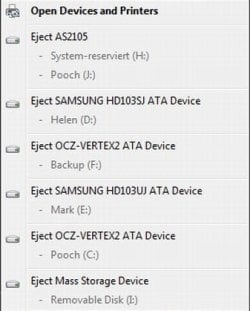
AS2105 is an external HDD and the Mass storage device is an SD card
 

My Computer

Computer Manufacturer/Model Number
Something I threw together
OS
Windows 7 Ultimate x64
CPU
Intel Core i7-2600K
Motherboard
Asus P8P67
Memory
16 GB G Skill F3-10666 CL9D-4GBRL
Graphics Card(s)
ATI Radeon HD 6870
Sound Card
ATI Radeon HDMI / Realtek ALC892
Monitor(s) Displays
2 x 22" standard monitors / LG32LC56v TV to watch films
Screen Resolution
1920 x1080
Hard Drives
2 x OCZ Vertex2 111.79GB
3 x Samsung103SJ
1 x Samsung103UJ
1 x WD3200BEVT
1 x Hitachi5K320-160
PSU
Thermaltake Toughpower Cable Management 750W
Case
Antec 300
Cooling
Noctua NH-U12P SE2 and 5 120mm Case fans
Keyboard
Microsoft Comfort Curve Keyboard 2000
Mouse
Hama M3110 / Logitech M305
Internet Speed
16000
Other Info
I have also used Fedora, Suse, Ubuntu Linux
And all other Windows from 95 to date except ME
my problem solved as soon as I enabled "Bluetooth" service from services.msc

I still don't know why Bluetooth service prevents the Safely remove hardware, there can be systems requiring USB Removal support, why the heck its so dependent on Bluetooth service ???
 

My Computer

OS
Windows 7 Ultimate x64
CPU
Core2duo E7500,2.93GHz
Motherboard
Intel
Memory
4GB DD3
Graphics Card(s)
Ge Force 9400GT
Monitor(s) Displays
Samsung 22 Inch 2233
Screen Resolution
1920x1080
Hard Drives
1TB Seagate Barracuda
PSU
450W
Cooling
Custom, Fans only
Keyboard
Microsoft
Mouse
Wireless
Internet Speed
2mbps
my problem solved as soon as I enabled "Bluetooth" service from services.msc

I still don't know why Bluetooth service prevents the Safely remove hardware, there can be systems requiring USB Removal support, why the heck its so dependent on Bluetooth service ???
I really do not know, but Microsoft probably have their reasons, :confused: important thing tho is that it now works :)
 

My Computer

Computer Manufacturer/Model Number
Something I threw together
OS
Windows 7 Ultimate x64
CPU
Intel Core i7-2600K
Motherboard
Asus P8P67
Memory
16 GB G Skill F3-10666 CL9D-4GBRL
Graphics Card(s)
ATI Radeon HD 6870
Sound Card
ATI Radeon HDMI / Realtek ALC892
Monitor(s) Displays
2 x 22" standard monitors / LG32LC56v TV to watch films
Screen Resolution
1920 x1080
Hard Drives
2 x OCZ Vertex2 111.79GB
3 x Samsung103SJ
1 x Samsung103UJ
1 x WD3200BEVT
1 x Hitachi5K320-160
PSU
Thermaltake Toughpower Cable Management 750W
Case
Antec 300
Cooling
Noctua NH-U12P SE2 and 5 120mm Case fans
Keyboard
Microsoft Comfort Curve Keyboard 2000
Mouse
Hama M3110 / Logitech M305
Internet Speed
16000
Other Info
I have also used Fedora, Suse, Ubuntu Linux
And all other Windows from 95 to date except ME
Back
Top