
You are using an out of date browser. It may not display this or other websites correctly.
You should upgrade or use an alternative browser.
You should upgrade or use an alternative browser.
Yo please help me with this 3tb drive.
- Thread starter Boskee
- Start date

My Computer
- Computer type
- PC/Desktop
- Computer Manufacturer/Model Number
- Built them myself, Science Experiments !
- OS
- Win7 Enterprise, Win7 x86 (Ult 7600), Win7 x64 Ult 7600, TechNet RTM on AMD x64 (2.8Ghz)
- CPU
- AMD fx8350 4ghz, AMD-32 2400mhz, AMD-64 3200mhz, AMDx64 2.8G
- Motherboard
- SIS 755, ECS-K8M890M-M (Ult 7600), GigaByte & others
- Memory
- 2gb, 4gb on the Ult 7600, 4gb on Technet RTM, 32gb on FX8350
- Graphics Card(s)
- Draw my own Graphics, several nVidia cards
- Sound Card
- on motherboard
- Monitor(s) Displays
- 19" flat scr, 28" I-Inc widescr,22" Emprex Widescr, 23" Acer
- Screen Resolution
- 1280 x 1024, 1440 x 900, 1920 x 1080
- Hard Drives
- 6 pata Ide HD's & 2 Sata HD's
added 80gb external on Ult 7600 computer,
numerous extra 1tb, 2TB, 3Tb SATA HD's
A collection of ext HD Docks w/ HDs
- PSU
- 430w, 550w, 600w, 700, 800, etc
- Case
- All Generic Full Towers
- Cooling
- Open Air & a few fans, some w/ colored LEDs
- Keyboard
- Compaq & Dell recycled from GoodWill
- Mouse
- Made in China Optical Wired Mouse
- Internet Speed
- Fast Cable InterNet
- Antivirus
- AVG Free on 24 different Desktops, NO Problems!
- Browser
- IE 8 is preferred, but use FireFox sometimes
- Other Info
- Linksys Routers, switches, & Hubs
Too Many USB Flash Drives to count, Biggest is 64GB !
Eight computers in my home network.
Sixteen computers at my business network.
Linked via TeamViewer !
Lots of old used spare computer parts everywhere!
Did you do the formatting of this HD? Does you computer Bios recognize Large Capacity HD's ?
My Computer
- Computer type
- PC/Desktop
- Computer Manufacturer/Model Number
- Built them myself, Science Experiments !
- OS
- Win7 Enterprise, Win7 x86 (Ult 7600), Win7 x64 Ult 7600, TechNet RTM on AMD x64 (2.8Ghz)
- CPU
- AMD fx8350 4ghz, AMD-32 2400mhz, AMD-64 3200mhz, AMDx64 2.8G
- Motherboard
- SIS 755, ECS-K8M890M-M (Ult 7600), GigaByte & others
- Memory
- 2gb, 4gb on the Ult 7600, 4gb on Technet RTM, 32gb on FX8350
- Graphics Card(s)
- Draw my own Graphics, several nVidia cards
- Sound Card
- on motherboard
- Monitor(s) Displays
- 19" flat scr, 28" I-Inc widescr,22" Emprex Widescr, 23" Acer
- Screen Resolution
- 1280 x 1024, 1440 x 900, 1920 x 1080
- Hard Drives
- 6 pata Ide HD's & 2 Sata HD's
added 80gb external on Ult 7600 computer,
numerous extra 1tb, 2TB, 3Tb SATA HD's
A collection of ext HD Docks w/ HDs
- PSU
- 430w, 550w, 600w, 700, 800, etc
- Case
- All Generic Full Towers
- Cooling
- Open Air & a few fans, some w/ colored LEDs
- Keyboard
- Compaq & Dell recycled from GoodWill
- Mouse
- Made in China Optical Wired Mouse
- Internet Speed
- Fast Cable InterNet
- Antivirus
- AVG Free on 24 different Desktops, NO Problems!
- Browser
- IE 8 is preferred, but use FireFox sometimes
- Other Info
- Linksys Routers, switches, & Hubs
Too Many USB Flash Drives to count, Biggest is 64GB !
Eight computers in my home network.
Sixteen computers at my business network.
Linked via TeamViewer !
Lots of old used spare computer parts everywhere!
Did you do the formatting of this HD? Does you computer Bios recognize Large Capacity HD's ?
im about to upload a video. Just reinstalled windows but my user is on a different disk so it kept most of the stuff but sony vegas isn't working so sorry if it is lacking editing
edit: dang taking so long to process
Last edited:
My Computer
- OS
- Windows 7 Ultimate 64 bit
http://www.youtube.com/watch?v=gUmzQyxH7X0
this is a video I made, help pls.
this is a video I made, help pls.
Last edited:
My Computer
- OS
- Windows 7 Ultimate 64 bit
Try this.
Download GParted bootable iso, burn it to cd using Imgburn at 4x speed.
Boot with it; click your 3tb disk; Tools- Convert partition table - Advanced - GPT - Okay when done.
Remove the cd, boot up normally and go to Disk Management; right-click the drive to initialize as simple volume, and format it NTFS. This should give you the 3 tb.
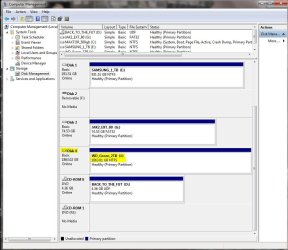
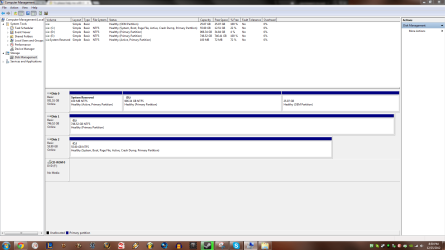
On another matter; you have two partitions with the active flag. That generally is not a good idea. Leave the System Reserved flag alone, but kill active on the C: partition (right click for that option).
Download GParted bootable iso, burn it to cd using Imgburn at 4x speed.
Boot with it; click your 3tb disk; Tools- Convert partition table - Advanced - GPT - Okay when done.
Remove the cd, boot up normally and go to Disk Management; right-click the drive to initialize as simple volume, and format it NTFS. This should give you the 3 tb.
On another matter; you have two partitions with the active flag. That generally is not a good idea. Leave the System Reserved flag alone, but kill active on the C: partition (right click for that option).
My Computer
- Computer Manufacturer/Model Number
- 8 home-builds from the 80's into 2004
- OS
- W7 Home Premium 32bit
Try this.
Download GParted bootable iso, burn it to cd using Imgburn at 4x speed.
Boot with it; click your 3tb disk; Tools- Convert partition table - Advanced - GPT - Okay when done.
Remove the cd, boot up normally and go to Disk Management; right-click the drive to initialize as simple volume, and format it NTFS. This should give you the 3 tb.
On another matter; you have two partitions with the active flag. That generally is not a good idea. Leave the System Reserved flag alone, but kill active on the C: partition (right click for that option).
I couldn't find any such thing called tools.
My Computer
- OS
- Windows 7 Ultimate 64 bit
My apologies; instructions were for the older version in my library of tech discs.
Go to Device tab - Create Partition Table - Advanced - click down arrow - choose GPT.
Go to Device tab - Create Partition Table - Advanced - click down arrow - choose GPT.
My Computer
- Computer Manufacturer/Model Number
- 8 home-builds from the 80's into 2004
- OS
- W7 Home Premium 32bit
My apologies; instructions were for the older version in my library of tech discs.
Go to Device tab - Create Partition Table - Advanced - click down arrow - choose GPT.
I just did that and nothing changed

My Computer
- OS
- Windows 7 Ultimate 64 bit
Making the assumption that GPartEd did the partition table work (10-15 minutes), I've got nothing else to offer to resurrect you're h/d to 3tb.
If nobody else comes on board to try to fix this, RMA it. When you get the replacement, run Gparted to get the GPT; then reboot and initialize it & format it in Disk Management.
By the way, you never answered Doc Brown's question about your BIOS seeing the 3tb as 3tb when you first boot up with it attached to the pc.
If nobody else comes on board to try to fix this, RMA it. When you get the replacement, run Gparted to get the GPT; then reboot and initialize it & format it in Disk Management.
By the way, you never answered Doc Brown's question about your BIOS seeing the 3tb as 3tb when you first boot up with it attached to the pc.
My Computer
- Computer Manufacturer/Model Number
- 8 home-builds from the 80's into 2004
- OS
- W7 Home Premium 32bit
Making the assumption that GPartEd did the partition table work (10-15 minutes), I've got nothing else to offer to resurrect you're h/d to 3tb.
If nobody else comes on board to try to fix this, RMA it. When you get the replacement, run Gparted to get the GPT; then reboot and initialize it & format it in Disk Management.
By the way, you never answered Doc Brown's question about your BIOS seeing the 3tb as 3tb when you first boot up with it attached to the pc.
what do you mean when my bios sees it?
My Computer
- OS
- Windows 7 Ultimate 64 bit
Tap the "hot" key (usually Del, Esc, F2,) to enter BIOS when you're first booting up. The first page usually lists the h/d's. What does it say about the 3tb size?
It would be helpful if you filled in your specs.
Check your mobo manufacturer's support site for a possible BIOS upgrade.
It would be helpful if you filled in your specs.
Check your mobo manufacturer's support site for a possible BIOS upgrade.
My Computer
- Computer Manufacturer/Model Number
- 8 home-builds from the 80's into 2004
- OS
- W7 Home Premium 32bit
Tap the "hot" key (usually Del, Esc, F2,) to enter BIOS when you're first booting up. The first page usually lists the h/d's. What does it say about the 3tb size?
It would be helpful if you filled in your specs.
Check your mobo manufacturer's support site for a possible BIOS upgrade.
yeah it shows up as a device to boot from and stuff like that
and i think my motherboard is Intel P67 Express Chipset.
i took it out of this computer Newegg.com - lenovo IdeaCentre K330 (7727-4FU) Desktop PC Intel Core i7 2600(3.40GHz) 8GB DDR3 1TB HDD Capacity NVIDIA GeForce GT 420 1GB Windows 7 Home Premium 64-bit
My Computer
- OS
- Windows 7 Ultimate 64 bit
Similar threads
- Replies
- 15
- Views
- 11K
- Replies
- 7
- Views
- 3K

- Replies
- 2
- Views
- 761
- Replies
- 12
- Views
- 3K
