"You don't have permission to enable or disable device wake."

fatbottoms

New member
Member
Local time
11:12 AM
Messages
54
"You don't have permission to enable or disable device wake."

This sleep problem is driving me crazy.

I've had problems in the past with my laptop not being able to go to sleep or awake from sleep, but I've always been able to figure it out by updating drivers or changing the settings in device manager, but this time nothing is working.

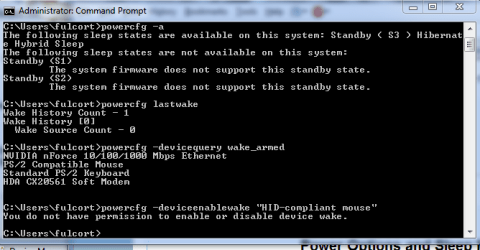
I've referenced the "Power options and sleep problems tutorial" and have included a screenshot of the command prompt.

When I type in powercfg -deviceenablewake "exact name of device listed in step 2A" , I get the "You do not have permission to enable or disable device wake."

I am the only user and have full administrator access.

Some background on my laptop: HP G60-120us 2ghz dual core 3gb ram.

Due to overheating issues, after my motherboard got fried, I got another motherboard from HP, but noticed that it was for a different model, but it didn't seem to make a difference as everything worked okay.

Then my hdd finally died after 6 months of "Smart Failure Message" so I upgraded to a bigger and faster hdd - from a 250gb 5400rpm Toshiba to a 750gb 7200rpm WD.

I have had problems with it ever since I replaced the hdd.

At first, I couldn't even get the computer to sleep, but finally figured out that it was my magicjack phone that was keeping it from going into the sleep state.

I never had this problem with the magicjack and sleep state before the hdd replacement.

Now, while it will go to sleep, I cannot get it to wake with my wireless laser mouse (Targus) or keyboard (Microsoft).

I've updated and downloaded every freaking driver for the mouse and keyboard from the manufacturer's to Microsoft updates and nothing seems to work.

My bios options are almost nil when it comes to changing anything, and my options to "allow this device to wake the computer" is greyed out in my device manager under USB, and don't have a power option under keyboard or mouse.

Can someone please tell me what to do?


Attachments
  • Command Prompt.PNG
    Command Prompt.PNG
    15.3 KB · Views: 58

My Computer My Computer

At a glance

windows 7 ultimateamd dual core 643gbnvidia g force 8200m
Computer Manufacturer/Model Number
hp pavillion g60-120us
OS
windows 7 ultimate
CPU
amd dual core 64
Memory
3gb
Graphics Card(s)
nvidia g force 8200m
Monitor(s) Displays
samsung hdtv
Screen Resolution
1366x768
Hard Drives
toshiba mk2552gsx (250gb)
Case
notebook
Internet Speed
time warner broad band
hi

You need to run the cmd with administrative privilages...

right click on cmd and run as administrator....

try this and let me know
 

My Computer My Computer

At a glance

Windows 7 ultimate x64
Computer Manufacturer/Model Number
Nothing specific....what ever the clients provide for Repair
OS
Windows 7 ultimate x64
I tried that and I get the same message.

As I said, I'm the only user on this laptop and have no other accounts.
 

My Computer My Computer

At a glance

windows 7 ultimateamd dual core 643gbnvidia g force 8200m
Computer Manufacturer/Model Number
hp pavillion g60-120us
OS
windows 7 ultimate
CPU
amd dual core 64
Memory
3gb
Graphics Card(s)
nvidia g force 8200m
Monitor(s) Displays
samsung hdtv
Screen Resolution
1366x768
Hard Drives
toshiba mk2552gsx (250gb)
Case
notebook
Internet Speed
time warner broad band
I should also mention that I use my HDTV as my monitor, and can wake the laptop with the touch pad.

I use my laptop like a desktop computer with the lid closed, and swipe my finger across the touch pad to wake it up.
 

My Computer My Computer

At a glance

windows 7 ultimateamd dual core 643gbnvidia g force 8200m
Computer Manufacturer/Model Number
hp pavillion g60-120us
OS
windows 7 ultimate
CPU
amd dual core 64
Memory
3gb
Graphics Card(s)
nvidia g force 8200m
Monitor(s) Displays
samsung hdtv
Screen Resolution
1366x768
Hard Drives
toshiba mk2552gsx (250gb)
Case
notebook
Internet Speed
time warner broad band
If you are referring to your laptop touchpad... then its already been armed for waking up....

If your bios has no option for wake and your targus mouse doesnt have option for wake.... then there is nothin much you can do... it is either depended on bios or the drivers that provides the capability.....
 

My Computer My Computer

At a glance

Windows 7 ultimate x64
Computer Manufacturer/Model Number
Nothing specific....what ever the clients provide for Repair
OS
Windows 7 ultimate x64
It was working previously before with the same setup.

The only thing I changed was the new hdd.

I don't understand how changing the hdd would effect this.
 

My Computer My Computer

At a glance

windows 7 ultimateamd dual core 643gbnvidia g force 8200m
Computer Manufacturer/Model Number
hp pavillion g60-120us
OS
windows 7 ultimate
CPU
amd dual core 64
Memory
3gb
Graphics Card(s)
nvidia g force 8200m
Monitor(s) Displays
samsung hdtv
Screen Resolution
1366x768
Hard Drives
toshiba mk2552gsx (250gb)
Case
notebook
Internet Speed
time warner broad band
How did you do it... i mean did you do a clean install of Windows 7 on the new HDD with the latest drivers ?? or just images the old HDD to the new one ???
 

My Computer My Computer

At a glance

Windows 7 ultimate x64
Computer Manufacturer/Model Number
Nothing specific....what ever the clients provide for Repair
OS
Windows 7 ultimate x64
No, I did a clean install of Windows 7 and I just recently dual booted with Windows 8 Release Preview and I'm having the same problems with Windows 8...so freaking frustrating.
 

My Computer My Computer

At a glance

windows 7 ultimateamd dual core 643gbnvidia g force 8200m
Computer Manufacturer/Model Number
hp pavillion g60-120us
OS
windows 7 ultimate
CPU
amd dual core 64
Memory
3gb
Graphics Card(s)
nvidia g force 8200m
Monitor(s) Displays
samsung hdtv
Screen Resolution
1366x768
Hard Drives
toshiba mk2552gsx (250gb)
Case
notebook
Internet Speed
time warner broad band
Due to overheating issues, after my motherboard got fried, I got another motherboard from HP, but noticed that it was for a different model, but it didn't seem to make a difference as everything worked okay.

you also did chnge th MB as well
 

My Computer My Computer

At a glance

Windows 7 ultimate x64
Computer Manufacturer/Model Number
Nothing specific....what ever the clients provide for Repair
OS
Windows 7 ultimate x64
Yes, I did change the motherboard, but that was about a year ago, and everything worked okay after the replacement.

The hdd, I just recently purchased.

I guess, I'll have to do yet another clean install and see if it makes a difference.
 

My Computer My Computer

At a glance

windows 7 ultimateamd dual core 643gbnvidia g force 8200m
Computer Manufacturer/Model Number
hp pavillion g60-120us
OS
windows 7 ultimate
CPU
amd dual core 64
Memory
3gb
Graphics Card(s)
nvidia g force 8200m
Monitor(s) Displays
samsung hdtv
Screen Resolution
1366x768
Hard Drives
toshiba mk2552gsx (250gb)
Case
notebook
Internet Speed
time warner broad band
Before you do that use this tool to post all the files here..

It might provide some clues... I will have a look
 

My Computer My Computer

At a glance

Windows 7 ultimate x64
Computer Manufacturer/Model Number
Nothing specific....what ever the clients provide for Repair
OS
Windows 7 ultimate x64
"You don't have permission to enable or disable device wake."

I just did a clean install of Windows 7 and I still have the same problems waking my laptop from a sleep state.

I've attached the SF Diagnostic Tool here.
 

Attachments

Last edited by a moderator:

My Computer My Computer

At a glance

windows 7 ultimateamd dual core 643gbnvidia g force 8200m
Computer Manufacturer/Model Number
hp pavillion g60-120us
OS
windows 7 ultimate
CPU
amd dual core 64
Memory
3gb
Graphics Card(s)
nvidia g force 8200m
Monitor(s) Displays
samsung hdtv
Screen Resolution
1366x768
Hard Drives
toshiba mk2552gsx (250gb)
Case
notebook
Internet Speed
time warner broad band
I have checked the logs... sorry couldn't post earlier...was busy.

Here's the deal

powercfg –deviceenablewake "devicename"

the above command works only if the device mentioned by using the powercfg-devicequerywake_programmable command.

Please run this command "powercfg-devicequerywake_programmable" and post the output

powercfg –deviceenablewake "HID-device compliant mouse" will not work nor will the you have permission to change it.... as this is generic device name....

The only way to set the usb devices is by having atleast one of the below options

a) You should have an option to wake from sleep from usb in the BIOS or

b) The drivers should be able to give you the option to do so... like having a proper devicename like "Targus mouse" or "Microsoft Keyboard"

If none of these are available ...then there is nothing much we could do...


Now as far as i understand from you previous post.... You had this option in XP but the same is not available in Windows 7 now ..... That is bit strange...Again please recheck the bios option or if you have specific windows 7 drivers for mouse and keyboard... please reinstall it again and let me know
 

My Computer My Computer

At a glance

Windows 7 ultimate x64
Computer Manufacturer/Model Number
Nothing specific....what ever the clients provide for Repair
OS
Windows 7 ultimate x64
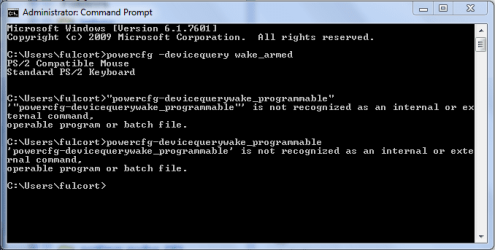
Okay, I ran the powercfg-devicequerywake_programmable command and I get back "is not recognized as an internal or external command etc...I included a screenshot of it.

Like I said before, I don't have the option in my bios, and my device name is not specific although I've downloaded the Targus mouse driver from their site.

Furthermore, when I plug in the little receiver for the mouse, it automatically downloads and installs a driver for it.

I tried to manually change the driver to the Targus driver, but this completely disables my mouse and the mouse becomes non-functional.

I've had this laptop for about 4 years which came with Vista and I've had some problems since I installed Windows 7 on it, but I've never encountered this problem where I couldn't wake the laptop with my mouse or keyboard from a sleep state.

I've had the exact same configuration regarding the mouse and keyboard, and nothing has changed except for a hdd upgrade.

This laptop was working fine with the sleep state until this past month when I replaced the hdd.

It's hard to believe that a different hdd would cause this, but there's nothing else I've changed since the last working configuration with the laptop.
 

Attachments

  • Capture.PNG
    Capture.PNG
    12.4 KB · Views: 28

My Computer My Computer

At a glance

windows 7 ultimateamd dual core 643gbnvidia g force 8200m
Computer Manufacturer/Model Number
hp pavillion g60-120us
OS
windows 7 ultimate
CPU
amd dual core 64
Memory
3gb
Graphics Card(s)
nvidia g force 8200m
Monitor(s) Displays
samsung hdtv
Screen Resolution
1366x768
Hard Drives
toshiba mk2552gsx (250gb)
Case
notebook
Internet Speed
time warner broad band
sorry the command was

powercfg -devicequery wake_programmable
 

My Computer My Computer

At a glance

Windows 7 ultimate x64
Computer Manufacturer/Model Number
Nothing specific....what ever the clients provide for Repair
OS
Windows 7 ultimate x64
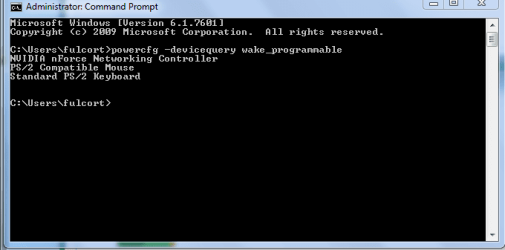
Here it is.
 

Attachments

  • Capture1.PNG
    Capture1.PNG
    8.9 KB · Views: 46

My Computer My Computer

At a glance

windows 7 ultimateamd dual core 643gbnvidia g force 8200m
Computer Manufacturer/Model Number
hp pavillion g60-120us
OS
windows 7 ultimate
CPU
amd dual core 64
Memory
3gb
Graphics Card(s)
nvidia g force 8200m
Monitor(s) Displays
samsung hdtv
Screen Resolution
1366x768
Hard Drives
toshiba mk2552gsx (250gb)
Case
notebook
Internet Speed
time warner broad band
hmm that looks like your laptops touchpad and keyboard...no usb possible....

Furthermore, when I plug in the little receiver for the mouse, it automatically downloads and installs a driver for it.

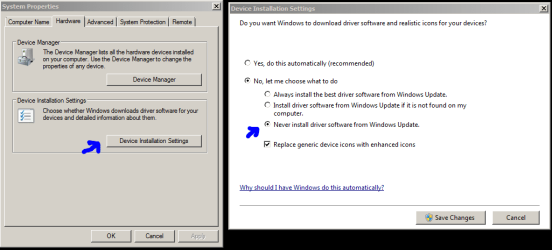
This is the windows update doing the driver install... you can stop this by going to system properties... and choosing the option as shown below (right click Computer icon and select properties)

driver.PNG


One you done this.... remove both the mouse and keyboard.... and then install the drivers from targus and keyboard..... once finished... plug the mouse and keyboard to another usb port rather than the one you have it normally plugged...

this should get the targus driver installed..

Then try the above command and let me know
 

My Computer My Computer

At a glance

Windows 7 ultimate x64
Computer Manufacturer/Model Number
Nothing specific....what ever the clients provide for Repair
OS
Windows 7 ultimate x64
I already had the option to not let windows automatically download and install drivers.

I uninstalled the drivers for the mouse and keyboard, and reinstalled the driver for the Targus mouse.

When I tried to plug in the receiver for the Targus mouse to a different usb port, I got a message saying "it does not recognize the device in the usb port.

I had to plug it back into the original port that it was in to make it work.

Although I have the option for not installing drivers automatically, it still installs the drivers automatically once it's plugged into a usb port that recognized the device.

Running the command prompt, I still get the same message.

For some reason my laptop is not specifying the exact device name of the Targus mouse or Microsoft mouse and keyboard, but this was always the case since I've had the laptop, and the generic HID-compliant mouse has worked before in waking from the sleep state up until now.

I thought there might be a problem with the mouse so I plugged into an old Dell desktop running Windows 7 and on this ancient machine, it recognizes and identifies the mouse and keyboard for both Targus and Microsoft, giving you the option to wake the device in device manager under mouse and keyboard.
 

My Computer My Computer

At a glance

windows 7 ultimateamd dual core 643gbnvidia g force 8200m
Computer Manufacturer/Model Number
hp pavillion g60-120us
OS
windows 7 ultimate
CPU
amd dual core 64
Memory
3gb
Graphics Card(s)
nvidia g force 8200m
Monitor(s) Displays
samsung hdtv
Screen Resolution
1366x768
Hard Drives
toshiba mk2552gsx (250gb)
Case
notebook
Internet Speed
time warner broad band
Back
Top