You guys... I am SO confused! I need some help!

tylar112

New member
Member
Local time
9:03 AM
Messages
51
Im so sorry that this is so long, but I want to be as detailed as possible so you know what I need help with.

Okay! so!
I was having some problems with my ATI driver earlier, if you want, you can read the thread here, http://www.sevenforums.com/graphic-cards/29210-my-ati-radeon-200-stops-working-when-i-restart.html

ANYWAY. I pretty much gave up on trying to fix my aero themes, and totally forgot about it.

so basically, I was searching around for some stuff about custom msstyles, and was having some troubles trying to install custom msstyles because I kept getting a "you need permission to perform this action" and after about an hour of researching, I ended up on this page, Fix “You need permission to perform this action” error

Which lead me to type "net user administrator /active:yes"
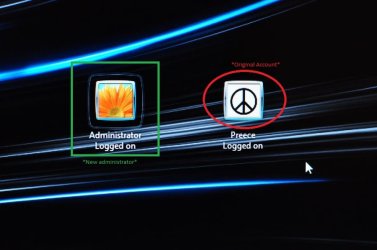
in the command prompt, And after I restarted, It brought me to the logon page, and for some reason I had a new "Administrator" account, and It had a weird box around it, and my original account does NOT. anyway, I logged onto it and BAM. my areo themes were working, and everything! I was so shocked! and confused! Which makes me think that this account is the top administrator. even though my original account was the account made when I first got windows 7.

Technically they're both Administrator accounts. BUT, for some reason, ((this may be hard to follow, so pay attention. see the attached file)) when I go to control panel on the NEW administrator account and go to "manage accounts" I click on my ORIGINAL account and I have the option to change account type for my ORIGINAL account.

When I log onto my original account, and go to control panel, then go to manage account and click on the ADMINISTRATOR account, I DONT have this option!

Like I said, Which makes me think that the new administrator account is the top administrator, and it seems to be working better, because my aero themes are back!

I want to know how to transfer ALL my files, such as my documents, pictures, music, personal folders, and programs so that they will work properly, to the NEW administrator account and then delete the original user account

thank you for reading all of this!
I hope someone can help me

thanks again! :)
 

Attachments

  • DSC_0034.JPG
    DSC_0034.JPG
    85.5 KB · Views: 10

My Computer My Computer

At a glance

Windows 7 Home Premium x64Genuine Intel(R) CPU U7300 @ 1.30GHz4.00 GigsMobile Intel(R) 4 Series Express Chipset Family
Computer Manufacturer/Model Number
Asus UL50A/UL50Ag Series
OS
Windows 7 Home Premium x64
CPU
Genuine Intel(R) CPU U7300 @ 1.30GHz
Memory
4.00 Gigs
Graphics Card(s)
Mobile Intel(R) 4 Series Express Chipset Family
Sound Card
Realtek High Definition Audio
Monitor(s) Displays
Generic PnP Monitor
Screen Resolution
1366 x 768 - 60Hz
Hard Drives
500 Gigs
Internet Speed
Slow as hell.
I want to know how to transfer ALL my files, such as my documents, pictures, music, personal folders, and programs so that they will work properly, to the NEW administrator account and then delete the original user account

enable show hidden files and folders

go to C:\users\<old_username>

copy everything except the nt dat files

paste them in folder

c:\users\<new_username>
 

My Computer My Computer

At a glance

XP, Seven, 2008R2AMD, Intel, VIACorsair, Kingston, etc.ATI, NVIDIA
Computer Manufacturer/Model Number
Too many to list.
OS
XP, Seven, 2008R2
CPU
AMD, Intel, VIA
Motherboard
Various
Memory
Corsair, Kingston, etc.
Graphics Card(s)
ATI, NVIDIA
Monitor(s) Displays
Samsung
Hard Drives
Maxtor, Western Digital
Keyboard
qwerty
Internet Speed
22 Mb/s @ home, 1 Gb/s @ server
Other Info
All of my systems still run fastest on XP 32-bit for the most part. Win7 is fun to play with, but I still prefer XP for raw speed, security, and functionality.
... I click on my ORIGINAL account and I have the option to change account type for my ORIGINAL account.

When I log onto my original account, and go to control panel, then go to manage account and click on the ADMINISTRATOR account, I DONT have this option!

What you're calling the "new administrator" is in fact the first account created during the installation of the OS. It is "built-in", in the sense that it cannot be deleted or permanently deactivated (not without really trying), and by definition it is always part of the "administrators" group. That's why you cannot demote it.

Your "original" account was actually created post-installation but it is not "built-in". While it is part of the "administrators" group, it is just as powerful as any other administrator account, with the caveat that it can be demoted or deleted by any other administrator.

.
I want to know how to transfer ALL my files, such as my documents, pictures, music, personal folders, and programs so that they will work properly, to the NEW administrator account and then delete the original user account

That is a very bad idea from a security perspective, which is why I personally don't want to help you do that.

The account you use for daily tasks like reading mail and accessing the web should not be an administrator account. Instead, it should be a normal user. That way, when malware inevitably finds its way onto your machine, the damage it can do will be highly limited by the fact that it's running in a non-admin user context.

Doing everything as an admin is just asking for pwnage. It is an old and outdated practice which should be actively avoided and discouraged in others.
 

My Computer My Computer

At a glance

Win7x64
Computer Manufacturer/Model Number
Multiple machines in various stages of decomposition.
OS
Win7x64
That is a very bad idea from a security perspective, which is why I personally don't want to help you do that.

Agreed. He should create a regular account first. In other words, do not use the built-in Administrator account. Copy the files to a new regular account.
 

My Computer My Computer

At a glance

XP, Seven, 2008R2AMD, Intel, VIACorsair, Kingston, etc.ATI, NVIDIA
Computer Manufacturer/Model Number
Too many to list.
OS
XP, Seven, 2008R2
CPU
AMD, Intel, VIA
Motherboard
Various
Memory
Corsair, Kingston, etc.
Graphics Card(s)
ATI, NVIDIA
Monitor(s) Displays
Samsung
Hard Drives
Maxtor, Western Digital
Keyboard
qwerty
Internet Speed
22 Mb/s @ home, 1 Gb/s @ server
Other Info
All of my systems still run fastest on XP 32-bit for the most part. Win7 is fun to play with, but I still prefer XP for raw speed, security, and functionality.
That is a very bad idea from a security perspective, which is why I personally don't want to help you do that.

Agreed. He should create a regular account first. In other words, do not use the built-in Administrator account. Copy the files to a new regular account.

that is actually an extremely smart idea.
would it make sense to create a new account and copy the files to the new regular account? or keep my original account and set it to standard.

how should I do this?

because im the only person to use my computer, and im always using it to the fullest
making songs, downloading music, playing games, everything! I dont want to be restricted from doing certain things.
If I make a "regular" account, what should I put on it?
I dont want to be switching from account, to account

I understand what you're saying, but Im trying to figure this out in my head on how I would organize it all
 

My Computer My Computer

At a glance

Windows 7 Home Premium x64Genuine Intel(R) CPU U7300 @ 1.30GHz4.00 GigsMobile Intel(R) 4 Series Express Chipset Family
Computer Manufacturer/Model Number
Asus UL50A/UL50Ag Series
OS
Windows 7 Home Premium x64
CPU
Genuine Intel(R) CPU U7300 @ 1.30GHz
Memory
4.00 Gigs
Graphics Card(s)
Mobile Intel(R) 4 Series Express Chipset Family
Sound Card
Realtek High Definition Audio
Monitor(s) Displays
Generic PnP Monitor
Screen Resolution
1366 x 768 - 60Hz
Hard Drives
500 Gigs
Internet Speed
Slow as hell.
how should I do this?

I've given the procedure above.

You create your new account, log in, then copy over the files from your old account into the new account.
 

My Computer My Computer

At a glance

XP, Seven, 2008R2AMD, Intel, VIACorsair, Kingston, etc.ATI, NVIDIA
Computer Manufacturer/Model Number
Too many to list.
OS
XP, Seven, 2008R2
CPU
AMD, Intel, VIA
Motherboard
Various
Memory
Corsair, Kingston, etc.
Graphics Card(s)
ATI, NVIDIA
Monitor(s) Displays
Samsung
Hard Drives
Maxtor, Western Digital
Keyboard
qwerty
Internet Speed
22 Mb/s @ home, 1 Gb/s @ server
Other Info
All of my systems still run fastest on XP 32-bit for the most part. Win7 is fun to play with, but I still prefer XP for raw speed, security, and functionality.
...because im the only person to use my computer, and im always using it to the fullest
making songs, downloading music, playing games, everything! I dont want to be restricted from doing certain things.

(In addition to what sup3rsprt said...)

Novice: "I am not some little baby that needs hand-holding and protecting on the Internet! I am knowledgeable and I know how to look after myself. Therefore, I am sufficiently advanced to always use an admin account and never be limited in any way by my own machine!"

Veteran: "In order to protect myself and my data, I will rely on a non-privileged account for daily tasks. Reading mail and browsing the web don't require admin rights anyway. When I do wish to make legitimate changes to the machine configuration, I will briefly "elevate" myself to a full admin context, and then quickly revert to a non-privileged user account as soon as possible."

Understanding the difference between the two mindsets and crossing over from the former to the latter is a rite of passage for any wanna-be-advanced computery person.
 

My Computer My Computer

At a glance

Win7x64
Computer Manufacturer/Model Number
Multiple machines in various stages of decomposition.
OS
Win7x64
... I click on my ORIGINAL account and I have the option to change account type for my ORIGINAL account.

When I log onto my original account, and go to control panel, then go to manage account and click on the ADMINISTRATOR account, I DONT have this option!

What you're calling the "new administrator" is in fact the first account created during the installation of the OS. It is "built-in", in the sense that it cannot be deleted or permanently deactivated (not without really trying), and by definition it is always part of the "administrators" group. That's why you cannot demote it.

Your "original" account was actually created post-installation but it is not "built-in". While it is part of the "administrators" group, it is just as powerful as any other administrator account, with the caveat that it can be demoted or deleted by any other administrator.

.
I want to know how to transfer ALL my files, such as my documents, pictures, music, personal folders, and programs so that they will work properly, to the NEW administrator account and then delete the original user account

That is a very bad idea from a security perspective, which is why I personally don't want to help you do that.

The account you use for daily tasks like reading mail and accessing the web should not be an administrator account. Instead, it should be a normal user. That way, when malware inevitably finds its way onto your machine, the damage it can do will be highly limited by the fact that it's running in a non-admin user context.

Doing everything as an admin is just asking for pwnage. It is an old and outdated practice which should be actively avoided and discouraged in others.

While I understand the reasoning behind this, I have to say that I completely disagree. There is no reason that malware will "inevitably" find its way into a system IF the user follows common sense rules. I operated my computer under an administrative account since such a thing was optional and to this day, I have had exactly one virus infection. I do not believe in being inconvenienced by running user a "limited user" account is necessary. I have tried it under XP (not since) and it was an absolute nuisance.

No need to flame, just putting another opinion out there. Common sense prevails.
 

My Computer My Computer

At a glance

Windows 7 Ultimate RTM (Technet)3.00 gigahertz Intel Core2 Duo E84004GBATI Radeon X1950 Pro
Computer Manufacturer/Model Number
Custom
OS
Windows 7 Ultimate RTM (Technet)
CPU
3.00 gigahertz Intel Core2 Duo E8400
Motherboard
ASUSTeK Computer INC. P5K/EPU Rev 1.xx
Memory
4GB
Graphics Card(s)
ATI Radeon X1950 Pro
Sound Card
Built in HD Audio
Monitor(s) Displays
22" Gateway LCD
Screen Resolution
1920 x 1200
Hard Drives
ST3160023A [Hard drive] (160.04 GB) -- drive 0, rev 8.01, ST3500630AS [Hard drive] (500.11 GB) -- drive 2, rev 3.AAK
ST3500630AS [Hard drive] (500.11 GB) -- drive 1, rev 3.AAK
Keyboard
Logitech G11
Mouse
Microsoft Wireless Laser Mouse 5000
Internet Speed
13.44 Mbps
... I click on my ORIGINAL account and I have the option to change account type for my ORIGINAL account.

When I log onto my original account, and go to control panel, then go to manage account and click on the ADMINISTRATOR account, I DONT have this option!

What you're calling the "new administrator" is in fact the first account created during the installation of the OS. It is "built-in", in the sense that it cannot be deleted or permanently deactivated (not without really trying), and by definition it is always part of the "administrators" group. That's why you cannot demote it.

Your "original" account was actually created post-installation but it is not "built-in". While it is part of the "administrators" group, it is just as powerful as any other administrator account, with the caveat that it can be demoted or deleted by any other administrator.

.
I want to know how to transfer ALL my files, such as my documents, pictures, music, personal folders, and programs so that they will work properly, to the NEW administrator account and then delete the original user account

That is a very bad idea from a security perspective, which is why I personally don't want to help you do that.

The account you use for daily tasks like reading mail and accessing the web should not be an administrator account. Instead, it should be a normal user. That way, when malware inevitably finds its way onto your machine, the damage it can do will be highly limited by the fact that it's running in a non-admin user context.

Doing everything as an admin is just asking for pwnage. It is an old and outdated practice which should be actively avoided and discouraged in others.

While I understand the reasoning behind this, I have to say that I completely disagree. There is no reason that malware will "inevitably" find its way into a system IF the user follows common sense rules. I operated my computer under an administrative account since such a thing was optional and to this day, I have had exactly one virus infection. I do not believe in being inconvenienced by running user a "limited user" account is necessary. I have tried it under XP (not since) and it was an absolutely nuisance.

No need to flame, just putting another opinion out there. Common sense prevails.


You posess a quality that the average new user does not... it is the lack of this quality that necessitates the need for operating in a standard user account... ;)
 

My Computer My Computer

At a glance

64-bit Windows 8.1 ProCore(TM) i5 CPU 4330 Haswell @ 3.20GHz12.00 GBIntel(R) HD Graphics
Computer type
PC/Desktop
Computer Manufacturer/Model Number
LENOVO K450 @3.0GHZ
OS
64-bit Windows 8.1 Pro
CPU
Core(TM) i5 CPU 4330 Haswell @ 3.20GHz
Motherboard
LENOVO
Memory
12.00 GB
Graphics Card(s)
Intel(R) HD Graphics
Sound Card
Intel HD integtrated
Monitor(s) Displays
HP 25' ISP Monitor
Screen Resolution
1900/1020
Hard Drives
(1) ST1000DM003-1CH162 (2) Generic STORAGE DEVICE USB Device (3) Generic STORAGE DEVICE USB Device
Internet Speed
100mb down/10mb up
While I understand the reasoning behind this, I have to say that I completely disagree.

Good. It would be extremely boring if everybody thought the same thing about everything :)

There is no reason that malware will "inevitably" find its way into a system IF the user follows common sense rules. I operated my computer under an administrative account since such a thing was optional and to this day, I have had exactly one virus infection.

Perhaps you'd have avoided that one infection as a standard user.

In many ways, this is the only real security advantage that Linux (supposedly) enjoys over Windows, and it's got more to do with the users than the OS. You don't see these debates on NIX forums. It's an ingrained mindset. They wouldn't dream of using the box to surf the web while logged on as root.

Microsoft faces an uphill battle to convince its own user base to adopt the same strategy - admin accounts only when absolutely necessary. It's a less technical audience, in general, and convenience means more to them than security.

I do not believe in being inconvenienced by running user a "limited user" account is necessary. I have tried it under XP (not since) and it was an absolute nuisance.

XP predated the LUA initiative. In other words, it was never specifically designed to facilitate the daily use of non-admin accounts. Vista and Win7 make it a lot easier.

No need to flame, just putting another opinion out there. Common sense prevails.

Whoever flames you for your opinion will have to endure public ridicule from me :)
 

My Computer My Computer

At a glance

Win7x64
Computer Manufacturer/Model Number
Multiple machines in various stages of decomposition.
OS
Win7x64
The first thing I do after installation is google "enable adminsitrator account", run the given command as Adminsitrator, log out, log back in as Administrator, delete named User Account, and I am free of any future hassles of any kind.

I've never had to do it after I had the system up and running, transferring to a whole new explorer, and I'm not sure I'd try. I would probably check the box to put the files on my desktop and then over time distribute them. I know I would do the settings over since there will be flies in that jar.
 
Back
Top