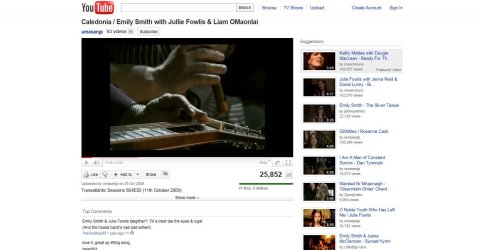
I have saved these files but do they refer to the 32 bit and 64 bit versions of IE9 or the 32 bit and 64 bit versions of Win 7. I am using Win 7 64 bit but I have both IE9 32 bit and 64 bit on the computer with the 32 bit version set as default. If they are 32 and 64 bit versions of IE9 presumably I will need to install both?
I'm thinking its a Flash problem, Youtube can use HTML5 to replace Flash.
Go to YouTube - Broadcast Yourself. & join the trial then try a couple of videos, if they play ok try uninstaling Flash.
To delete IE9 & revert back to IE8 go to the Start search box & enter view installed updates
scroll down to the Microsoft Windows section & delete IE9 , you'll auto get IE8 back on a restart.
If none of the above work I think you're screwed maybe the best option would be to ditch IE & use a better browser.
My Computer
Computer type
PC/Desktop
Computer Manufacturer/Model Number
self build
OS
Windows 7 Ultimate 64 bit
CPU
Intel Core i7 4770K overclocked to 4.7GHz Quad Core Haswell
Motherboard
Asus Z87 Pro (Socket 1150) ATX Motherboard
Memory
16GB Team Group Vulcan Gold 2133MHz
Graphics Card(s)
ATI Radeon HD 7880 Series Display adapter
Monitor(s) Displays
NEC LCD2690WUXi2
Screen Resolution
26" 1920 x 1200
Hard Drives
Samsung 500GB SSD 840 EVO SATA 6Gb/s
Samsung 250GB SSD 840 EVO SATA 6Gb/s
PSU
Corsair AX760 Platinum
Case
Cooler Master HAF X Gaming Tower
Cooling
XSPC RayStorm 750 RS360 Water cooling
Mouse
Razer Death Adder left handed
Internet Speed
126Mb download 11.5Mb up
Antivirus
Avast free
Browser
Opera
Other Info
Main Browser is Opera
Favorite software Adobe Lightroom & Photoshop
best plugins Nik software
Firewall : Private firewall 7
I have saved these files but do they refer to the 32 bit and 64 bit versions of IE9 or the 32 bit and 64 bit versions of Win 7. I am using Win 7 64 bit but I have both IE9 32 bit and 64 bit on the computer with the 32 bit version set as default. If they are 32 and 64 bit versions of IE9 presumably I will need to install both?
If I remember correctly it will install both if you are on x64.
My Computer
Computer type
Laptop
Computer Manufacturer/Model Number
Hewlett-Packard/G62-107SA Notebook
OS
Microsoft Windows 7 Home Premium 64-bit Service Pack 1
CPU
Intel(R) Core(TM) i3 CPU M 330 @ 2.13GHz
Motherboard
Hewlett-Packard 1425
Memory
8 GB DDR3
Graphics Card(s)
Intel(R) HD Graphics
Sound Card
Realtek High Definition Audio
Monitor(s) Displays
Builtin
Screen Resolution
1366 x 768 x 32 bits (4294967296 colors) @ 60 Hz
Hard Drives
250 GB SATA Hard Disk Drive 7200 rpm
2TB Seagate GoFlex USB 2 Drive
1TB Iomega Prestige USB 2 Drive
1.5TB Iomega Prestige USB 2 Drive (Samsung)
2TB WD MyBook Live NAS.
I reverted to IE8 and that didn't make any difference so I went to reinstate IE9 ( I have done this before without any problem) This time IE9 would not install. I read the help and had another go it still wouldn't install and the whole thing froze and I noticed that I was using 98% memeory (8K MBytes)!!! I crashed the beast and did a System Restore. All now seems to be well
I think the time has come to accept there is some problem with the You Tube display and leave it alone.
Microsoft Windows 7 Home Premium 64-bit Service Pack 1
CPU
Intel(R) Core(TM) i3 CPU M 330 @ 2.13GHz
Motherboard
Hewlett-Packard 1425
Memory
8 GB DDR3
Graphics Card(s)
Intel(R) HD Graphics
Sound Card
Realtek High Definition Audio
Monitor(s) Displays
Builtin
Screen Resolution
1366 x 768 x 32 bits (4294967296 colors) @ 60 Hz
Hard Drives
250 GB SATA Hard Disk Drive 7200 rpm
2TB Seagate GoFlex USB 2 Drive
1TB Iomega Prestige USB 2 Drive
1.5TB Iomega Prestige USB 2 Drive (Samsung)
2TB WD MyBook Live NAS.
You are the only person I have found on the Internet to even mention this situation. I see no one had any solution.
I was running Windows 7 Home Premium and just upgraded to Windows 7 Ultimate. The first thing I noticed was in going back to a YouTube video that showed how to access "Windows Seven Anytime", to upgrade, it looked different all of a sudden. It looked exactly like your picture. It looks like the entire YouTube page was in letterbox.
I did not like it one bit. I could not find an answer by searching so I tried to figure it out myself.
I am using Mozilla Firefox as my default browser and was so before upgrading. After trying many things, I looked into firefox addons. Sure enough I found that my Windows Seven Ultimate upgrade put an" add-on" under "plug-ins" in Firefox called "Windows Presentation Foundation". I disabled it in Mozilla Firefox/tools/add-on's/plug-in's. Now YouTube looks normal.
If your default browser was Microsoft Explorer, look under add-on's for this plug-in, and either disable or remove it.
I haven't been into YouTube since I decided to stop trying to find a solution because of the problems re-installing IE9. I don't have Windows Presentation Foundation in either Firefox or IE9. However I have just opened a YouTube video and everything is as it should be. I don't understand any of it. Compare the attached with the first image I posted.
Glad it's sorted. I guess we just put it down to one of those things.
My Computer
Computer type
Laptop
Computer Manufacturer/Model Number
Hewlett-Packard/G62-107SA Notebook
OS
Microsoft Windows 7 Home Premium 64-bit Service Pack 1
CPU
Intel(R) Core(TM) i3 CPU M 330 @ 2.13GHz
Motherboard
Hewlett-Packard 1425
Memory
8 GB DDR3
Graphics Card(s)
Intel(R) HD Graphics
Sound Card
Realtek High Definition Audio
Monitor(s) Displays
Builtin
Screen Resolution
1366 x 768 x 32 bits (4294967296 colors) @ 60 Hz
Hard Drives
250 GB SATA Hard Disk Drive 7200 rpm
2TB Seagate GoFlex USB 2 Drive
1TB Iomega Prestige USB 2 Drive
1.5TB Iomega Prestige USB 2 Drive (Samsung)
2TB WD MyBook Live NAS.