
Information
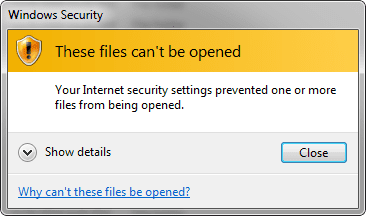
This will show you how to fix the "Windows Security", "These files can't be opened" error with the message "Your internet security settings prevented one or more file from being opened.".
This happens when you attempt to launch any .EXE program.
This happens when you attempt to launch any .EXE program.
Note
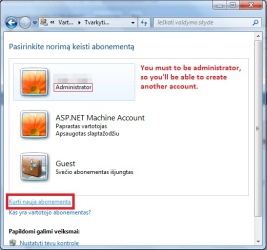
You must have administrator rights (to be administrator). You'll have to create another account, there will be fresh registrys, you'll have to export them.
EXAMPLE: The table is looking exactly like in this picture.
STEP 1
Create new user/administrator: Go to start menu, "Control Panel" and "User Accounts".
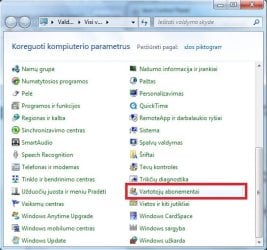
Click on "Manage another account"...

...and "Create new account".
Type in the name of user and check "Administrator".
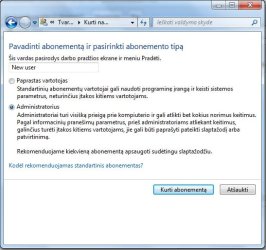
Once you've done, click "Create User".
STEP 2
Switch to newly created user and run "Registry Editor": Go to start menu, at "Shutdown" button you can see arrow, click on it and "Switch user".
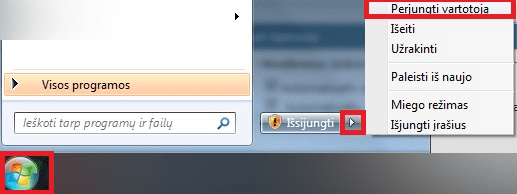
Select the user you created.
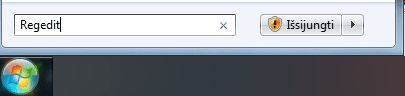
In the newly created user, go to start menu and type in "Regedit", hit "Enter" and click "Yes" to bring the "Registry Editor" up.
STEP 3
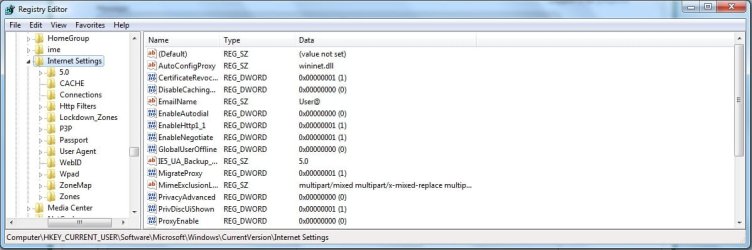
Expand the following registrys:
"HKEY_CURRENT_USER\Software\Microsoft\Windows\CurrentVersion\Internet Settings"
STEP 4
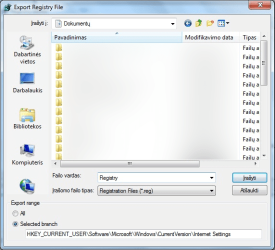
Export "Internet Settings" to file (.reg): Right click on "Internet Settings" and "Export":
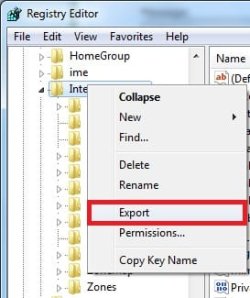
Select the directory (I used "Documents"), type the name and click "Save".
STEP 5
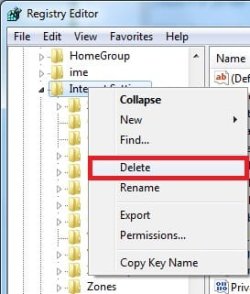
Switch back to original account and remove "Internet Settings" registry key: Go to "HKEY_CURRENT_USER\Software\Microsoft\Windows\CurrentVersion\Internet Settings" again, right click on "Internet Settings" and "Delete" (Because it's a crashed registry).
STEP 6
Import a new registry into "HKEY_CURRENT_USER\Software\Microsoft\Windows\CurrentVersion": Go to "HKEY_CURRENT_USER\Software\Microsoft\Windows\CurrentVersion\", then "File", "Import" and select a newly created registry key (Which you exported during using the newly created user).
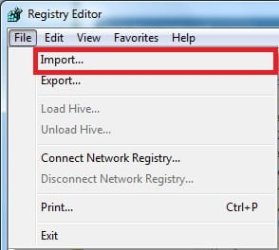
Click "Open". New and fixed registry should be there. RECOMMENDATION: Restart your PC after this, to refresh everything.
I hope it works!

Tutorial by Gregaras.
Last edited:


