Solved Your last browser session closed unexpectly.

Vonda

New member
Power User
VIP
Local time
6:41 AM
Messages
160
Location
Canada
Every time I try to put an URL in the address bar, I get Internet Explorer stopped working window.
Then when I restart IE, it goes to my home page and works OK within the web site. As soon I try to type anything in the address bar, it does the same thing.
At the bottom it then has a narrow window stating Your last browsing session closed unexpectedly and a restore session button. I have no problem accessing other web sites from my "favored" list.
Also, some photos do not show in IE 10 whereas they do in Google Chrome.
Things I have done so far:
ran malwarebytes, S&D spybot, super anti spyware, reset IE 10, downloaded IE 11, went to restore before problem stated, but it stated that restore did not work.
 

My Computer

Computer Manufacturer/Model Number
HPE-400f
OS
Widows 7 home premium 64 bit
CPU
AMD phenom(tm) 11 x 4 processor 3.00 GHz
Motherboard
?
Memory
8.00 GB
Graphics Card(s)
ATI Radeon HD 5450
Sound Card
?
Monitor(s) Displays
HP vs17
Hard Drives
1 TB Sata
Mouse
usb
Internet Speed
download 15 mbps
Hi,
See what this does,
Use No Add-ons mode/ Click the Start button and type in the search box,
Internet explorer
Start-no%20add-ons-7.jpg

Click on the suggestion (No Add-ons) or it’s located at,
Start/ All programs/ Accessories folder/ System tools folder/ No add-ons.
http://windows.microsoft.com/en-us/internet-explorer/manage-add-ons#ie=ie-10-win-7
http://windows.microsoft.com/en-IN/windows7/How-to-manage-add-ons-in-Internet-Explorer-9
If using ie10 the first link will apply to ie9 as well,
http://windows.microsoft.com/en-us/internet-explorer/ie-crashes-stops-working#ie=ie-10-win-7

Activate EPM if on a 64 bit version of windows,
http://www.sevenforums.com/tutorials/280434-internet-explorer-10-enable-32-bit-64-bit-ie10-windows-7-a.html#post2312336
Add the Run box to the Start menu list,
http://www.sevenforums.com/tutorials/559-start-menu-add-run-button.html
Open the Run command and Paste this into it and Okay,
"C:\Program Files\Internet Explorer\iexplore.exe" -extoff
 

My Computer

Computer type
PC/Desktop
Computer Manufacturer/Model Number
Custom assembled by me :}
OS
Win-7-Pro64bit 7-H-Prem-64bit
CPU
i7-5930K 2nd i9-9940x both water blocked VRM's too
Motherboard
ASUS SABERTOOTH X99 2nd ASUS x299 Apex
Memory
Trident-z 3200C14 2nd Trident-z 3600C16
Graphics Card(s)
EVGA 1080ti ftw3 2nd Titan Xp both water blocked
Sound Card
Built-in Realtek
Monitor(s) Displays
1-AOC G2460PG 24"G-Sync 144Hz/ 2nd 1-ASUS VG248QE 24" 144Hz
Screen Resolution
1920 x 1080 144Hz
Hard Drives
2-Samsung M.2 Evo & Evo Plus
2-Samsung 850 EVO 500GB SSD's/ 3-2.5 W.D. Black 1tb-&3-1tb/3-3.5 WD Black 1tb hdd's
PSU
EVGA SuperNOVA 1000-P2 2nd 1200-P2
Case
2-Corsair Obsidian Series 450D Black ATX Mid Tower
Cooling
Custom water loops
Keyboard
Logitech G710+/ 2nd Logitech G910
Mouse
2-RedDragon M901 Perdition 16400 dpi Gaming mouse = wired
Internet Speed
Comcast Ping 19ms 89.31mbps download speed 6.12mbps upload
Antivirus
Malwarebytes Pro/ Superantispyware Pro
Browser
FireFox & Pale moon
Other Info
2nd ASUS X299 Apex/Intel i9-9940x with Custom water loop/7H-Prem-x64/Corsair 450D case/Ram Trident-z 3600C16 4x8gb / Samsung970Evo plus 500gb SSD/Dual ssd EZ swap evo/PSU EVGA SuperNova 1200w-P2 80+Platinum/GPU Titan Xp /8-ML-140 on push-pull on 2-280GTX rads
Hi ThrashZone,
Thanks for getting so quick with a reply.
I did get as far to shut down the add ons, but I restarted the PC thinking that it needed to be done to take effect and I got a BOD. At the moment I am replying from our other PC while my PC is doing the start up repair.
I think that I have now the IE 11, but there does not seem to be an easy way to find out which version (IE 10 or IE 11) I have. All it says it is IE 64 bit.
I
 

My Computer

Computer Manufacturer/Model Number
HPE-400f
OS
Widows 7 home premium 64 bit
CPU
AMD phenom(tm) 11 x 4 processor 3.00 GHz
Motherboard
?
Memory
8.00 GB
Graphics Card(s)
ATI Radeon HD 5450
Sound Card
?
Monitor(s) Displays
HP vs17
Hard Drives
1 TB Sata
Mouse
usb
Internet Speed
download 15 mbps
Hi,
Wow do you mean BSOD = Blue screen of death ?
Try Safe mode with networking,
Shut down your machine, Unplug-Hold the power button down for 30/45 seconds (Power Drain)
Power up and Tap the F8 key continuously until you see a black page with white text,
Use the down arrow key to toggle to safe mode with networking/ hit the enter key.
Login as usual
Other advanced methods,
http://www.sevenforums.com/tutorials/69585-safe-mode.html
http://windows.microsoft.com/en-US/windows7/Advanced-startup-options-including-safe-mode

When you get into Safe mode with networking waste no time,
Run these scanners,
Review Jacee’s instructions to run Adwcleaner here post #7,
Ignore the title of the thread,
http://www.sevenforums.com/system-security/316404-instant-savings-app.html
Screen shot of the download button to use for Adwcleaner

Manually Update them before running full scans,
Try not to use your computer while the scans are running, (one at a time of course).
Uncheck the box to Activate the Free trial from the final install options,
http://www.malwarebytes.org/products/malwarebytes_free
http://www.superantispyware.com/?tag=SUPERANTISPYWARE
This one is the longest up to 4 hours, the others are only about 45 minutes,
http://www.microsoft.com/security/scanner/en-us/default.aspx

Rerun the scanners starting normally post both scan results use the Text attachment option,
See the links above my signature picture on how if you need too,
Cheers.
 

My Computer

Computer type
PC/Desktop
Computer Manufacturer/Model Number
Custom assembled by me :}
OS
Win-7-Pro64bit 7-H-Prem-64bit
CPU
i7-5930K 2nd i9-9940x both water blocked VRM's too
Motherboard
ASUS SABERTOOTH X99 2nd ASUS x299 Apex
Memory
Trident-z 3200C14 2nd Trident-z 3600C16
Graphics Card(s)
EVGA 1080ti ftw3 2nd Titan Xp both water blocked
Sound Card
Built-in Realtek
Monitor(s) Displays
1-AOC G2460PG 24"G-Sync 144Hz/ 2nd 1-ASUS VG248QE 24" 144Hz
Screen Resolution
1920 x 1080 144Hz
Hard Drives
2-Samsung M.2 Evo & Evo Plus
2-Samsung 850 EVO 500GB SSD's/ 3-2.5 W.D. Black 1tb-&3-1tb/3-3.5 WD Black 1tb hdd's
PSU
EVGA SuperNOVA 1000-P2 2nd 1200-P2
Case
2-Corsair Obsidian Series 450D Black ATX Mid Tower
Cooling
Custom water loops
Keyboard
Logitech G710+/ 2nd Logitech G910
Mouse
2-RedDragon M901 Perdition 16400 dpi Gaming mouse = wired
Internet Speed
Comcast Ping 19ms 89.31mbps download speed 6.12mbps upload
Antivirus
Malwarebytes Pro/ Superantispyware Pro
Browser
FireFox & Pale moon
Other Info
2nd ASUS X299 Apex/Intel i9-9940x with Custom water loop/7H-Prem-x64/Corsair 450D case/Ram Trident-z 3600C16 4x8gb / Samsung970Evo plus 500gb SSD/Dual ssd EZ swap evo/PSU EVGA SuperNova 1200w-P2 80+Platinum/GPU Titan Xp /8-ML-140 on push-pull on 2-280GTX rads
The startup repair is still running, it can not be cancelled unless I use the hard shut down. Should I do that?
I did run the first two scanners this morning and no problems were found. Once I get the PC function again I shall do the MS security scanner.
 

My Computer

Computer Manufacturer/Model Number
HPE-400f
OS
Widows 7 home premium 64 bit
CPU
AMD phenom(tm) 11 x 4 processor 3.00 GHz
Motherboard
?
Memory
8.00 GB
Graphics Card(s)
ATI Radeon HD 5450
Sound Card
?
Monitor(s) Displays
HP vs17
Hard Drives
1 TB Sata
Mouse
usb
Internet Speed
download 15 mbps
Hi,
Okay yea let it run,
Use Adwcleaner at least Microsoft security scanner is not near as good,

Exactly what sent you to bsod land ?
Not No add-ons mode ?
Not enabling EPM ?
Please give details,
Cheers.
You might post screen shots of your Show all add-ons page/ Toolbars and extensions,
all%20add-ons.jpg
 

My Computer

Computer type
PC/Desktop
Computer Manufacturer/Model Number
Custom assembled by me :}
OS
Win-7-Pro64bit 7-H-Prem-64bit
CPU
i7-5930K 2nd i9-9940x both water blocked VRM's too
Motherboard
ASUS SABERTOOTH X99 2nd ASUS x299 Apex
Memory
Trident-z 3200C14 2nd Trident-z 3600C16
Graphics Card(s)
EVGA 1080ti ftw3 2nd Titan Xp both water blocked
Sound Card
Built-in Realtek
Monitor(s) Displays
1-AOC G2460PG 24"G-Sync 144Hz/ 2nd 1-ASUS VG248QE 24" 144Hz
Screen Resolution
1920 x 1080 144Hz
Hard Drives
2-Samsung M.2 Evo & Evo Plus
2-Samsung 850 EVO 500GB SSD's/ 3-2.5 W.D. Black 1tb-&3-1tb/3-3.5 WD Black 1tb hdd's
PSU
EVGA SuperNOVA 1000-P2 2nd 1200-P2
Case
2-Corsair Obsidian Series 450D Black ATX Mid Tower
Cooling
Custom water loops
Keyboard
Logitech G710+/ 2nd Logitech G910
Mouse
2-RedDragon M901 Perdition 16400 dpi Gaming mouse = wired
Internet Speed
Comcast Ping 19ms 89.31mbps download speed 6.12mbps upload
Antivirus
Malwarebytes Pro/ Superantispyware Pro
Browser
FireFox & Pale moon
Other Info
2nd ASUS X299 Apex/Intel i9-9940x with Custom water loop/7H-Prem-x64/Corsair 450D case/Ram Trident-z 3600C16 4x8gb / Samsung970Evo plus 500gb SSD/Dual ssd EZ swap evo/PSU EVGA SuperNova 1200w-P2 80+Platinum/GPU Titan Xp /8-ML-140 on push-pull on 2-280GTX rads
the start-up repair took more than three hours and my PC is now in working order except for the problem with IE I don't know if it is 10 or the 11 version.
The BSOD occurred after I disabled the add-ons and did a re-start because I thought it needed that in order to take effect.
I clicked on print screen key, and the pc shut this web page and went to my home page.
What does EPM stand for? I am technically challenged and have a hard time following the instructions.
I shall post this reply first before I attempt another screen shot of the tool bars and add-ons. Then I'll run the Adwcleaner.
 

My Computer

Computer Manufacturer/Model Number
HPE-400f
OS
Widows 7 home premium 64 bit
CPU
AMD phenom(tm) 11 x 4 processor 3.00 GHz
Motherboard
?
Memory
8.00 GB
Graphics Card(s)
ATI Radeon HD 5450
Sound Card
?
Monitor(s) Displays
HP vs17
Hard Drives
1 TB Sata
Mouse
usb
Internet Speed
download 15 mbps
The same thing happened with taking a screen shot. The screen flickered a bit, went to my home page and the "Your last browsing session closed unexpectedly and a restore " showed at the bottom of the page.
I shall now get to the Adwcleaner and run it. Thanks for your help so far.
 

My Computer

Computer Manufacturer/Model Number
HPE-400f
OS
Widows 7 home premium 64 bit
CPU
AMD phenom(tm) 11 x 4 processor 3.00 GHz
Motherboard
?
Memory
8.00 GB
Graphics Card(s)
ATI Radeon HD 5450
Sound Card
?
Monitor(s) Displays
HP vs17
Hard Drives
1 TB Sata
Mouse
usb
Internet Speed
download 15 mbps
Adwcleaner results:
# AdwCleaner v3.024 - Report created 18/04/2014 at 22:18:56
# Updated 18/04/2014 by Xplode
# Operating System : Windows 7 Home Premium Service Pack 1 (64 bits)
# Username : Vonda - VONDA-HP
# Running from : C:\Users\Vonda\Downloads\AdwCleaner (1).exe
# Option : Clean
***** [ Services ] *****

***** [ Files / Folders ] *****

***** [ Shortcuts ] *****

***** [ Registry ] *****
Key Deleted : HKLM\SOFTWARE\Microsoft\Windows\CurrentVersion\Explorer\Browser Helper Objects\{02478D38-C3F9-4EFB-9B51-7695ECA05670}
Key Deleted : HKLM\SOFTWARE\Microsoft\Windows\CurrentVersion\Ext\PreApproved\{02478D38-C3F9-4EFB-9B51-7695ECA05670}
Key Deleted : HKLM\SOFTWARE\Microsoft\Windows\CurrentVersion\Ext\PreApproved\{EF99BD32-C1FB-11D2-892F-0090271D4F88}
Key Deleted : HKLM\Software\systweak
***** [ Browsers ] *****
-\\ Internet Explorer v11.0.9600.17041

-\\ Mozilla Firefox v
-\\ Google Chrome v34.0.1847.116
[ File : C:\Users\Vonda\AppData\Local\Google\Chrome\User Data\Default\preferences ]

*************************
AdwCleaner[R0].txt - [5347 octets] - [09/03/2014 15:43:00]
AdwCleaner[R1].txt - [976 octets] - [09/03/2014 15:49:23]
AdwCleaner[R2].txt - [1027 octets] - [09/03/2014 16:45:52]
AdwCleaner[R3].txt - [1152 octets] - [09/03/2014 22:27:08]
AdwCleaner[R4].txt - [1670 octets] - [18/04/2014 22:17:38]
AdwCleaner[S0].txt - [5171 octets] - [09/03/2014 15:44:24]
AdwCleaner[S1].txt - [1036 octets] - [09/03/2014 15:50:33]
AdwCleaner[S2].txt - [1089 octets] - [09/03/2014 16:47:10]
AdwCleaner[S3].txt - [1214 octets] - [09/03/2014 22:27:44]
AdwCleaner[S4].txt - [1599 octets] - [18/04/2014 22:18:56]
########## EOF - C:\AdwCleaner\AdwCleaner[S4].txt - [1659 octets] ##########
 

My Computer

Computer Manufacturer/Model Number
HPE-400f
OS
Widows 7 home premium 64 bit
CPU
AMD phenom(tm) 11 x 4 processor 3.00 GHz
Motherboard
?
Memory
8.00 GB
Graphics Card(s)
ATI Radeon HD 5450
Sound Card
?
Monitor(s) Displays
HP vs17
Hard Drives
1 TB Sata
Mouse
usb
Internet Speed
download 15 mbps

My Computer

Computer type
PC/Desktop
Computer Manufacturer/Model Number
Custom assembled by me :}
OS
Win-7-Pro64bit 7-H-Prem-64bit
CPU
i7-5930K 2nd i9-9940x both water blocked VRM's too
Motherboard
ASUS SABERTOOTH X99 2nd ASUS x299 Apex
Memory
Trident-z 3200C14 2nd Trident-z 3600C16
Graphics Card(s)
EVGA 1080ti ftw3 2nd Titan Xp both water blocked
Sound Card
Built-in Realtek
Monitor(s) Displays
1-AOC G2460PG 24"G-Sync 144Hz/ 2nd 1-ASUS VG248QE 24" 144Hz
Screen Resolution
1920 x 1080 144Hz
Hard Drives
2-Samsung M.2 Evo & Evo Plus
2-Samsung 850 EVO 500GB SSD's/ 3-2.5 W.D. Black 1tb-&3-1tb/3-3.5 WD Black 1tb hdd's
PSU
EVGA SuperNOVA 1000-P2 2nd 1200-P2
Case
2-Corsair Obsidian Series 450D Black ATX Mid Tower
Cooling
Custom water loops
Keyboard
Logitech G710+/ 2nd Logitech G910
Mouse
2-RedDragon M901 Perdition 16400 dpi Gaming mouse = wired
Internet Speed
Comcast Ping 19ms 89.31mbps download speed 6.12mbps upload
Antivirus
Malwarebytes Pro/ Superantispyware Pro
Browser
FireFox & Pale moon
Other Info
2nd ASUS X299 Apex/Intel i9-9940x with Custom water loop/7H-Prem-x64/Corsair 450D case/Ram Trident-z 3600C16 4x8gb / Samsung970Evo plus 500gb SSD/Dual ssd EZ swap evo/PSU EVGA SuperNova 1200w-P2 80+Platinum/GPU Titan Xp /8-ML-140 on push-pull on 2-280GTX rads
Very good now see if you can take the screen shots,
Cheers.
 

My Computer

Computer type
PC/Desktop
Computer Manufacturer/Model Number
Custom assembled by me :}
OS
Win-7-Pro64bit 7-H-Prem-64bit
CPU
i7-5930K 2nd i9-9940x both water blocked VRM's too
Motherboard
ASUS SABERTOOTH X99 2nd ASUS x299 Apex
Memory
Trident-z 3200C14 2nd Trident-z 3600C16
Graphics Card(s)
EVGA 1080ti ftw3 2nd Titan Xp both water blocked
Sound Card
Built-in Realtek
Monitor(s) Displays
1-AOC G2460PG 24"G-Sync 144Hz/ 2nd 1-ASUS VG248QE 24" 144Hz
Screen Resolution
1920 x 1080 144Hz
Hard Drives
2-Samsung M.2 Evo & Evo Plus
2-Samsung 850 EVO 500GB SSD's/ 3-2.5 W.D. Black 1tb-&3-1tb/3-3.5 WD Black 1tb hdd's
PSU
EVGA SuperNOVA 1000-P2 2nd 1200-P2
Case
2-Corsair Obsidian Series 450D Black ATX Mid Tower
Cooling
Custom water loops
Keyboard
Logitech G710+/ 2nd Logitech G910
Mouse
2-RedDragon M901 Perdition 16400 dpi Gaming mouse = wired
Internet Speed
Comcast Ping 19ms 89.31mbps download speed 6.12mbps upload
Antivirus
Malwarebytes Pro/ Superantispyware Pro
Browser
FireFox & Pale moon
Other Info
2nd ASUS X299 Apex/Intel i9-9940x with Custom water loop/7H-Prem-x64/Corsair 450D case/Ram Trident-z 3600C16 4x8gb / Samsung970Evo plus 500gb SSD/Dual ssd EZ swap evo/PSU EVGA SuperNova 1200w-P2 80+Platinum/GPU Titan Xp /8-ML-140 on push-pull on 2-280GTX rads
You mean I should run it again or post the note pad file as an attachment rather than copy and paste.
 

My Computer

Computer Manufacturer/Model Number
HPE-400f
OS
Widows 7 home premium 64 bit
CPU
AMD phenom(tm) 11 x 4 processor 3.00 GHz
Motherboard
?
Memory
8.00 GB
Graphics Card(s)
ATI Radeon HD 5450
Sound Card
?
Monitor(s) Displays
HP vs17
Hard Drives
1 TB Sata
Mouse
usb
Internet Speed
download 15 mbps
No, I still get the page going white, Internet Explorer stopped working and flicker and then it goes back to my home page.
 

My Computer

Computer Manufacturer/Model Number
HPE-400f
OS
Widows 7 home premium 64 bit
CPU
AMD phenom(tm) 11 x 4 processor 3.00 GHz
Motherboard
?
Memory
8.00 GB
Graphics Card(s)
ATI Radeon HD 5450
Sound Card
?
Monitor(s) Displays
HP vs17
Hard Drives
1 TB Sata
Mouse
usb
Internet Speed
download 15 mbps

My Computer

Computer type
PC/Desktop
Computer Manufacturer/Model Number
Custom assembled by me :}
OS
Win-7-Pro64bit 7-H-Prem-64bit
CPU
i7-5930K 2nd i9-9940x both water blocked VRM's too
Motherboard
ASUS SABERTOOTH X99 2nd ASUS x299 Apex
Memory
Trident-z 3200C14 2nd Trident-z 3600C16
Graphics Card(s)
EVGA 1080ti ftw3 2nd Titan Xp both water blocked
Sound Card
Built-in Realtek
Monitor(s) Displays
1-AOC G2460PG 24"G-Sync 144Hz/ 2nd 1-ASUS VG248QE 24" 144Hz
Screen Resolution
1920 x 1080 144Hz
Hard Drives
2-Samsung M.2 Evo & Evo Plus
2-Samsung 850 EVO 500GB SSD's/ 3-2.5 W.D. Black 1tb-&3-1tb/3-3.5 WD Black 1tb hdd's
PSU
EVGA SuperNOVA 1000-P2 2nd 1200-P2
Case
2-Corsair Obsidian Series 450D Black ATX Mid Tower
Cooling
Custom water loops
Keyboard
Logitech G710+/ 2nd Logitech G910
Mouse
2-RedDragon M901 Perdition 16400 dpi Gaming mouse = wired
Internet Speed
Comcast Ping 19ms 89.31mbps download speed 6.12mbps upload
Antivirus
Malwarebytes Pro/ Superantispyware Pro
Browser
FireFox & Pale moon
Other Info
2nd ASUS X299 Apex/Intel i9-9940x with Custom water loop/7H-Prem-x64/Corsair 450D case/Ram Trident-z 3600C16 4x8gb / Samsung970Evo plus 500gb SSD/Dual ssd EZ swap evo/PSU EVGA SuperNova 1200w-P2 80+Platinum/GPU Titan Xp /8-ML-140 on push-pull on 2-280GTX rads

My Computer

Computer Manufacturer/Model Number
HPE-400f
OS
Widows 7 home premium 64 bit
CPU
AMD phenom(tm) 11 x 4 processor 3.00 GHz
Motherboard
?
Memory
8.00 GB
Graphics Card(s)
ATI Radeon HD 5450
Sound Card
?
Monitor(s) Displays
HP vs17
Hard Drives
1 TB Sata
Mouse
usb
Internet Speed
download 15 mbps

My Computer

Computer type
PC/Desktop
Computer Manufacturer/Model Number
Custom assembled by me :}
OS
Win-7-Pro64bit 7-H-Prem-64bit
CPU
i7-5930K 2nd i9-9940x both water blocked VRM's too
Motherboard
ASUS SABERTOOTH X99 2nd ASUS x299 Apex
Memory
Trident-z 3200C14 2nd Trident-z 3600C16
Graphics Card(s)
EVGA 1080ti ftw3 2nd Titan Xp both water blocked
Sound Card
Built-in Realtek
Monitor(s) Displays
1-AOC G2460PG 24"G-Sync 144Hz/ 2nd 1-ASUS VG248QE 24" 144Hz
Screen Resolution
1920 x 1080 144Hz
Hard Drives
2-Samsung M.2 Evo & Evo Plus
2-Samsung 850 EVO 500GB SSD's/ 3-2.5 W.D. Black 1tb-&3-1tb/3-3.5 WD Black 1tb hdd's
PSU
EVGA SuperNOVA 1000-P2 2nd 1200-P2
Case
2-Corsair Obsidian Series 450D Black ATX Mid Tower
Cooling
Custom water loops
Keyboard
Logitech G710+/ 2nd Logitech G910
Mouse
2-RedDragon M901 Perdition 16400 dpi Gaming mouse = wired
Internet Speed
Comcast Ping 19ms 89.31mbps download speed 6.12mbps upload
Antivirus
Malwarebytes Pro/ Superantispyware Pro
Browser
FireFox & Pale moon
Other Info
2nd ASUS X299 Apex/Intel i9-9940x with Custom water loop/7H-Prem-x64/Corsair 450D case/Ram Trident-z 3600C16 4x8gb / Samsung970Evo plus 500gb SSD/Dual ssd EZ swap evo/PSU EVGA SuperNova 1200w-P2 80+Platinum/GPU Titan Xp /8-ML-140 on push-pull on 2-280GTX rads
I had no problem with the resetting of IE, but the same issue still exist. I can't even change the URL back to my home page in options.

Could have something to do with IE 11? That I downloaded after the initial problem of not being able to view some photos in IE 10
 
Last edited:

My Computer

Computer Manufacturer/Model Number
HPE-400f
OS
Widows 7 home premium 64 bit
CPU
AMD phenom(tm) 11 x 4 processor 3.00 GHz
Motherboard
?
Memory
8.00 GB
Graphics Card(s)
ATI Radeon HD 5450
Sound Card
?
Monitor(s) Displays
HP vs17
Hard Drives
1 TB Sata
Mouse
usb
Internet Speed
download 15 mbps
Hi,
You can uninstall ie11 if you wish too,
http://www.sevenforums.com/tutorials/313358-internet-explorer-11-uninstall-windows-7-a.html
Reset would Disable all add-ons except for Adobe flash player for some odd reason if you did it correctly and checked the box to Delete Personal setting.
Review your Uninstall a program list and if you can manage to take screen shots with the windows snipping tool ?
See the links above my signature for how,
Cheers.
 

My Computer

Computer type
PC/Desktop
Computer Manufacturer/Model Number
Custom assembled by me :}
OS
Win-7-Pro64bit 7-H-Prem-64bit
CPU
i7-5930K 2nd i9-9940x both water blocked VRM's too
Motherboard
ASUS SABERTOOTH X99 2nd ASUS x299 Apex
Memory
Trident-z 3200C14 2nd Trident-z 3600C16
Graphics Card(s)
EVGA 1080ti ftw3 2nd Titan Xp both water blocked
Sound Card
Built-in Realtek
Monitor(s) Displays
1-AOC G2460PG 24"G-Sync 144Hz/ 2nd 1-ASUS VG248QE 24" 144Hz
Screen Resolution
1920 x 1080 144Hz
Hard Drives
2-Samsung M.2 Evo & Evo Plus
2-Samsung 850 EVO 500GB SSD's/ 3-2.5 W.D. Black 1tb-&3-1tb/3-3.5 WD Black 1tb hdd's
PSU
EVGA SuperNOVA 1000-P2 2nd 1200-P2
Case
2-Corsair Obsidian Series 450D Black ATX Mid Tower
Cooling
Custom water loops
Keyboard
Logitech G710+/ 2nd Logitech G910
Mouse
2-RedDragon M901 Perdition 16400 dpi Gaming mouse = wired
Internet Speed
Comcast Ping 19ms 89.31mbps download speed 6.12mbps upload
Antivirus
Malwarebytes Pro/ Superantispyware Pro
Browser
FireFox & Pale moon
Other Info
2nd ASUS X299 Apex/Intel i9-9940x with Custom water loop/7H-Prem-x64/Corsair 450D case/Ram Trident-z 3600C16 4x8gb / Samsung970Evo plus 500gb SSD/Dual ssd EZ swap evo/PSU EVGA SuperNova 1200w-P2 80+Platinum/GPU Titan Xp /8-ML-140 on push-pull on 2-280GTX rads
I can not find the systweak toolbar in programs or with the revo uninstaller. neither does it show with the search window.
I shall tomorrow follow the other instructions and try the snipping tool.
Thank you for all the time you spend so far on this issue.
 

My Computer

Computer Manufacturer/Model Number
HPE-400f
OS
Widows 7 home premium 64 bit
CPU
AMD phenom(tm) 11 x 4 processor 3.00 GHz
Motherboard
?
Memory
8.00 GB
Graphics Card(s)
ATI Radeon HD 5450
Sound Card
?
Monitor(s) Displays
HP vs17
Hard Drives
1 TB Sata
Mouse
usb
Internet Speed
download 15 mbps
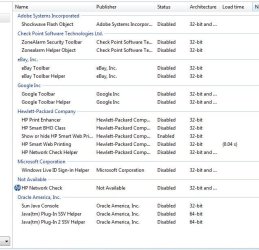
here is the pic of disabled add-ons. I still have not been able to find the Systweak toolbar. I also tried the JTL program to see if it would be removed.
 

Attachments

  • Capture.JPG
    Capture.JPG
    64.4 KB · Views: 30

My Computer

Computer Manufacturer/Model Number
HPE-400f
OS
Widows 7 home premium 64 bit
CPU
AMD phenom(tm) 11 x 4 processor 3.00 GHz
Motherboard
?
Memory
8.00 GB
Graphics Card(s)
ATI Radeon HD 5450
Sound Card
?
Monitor(s) Displays
HP vs17
Hard Drives
1 TB Sata
Mouse
usb
Internet Speed
download 15 mbps
Back
Top