Solved Your opinion for Intel Xeon E5620 CPU ( Video editing, gaming )

My CPU even didnt break on 5GHz with 1,65V VCore on Server Motherboard
The Xeon X5650 i have is similar to the E5620 but has 2 cores less
so why should it break?
I'm sorry, but I have a hard time believing this. That's almost a 100% overclock on air. It can't be stable 24/7, and if it is, it must throw so much heat into the room it's unbearable. Aside from that, a 7400 RPM fan must sound like a jet taking off.

As Layback said, 1.65 volts is in the toaster range. Even if it does work 24/7, you're running so far over voltage that you drastically shorten the life of your processor. If you're just OC'ing for sport, or to show off, that's fine, but I find it incredibly hard to believe that you can run that rig at 5 GHz for any length of time before blue screening, or shutting down from excess heat. What kind of temps are you getting? What did you use to load test? How long will it run at full load? With exotic liquid cooling or a Pelletier cooler I could accept that it might be plausible to run stable at that speed and voltage.

I need to see a CPU-Z validation before I even start to buy this one, and that will only tell me if you actually hit 5 GHz. It won't tell me if it's stable.
 

My Computer My Computer

At a glance

Win 7 Pro x64/Win 10 Pro x64 dual bootAMD FX 8350 Vishera @ 420016 GB Mushkin Blackline DDR3-2400 @ 1866 (9-1...XFX Radeon R9 280 Double D Black Edition
Computer type
PC/Desktop
Computer Manufacturer/Model Number
Mellon Labs (custom build)
OS
Win 7 Pro x64/Win 10 Pro x64 dual boot
CPU
AMD FX 8350 Vishera @ 4200
Motherboard
ASUS M5A97 R2.0
Memory
16 GB Mushkin Blackline DDR3-2400 @ 1866 (9-10-10-10-31)
Graphics Card(s)
XFX Radeon R9 280 Double D Black Edition
Sound Card
Realtek HD Audio on MB. Sounds great.
Monitor(s) Displays
Acer 24", Acer 22"
Screen Resolution
3840 x 1080
Hard Drives
1 x Mushkin Chronos 120 GB SSD (Win 10)
1 x Samsung 850 EVO 250 GB SSD (Win 7)
1 x WD 1TB SATA Blue
1 x WD 1TB SATA Green
PSU
Corsair TX-750
Case
CoolerMaster HAF 912+
Cooling
Coolermaster Seidon 240M Liquid AIO. 6 case fans
Keyboard
Logitech G710+
Mouse
Logitech G500s
Internet Speed
Much better since I got fiber, but still way overpriced.
Antivirus
MSE, Malware Bytes for scanning
Browser
Firefox
Other Info
Corsair VOID USB headphones.

A Mellon Labs X-1 - LCD Smartie driven system status display.

Brought to you by the letter E

My CPU even didnt break on 5GHz with 1,65V VCore on Server Motherboard
The Xeon X5650 i have is similar to the E5620 but has 2 cores less
so why should it break?
I'm sorry, but I have a hard time believing this. That's almost a 100% overclock on air. It can't be stable 24/7, and if it is, it must throw so much heat into the room it's unbearable. Aside from that, a 7400 RPM fan must sound like a jet taking off.

As Layback said, 1.65 volts is in the toaster range. Even if it does work 24/7, you're running so far over voltage that you drastically shorten the life of your processor. If you're just OC'ing for sport, or to show off, that's fine, but I find it incredibly hard to believe that you can run that rig at 5 GHz for any length of time before blue screening, or shutting down from excess heat. What kind of temps are you getting? What did you use to load test? How long will it run at full load? With exotic liquid cooling or a Pelletier cooler I could accept that it might be plausible to run stable at that speed and voltage.

I need to see a CPU-Z validation before I even start to buy this one, and that will only tell me if you actually hit 5 GHz. It won't tell me if it's stable.

Even the Ivy Bridge CPU didnt die on 1,67 as u can see in the CPU-Z picture

i tested the Westmere CPU under Chinebench R15 and LinX
I will search for the CPU-Z Pictures
 

My Computer My Computer

At a glance

Windows 7 Professional x64Intell Xeon E5730Hewlett Packard 8x 8GB REG ECC @ 1600MHzPalit NVIDiA Geforce GTX 970
Computer type
PC/Desktop
Computer Manufacturer/Model Number
Intel
OS
Windows 7 Professional x64
CPU
Intell Xeon E5730
Motherboard
Intel S5520HC
Memory
Hewlett Packard 8x 8GB REG ECC @ 1600MHz
Graphics Card(s)
Palit NVIDiA Geforce GTX 970
Hard Drives
4x IBM 73GB 15k RPM @ SAS in RAID 0
2x SAMSUNG EVO 840 120GB in RAID 0
Antivirus
None
Browser
Firefox
Ahoy brothers

Just checked out the E5620 on MSI X58 Pro-E

Its possible to run it on 4,4GHz without problems


Check this out
5ks4p8umdy9.png


Not broken yet


xvk4vl41jm4q.png


i will try lower voltages tomorrow..
 

My Computer My Computer

At a glance

Windows 7 Professional x64Intell Xeon E5730Hewlett Packard 8x 8GB REG ECC @ 1600MHzPalit NVIDiA Geforce GTX 970
Computer type
PC/Desktop
Computer Manufacturer/Model Number
Intel
OS
Windows 7 Professional x64
CPU
Intell Xeon E5730
Motherboard
Intel S5520HC
Memory
Hewlett Packard 8x 8GB REG ECC @ 1600MHz
Graphics Card(s)
Palit NVIDiA Geforce GTX 970
Hard Drives
4x IBM 73GB 15k RPM @ SAS in RAID 0
2x SAMSUNG EVO 840 120GB in RAID 0
Antivirus
None
Browser
Firefox

My Computer My Computer

At a glance

Win-7-Pro64bit 7-H-Prem-64biti7-5930K 2nd i9-9940x both water blocked VRM'...Trident-z 3200C14 2nd Trident-z 3600C16EVGA 1080ti ftw3 2nd Titan Xp both water blocked
Computer type
PC/Desktop
Computer Manufacturer/Model Number
Custom assembled by me :}
OS
Win-7-Pro64bit 7-H-Prem-64bit
CPU
i7-5930K 2nd i9-9940x both water blocked VRM's too
Motherboard
ASUS SABERTOOTH X99 2nd ASUS x299 Apex
Memory
Trident-z 3200C14 2nd Trident-z 3600C16
Graphics Card(s)
EVGA 1080ti ftw3 2nd Titan Xp both water blocked
Sound Card
Built-in Realtek
Monitor(s) Displays
1-AOC G2460PG 24"G-Sync 144Hz/ 2nd 1-ASUS VG248QE 24" 144Hz
Screen Resolution
1920 x 1080 144Hz
Hard Drives
2-Samsung M.2 Evo & Evo Plus
2-Samsung 850 EVO 500GB SSD's/ 3-2.5 W.D. Black 1tb-&3-1tb/3-3.5 WD Black 1tb hdd's
PSU
EVGA SuperNOVA 1000-P2 2nd 1200-P2
Case
2-Corsair Obsidian Series 450D Black ATX Mid Tower
Cooling
Custom water loops
Keyboard
Logitech G710+/ 2nd Logitech G910
Mouse
2-RedDragon M901 Perdition 16400 dpi Gaming mouse = wired
Internet Speed
Comcast Ping 19ms 89.31mbps download speed 6.12mbps upload
Antivirus
Malwarebytes Pro/ Superantispyware Pro
Browser
FireFox & Pale moon
Other Info
2nd ASUS X299 Apex/Intel i9-9940x with Custom water loop/7H-Prem-x64/Corsair 450D case/Ram Trident-z 3600C16 4x8gb / Samsung970Evo plus 500gb SSD/Dual ssd EZ swap evo/PSU EVGA SuperNova 1200w-P2 80+Platinum/GPU Titan Xp /8-ML-140 on push-pull on 2-280GTX rads
So .. what do you guys think about that ? ^^
All I am concerned now is the power consumption when it's overclocked to that much, I really dont want to increase my electric bills by too much, after all I am not the one who pays the bills so I guess I cant be that selfish, need to be careful with this :)
 

My Computer My Computer

At a glance

Windows 7 Professional 64bitIntel Xeon E5645 6 cores 2,4 GHz 50% Overcloc...Kingston 3x4GB DDR3 1600 MHzMSI Nvidia GTX 560 Ti Twin Frozr ii OC
Computer type
PC/Desktop
OS
Windows 7 Professional 64bit
CPU
Intel Xeon E5645 6 cores 2,4 GHz 50% Overclocked to 3,6 GHz
Motherboard
MSI X58 Pro-E
Memory
Kingston 3x4GB DDR3 1600 MHz
Graphics Card(s)
MSI Nvidia GTX 560 Ti Twin Frozr ii OC
Screen Resolution
19'
Hard Drives
1X Western Digital Blue 1TB
1x Western Digital Blue 500GB
PSU
Cooler Master B500 V2 500W
Internet Speed
30 MB/s download speed, 15 mb/s upload speed
Antivirus
Avast Free
Browser
Mozilla

My Computer My Computer

At a glance

Win-7-Pro64bit 7-H-Prem-64biti7-5930K 2nd i9-9940x both water blocked VRM'...Trident-z 3200C14 2nd Trident-z 3600C16EVGA 1080ti ftw3 2nd Titan Xp both water blocked
Computer type
PC/Desktop
Computer Manufacturer/Model Number
Custom assembled by me :}
OS
Win-7-Pro64bit 7-H-Prem-64bit
CPU
i7-5930K 2nd i9-9940x both water blocked VRM's too
Motherboard
ASUS SABERTOOTH X99 2nd ASUS x299 Apex
Memory
Trident-z 3200C14 2nd Trident-z 3600C16
Graphics Card(s)
EVGA 1080ti ftw3 2nd Titan Xp both water blocked
Sound Card
Built-in Realtek
Monitor(s) Displays
1-AOC G2460PG 24"G-Sync 144Hz/ 2nd 1-ASUS VG248QE 24" 144Hz
Screen Resolution
1920 x 1080 144Hz
Hard Drives
2-Samsung M.2 Evo & Evo Plus
2-Samsung 850 EVO 500GB SSD's/ 3-2.5 W.D. Black 1tb-&3-1tb/3-3.5 WD Black 1tb hdd's
PSU
EVGA SuperNOVA 1000-P2 2nd 1200-P2
Case
2-Corsair Obsidian Series 450D Black ATX Mid Tower
Cooling
Custom water loops
Keyboard
Logitech G710+/ 2nd Logitech G910
Mouse
2-RedDragon M901 Perdition 16400 dpi Gaming mouse = wired
Internet Speed
Comcast Ping 19ms 89.31mbps download speed 6.12mbps upload
Antivirus
Malwarebytes Pro/ Superantispyware Pro
Browser
FireFox & Pale moon
Other Info
2nd ASUS X299 Apex/Intel i9-9940x with Custom water loop/7H-Prem-x64/Corsair 450D case/Ram Trident-z 3600C16 4x8gb / Samsung970Evo plus 500gb SSD/Dual ssd EZ swap evo/PSU EVGA SuperNova 1200w-P2 80+Platinum/GPU Titan Xp /8-ML-140 on push-pull on 2-280GTX rads
Over clocking any computer will not raise the electric bill.

When over clocking a cpu your talking tenths of a volt DC.
You won't have a meter at home to measure the difference in wall outlet change because it would be so minute.

Go ahead and over clock it like you have been posting then you can go to the thread that ThrashZone has posted to gather your bragging rights.
 

My Computer My Computer

At a glance

Windows 10 Pro. 64/ version 1709 Windows 7 Pr...Intel i7-6800K @ 4.3Corsair Platinum 16 gig @2400EVGA GTX 1070 OC
Computer type
PC/Desktop
Computer Manufacturer/Model Number
Home made Desktop
OS
Windows 10 Pro. 64/ version 1709 Windows 7 Pro/64
CPU
Intel i7-6800K @ 4.3
Motherboard
ASUS X-99 Deluxe II
Memory
Corsair Platinum 16 gig @2400
Graphics Card(s)
EVGA GTX 1070 OC
Monitor(s) Displays
Asus 27" LED LCD/VE278Q
Screen Resolution
1920-1080 or 1280-720 HDMI
Hard Drives
INTEL SSD 730-240 Gb Sata 3.0/
PSU
EVGA Platium 1200W
Case
Phanteks Luxe Tempered Glass 8 fans/ one radiator
Cooling
XSPC/ Water Cooled CPU
Keyboard
Das 4 Professional
Mouse
Logitech M705/MX Anywhere 2-S
Internet Speed
100 mbits
Antivirus
Microsoft Security Essentials/ Malwarebytes Premium 3.0/ SAS
Browser
I.E. 11 default/Firefox/ ISP Time Warner Cable/Spectrum
Other Info
LG BluRay Burner/
Sound system-KLipsch-THX/
Icy Dock ssd Hot Swap bays.
@Layback Bear

Sorry but what do you mean by saying overclocking the CPU wont raise electric bills ? I dont quite understand you, as far as I know it happens often that people overclock their CPU / GPU and then end up " declocking " it just because of getting higher electric bills.
Do you mean that the difference will be barely visible or something like that ?

@TrashZone
Basically, the motherboard Knogle used for overclocking his E5620 is mine, I just ordered it on his address just so he can set the overclocking settings to the motherboard for me and he'll send me both the cooler and motherboard, once that's done I wont have to overclock it by myself because it'd be already done, I'll just have to place the new components in my PC case and that's all.

I guess I'll post my benchmark once I receive the components or just let Knogle do that :)
 

My Computer My Computer

At a glance

Windows 7 Professional 64bitIntel Xeon E5645 6 cores 2,4 GHz 50% Overcloc...Kingston 3x4GB DDR3 1600 MHzMSI Nvidia GTX 560 Ti Twin Frozr ii OC
Computer type
PC/Desktop
OS
Windows 7 Professional 64bit
CPU
Intel Xeon E5645 6 cores 2,4 GHz 50% Overclocked to 3,6 GHz
Motherboard
MSI X58 Pro-E
Memory
Kingston 3x4GB DDR3 1600 MHz
Graphics Card(s)
MSI Nvidia GTX 560 Ti Twin Frozr ii OC
Screen Resolution
19'
Hard Drives
1X Western Digital Blue 1TB
1x Western Digital Blue 500GB
PSU
Cooler Master B500 V2 500W
Internet Speed
30 MB/s download speed, 15 mb/s upload speed
Antivirus
Avast Free
Browser
Mozilla
What I mean is a over clocked computer will never show a effect on the electricity bill that one can measure. At lease my two over clocked computer don't have any more effect on my bill that a 50 watt light bulb would and I can't measure that either.

To me not over clocking to save on the electricity bill is foolish.
A while back I did a little research on this subject on line.
Their are all kinds of articles with charts and graphs indicating all kinds of things.

When I got done doing all the figuring the amount of extra my computers used being over clocked in a year I couldn't buy a StarBucks coffee with the difference.
 
Last edited:

My Computer My Computer

At a glance

Windows 10 Pro. 64/ version 1709 Windows 7 Pr...Intel i7-6800K @ 4.3Corsair Platinum 16 gig @2400EVGA GTX 1070 OC
Computer type
PC/Desktop
Computer Manufacturer/Model Number
Home made Desktop
OS
Windows 10 Pro. 64/ version 1709 Windows 7 Pro/64
CPU
Intel i7-6800K @ 4.3
Motherboard
ASUS X-99 Deluxe II
Memory
Corsair Platinum 16 gig @2400
Graphics Card(s)
EVGA GTX 1070 OC
Monitor(s) Displays
Asus 27" LED LCD/VE278Q
Screen Resolution
1920-1080 or 1280-720 HDMI
Hard Drives
INTEL SSD 730-240 Gb Sata 3.0/
PSU
EVGA Platium 1200W
Case
Phanteks Luxe Tempered Glass 8 fans/ one radiator
Cooling
XSPC/ Water Cooled CPU
Keyboard
Das 4 Professional
Mouse
Logitech M705/MX Anywhere 2-S
Internet Speed
100 mbits
Antivirus
Microsoft Security Essentials/ Malwarebytes Premium 3.0/ SAS
Browser
I.E. 11 default/Firefox/ ISP Time Warner Cable/Spectrum
Other Info
LG BluRay Burner/
Sound system-KLipsch-THX/
Icy Dock ssd Hot Swap bays.
Vladimir:

Everything I've read says that a heavily overclocked system might use about 20 percent more electricity than the same system not overclocked. Many Intel processors can provide a good overclock even when using stock voltage.

How much overclocking would add to your electricity bill depends on your local power rate per KWH, how many hours a day the PC runs, how much you stand on the throttle, and ultimately how many watts the system pulls from the wall socket.

In a non-gaming situation, the typical PC draws under 100 watts most of the time.

You can easily measure it with a Kill-A-Watt device.
 

My Computer My Computer

At a glance

Windows 7 Home Premium SP1, 64-bitIntel Skylake i5-6600K, not overclocked8 GB HyperX DDR4-2666 (2 x 4 GB)none; graphics are integrated on CPU
Computer type
PC/Desktop
Computer Manufacturer/Model Number
Ignatz Special; 4 speed manual gearbox; factory air conditioning; one of one
OS
Windows 7 Home Premium SP1, 64-bit
CPU
Intel Skylake i5-6600K, not overclocked
Motherboard
AsRock Z170M Extreme 4, micro ATX
Memory
8 GB HyperX DDR4-2666 (2 x 4 GB)
Graphics Card(s)
none; graphics are integrated on CPU
Sound Card
onboard: Realtek ALC1150; external: USB Behringer UF0-202
Monitor(s) Displays
Dell S2340M 23 inch IPS
Screen Resolution
1600 x 900
Hard Drives
System: Crucial MX100 series SSD, 128 GB;
Data: Samsung Spinpoint 103SJ, 1 TB;
Backup: WD Caviar Green WD30EZRX-00D8PB0, 3 TB
PSU
Rosewill SilentNight 500 watt fanless, semi-modular
Case
Antec Solo II
Cooling
Noctua NH-U12S; Noctua F12 intake, Noctua S12A exhaust
Keyboard
Microsoft 200 6JH-00001 USB
Mouse
Dell or Microsoft optical wired; USB
Antivirus
Microsoft Security Essentials and Malwarebytes Premium
Browser
Pale Moon
Other Info
All fans PWM; speeds at idle: CPU circa 500 rpm; intake circa 600 rpm; exhaust circa 600 rpm; CPU temps 27 idle and 47 C load in a warm room (27 C/81 F) when running Intel Extreme Tuning Utility stress test.
I guess I shouldnt be worried for the electric bills, to me honestly 20% more doesnt really seem to be a big deal, but I'll just have to wait until next month when I receive my motherboard and cooler so I can test this on my own and see for once if it makes any noticable difference in the bills.
After all, the frequency can be lowered so .. let's just wait and see :)

Thank you for your message, ignatzatsonic
 

My Computer My Computer

At a glance

Windows 7 Professional 64bitIntel Xeon E5645 6 cores 2,4 GHz 50% Overcloc...Kingston 3x4GB DDR3 1600 MHzMSI Nvidia GTX 560 Ti Twin Frozr ii OC
Computer type
PC/Desktop
OS
Windows 7 Professional 64bit
CPU
Intel Xeon E5645 6 cores 2,4 GHz 50% Overclocked to 3,6 GHz
Motherboard
MSI X58 Pro-E
Memory
Kingston 3x4GB DDR3 1600 MHz
Graphics Card(s)
MSI Nvidia GTX 560 Ti Twin Frozr ii OC
Screen Resolution
19'
Hard Drives
1X Western Digital Blue 1TB
1x Western Digital Blue 500GB
PSU
Cooler Master B500 V2 500W
Internet Speed
30 MB/s download speed, 15 mb/s upload speed
Antivirus
Avast Free
Browser
Mozilla
It's actually funny
You're more worried about the electric bill than frying your cpu :roflmao:
 

My Computer My Computer

At a glance

Win-7-Pro64bit 7-H-Prem-64biti7-5930K 2nd i9-9940x both water blocked VRM'...Trident-z 3200C14 2nd Trident-z 3600C16EVGA 1080ti ftw3 2nd Titan Xp both water blocked
Computer type
PC/Desktop
Computer Manufacturer/Model Number
Custom assembled by me :}
OS
Win-7-Pro64bit 7-H-Prem-64bit
CPU
i7-5930K 2nd i9-9940x both water blocked VRM's too
Motherboard
ASUS SABERTOOTH X99 2nd ASUS x299 Apex
Memory
Trident-z 3200C14 2nd Trident-z 3600C16
Graphics Card(s)
EVGA 1080ti ftw3 2nd Titan Xp both water blocked
Sound Card
Built-in Realtek
Monitor(s) Displays
1-AOC G2460PG 24"G-Sync 144Hz/ 2nd 1-ASUS VG248QE 24" 144Hz
Screen Resolution
1920 x 1080 144Hz
Hard Drives
2-Samsung M.2 Evo & Evo Plus
2-Samsung 850 EVO 500GB SSD's/ 3-2.5 W.D. Black 1tb-&3-1tb/3-3.5 WD Black 1tb hdd's
PSU
EVGA SuperNOVA 1000-P2 2nd 1200-P2
Case
2-Corsair Obsidian Series 450D Black ATX Mid Tower
Cooling
Custom water loops
Keyboard
Logitech G710+/ 2nd Logitech G910
Mouse
2-RedDragon M901 Perdition 16400 dpi Gaming mouse = wired
Internet Speed
Comcast Ping 19ms 89.31mbps download speed 6.12mbps upload
Antivirus
Malwarebytes Pro/ Superantispyware Pro
Browser
FireFox & Pale moon
Other Info
2nd ASUS X299 Apex/Intel i9-9940x with Custom water loop/7H-Prem-x64/Corsair 450D case/Ram Trident-z 3600C16 4x8gb / Samsung970Evo plus 500gb SSD/Dual ssd EZ swap evo/PSU EVGA SuperNova 1200w-P2 80+Platinum/GPU Titan Xp /8-ML-140 on push-pull on 2-280GTX rads

My Computer My Computer

At a glance

Windows 7 x64 Ultimate and numerous virtual m...AMD FX-8350 Vishera 32nm Technology @ 4.2 GHz...G Skill 32.0GB Dual-Channel DDR3 @ 1204MHz (1...EVGA GeForce GTX 960 4GB Super SC ACX 2.0+ wi...
Computer type
PC/Desktop
Computer Manufacturer/Model Number
Bluethunder II
OS
Windows 7 x64 Ultimate and numerous virtual machines
CPU
AMD FX-8350 Vishera 32nm Technology @ 4.2 GHz default
Motherboard
ASUSTeK COMPUTER INC. SABERTOOTH 990FX R2.0 (Socket 942)
Memory
G Skill 32.0GB Dual-Channel DDR3 @ 1204MHz (11-13-13-31)
Graphics Card(s)
EVGA GeForce GTX 960 4GB Super SC ACX 2.0+ with Back Plate
Sound Card
Creative X-Fi Titanium HD Audiophile PCIe
Monitor(s) Displays
LG L227WTG x 3
Screen Resolution
1680 x 1050 16:10
Hard Drives
238GB Samsung850 PRO SATA Disk Device (SSD)
1863GB Seagate ST2000DM 001-1CH164 (SATA)
1397GB Seagate ST1500DL 003-9VT16L(SATA)
466GB Western Digital WDC WD50 03AZEX-00K1GA0 (SATA) x 2
932GB Seagate ST310005 28AS SATA Disk Device (SATA)
PSU
Enermax Revolution87+ 1000 Watts Gold Certified Power Supply
Case
Rocketfish Full Tower
Cooling
Cooler Master Hyper 212 EVO Push Pull 120mm Fans
Keyboard
Logitech K740
Mouse
Logitech G100S Laser LED + Logitech Gamepad F310
Internet Speed
500 mbs down and 30mbs up
Antivirus
Malwarebytes Pro & Avast and MSE on certain Virtual Machines
Browser
Firefox (Main) Chrome, Internet Explorer (Back Up)
Other Info
Logitech X 230 2.1 Stereo System and 5.1 Yamaha RX V2090
B&W DM6 Monitor Speakers + Center and Surround Speakers
Using Mouse Without Borders (Google it)
I havent yet received my motherboard and cooler so I cant really test this on my own.

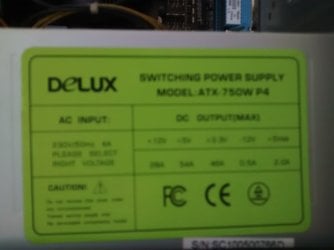
I really dont want problems such as frying my CPU and other parts, I guess the PSU plays an important role here so .. could you guys tell me if my PSU is good enough for the overclocked CPU ?

My PSU is Delux ATX-750W P4

Sorry for the blurry picture, it's my phone's camera fault..

Im also thinking about upgrading my PSU to Antec VP500PC 500W
Antec - VP500PC
 

Attachments

  • 1.jpg
    1.jpg
    174.4 KB · Views: 1
Last edited:

My Computer My Computer

At a glance

Windows 7 Professional 64bitIntel Xeon E5645 6 cores 2,4 GHz 50% Overcloc...Kingston 3x4GB DDR3 1600 MHzMSI Nvidia GTX 560 Ti Twin Frozr ii OC
Computer type
PC/Desktop
OS
Windows 7 Professional 64bit
CPU
Intel Xeon E5645 6 cores 2,4 GHz 50% Overclocked to 3,6 GHz
Motherboard
MSI X58 Pro-E
Memory
Kingston 3x4GB DDR3 1600 MHz
Graphics Card(s)
MSI Nvidia GTX 560 Ti Twin Frozr ii OC
Screen Resolution
19'
Hard Drives
1X Western Digital Blue 1TB
1x Western Digital Blue 500GB
PSU
Cooler Master B500 V2 500W
Internet Speed
30 MB/s download speed, 15 mb/s upload speed
Antivirus
Avast Free
Browser
Mozilla
Anyone .. ?
 

My Computer My Computer

At a glance

Windows 7 Professional 64bitIntel Xeon E5645 6 cores 2,4 GHz 50% Overcloc...Kingston 3x4GB DDR3 1600 MHzMSI Nvidia GTX 560 Ti Twin Frozr ii OC
Computer type
PC/Desktop
OS
Windows 7 Professional 64bit
CPU
Intel Xeon E5645 6 cores 2,4 GHz 50% Overclocked to 3,6 GHz
Motherboard
MSI X58 Pro-E
Memory
Kingston 3x4GB DDR3 1600 MHz
Graphics Card(s)
MSI Nvidia GTX 560 Ti Twin Frozr ii OC
Screen Resolution
19'
Hard Drives
1X Western Digital Blue 1TB
1x Western Digital Blue 500GB
PSU
Cooler Master B500 V2 500W
Internet Speed
30 MB/s download speed, 15 mb/s upload speed
Antivirus
Avast Free
Browser
Mozilla
Hi,
I'm not sure where a 750w to a 500w psu is considered a upgrade :confused:
If referring just in brand name ?
I've never heard of Delux so I guess that's 1 possibility ?

Your o-c is more concerning than anything and the only question there is why are you o-cing it so much :shock:

You haven't done it for any SevenForum benchmark tests so again why ?
 

My Computer My Computer

At a glance

Win-7-Pro64bit 7-H-Prem-64biti7-5930K 2nd i9-9940x both water blocked VRM'...Trident-z 3200C14 2nd Trident-z 3600C16EVGA 1080ti ftw3 2nd Titan Xp both water blocked
Computer type
PC/Desktop
Computer Manufacturer/Model Number
Custom assembled by me :}
OS
Win-7-Pro64bit 7-H-Prem-64bit
CPU
i7-5930K 2nd i9-9940x both water blocked VRM's too
Motherboard
ASUS SABERTOOTH X99 2nd ASUS x299 Apex
Memory
Trident-z 3200C14 2nd Trident-z 3600C16
Graphics Card(s)
EVGA 1080ti ftw3 2nd Titan Xp both water blocked
Sound Card
Built-in Realtek
Monitor(s) Displays
1-AOC G2460PG 24"G-Sync 144Hz/ 2nd 1-ASUS VG248QE 24" 144Hz
Screen Resolution
1920 x 1080 144Hz
Hard Drives
2-Samsung M.2 Evo & Evo Plus
2-Samsung 850 EVO 500GB SSD's/ 3-2.5 W.D. Black 1tb-&3-1tb/3-3.5 WD Black 1tb hdd's
PSU
EVGA SuperNOVA 1000-P2 2nd 1200-P2
Case
2-Corsair Obsidian Series 450D Black ATX Mid Tower
Cooling
Custom water loops
Keyboard
Logitech G710+/ 2nd Logitech G910
Mouse
2-RedDragon M901 Perdition 16400 dpi Gaming mouse = wired
Internet Speed
Comcast Ping 19ms 89.31mbps download speed 6.12mbps upload
Antivirus
Malwarebytes Pro/ Superantispyware Pro
Browser
FireFox & Pale moon
Other Info
2nd ASUS X299 Apex/Intel i9-9940x with Custom water loop/7H-Prem-x64/Corsair 450D case/Ram Trident-z 3600C16 4x8gb / Samsung970Evo plus 500gb SSD/Dual ssd EZ swap evo/PSU EVGA SuperNova 1200w-P2 80+Platinum/GPU Titan Xp /8-ML-140 on push-pull on 2-280GTX rads
Hello,

The current PSU 750W I have is Delux PSU, company that doesnt exist anymore and when it existed it was mostly used in Russia / European balkan countries, so no doubt why you havent heard its name before.
There's nothing you can find for it on internet too.

The thing about this PSU is that it's not actually 750W, the real / continuous rate is like 200-250W and it does not offer any overheating protection etc, it's old and it's not effective. I bought my PC back in 2010, so the PSU is definitely not newer than 2010

The new one Im going to buy is 500W - 500W real power / continuous power and it's certificated for 80 Plus ( 82% effective, 80 plus bronze certificate ).

Anyway, I dont think I can find any better PSU for the money than that so .. I'll go for it :)

As for the SevenForums benchmark, the only reason why I havent posted benchmark results is because I dont have the components yet, I'll have my cooler and motherboard by the end of this month ( waiting for my brother to come back in my country because he's got my ordered components with him ), once I have them I'll make sure I post benchmark results :)
 

My Computer My Computer

At a glance

Windows 7 Professional 64bitIntel Xeon E5645 6 cores 2,4 GHz 50% Overcloc...Kingston 3x4GB DDR3 1600 MHzMSI Nvidia GTX 560 Ti Twin Frozr ii OC
Computer type
PC/Desktop
OS
Windows 7 Professional 64bit
CPU
Intel Xeon E5645 6 cores 2,4 GHz 50% Overclocked to 3,6 GHz
Motherboard
MSI X58 Pro-E
Memory
Kingston 3x4GB DDR3 1600 MHz
Graphics Card(s)
MSI Nvidia GTX 560 Ti Twin Frozr ii OC
Screen Resolution
19'
Hard Drives
1X Western Digital Blue 1TB
1x Western Digital Blue 500GB
PSU
Cooler Master B500 V2 500W
Internet Speed
30 MB/s download speed, 15 mb/s upload speed
Antivirus
Avast Free
Browser
Mozilla
Hi there,

It's been a while since my last post in this thread.

Alright so, I finally got my new stuffs.
It took me a bit longer due to waiting for arrival of the new PSU I ordered. So, I bought Cooler Master B500 V2 500W PSU because my previous Delux 750W PSU had about 200-250W real power which is very low and too risky to use for the new components.

Now I have the Intel Xeon E5620 2,4 GHz overclocked to 3,6 GHz ( 50% overclock ) and so far there's absolutely no problems. Voltage is bellow the max recommended and everything else too.
The max temperature on 100% load is 63C ( about 14C less than the max recommended temperature which is 77.6C ) and before overclocking ( at 2,4 ghz base clock ) it was only 42C.

Anyway, I would like to run some benchmark tests which is the reason of my post this time, I would like you guys to recommend me some tests I shall run for my CPU.

Thank you
 

My Computer My Computer

At a glance

Windows 7 Professional 64bitIntel Xeon E5645 6 cores 2,4 GHz 50% Overcloc...Kingston 3x4GB DDR3 1600 MHzMSI Nvidia GTX 560 Ti Twin Frozr ii OC
Computer type
PC/Desktop
OS
Windows 7 Professional 64bit
CPU
Intel Xeon E5645 6 cores 2,4 GHz 50% Overclocked to 3,6 GHz
Motherboard
MSI X58 Pro-E
Memory
Kingston 3x4GB DDR3 1600 MHz
Graphics Card(s)
MSI Nvidia GTX 560 Ti Twin Frozr ii OC
Screen Resolution
19'
Hard Drives
1X Western Digital Blue 1TB
1x Western Digital Blue 500GB
PSU
Cooler Master B500 V2 500W
Internet Speed
30 MB/s download speed, 15 mb/s upload speed
Antivirus
Avast Free
Browser
Mozilla

My Computer My Computer

At a glance

Win-7-Pro64bit 7-H-Prem-64biti7-5930K 2nd i9-9940x both water blocked VRM'...Trident-z 3200C14 2nd Trident-z 3600C16EVGA 1080ti ftw3 2nd Titan Xp both water blocked
Computer type
PC/Desktop
Computer Manufacturer/Model Number
Custom assembled by me :}
OS
Win-7-Pro64bit 7-H-Prem-64bit
CPU
i7-5930K 2nd i9-9940x both water blocked VRM's too
Motherboard
ASUS SABERTOOTH X99 2nd ASUS x299 Apex
Memory
Trident-z 3200C14 2nd Trident-z 3600C16
Graphics Card(s)
EVGA 1080ti ftw3 2nd Titan Xp both water blocked
Sound Card
Built-in Realtek
Monitor(s) Displays
1-AOC G2460PG 24"G-Sync 144Hz/ 2nd 1-ASUS VG248QE 24" 144Hz
Screen Resolution
1920 x 1080 144Hz
Hard Drives
2-Samsung M.2 Evo & Evo Plus
2-Samsung 850 EVO 500GB SSD's/ 3-2.5 W.D. Black 1tb-&3-1tb/3-3.5 WD Black 1tb hdd's
PSU
EVGA SuperNOVA 1000-P2 2nd 1200-P2
Case
2-Corsair Obsidian Series 450D Black ATX Mid Tower
Cooling
Custom water loops
Keyboard
Logitech G710+/ 2nd Logitech G910
Mouse
2-RedDragon M901 Perdition 16400 dpi Gaming mouse = wired
Internet Speed
Comcast Ping 19ms 89.31mbps download speed 6.12mbps upload
Antivirus
Malwarebytes Pro/ Superantispyware Pro
Browser
FireFox & Pale moon
Other Info
2nd ASUS X299 Apex/Intel i9-9940x with Custom water loop/7H-Prem-x64/Corsair 450D case/Ram Trident-z 3600C16 4x8gb / Samsung970Evo plus 500gb SSD/Dual ssd EZ swap evo/PSU EVGA SuperNova 1200w-P2 80+Platinum/GPU Titan Xp /8-ML-140 on push-pull on 2-280GTX rads
@ knogle

i read these tutorials few times, and still dont get it :(

i have X8DTT-F and also X8DTI-F also intel s5500bc

on first motherboard set fsb should work so no problem (will check later)

now i want to focus on X8DTI-F
bcoz is the same as you have i guess so will be easier to make it

i download RW-everything

i choose clock generator (19bytes)

i want to make 166FSB

which byte i should change? and what value put there?

also maybe for future i need 1,45V so you are using any vmods? or can be done via software (RW or DOS)
whatever
 

My Computer My Computer

At a glance

Win7 Ultimate2x XEON X567012X4GB MICRON ECC2x GTX970 SLI
Computer type
PC/Desktop
OS
Win7 Ultimate
CPU
2x XEON X5670
Motherboard
SUPERMICRO X8DTI-F
Memory
12X4GB MICRON ECC
Graphics Card(s)
2x GTX970 SLI
Sound Card
X-FI
Monitor(s) Displays
3x1200x1600
Screen Resolution
3600x1600
Hard Drives
2x 500GB SAMSUNG 840
PSU
BQT 1000W
Case
HAF 932
Cooling
PROMILATECH MEGAHALEMS
Back
Top