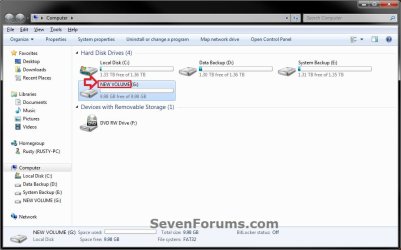
Convert FAT or FAT32 Volume to NTFS

How to Convert a FAT or FAT32 Volume to NTFS in Windows 7


   Information
This will show you how to convert a drive or partition volume with a FAT (FAT16) or FAT32 file system to a NTFS file system in Windows 7 without having to format the volume and lose your data on it.
   Note
Before you start to convert a FAT or FAT32 volume to NTFS, please consider the following limitations and requirements:
  • UDF and CDfs file systems are only used with optical media and cannot be converted to NTFS.
  • FAT12 is the only format used on floppy diskettes (as if these are used anymore ;)). This does not apply to a USB flash key though.
  • The conversion to NTFS is a one-way process. After you convert a drive or a partition to NTFS, you cannot convert it back to FAT or to FAT32 unless you format it again as FAT or FAT32.
  • The convert command requires that you have enough free space on the drive or on the partition that you want to convert to be able to convert it. If Convert.exe determines that there is not sufficient free space on the volume, it will not convert the volume.
  • If the files are being used on the volume that you are trying to convert, then you will be prompted with:
    "Convert cannot run because the volume is in use by another process. Convert may run if this volume is dismounted first. ALL OPENED HANDLES TO THIS VOLUME WOULD THEN BE INVALID. Would you like to force a dismount on this volume? <Y/N>"
    • Quit all the programs that are using the files on the drive, and then type Y at the command prompt to convert the drive to NTFS.
  • If the drive or partition volume that you are trying to convert is in use, then you will be prompted with:
    "Convert cannot gain exclusive access to the drive letter drive, so it cannot convert it now. Would you like to schedule it to be converted the next time the system restarts? <Y/N>"
    • To resolve this issue, type Y at the command prompt. The volume or drive will be converted to NTFS the next time that you restart the computer.
   Warning
Although the chance of corruption or data loss during the conversion is minimal, it is recommended that you backup any data that you do not want to lose on the volume that you want to convert before you start the conversion to be extra safe.

The only way to convert a NTFS disk back to a FAT or FAT32 disk is to format the disk.

Before you begin, note that the FAT32 file system has size limitations. In this version of Windows, you cannot create a FAT32 partition greater than 32 GB (32728 MB). In addition, you cannot store a file larger than 4 GB on a FAT32 partition. For more information, see Comparing NTFS and FAT file systems.


Here's How:
1. To Use a Elevated Command Prompt in Windows
A) Open an elevated command prompt.

B) Go to step 3.
2. To Use a Command Prompt at Boot
A) Open a command prompt at boot.

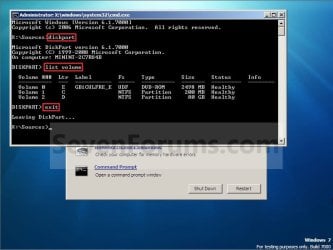
B) In the command prompt, type diskpart and press Enter. (see screenshot below)

C) In the command prompt, type list volume and press Enter. (see screenshot below)
NOTE: This will let you see what the drive letter is for the drive that you want to connvert since it may not always be the same drive letter that it is in Windows.

D) After making note of the drive letter, type exit and press Enter. (see screenshot below)
Command-1.jpg
E) Continue on to step 3 to convert the drive.
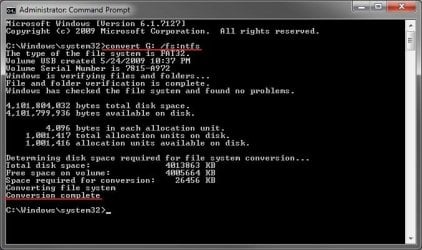
3. In the command prompt, type convert drive letter: /fs:ntfs and press Enter. (See screenshot below)
NOTE: Substitute drive letter for the drive letter of the FAT or FAT32 drive or partition that you want to convert to NTFS. For example, I want to convert my USB flash key with the drive letter G: , so I would type convert g: /fs:ntfs and press enter.
Command.jpg
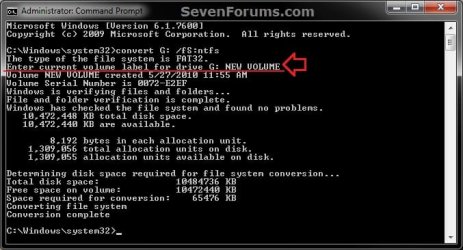
4. If prompted to Enter current volume label for drive (drive letter) (ex: G: ), then enter the name (ex: NEW VOLUME) of this drive letter as it is displayed in the Computer window and press Enter. (see screenshots below)
Current_Volume_Label-1.jpg

Current_Volume_Label-2.jpg
5. When the conversion to NTFS is complete, you receive the Conversion complete message. (See screenshot above)
NOTE: This may take a while to convert depending on full and large the drive is. It may also seem like it has hung at points, but be patient and let it finish.

6. Close the command prompt.
NOTE: If you used a command prompt at boot, then also close the System Recovery Options window and restart the computer.
That's it,
Shawn


Last edited:
When I tried this, it said:

Microsoft Windows [Version 6.1.7600]
Copyright (c) 2009 Microsoft Corporation. All rights reserved.
C:\Windows\system32>convert G: /fs:ntfs
CONVERT is not available for RAW drives.
C:\Windows\system32>

My G drive is a Samsung 300GB HD300LD PATA connected via IDE slave. It used to hold all of my work on it. Is it possible to still recover this data? When I go into BIOS, or when my system posts, it shows the file system is formatted FAT32. Maybe I should try this from a fresh boot and not from within Windows 7?
 
Last edited:

My Computer

Computer Manufacturer/Model Number
Custom built ASUS-based mid-tower
OS
Windows7 on desktop & Vista on laptop
CPU
AMD Athlon II X2 240
Motherboard
ASUS M3A78-EM
Memory
4 GB Corsair DDR2 1066MHz (2x2096MB)
Graphics Card(s)
ATI Radeon HD 3200 GPU (integrated graphics)
Sound Card
Realtek ALC1200 HD Audio 8-Channel CODEC (integrated sound)
Monitor(s) Displays
20" HANNspree flatscreen HMDI HF207 & DYNEX HDTV
Screen Resolution
HDMI 1600x900 (recommended setting, so I leave it)
Hard Drives
Seagate 500GB LP SATA HD/5900/16MB/SATA-3G,
Seagate 250GB SATA HD/7200/16MB/SATA-3G,
Samsung 300GB HD300LD PATA,
WD My Book Essentials 1TB USB 2.0 external
PSU
450W
Case
Power Up! ATX mid-tower
Cooling
120mm Side Case Cooling Fan, CPU Fan
Keyboard
Omnitech rubber flexible ultrathin USB/PS/2 adapter USB
Mouse
Wacom Bamboo Fun small Pen Mouse Tablet
Internet Speed
Cable
Other Info
Laptop computer: COMPAQ Presario C762NR Notebook PC w/Intel Pentium dual-CPU T2370 @ 1.73 GHz, 15.4" BrightView running Vista Home Premium SP2 32-BIT, 3 GB RAM, with external Western Digital 1tb My Book Essentials USB Hard drive.
Hello Andrea,

It seems that the drive is blank or has not been formatted with the RAW error like that. Try removing any (slave/master) jumpers on the drive to see if it may allow you to afterwards. It should work just fine in Windows 7 though.

Be sure to backup your data on that drive to be safe though if possible.
 

My Computer

Computer type
PC/Desktop
Computer Manufacturer/Model Number
Self built custom
OS
64-bit Windows 11 Pro for Workstations
CPU
Intel i7-8700K OC'd to 5 GHz
Motherboard
ASUS ROG Maximus XI Formula Z390
Memory
64 GB (4x16GB) G.SKILL TridentZ RGB DDR4 3600 MHz
Graphics Card(s)
ASUS ROG-STRIX-GTX1080TI-O11G-GAMING
Sound Card
Integrated
Monitor(s) Displays
2 x Samsung Odyssey G7 27"
Screen Resolution
2560x1440
Hard Drives
1TB Samsung 990 PRO M.2,
4TB Samsung 990 PRO PRO M.2,
TerraMaster F8 SSD Plus NAS
PSU
Seasonic Prime Titanium 850W
Case
Thermaltake Core P3
Cooling
Corsair Hydro H115i
Keyboard
Logitech wireless K800
Mouse
Logitech MX Master 4
Internet Speed
2 Gb/s Download and 100 Mb/s Upload
Antivirus
Malwarebyte Anti-Malware Premium
Browser
Google Chrome
Other Info
Logitech Z625 speaker system,
Logitech BRIO 4K Pro webcam,
HP Color LaserJet Pro MFP M477fdn,
APC SMART-UPS RT 1000 XL - SURT1000XLI,
Galaxy S23 Plus phone
Hello. Can i also make a external hdd NTFS into a fat 32 partition? i wanna back up my ps3 so i can install ubuntu on it.
 

My Computer

Computer Manufacturer/Model Number
Ibuypower
OS
Windows 7 Ultimate
CPU
AMD Phenom X4 2.2Ghz
Motherboard
MSI
Memory
4GB
Graphics Card(s)
4850
Sound Card
onboard sound system
Monitor(s) Displays
1920X1080
Screen Resolution
1920X1080
PSU
800 watts
Case
xion dazel
Hello Akpsp,

Yes, but it cannot be converted so you will have to format the external drive as a FAT32 partition instead. Be sure to backup anything on the drive that you do not want to lose first though.
 

My Computer

Computer type
PC/Desktop
Computer Manufacturer/Model Number
Self built custom
OS
64-bit Windows 11 Pro for Workstations
CPU
Intel i7-8700K OC'd to 5 GHz
Motherboard
ASUS ROG Maximus XI Formula Z390
Memory
64 GB (4x16GB) G.SKILL TridentZ RGB DDR4 3600 MHz
Graphics Card(s)
ASUS ROG-STRIX-GTX1080TI-O11G-GAMING
Sound Card
Integrated
Monitor(s) Displays
2 x Samsung Odyssey G7 27"
Screen Resolution
2560x1440
Hard Drives
1TB Samsung 990 PRO M.2,
4TB Samsung 990 PRO PRO M.2,
TerraMaster F8 SSD Plus NAS
PSU
Seasonic Prime Titanium 850W
Case
Thermaltake Core P3
Cooling
Corsair Hydro H115i
Keyboard
Logitech wireless K800
Mouse
Logitech MX Master 4
Internet Speed
2 Gb/s Download and 100 Mb/s Upload
Antivirus
Malwarebyte Anti-Malware Premium
Browser
Google Chrome
Other Info
Logitech Z625 speaker system,
Logitech BRIO 4K Pro webcam,
HP Color LaserJet Pro MFP M477fdn,
APC SMART-UPS RT 1000 XL - SURT1000XLI,
Galaxy S23 Plus phone
Hello Andrea,

It seems that the drive is blank or has not been formatted with the RAW error like that. Try removing any (slave/master) jumpers on the drive to see if it may allow you to afterwards. It should work just fine in Windows 7 though.

Be sure to backup your data on that drive to be safe though if possible.

I used a program called Drive Dig (or something like that) that digs up all images, data, etc, on drives that aren't "formatted" .... I was able to recover some data.... but not much. I don't know what happened, but I think the MBR got wiped out. The Master Boot Record... or the partition table got wiped out. I need to rebuild it, or just format the drive and count my losses. It used to have all my backed up good data, including things I can't replace or otherwise find... I wonder if there is a tool to recover the MBR or rebuilt the partition table... ?
 

My Computer

Computer Manufacturer/Model Number
Custom built ASUS-based mid-tower
OS
Windows7 on desktop & Vista on laptop
CPU
AMD Athlon II X2 240
Motherboard
ASUS M3A78-EM
Memory
4 GB Corsair DDR2 1066MHz (2x2096MB)
Graphics Card(s)
ATI Radeon HD 3200 GPU (integrated graphics)
Sound Card
Realtek ALC1200 HD Audio 8-Channel CODEC (integrated sound)
Monitor(s) Displays
20" HANNspree flatscreen HMDI HF207 & DYNEX HDTV
Screen Resolution
HDMI 1600x900 (recommended setting, so I leave it)
Hard Drives
Seagate 500GB LP SATA HD/5900/16MB/SATA-3G,
Seagate 250GB SATA HD/7200/16MB/SATA-3G,
Samsung 300GB HD300LD PATA,
WD My Book Essentials 1TB USB 2.0 external
PSU
450W
Case
Power Up! ATX mid-tower
Cooling
120mm Side Case Cooling Fan, CPU Fan
Keyboard
Omnitech rubber flexible ultrathin USB/PS/2 adapter USB
Mouse
Wacom Bamboo Fun small Pen Mouse Tablet
Internet Speed
Cable
Other Info
Laptop computer: COMPAQ Presario C762NR Notebook PC w/Intel Pentium dual-CPU T2370 @ 1.73 GHz, 15.4" BrightView running Vista Home Premium SP2 32-BIT, 3 GB RAM, with external Western Digital 1tb My Book Essentials USB Hard drive.
I am unable to format my 32GB USB Flash Drive with format or convert. Here is a screen shot of what happened.
ConvertFailure.jpg
 
Last edited by a moderator:

My Computer

OS
Windows 7
CPU
AMD 4850e
Motherboard
Gigabyte 780G
Memory
Corsair DDR 800 2GB
Graphics Card(s)
PNY 8600GT
Monitor(s) Displays
Sony KDS-55A3000
Hard Drives
Hitachi 500GB & Seagate 500GB
Case
Thermaltake Bach Media Center (HTPC)
Hello Bob, and welcome to Seven Forums.

Does your USB flash drive have write protection built into it? If so you will need to turn that off first. Also look in Disk Management (diskmgmt.msc) to see if you may be able to format it in there.
 

My Computer

Computer type
PC/Desktop
Computer Manufacturer/Model Number
Self built custom
OS
64-bit Windows 11 Pro for Workstations
CPU
Intel i7-8700K OC'd to 5 GHz
Motherboard
ASUS ROG Maximus XI Formula Z390
Memory
64 GB (4x16GB) G.SKILL TridentZ RGB DDR4 3600 MHz
Graphics Card(s)
ASUS ROG-STRIX-GTX1080TI-O11G-GAMING
Sound Card
Integrated
Monitor(s) Displays
2 x Samsung Odyssey G7 27"
Screen Resolution
2560x1440
Hard Drives
1TB Samsung 990 PRO M.2,
4TB Samsung 990 PRO PRO M.2,
TerraMaster F8 SSD Plus NAS
PSU
Seasonic Prime Titanium 850W
Case
Thermaltake Core P3
Cooling
Corsair Hydro H115i
Keyboard
Logitech wireless K800
Mouse
Logitech MX Master 4
Internet Speed
2 Gb/s Download and 100 Mb/s Upload
Antivirus
Malwarebyte Anti-Malware Premium
Browser
Google Chrome
Other Info
Logitech Z625 speaker system,
Logitech BRIO 4K Pro webcam,
HP Color LaserJet Pro MFP M477fdn,
APC SMART-UPS RT 1000 XL - SURT1000XLI,
Galaxy S23 Plus phone
Hello Bob, and welcome to Seven Forums.

Does your USB flash drive have write protection built into it? If so you will need to turn that off first. Also look in Disk Management (diskmgmt.msc) to see if you may be able to format it in there.

Thanks. I will check that out when I get home. How do I check write protection?
 

My Computer

OS
Windows 7
CPU
AMD 4850e
Motherboard
Gigabyte 780G
Memory
Corsair DDR 800 2GB
Graphics Card(s)
PNY 8600GT
Monitor(s) Displays
Sony KDS-55A3000
Hard Drives
Hitachi 500GB & Seagate 500GB
Case
Thermaltake Bach Media Center (HTPC)
It depends on your USB flash drive. Some have a switch to turn it off and on, some are software protected, and others have a special parition on it.
 

My Computer

Computer type
PC/Desktop
Computer Manufacturer/Model Number
Self built custom
OS
64-bit Windows 11 Pro for Workstations
CPU
Intel i7-8700K OC'd to 5 GHz
Motherboard
ASUS ROG Maximus XI Formula Z390
Memory
64 GB (4x16GB) G.SKILL TridentZ RGB DDR4 3600 MHz
Graphics Card(s)
ASUS ROG-STRIX-GTX1080TI-O11G-GAMING
Sound Card
Integrated
Monitor(s) Displays
2 x Samsung Odyssey G7 27"
Screen Resolution
2560x1440
Hard Drives
1TB Samsung 990 PRO M.2,
4TB Samsung 990 PRO PRO M.2,
TerraMaster F8 SSD Plus NAS
PSU
Seasonic Prime Titanium 850W
Case
Thermaltake Core P3
Cooling
Corsair Hydro H115i
Keyboard
Logitech wireless K800
Mouse
Logitech MX Master 4
Internet Speed
2 Gb/s Download and 100 Mb/s Upload
Antivirus
Malwarebyte Anti-Malware Premium
Browser
Google Chrome
Other Info
Logitech Z625 speaker system,
Logitech BRIO 4K Pro webcam,
HP Color LaserJet Pro MFP M477fdn,
APC SMART-UPS RT 1000 XL - SURT1000XLI,
Galaxy S23 Plus phone
It depends on your USB flash drive. Some have a switch to turn it off and on, some are software protected, and others have a special parition on it.

Mine has no switch. It appears to have no software since I did format it using FAT32. How would I access the special partition, if it has one?
 

My Computer

OS
Windows 7
CPU
AMD 4850e
Motherboard
Gigabyte 780G
Memory
Corsair DDR 800 2GB
Graphics Card(s)
PNY 8600GT
Monitor(s) Displays
Sony KDS-55A3000
Hard Drives
Hitachi 500GB & Seagate 500GB
Case
Thermaltake Bach Media Center (HTPC)
Since you formated as FAT32, I would think that you could just format it again with NTFS selected instead?

Computer.jpg
 

My Computer

Computer type
PC/Desktop
Computer Manufacturer/Model Number
Self built custom
OS
64-bit Windows 11 Pro for Workstations
CPU
Intel i7-8700K OC'd to 5 GHz
Motherboard
ASUS ROG Maximus XI Formula Z390
Memory
64 GB (4x16GB) G.SKILL TridentZ RGB DDR4 3600 MHz
Graphics Card(s)
ASUS ROG-STRIX-GTX1080TI-O11G-GAMING
Sound Card
Integrated
Monitor(s) Displays
2 x Samsung Odyssey G7 27"
Screen Resolution
2560x1440
Hard Drives
1TB Samsung 990 PRO M.2,
4TB Samsung 990 PRO PRO M.2,
TerraMaster F8 SSD Plus NAS
PSU
Seasonic Prime Titanium 850W
Case
Thermaltake Core P3
Cooling
Corsair Hydro H115i
Keyboard
Logitech wireless K800
Mouse
Logitech MX Master 4
Internet Speed
2 Gb/s Download and 100 Mb/s Upload
Antivirus
Malwarebyte Anti-Malware Premium
Browser
Google Chrome
Other Info
Logitech Z625 speaker system,
Logitech BRIO 4K Pro webcam,
HP Color LaserJet Pro MFP M477fdn,
APC SMART-UPS RT 1000 XL - SURT1000XLI,
Galaxy S23 Plus phone
I have tried everything it seems and am still unable to get it converted or formatted to NTFS. It looks like it is formatting, but when it reaches 100% I get an error stating windows was unable to complete the format properly. I have gone to the USB properties and enabled write caching under policies and still no luck. I have tried formatting from CMD Prompt, right clicking, and from within disk management and all have failed. Mind you FAT32 format works fine and the disk is accessible when formatted with such. Any other suggestions? Thanks. Here is another screen shot.
FormatFailed.jpg
 
Last edited:

My Computer

OS
Windows 7
CPU
AMD 4850e
Motherboard
Gigabyte 780G
Memory
Corsair DDR 800 2GB
Graphics Card(s)
PNY 8600GT
Monitor(s) Displays
Sony KDS-55A3000
Hard Drives
Hitachi 500GB & Seagate 500GB
Case
Thermaltake Bach Media Center (HTPC)

My Computer

Computer type
PC/Desktop
Computer Manufacturer/Model Number
Self built custom
OS
64-bit Windows 11 Pro for Workstations
CPU
Intel i7-8700K OC'd to 5 GHz
Motherboard
ASUS ROG Maximus XI Formula Z390
Memory
64 GB (4x16GB) G.SKILL TridentZ RGB DDR4 3600 MHz
Graphics Card(s)
ASUS ROG-STRIX-GTX1080TI-O11G-GAMING
Sound Card
Integrated
Monitor(s) Displays
2 x Samsung Odyssey G7 27"
Screen Resolution
2560x1440
Hard Drives
1TB Samsung 990 PRO M.2,
4TB Samsung 990 PRO PRO M.2,
TerraMaster F8 SSD Plus NAS
PSU
Seasonic Prime Titanium 850W
Case
Thermaltake Core P3
Cooling
Corsair Hydro H115i
Keyboard
Logitech wireless K800
Mouse
Logitech MX Master 4
Internet Speed
2 Gb/s Download and 100 Mb/s Upload
Antivirus
Malwarebyte Anti-Malware Premium
Browser
Google Chrome
Other Info
Logitech Z625 speaker system,
Logitech BRIO 4K Pro webcam,
HP Color LaserJet Pro MFP M477fdn,
APC SMART-UPS RT 1000 XL - SURT1000XLI,
Galaxy S23 Plus phone
It depends on your USB flash drive. Some have a switch to turn it off and on, some are software protected, and others have a special parition on it.

Ok I found no way around the issue. I have ensured all write protect is disabled (although I found nothing on my device to indicate it was write protected). I have tried formatting from right click, disk management, & CMD Prompt, and all has failed. Now here is the other option I found, and that is exFAT. That is available by simply selecting Better Performance under Properties\Policies tab. That removes the 4GB file size limit which most of us with a 32GB USB Stick don't want. So that option does the trick for that. I think there is quite a few people out there with devices that simply will not convert or format to NTFS. So exFAT is your only option to remove the 4GB file size restriction. Hope this info helps someone with the same issues as I have had. Thanks.
 

My Computer

OS
Windows 7
CPU
AMD 4850e
Motherboard
Gigabyte 780G
Memory
Corsair DDR 800 2GB
Graphics Card(s)
PNY 8600GT
Monitor(s) Displays
Sony KDS-55A3000
Hard Drives
Hitachi 500GB & Seagate 500GB
Case
Thermaltake Bach Media Center (HTPC)
Thank you Bob for posting back with your results. I'm happy to hear that you got it sorted. :)
 

My Computer

Computer type
PC/Desktop
Computer Manufacturer/Model Number
Self built custom
OS
64-bit Windows 11 Pro for Workstations
CPU
Intel i7-8700K OC'd to 5 GHz
Motherboard
ASUS ROG Maximus XI Formula Z390
Memory
64 GB (4x16GB) G.SKILL TridentZ RGB DDR4 3600 MHz
Graphics Card(s)
ASUS ROG-STRIX-GTX1080TI-O11G-GAMING
Sound Card
Integrated
Monitor(s) Displays
2 x Samsung Odyssey G7 27"
Screen Resolution
2560x1440
Hard Drives
1TB Samsung 990 PRO M.2,
4TB Samsung 990 PRO PRO M.2,
TerraMaster F8 SSD Plus NAS
PSU
Seasonic Prime Titanium 850W
Case
Thermaltake Core P3
Cooling
Corsair Hydro H115i
Keyboard
Logitech wireless K800
Mouse
Logitech MX Master 4
Internet Speed
2 Gb/s Download and 100 Mb/s Upload
Antivirus
Malwarebyte Anti-Malware Premium
Browser
Google Chrome
Other Info
Logitech Z625 speaker system,
Logitech BRIO 4K Pro webcam,
HP Color LaserJet Pro MFP M477fdn,
APC SMART-UPS RT 1000 XL - SURT1000XLI,
Galaxy S23 Plus phone
cyclic redundancy check error

I did exactly what the tutorial said on my 1TB External Hard drive, and it has been converted to NTFS as i have checked on its properties. However I got a message saying 'cyclic redundancy check error' after it had converted it. What does this mean? Sorry I don't have a screen shot, its says the error after it says 'converting file system' on the command prompt.
 

My Computer

Computer Manufacturer/Model Number
Acer Aspire 5738G
OS
Windows 7 Home Premium
CPU
Intel core 2 Duo T660
Memory
4GB
Graphics Card(s)
ATI Radeon HD 4570
Sound Card
ATI Radeon HD 4570
Monitor(s) Displays
15.5 Inch monitor
Hard Drives
320GB Internal
1TB External
Hello Jonus, and welcome to Seven Forums.

You can read more details about the error at the link below.

Data Error Cyclic Redundancy Check-Top Bits

However, this usually indicates data corruption on the drive. You might see if running chkdsk may be able to fix it.

Hope this helps,
Shawn
 

My Computer

Computer type
PC/Desktop
Computer Manufacturer/Model Number
Self built custom
OS
64-bit Windows 11 Pro for Workstations
CPU
Intel i7-8700K OC'd to 5 GHz
Motherboard
ASUS ROG Maximus XI Formula Z390
Memory
64 GB (4x16GB) G.SKILL TridentZ RGB DDR4 3600 MHz
Graphics Card(s)
ASUS ROG-STRIX-GTX1080TI-O11G-GAMING
Sound Card
Integrated
Monitor(s) Displays
2 x Samsung Odyssey G7 27"
Screen Resolution
2560x1440
Hard Drives
1TB Samsung 990 PRO M.2,
4TB Samsung 990 PRO PRO M.2,
TerraMaster F8 SSD Plus NAS
PSU
Seasonic Prime Titanium 850W
Case
Thermaltake Core P3
Cooling
Corsair Hydro H115i
Keyboard
Logitech wireless K800
Mouse
Logitech MX Master 4
Internet Speed
2 Gb/s Download and 100 Mb/s Upload
Antivirus
Malwarebyte Anti-Malware Premium
Browser
Google Chrome
Other Info
Logitech Z625 speaker system,
Logitech BRIO 4K Pro webcam,
HP Color LaserJet Pro MFP M477fdn,
APC SMART-UPS RT 1000 XL - SURT1000XLI,
Galaxy S23 Plus phone
Thanks for welcoming me :)

I've done a error check on my external hard drive and it says that there are no errors....which surprised me since it said i had an error before....everything seems to be working on it fine as well. I dont know what else to do about it now....maybe I'll find some data on it that is corrupted in the future, since their is rather allot of data on my disk.

Thanks for the Help :D
 

My Computer

Computer Manufacturer/Model Number
Acer Aspire 5738G
OS
Windows 7 Home Premium
CPU
Intel core 2 Duo T660
Memory
4GB
Graphics Card(s)
ATI Radeon HD 4570
Sound Card
ATI Radeon HD 4570
Monitor(s) Displays
15.5 Inch monitor
Hard Drives
320GB Internal
1TB External
Well, hopefully you will not find any missing or currupted data on it later.
 

My Computer

Computer type
PC/Desktop
Computer Manufacturer/Model Number
Self built custom
OS
64-bit Windows 11 Pro for Workstations
CPU
Intel i7-8700K OC'd to 5 GHz
Motherboard
ASUS ROG Maximus XI Formula Z390
Memory
64 GB (4x16GB) G.SKILL TridentZ RGB DDR4 3600 MHz
Graphics Card(s)
ASUS ROG-STRIX-GTX1080TI-O11G-GAMING
Sound Card
Integrated
Monitor(s) Displays
2 x Samsung Odyssey G7 27"
Screen Resolution
2560x1440
Hard Drives
1TB Samsung 990 PRO M.2,
4TB Samsung 990 PRO PRO M.2,
TerraMaster F8 SSD Plus NAS
PSU
Seasonic Prime Titanium 850W
Case
Thermaltake Core P3
Cooling
Corsair Hydro H115i
Keyboard
Logitech wireless K800
Mouse
Logitech MX Master 4
Internet Speed
2 Gb/s Download and 100 Mb/s Upload
Antivirus
Malwarebyte Anti-Malware Premium
Browser
Google Chrome
Other Info
Logitech Z625 speaker system,
Logitech BRIO 4K Pro webcam,
HP Color LaserJet Pro MFP M477fdn,
APC SMART-UPS RT 1000 XL - SURT1000XLI,
Galaxy S23 Plus phone
Back
Top