
Windows Easy Transfer - Using the XP Version on Windows 7
Reasons for using this older version of Windows Easy Transfer include:
· Outlook settings & email
· System settings
· Select program settings
Step 1
Fetch the Windows XP installer for Windows Easy Transfer(x64 64-bit)
Download details: Windows Easy Transfer for transferring from Windows XP (64 bit) to Windows 7
(x86 32-bit)
Download details: Windows Easy Transfer for transferring from Windows XP (32 bit) to Windows 7
Step 2
Extract the contents of the installer with WinRAR (or an equivalent).
Step 3
Find “migwiz” in the folder you extracted the installer, and double –click it
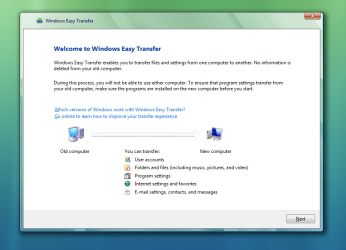
Step 4
Have fun!
How to: Implement the XP Windows Easy Transfer on Windows 7
Information
This tutorial is about implementing the Vista/XP Windows Easy Transfer on Windows 7, not the Windows Easy Transfer application built into Windows 7
Reasons for using this older version of Windows Easy Transfer include:
· Outlook settings & email
· System settings
· Select program settings
Information
The Windows 7 version of Windows Easy Transfer does not seem to support transferring Outlook settings & email
Note
This tutorial is meant to be used on the “old” computer, or the computer that has the files & settings you want to transfer. The “new”, or destination computer does not need this
Step 1
Fetch the Windows XP installer for Windows Easy Transfer(x64 64-bit)
Download details: Windows Easy Transfer for transferring from Windows XP (64 bit) to Windows 7
(x86 32-bit)
Download details: Windows Easy Transfer for transferring from Windows XP (32 bit) to Windows 7
Step 2
Extract the contents of the installer with WinRAR (or an equivalent).
Note
Since Windows 7 has a version of WET already installed. Please DO NOT double-click the installer
Step 3
Find “migwiz” in the folder you extracted the installer, and double –click it
Step 4
Have fun!
Information
Resources on using this version of Windows Easy Transfer
How to use Windows Easy Transfer to migrate files and settings from one Windows-based computer to another Windows Vista-based computer
Migrating to Vista using Windows Easy Transfer
Using Windows Easy Transfer to transfer your data to a new computer
How to use Windows Easy Transfer to migrate files and settings from one Windows-based computer to another Windows Vista-based computer
Migrating to Vista using Windows Easy Transfer
Using Windows Easy Transfer to transfer your data to a new computer
Last edited:
