
How to Have Multiple Home Pages for Pinned Sites in IE9 and IE10
Information
This tutorial will show you how to have multiple home pages for any pinned site in IE9
OPTION ONE
In IE9 or IE10
2. Open a new tab and navigate to the page that you would like to add as a second home page.
3. Right-Click on the home button and select 'Add as home page' (note: in the screenshot I have pinned bing and want to add google as a second homepage)

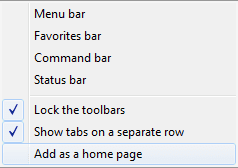
4. That's it! Now when you click on the pinned site logo your pinned site will open, and the second homepage will open in a new tab.
OPTION TWO
Through Internet Options
2. Press Alt + X, and then select 'Internet Options'.
3. Add the homepage(s) that you wish to open along with your pinned site in the box.
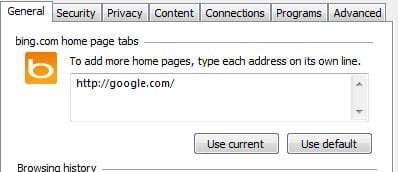
4. Click 'Apply'
Hope that helps!

Related Tutorials
- How to Pin and Unpin Websites from IE9 to the Taskbar or Start Menu
- How to Pin and Unpin Websites from IE10 to Start Screen in Windows 8
- How to Pin Site Tile to Start Screen from Internet Explorer 11 (IE11) in Windows 8.1
- How to Enable or Disable Internet Explorer 9 Ability to Pin Sites
- How to Open Only the First or All Home Pages when Internet Explorer Starts
- How to Add or Change the Home Page in Internet Explorer
- How to Prevent Changing and Specify a Default Home Page in Internet Explorer
- How to Set Internet Explorer 10 (IE10) to Start with Last Browsing Session or Home Page
Last edited by a moderator:

