
How to See Available Sleep States on Your System in Windows 7
Information
This will show you how to get a report of the sleep states available on your system in Windows 7. The report will also attempt to provide a reason why sleep states are unavailable as well.
Note
System Sleeping States
Only states S1, S2, S3, and S4 are the sleeping states. A system in one of these states is not performing any computational tasks and appears to be off. Unlike a system in the shutdown state (S5), however, a sleeping system retains memory state, either in the hardware or on disk. The operating system need not be rebooted to return the computer to the working state.
Some devices can wake the system from a sleeping state when certain events occur, such as an incoming call to a modem. In addition, on some computers, an external indicator tells the user that the system is merely sleeping.
With each successive sleep state, from S1 to S4, more of the computer is shut down. All ACPI-compliant computers shut off their processor clocks at S1 and lose system hardware context at S4 (unless a hibernate file is written before shutdown), as listed in the sections below. Details of the intermediate sleep states can vary depending on how the manufacturer has designed the machine. For example, on some machines certain chips on the motherboard might lose power at S3, while on others such chips retain power until S4. Furthermore, some devices might be able to wake the system only from S1 and not from deeper sleep states.
System Power State S0
System power state S0 is the working state where your Windows PC is turned on and awake. This is not a sleep state. It has the following characteristics:
System Power State S1
System power state S1 is a sleeping state with the following characteristics:
System Power State S2
System power state S2 is similar to S1 except that the CPU context and contents of the system cache are lost because the processor loses power. State S2 has the following characteristics:
System Power State S3
System power state S3 is a sleeping state with the following characteristics:
System Power State S4
System power state S4, the hibernate state, is the lowest-powered sleeping state and has the longest wake-up latency. To reduce power consumption to a minimum, the hardware powers off all devices. Operating system context, however, is maintained in a hibernate file (an image of memory) that the system writes to disk before entering the S4 state. Upon restart, the loader reads this file and jumps to the system's previous, prehibernation location.
If a computer in state S1, S2, or S3 loses all AC or battery power, it loses system hardware context and therefore must reboot to return to S0. A computer in state S4, however, can restart from its previous location even after it loses battery or AC power because operating system context is retained in the hibernate file. A computer in the hibernate state uses no power (with the possible exception of trickle current).
State S4 has the following characteristics:
System Power State S5
In the S5, or shutdown, state, the machine has no memory state and is not performing any computational tasks. The only difference between states S4 and S5 is that the computer can restart from the hibernate file in state S4, while restarting from state S5 requires rebooting the system. State S5 has the following characteristics:
For more detailed information on system sleeping states, see:
Only states S1, S2, S3, and S4 are the sleeping states. A system in one of these states is not performing any computational tasks and appears to be off. Unlike a system in the shutdown state (S5), however, a sleeping system retains memory state, either in the hardware or on disk. The operating system need not be rebooted to return the computer to the working state.
Some devices can wake the system from a sleeping state when certain events occur, such as an incoming call to a modem. In addition, on some computers, an external indicator tells the user that the system is merely sleeping.
With each successive sleep state, from S1 to S4, more of the computer is shut down. All ACPI-compliant computers shut off their processor clocks at S1 and lose system hardware context at S4 (unless a hibernate file is written before shutdown), as listed in the sections below. Details of the intermediate sleep states can vary depending on how the manufacturer has designed the machine. For example, on some machines certain chips on the motherboard might lose power at S3, while on others such chips retain power until S4. Furthermore, some devices might be able to wake the system only from S1 and not from deeper sleep states.
System Power State S0
System power state S0 is the working state where your Windows PC is turned on and awake. This is not a sleep state. It has the following characteristics:
- Power consumption Maximum. However, the power state of individual devices can change dynamically as power conservation takes place on a per-device basis. Unused devices can be powered down and powered up as needed.
- Software resumption Not applicable.
- Hardware latency None.
- System hardware context All context is retained.
System Power State S1
System power state S1 is a sleeping state with the following characteristics:
- Power consumption Less consumption than in S0 and greater than in the other sleep states. Processor clock is off and bus clocks are stopped.
- Software resumption Control restarts where it left off.
- Hardware latency Typically no more than two seconds.
- System hardware context All context retained and maintained by hardware.
System Power State S2
System power state S2 is similar to S1 except that the CPU context and contents of the system cache are lost because the processor loses power. State S2 has the following characteristics:
- Power consumption Less consumption than in state S1 and greater than in S3. Processor is off. Bus clocks are stopped; some buses might lose power.
- Software resumption After wake-up, control starts from the processor's reset vector.
- Hardware latency Two seconds or more; greater than or equal to the latency for S1.
- System hardware context CPU context and system cache contents are lost.
System Power State S3
System power state S3 is a sleeping state with the following characteristics:
- Power consumption Less consumption than in state S2. Processor is off and some chips on the motherboard also might be off.
- Software resumption After the wake-up event, control starts from the processor's reset vector.
- Hardware latency Almost indistinguishable from S2.
- System hardware context Only system memory is retained. CPU context, cache contents, and chipset context are lost.
System Power State S4
System power state S4, the hibernate state, is the lowest-powered sleeping state and has the longest wake-up latency. To reduce power consumption to a minimum, the hardware powers off all devices. Operating system context, however, is maintained in a hibernate file (an image of memory) that the system writes to disk before entering the S4 state. Upon restart, the loader reads this file and jumps to the system's previous, prehibernation location.
If a computer in state S1, S2, or S3 loses all AC or battery power, it loses system hardware context and therefore must reboot to return to S0. A computer in state S4, however, can restart from its previous location even after it loses battery or AC power because operating system context is retained in the hibernate file. A computer in the hibernate state uses no power (with the possible exception of trickle current).
State S4 has the following characteristics:
- Power consumption Off, except for trickle current to the power button and similar devices.
- Software resumption System restarts from the saved hibernate file. If the hibernate file cannot be loaded, rebooting is required. Reconfiguring the hardware while the system is in the S4 state might result in changes that prevent the hibernate file from loading correctly.
- Hardware latency Long and undefined. Only physical interaction returns the system to the working state. Such interaction might include the user pressing the ON switch or, if the appropriate hardware is present and wake-up is enabled, an incoming ring for the modem or activity on a LAN. The machine can also awaken from a resume timer if the hardware supports it.
- System hardware context None retained in hardware. The system writes an image of memory in the hibernate file before powering down. When the operating system is loaded, it reads this file and jumps to its previous location
System Power State S5
In the S5, or shutdown, state, the machine has no memory state and is not performing any computational tasks. The only difference between states S4 and S5 is that the computer can restart from the hibernate file in state S4, while restarting from state S5 requires rebooting the system. State S5 has the following characteristics:
- Power consumption Off, except for trickle current to devices such as the power button.
- Software resumption Boot is required upon awakening.
- Hardware latency Long and undefined. Only physical interaction, such as the user pressing the ON switch, returns the system to the working state. The BIOS can also awaken from a resume timer if the system is so configured.
- System hardware context None retained.
For more detailed information on system sleeping states, see:
Here's How: 1. Open a command prompt.
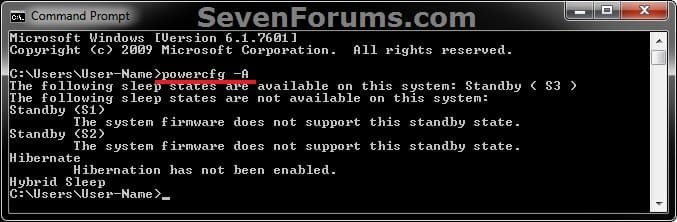
2. In the command prompt, type in the command below and press enter. powercfg -a
3. You will now get a report of the available sleep states on the system.
That's it,
Shawn
Related Tutorials
- How to See a List of Devices that are able to Wake Up the Computer
- How to See What Woke Up Your Computer Last
- How to Read the Wake Source Log in Event Viewer for Vista, Windows 7, and Windows 8
- How to Change the Power Plan Settings in Windows 7
- How to Enable or Disable Hibernate in Windows 7 and Windows 8
- How to Run a Power Efficiency Diagnostics Report in Windows 7 and Windows 8
Last edited:


