Windows Defender Offline

How to Use Windows Defender Offline

   Information
The former Microsoft Standalone System Sweeper (MSSS) BETA has been rebranded and available as Windows Defender Offline now.

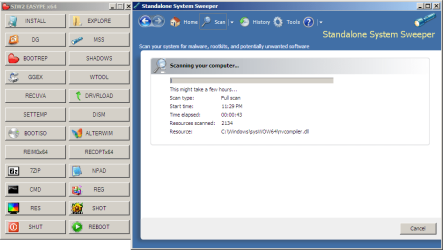
Windows Defender Offline is a free standalone, bootable malware and virus remover from Microsoft that performs an offline scan of an infected PC to remove viruses, rootkits and other advanced malware.

This tutorial will show you how to update and use the Windows Defender Offline Tool to create a 32-bit or 64-bit Windows Defender Offline bootable CD/DVD, USB flash drive, or ISO file on any computer to help you start an infected 32-bit or 64-bit PC and perform an offline scan at boot to help identify and remove rootkits and other malicious malware. In addition, Windows Defender Offline can be used if you cannot install or start an antivirus program on your computer, or if the installed AV program can’t detect or remove malware on your computer.

The log files for Windows Defender Offline are stored in a MPLog-MM/DD/YYYY-HH/MM/SS .txt file in the folder below on the computer that was scanned at boot.
C:\Windows\Windows Defender Offline\Support
For Windows Defender Offline FAQ's, see: Windows Defender Offline: frequently asked questions

   Note
Minimum System Requirements:

For both the PC infected with a virus or malware, and the PC that you are creating the bootable media on, you'll need PCs with the following minimum requirements.
  • Operating system:
    • Windows XP (Service Pack 3)
    • Windows Vista (RTM, Service Pack 1, or Service Pack 2, or higher)
    • Windows 7 (RTM, Service Pack 1, or higher)
    • Windows 8
  • Processor:
    • Windows XP: 500 MHz or higher
    • Windows Vista, Windows 7, and Windows 8: 1.0 GHz or higher
  • Memory:
    • Windows XP: 768 MB RAM or higher
    • Windows Vista, Windows 7, and Windows 8: 1 GB RAM or higher
  • Video resolution: 800 × 600 or higher
  • Available hard disk space: 500 MB
For the PC infected by a virus or malware:
  • The PC must have the same Windows operating system (OS) architecture 32-bit or 64-bit as Windows Defender Offline. Bootable media created on any version of Windows can be run on any other version of Windows. The only thing that needs to match is the architecture of Windows Defender Offline and the OS of the infected machine.
  • Internet connection: Only required to update the latest malware definitions for a Windows Defender Offline bootable USB flash drive.
  • In addition, BitLocker must be disabled to use Windows Defender Offline Beta.
For the PC on which you create the bootable media:
  • Administrator account: A user account with administrator privileges to create the bootable media.
  • Internet connection: An Internet connection to install and download the latest virus and spyware definitions for Windows Defender Offline.
  • Internet browser: Windows Internet Explorer 7.0 or higher, or Mozilla Firefox 3.0 or higher.
  • Media: A CD, DVD, or USB flash drive with at least 250 MB of free space.
   Tip
If you get a Error Code 0x8004cc04, Error Code 0x8004cc05, or Error Code 0x8050800c while using Windows Defender Offline, then please see the same suggested solutions here for MSSS.

If you have UEFI, then Windows Defender Offline is now able to boot with Secure Boot ENABLED.

   Warning
For obvious reasons, the "Windows Defender Offline" bootable CD/DVD, USB flash drive, or ISO should be created on a different computer other than the one that you suspect may be infected with malware.


STEP ONE

To Create a "Windows Defender Offline" Bootable CD/DVD, USB Flash Drive, or ISO File


1. If you have not already, you will need to download the same 32-bit or 64-bit version of Windows Defender Offline Tool at the download link below for the same 32-bit or 64-bit Windows that is installed on the computer that you will be scanning at boot, and save the exe file to your desktop.

Download


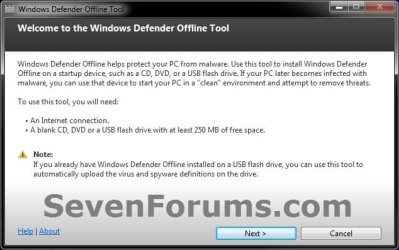
2. Run the downloaded mssstool64.exe (64-bit) or mssstool32.exe (32-bit) file, and click on Next. (see screenshot below)
Step1.jpg
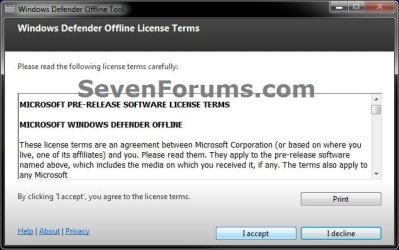
3. Click on the I accept button. (see screenshot below)
NOTE: You will only be prompted for this the first time that you run the Windows Defender Offline Tool.
Step2.jpg
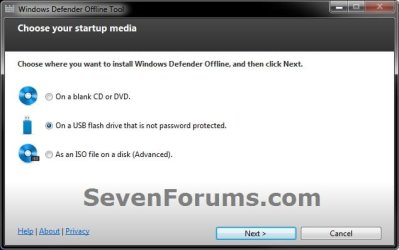
4. Do step 5, 6, or 7 below for what type of bootable "Windows Defender Offline" CD/DVD, USB, or ISO that you would like to create to scan with. (see screenshot below)
Step3.jpg
5. To Create a"Windows Defender Offline" Bootable CD or DVD
A) Insert a blank unformatted CD or DVD into the CD/DVD drive.
NOTE: If a AutoPlay window opens afterwards, close it.

B) Select (dot) Use a blank CD or a DVD, and click on Next. (see screenshot below step 4)

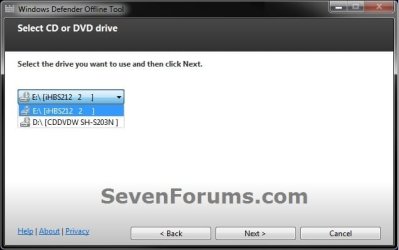
C) If you have more than one DC/DVD drive, then select the CD/DVD drive with the blank CD/DVD in it, and click on Next. (see screenshot below)
DVD-1.jpg
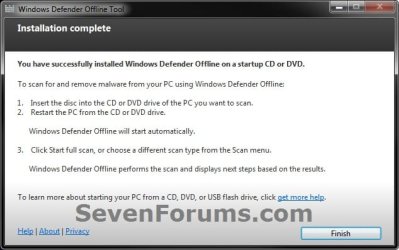
D) When it's finished, click on Finish. (see screenshot below)
NOTE: Be sure to label the CD/DVD as being able to only be used on a 32-bit or 64-bit Windows computer at boot.
DVD-2.jpg
E) Go to step 8.
6. To Create a "Windows Defender Offline" Bootable USB Flash Drive


   Note
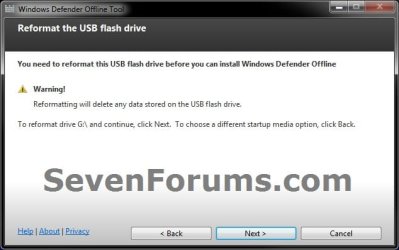
If you run the Windows Defender Offline Tool again on the same USB flash drive, and if the following conditions below are met, the tool will only download new updated malware definitions (approx. 69.48 MB) and update the USB drive without reformatting it.
  • The USB flash drive has Windows Defender Offline previously installed on it.
  • The Windows Defender Offline Tool version that was used to create the bootable USB flash drive the first run is the same as the one being used for the second run.
  • Files on the USB flash drive are not damaged or missing (the tool will verify that).
A) Connect a USB flash drive that is not password protected to your computer.
WARNING: This USB drive will be formated during this process, so be sure to backup anything that you do not want to lose to another location first.

B) Select (dot) On a USB flash drive that is not password protected, and click on Next. (see screenshot below step 4)

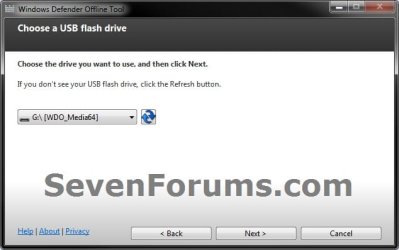
C) If you have more than one USB drives connected, then select the one that you want to use, and click on Next. (see screenshot below)
USB-1B.jpg
D) When it's finished, click on Finish. (see screenshot below)
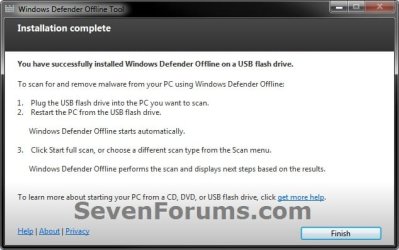
USB-2.jpg
E) Go to step 8.
7. To Create a "Windows Defender Offline" Bootable ISO File
A) Select (dot) Create Standalone System Sweeper on an ISO File, and click on Next. (see screenshot below step 4)

B) Select (browse) where you would like to save the ISO file to, and click on Next. (see screenshots below)
ISO-1.jpg

ISO-2.jpg

C) When it's finished, click on Finish. (see screenshot below)
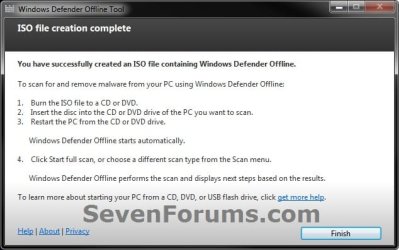
ISO-3.jpg
D) You can now use the ISO file to boot with in a virtual machine (ex: Windows Virtual PC), or use the free Windows 7 USB/DVD Download Tool to burn the ISO to a DVD or USB flash drive.

E) Continue on to step 8.
8. You will now be able to boot from the 32-bit or 64-bit CD/DVD, USB, or ISO that you created to run Windows Defender Offline on the same 32-bit or 64-bit computer as in the STEP TWO section below when you like.


STEP TWO

To Scan a Computer with the Bootable CD/DVD or USB Flash Drive


1. Insert or connect the same 32-bit or 64-bit Windows Defender Offline bootable CD/DVD or USB flash drive to the same type of 32-bit or 64-bit Windows computer that you want to scan at boot.
NOTE: For example, you can only use a created 32-bit USB on a 32-bit computer at boot, and you can only use a created 64-bit USB on a 64-bit computer at boot.

2. In your BIOS/UEFI Boot Menu (ex: F11) of the computer that you want to scan, select to temporarily boot from the CD/DVD or USB flash drive created in the STEP ONE section above, and boot from it.

   Note
Please consult your computer's or motherboard's manual for exact details on how to do this.

You do not need to change the boot priority order in the BIOS/UEFI settings for this. Use the Boot Menu instead to select to only temporarily boot from the DVD/USB instead.


3. This is what you will see while it's booting from the CD/DVD or USB flash drive.
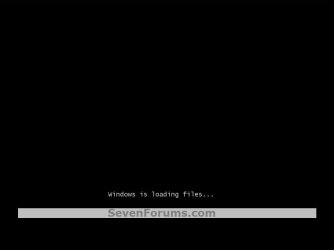
restart-1.jpg

restart-2.jpg

4. When Windows Defender Offline has booted, you will be able to update the definitions and select what type of scan you would like to run on the computer. A Full Scan is recommended, and could take several hours to complete.
NOTE: You will only be able to update the definitions at boot if you are using a bootable USB flash drive with a internet connection, and not with a bootable CD/DVD.
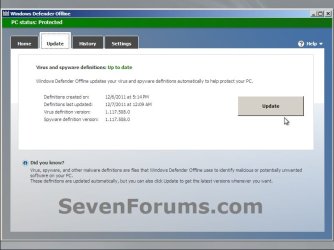
Update.jpg

Scan.jpg

5. When finished, close Windows Defender Offline to restart the computer back into Windows.
That's it,
Shawn


Attachments

  • USB-1.jpg
    USB-1.jpg
    63.9 KB · Views: 109
Last edited:
Another excellent tutorial, Brink. Thanks.

One question....stated at the bottom of the download page is the message that your computer must be able to run Microsoft Security Essentials. Does this mean that MSE will be installed and will this conflict with Norton 360 version 5 which I currently use? I have always thought that one should never have two AV programmes installed since they may interfere with each other, and Windows doesn't like it.
 

My Computer

Computer Manufacturer/Model Number
Mesh 955 XGS
OS
Windows 7 64 bit
CPU
Athlon X4 955 Black edition
Motherboard
ASUS M4A78 Pro
Memory
8GB DDR2
Graphics Card(s)
1x Radeon 4890
Monitor(s) Displays
IIyama ProLite E2208HDS
Screen Resolution
1920X1080p
Hard Drives
2x 1TB Samsung SATA2
1x 320GB IDE
PSU
600 watt
Cooling
Standard
Keyboard
MS wireless 6000
Mouse
MS wireless laser 7000
Internet Speed
Not as fast as it should be......
No, it won't install MSE.
 

My Computer

Computer type
PC/Desktop
Computer Manufacturer/Model Number
Airbot 2.0
OS
Windows 7 Ultimate x64 SP1
CPU
Core i7 920 (D0) @ 4Ghz, *26c idle *65c full load on air
Motherboard
Asus P6X58D Premium - Sata 6Gb/s - USB 3.0
Memory
12GB DDR3 Corsair Dominator -CMD12GX3M6A1600C8 at 1600MHz
Graphics Card(s)
Zotac Geforce GTX 770
Sound Card
ASUS Xonar D2X
Monitor(s) Displays
1 LG 24" Flatron W2453V-PF 1 Samsung 24" P2450H both 2ms RT
Screen Resolution
1920x1080@60hz
Hard Drives
1 Samsung 250GB 840 Evo SSD
1 OCZ Vertex2 180GB SSD
1 TB Samsung Spinpoint F1 7200RPM 32MB cache
2 500GB WD Caviar Blacks 7200RPM 32MB cache (WD5001AALS)

Pioneer DVD Burner DVR-S18M
PSU
Corsair HX1000W
Case
Cooler Master HAF 932
Cooling
Case Fans *3 230mm, *1 140mm/CPU - *Tuniq Tower 120 Extreme
Keyboard
Logitech Wireless MK700
Mouse
Logitech Wireless MK700
Internet Speed
DL 15 Mbps UL 0.98 Mbps
Antivirus
None
Browser
Firefox Nightly
Other Info
Processor-7.7 *RAM- 7.9 *Graphics-7.9 *Gaming Graphics- 7.9 *SSD- 7.8 W.E.I final score= 7.7
*Phone- LG Nexus 5
Another excellent tutorial, Brink. Thanks.

One question....stated at the bottom of the download page is the message that your computer must be able to run Microsoft Security Essentials. Does this mean that MSE will be installed and will this conflict with Norton 360 version 5 which I currently use? I have always thought that one should never have two AV programmes installed since they may interfere with each other, and Windows doesn't like it.

Hello Steve,

No, Microsoft Security Essentials (MSE) or anything else will not be installed. It was just a reference as an optional separate program that you could install on the computer and use if you did not already have a antivirus program installed on your computer.

Microsoft Standalone System Sweeper is a standalone program that runs at boot from the created CD/DVD, USB, or ISO instead, and does not install anything on your computer.
 

My Computer

Computer type
PC/Desktop
Computer Manufacturer/Model Number
Self built custom
OS
64-bit Windows 11 Pro for Workstations
CPU
Intel i7-8700K OC'd to 5 GHz
Motherboard
ASUS ROG Maximus XI Formula Z390
Memory
64 GB (4x16GB) G.SKILL TridentZ RGB DDR4 3600 MHz
Graphics Card(s)
ASUS ROG-STRIX-GTX1080TI-O11G-GAMING
Sound Card
Integrated
Monitor(s) Displays
2 x Samsung Odyssey G7 27"
Screen Resolution
2560x1440
Hard Drives
1TB Samsung 990 PRO M.2,
4TB Samsung 990 PRO PRO M.2,
TerraMaster F8 SSD Plus NAS
PSU
Seasonic Prime Titanium 850W
Case
Thermaltake Core P3
Cooling
Corsair Hydro H115i
Keyboard
Logitech wireless K800
Mouse
Logitech MX Master 4
Internet Speed
2 Gb/s Download and 100 Mb/s Upload
Antivirus
Malwarebyte Anti-Malware Premium
Browser
Google Chrome
Other Info
Logitech Z625 speaker system,
Logitech BRIO 4K Pro webcam,
HP Color LaserJet Pro MFP M477fdn,
APC SMART-UPS RT 1000 XL - SURT1000XLI,
Galaxy S23 Plus phone
No, that does not mean that MSE will be installed. It's just a suggestion for those using this tool who don't already have an alternative installed.
 

My Computer

Computer type
PC/Desktop
Computer Manufacturer/Model Number
Dwarf Dwf/11/2012 r09/2013
OS
Windows 8.1 Pro RTM x64
CPU
Intel Core-i5-3570K 4-core @ 3.4GHz (Ivy Bridge) (OC 4.4GHz)
Motherboard
ASRock Z77 Extreme4-M
Memory
4 x 4GB DDR3-1600 Corsair Vengeance CMZ8GX3M2A1600C9B (16GB)
Graphics Card(s)
MSI GeForce GTX770 Gaming OC 2GB
Sound Card
Realtek High Definition on board solution (ALC 898)
Monitor(s) Displays
ViewSonic VA1912w Widescreen (VGA)
Screen Resolution
1440x900
Hard Drives
OCZ Agility 3 SSD 120GB SATA III x2 (RAID 0)
Samsung HD501LJ 500GB SATA II x2
Hitachi HDS721010CLA332 1TB SATA II
Iomega 1.5TB Ext USB 2.0
WD 2.0TB Ext USB 3.0
PSU
XFX Pro Series 850W Semi-Modular
Case
Gigabyte IF233
Cooling
1 x 120mm Front Inlet 1 x 120mm Rear Exhaust
Keyboard
Microsoft Comfort Curve Keyboard 3000 (USB)
Mouse
Microsoft Comfort Mouse 3000 for Business (USB)
Internet Speed
NetGear DG834Gv3 ADSL Modem/Router (Ethernet) ~4.0 Mb/s (O2)
Antivirus
Avast! 8.0.1497
Browser
IE 11
Other Info
Optical Drive: HL-DT-ST BD-RE BH10LS30 SATA Bluray
Lexmark S305 Printer/Scanner/Copier (USB)
WEI Score: 8.1/8.1/8.5/8.5/8.25
Asus Eee PC 1011PX Netbook (Windows 7 x86 Starter)
Great article Brink!

Another tip regarding update definitions -

:tip: Update definition on a USB thumb drive
(instructions below are relevant for version 1.0.856.0)

When running the tool again, if the following conditions are met, it will only download definitions (approx. 60MB) and update the USB drive without reformatting it:
  1. A USB thumb drive media is selected.
  2. The USB drive being has a previously installed Standalone System Sweeper.
  3. The version that was used to create the bootable media is the same as being used at the second run.
  4. Files on the USB drive were not damanged or missing (the tool will verify that).
Enjoy!
Guy Arad.
 

My Computer

OS
Windows 7 Enterprise x64 SP1
Hello Guy Arad, and welcome to Seven Forums.

Thank you. Added. :)
 

My Computer

Computer type
PC/Desktop
Computer Manufacturer/Model Number
Self built custom
OS
64-bit Windows 11 Pro for Workstations
CPU
Intel i7-8700K OC'd to 5 GHz
Motherboard
ASUS ROG Maximus XI Formula Z390
Memory
64 GB (4x16GB) G.SKILL TridentZ RGB DDR4 3600 MHz
Graphics Card(s)
ASUS ROG-STRIX-GTX1080TI-O11G-GAMING
Sound Card
Integrated
Monitor(s) Displays
2 x Samsung Odyssey G7 27"
Screen Resolution
2560x1440
Hard Drives
1TB Samsung 990 PRO M.2,
4TB Samsung 990 PRO PRO M.2,
TerraMaster F8 SSD Plus NAS
PSU
Seasonic Prime Titanium 850W
Case
Thermaltake Core P3
Cooling
Corsair Hydro H115i
Keyboard
Logitech wireless K800
Mouse
Logitech MX Master 4
Internet Speed
2 Gb/s Download and 100 Mb/s Upload
Antivirus
Malwarebyte Anti-Malware Premium
Browser
Google Chrome
Other Info
Logitech Z625 speaker system,
Logitech BRIO 4K Pro webcam,
HP Color LaserJet Pro MFP M477fdn,
APC SMART-UPS RT 1000 XL - SURT1000XLI,
Galaxy S23 Plus phone
Great tut, again thanks.

As soon as I saw this, was hoping it was available in an ISO file.
Will add this to my rescue USB tool.
 

My Computer

Computer type
PC/Desktop
Computer Manufacturer/Model Number
76~2.0
OS
Windows 7 Ult x64 - SP1/ Windows 8 Pro x64
CPU
Intel Core i5-3570K 4.6GHz
Motherboard
Gigabyte GA-Z77X UD3H, f18
Memory
8GB (2X4GB) DDR3 1600 Corsair Vengeance CL8 1.5v
Graphics Card(s)
Sapphire HD 7770 Vapor-X OC 1GB DDR5
Sound Card
Onboard VIA VT2021
Monitor(s) Displays
22" LCD Dell
Screen Resolution
1680x1050
Hard Drives
Samsung 840Pro 128GB SSD,
Seagate Barracuda 500GB SATA2 7200rpm 32MB cache, Seagate Barracuda 1TB SATA2 7200rpm 32MB cache,
PSU
Corsair HX650W
Case
Cooler Master Storm Scout
Cooling
Corsair H80 2x12cm Noctua NF P12 , 2x14cm case fans
Keyboard
Logitech Wave
Mouse
CM Sentinel
Internet Speed
Dismal
Antivirus
Avast
Browser
Opera Next
Other Info
Haswell laptop: HP Envy 17t-j, i7-4700MQ, GeForce 740M 2GB DDR3, 17.3" Full HD 1920x1080, 16GB RAM, Samsung 840 Pro 128GB, 1TB Hitachi 7200 HDD,
Desktop: eSATA ports,
External eSATA Seagate 500GB SATA2 7200rpm,
External WD USB 500GB
Great tut, again thanks.

As soon as I saw this, was hoping it was available in an ISO file.
Will add this to my rescue USB tool.

I'm glad you are happy with the ISO option. We were hoping it would be of use.
However, if you prepare the ISO now and keep it aside, it will not be up-to-date by the time you are using it (hopefully never :) ).

I have two suggestions for you:
  1. Since the tool will reformat your USB, backup your rescue USB drive and create a bootable USB using the tool (you can then copy your data back onto the USB drive), and add the tool binary as well. By the time you have to use, it run the tool again with the same USB drive. The tool will detect the already installed product and will only update the definitions (without reformatting or altering your data).
  2. The second option is indeed to keep an ISO and when the day comes use Brink's option #1 of manually updating the definitions.
    Please keep in mind that the latter option is not currently supported or intended by Microsoft. Use it at your own risk.
Thanks,
Guy.
 

My Computer

OS
Windows 7 Enterprise x64 SP1
I found the ISO useful to run at boot on a virtual machine (ex: Windows Virtual PC) to scan it. You can just select the ISO file to act as a "DVD Drive" in the VM's settings to boot from.
 

My Computer

Computer type
PC/Desktop
Computer Manufacturer/Model Number
Self built custom
OS
64-bit Windows 11 Pro for Workstations
CPU
Intel i7-8700K OC'd to 5 GHz
Motherboard
ASUS ROG Maximus XI Formula Z390
Memory
64 GB (4x16GB) G.SKILL TridentZ RGB DDR4 3600 MHz
Graphics Card(s)
ASUS ROG-STRIX-GTX1080TI-O11G-GAMING
Sound Card
Integrated
Monitor(s) Displays
2 x Samsung Odyssey G7 27"
Screen Resolution
2560x1440
Hard Drives
1TB Samsung 990 PRO M.2,
4TB Samsung 990 PRO PRO M.2,
TerraMaster F8 SSD Plus NAS
PSU
Seasonic Prime Titanium 850W
Case
Thermaltake Core P3
Cooling
Corsair Hydro H115i
Keyboard
Logitech wireless K800
Mouse
Logitech MX Master 4
Internet Speed
2 Gb/s Download and 100 Mb/s Upload
Antivirus
Malwarebyte Anti-Malware Premium
Browser
Google Chrome
Other Info
Logitech Z625 speaker system,
Logitech BRIO 4K Pro webcam,
HP Color LaserJet Pro MFP M477fdn,
APC SMART-UPS RT 1000 XL - SURT1000XLI,
Galaxy S23 Plus phone
Hopefully, this tool will be improved prior to its final release. One thing that I feel needs to be addressed is the 32-bit/64-bit issue. It might be fine for those of us who only have one OS installed, or only have OSes of either 32-bit or 64-bit architecture (but not both). What about those of us who, like me, have both?
 

My Computer

Computer type
PC/Desktop
Computer Manufacturer/Model Number
Dwarf Dwf/11/2012 r09/2013
OS
Windows 8.1 Pro RTM x64
CPU
Intel Core-i5-3570K 4-core @ 3.4GHz (Ivy Bridge) (OC 4.4GHz)
Motherboard
ASRock Z77 Extreme4-M
Memory
4 x 4GB DDR3-1600 Corsair Vengeance CMZ8GX3M2A1600C9B (16GB)
Graphics Card(s)
MSI GeForce GTX770 Gaming OC 2GB
Sound Card
Realtek High Definition on board solution (ALC 898)
Monitor(s) Displays
ViewSonic VA1912w Widescreen (VGA)
Screen Resolution
1440x900
Hard Drives
OCZ Agility 3 SSD 120GB SATA III x2 (RAID 0)
Samsung HD501LJ 500GB SATA II x2
Hitachi HDS721010CLA332 1TB SATA II
Iomega 1.5TB Ext USB 2.0
WD 2.0TB Ext USB 3.0
PSU
XFX Pro Series 850W Semi-Modular
Case
Gigabyte IF233
Cooling
1 x 120mm Front Inlet 1 x 120mm Rear Exhaust
Keyboard
Microsoft Comfort Curve Keyboard 3000 (USB)
Mouse
Microsoft Comfort Mouse 3000 for Business (USB)
Internet Speed
NetGear DG834Gv3 ADSL Modem/Router (Ethernet) ~4.0 Mb/s (O2)
Antivirus
Avast! 8.0.1497
Browser
IE 11
Other Info
Optical Drive: HL-DT-ST BD-RE BH10LS30 SATA Bluray
Lexmark S305 Printer/Scanner/Copier (USB)
WEI Score: 8.1/8.1/8.5/8.5/8.25
Asus Eee PC 1011PX Netbook (Windows 7 x86 Starter)
Agreed. It would be nice to have a universal version that could be used on both 32-bit an 64-bit.
 

My Computer

Computer type
PC/Desktop
Computer Manufacturer/Model Number
Self built custom
OS
64-bit Windows 11 Pro for Workstations
CPU
Intel i7-8700K OC'd to 5 GHz
Motherboard
ASUS ROG Maximus XI Formula Z390
Memory
64 GB (4x16GB) G.SKILL TridentZ RGB DDR4 3600 MHz
Graphics Card(s)
ASUS ROG-STRIX-GTX1080TI-O11G-GAMING
Sound Card
Integrated
Monitor(s) Displays
2 x Samsung Odyssey G7 27"
Screen Resolution
2560x1440
Hard Drives
1TB Samsung 990 PRO M.2,
4TB Samsung 990 PRO PRO M.2,
TerraMaster F8 SSD Plus NAS
PSU
Seasonic Prime Titanium 850W
Case
Thermaltake Core P3
Cooling
Corsair Hydro H115i
Keyboard
Logitech wireless K800
Mouse
Logitech MX Master 4
Internet Speed
2 Gb/s Download and 100 Mb/s Upload
Antivirus
Malwarebyte Anti-Malware Premium
Browser
Google Chrome
Other Info
Logitech Z625 speaker system,
Logitech BRIO 4K Pro webcam,
HP Color LaserJet Pro MFP M477fdn,
APC SMART-UPS RT 1000 XL - SURT1000XLI,
Galaxy S23 Plus phone
Thanks for the replies which cleared up the problem. Now I can go ahead and use it.

Thanks again :D
 

My Computer

Computer Manufacturer/Model Number
Mesh 955 XGS
OS
Windows 7 64 bit
CPU
Athlon X4 955 Black edition
Motherboard
ASUS M4A78 Pro
Memory
8GB DDR2
Graphics Card(s)
1x Radeon 4890
Monitor(s) Displays
IIyama ProLite E2208HDS
Screen Resolution
1920X1080p
Hard Drives
2x 1TB Samsung SATA2
1x 320GB IDE
PSU
600 watt
Cooling
Standard
Keyboard
MS wireless 6000
Mouse
MS wireless laser 7000
Internet Speed
Not as fast as it should be......
It is interesting - strange that sys rec options are not in there as well.

MS made sys rec options bit version specific - I don't imagine they will do any different with this.

Shame really, Eset scanner works great in my pe3 builds - and on any bit version target.

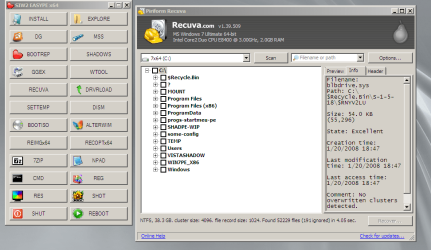
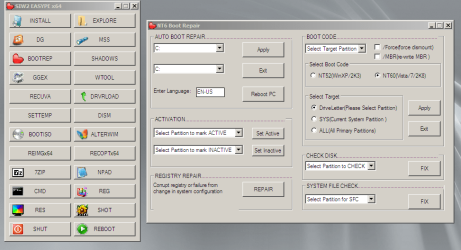
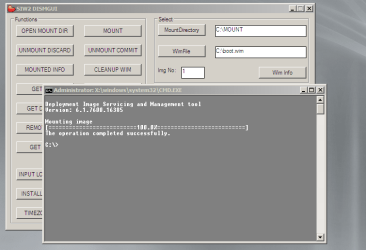
I made my own shell to get a few more apps. in there - no sense in having boot media with only one function.

Captured11.png

Captured10.png

Captured9.png

Captured6.png

Captured4jpg.png
 

My Computers

System One System Two

  • Computer type
    PC/Desktop
    OS
    7 X64
    CPU
    i5 8400
    Motherboard
    gigabyte b365m ds3h
    Memory
    2x8gb 3200mhz
    Hard Drives
    various
    PSU
    pure power 11 400w cm
    Case
    Coolermaster
    Cooling
    cryorig m9i
  • Computer type
    PC/Desktop
    OS
    7x64
    CPU
    g5400
    Motherboard
    ga b365m ds3h
    Memory
    8gb ddr4 2400
    PSU
    xfx pro 450w
Another useful tutorial - thanks. I'll add the iso to my utility flash drive.

This may happen already & I haven't noticed - do new tutorials have a prominent place for say 2 weeks so they can be easily spotted?
 

My Computer

Computer type
PC/Desktop
Computer Manufacturer/Model Number
Own build
OS
Windows 7x64 Home Premium SP1
CPU
Intel i7 2600k
Motherboard
ASUS P8Z68 Deluxe
Memory
G.Skill Ripjaws (DDR3-1600) 2x4GB
Graphics Card(s)
Nvidia GeForce GTS 450; Intel HD Graphics 3000(GT2+)
Monitor(s) Displays
Dell Ultrasharp IPS panel U2311H, Samsung SyncMaster P2350
Screen Resolution
1920x1080
Hard Drives
Samsung 850 Pro SSD 256GB, Samsung SSD 840 120GB, Seagates 1TB Barracuda ST31000528AS x2
PSU
Seasonic M12II 520W
Case
Lian Li Lancool PC-K60
Cooling
Case: 1x120mm, 3x140mm CPU: Hyper 212+
Keyboard
Logitech MK520 (wireless)
Mouse
Logitech MK520
Internet Speed
6-7 Mbps
Antivirus
Norton Security Premium, Malwarebytes on 2 (MSE on 3rd PC)
Browser
FireFox
Other Info
Audio: Logitech Z523 2.1
No, they go down the list just like threads do, unless they're stickied.
 

My Computer

Computer type
PC/Desktop
Computer Manufacturer/Model Number
Airbot 2.0
OS
Windows 7 Ultimate x64 SP1
CPU
Core i7 920 (D0) @ 4Ghz, *26c idle *65c full load on air
Motherboard
Asus P6X58D Premium - Sata 6Gb/s - USB 3.0
Memory
12GB DDR3 Corsair Dominator -CMD12GX3M6A1600C8 at 1600MHz
Graphics Card(s)
Zotac Geforce GTX 770
Sound Card
ASUS Xonar D2X
Monitor(s) Displays
1 LG 24" Flatron W2453V-PF 1 Samsung 24" P2450H both 2ms RT
Screen Resolution
1920x1080@60hz
Hard Drives
1 Samsung 250GB 840 Evo SSD
1 OCZ Vertex2 180GB SSD
1 TB Samsung Spinpoint F1 7200RPM 32MB cache
2 500GB WD Caviar Blacks 7200RPM 32MB cache (WD5001AALS)

Pioneer DVD Burner DVR-S18M
PSU
Corsair HX1000W
Case
Cooler Master HAF 932
Cooling
Case Fans *3 230mm, *1 140mm/CPU - *Tuniq Tower 120 Extreme
Keyboard
Logitech Wireless MK700
Mouse
Logitech Wireless MK700
Internet Speed
DL 15 Mbps UL 0.98 Mbps
Antivirus
None
Browser
Firefox Nightly
Other Info
Processor-7.7 *RAM- 7.9 *Graphics-7.9 *Gaming Graphics- 7.9 *SSD- 7.8 W.E.I final score= 7.7
*Phone- LG Nexus 5
Great tut, again thanks.

As soon as I saw this, was hoping it was available in an ISO file.
Will add this to my rescue USB tool.

I'm glad you are happy with the ISO option. We were hoping it would be of use.
However, if you prepare the ISO now and keep it aside, it will not be up-to-date by the time you are using it (hopefully never :) ).


I have two suggestions for you:
  1. Since the tool will reformat your USB, backup your rescue USB drive and create a bootable USB using the tool (you can then copy your data back onto the USB drive), and add the tool binary as well. By the time you have to use, it run the tool again with the same USB drive. The tool will detect the already installed product and will only update the definitions (without reformatting or altering your data).
  2. The second option is indeed to keep an ISO and when the day comes use Brink's option #1 of manually updating the definitions.
    Please keep in mind that the latter option is not currently supported or intended by Microsoft. Use it at your own risk.
Thanks,
Guy.

Thank you for the reply.

Haven't tested it yet, but would like to know if the ISO version is the same as the CD/DVD and USB version?
Reformats the entire USB drive when opened?

I agree the vast majority will install this on a clean USB or CD/DVD for one time use, but many of us would like the option to install it as a program ISO in order to add it an existing USB multi tool device.

In program updating would be the preferred option but, re-D/L'ing and adding to the USB tool would be fairly simple once it is setup.

One of my USB multi tool device has bootable files with an editable program list, which allows adding any ISO file program. Then when booting to the device you can select the program you want to run. I have several small programs installed on it and it can also still be used for any other file storage.
This makes the tool very useful and time saving, and excellent trouble shooting device.

My favorite multi tool is a PE based device that you can add programs to, very useful as it allows much more flexibility. This would benefit greatly from the in program update function.

As mentioned, 'no sense in having boot media with only one function', when it is possible, and many available methods, to make a multi tool device.

These are just some suggestions that I hope MS can consider for this useful program.
 

My Computer

Computer type
PC/Desktop
Computer Manufacturer/Model Number
76~2.0
OS
Windows 7 Ult x64 - SP1/ Windows 8 Pro x64
CPU
Intel Core i5-3570K 4.6GHz
Motherboard
Gigabyte GA-Z77X UD3H, f18
Memory
8GB (2X4GB) DDR3 1600 Corsair Vengeance CL8 1.5v
Graphics Card(s)
Sapphire HD 7770 Vapor-X OC 1GB DDR5
Sound Card
Onboard VIA VT2021
Monitor(s) Displays
22" LCD Dell
Screen Resolution
1680x1050
Hard Drives
Samsung 840Pro 128GB SSD,
Seagate Barracuda 500GB SATA2 7200rpm 32MB cache, Seagate Barracuda 1TB SATA2 7200rpm 32MB cache,
PSU
Corsair HX650W
Case
Cooler Master Storm Scout
Cooling
Corsair H80 2x12cm Noctua NF P12 , 2x14cm case fans
Keyboard
Logitech Wave
Mouse
CM Sentinel
Internet Speed
Dismal
Antivirus
Avast
Browser
Opera Next
Other Info
Haswell laptop: HP Envy 17t-j, i7-4700MQ, GeForce 740M 2GB DDR3, 17.3" Full HD 1920x1080, 16GB RAM, Samsung 840 Pro 128GB, 1TB Hitachi 7200 HDD,
Desktop: eSATA ports,
External eSATA Seagate 500GB SATA2 7200rpm,
External WD USB 500GB
Thank you for the reply.

Haven't tested it yet, but would like to know if the ISO version is the same as the CD/DVD and USB version?
Reformats the entire USB drive when opened?

I'm not sure I completely understand your question. Let me try to organize things a bit:
The tool, once downloaded and ran on your machine will enable to choose between create a bootable CD/DVD, USB or creating an ISO file (which can later be burnt or mounted to a VM and used as bootable).
The tool requires your optical media (CD/DVD) to be blank, and your USB drive with at least 250MB of space.
In case you select the USB option the tool will reformat the USB drive on the first run only. Subsequent runs of the tool with the USB drive and same version of the tool will only update the definitions on the USB drive without reformatting it (after verifying the files on the USB drive).

The all bootable media created contain the same version of data. The bootable data doesn't contain any action to format or alter information on your hard drive (unless remediating infected files of course). Only the tool used to create the bootable media could formats the USB drive (but only if used to create a bootable USB dirve, not if used to create an ISO file).

:warn: Please note that the scenario you are describing is not supported by Microsoft and the advise I'm giving is voluntary only.

I hope that answers your question,
Guy Arad.
 

My Computer

OS
Windows 7 Enterprise x64 SP1
Thanks again for the reply, I think you answered my question.

One bootable flash drive tool I'm using is the Corsair Bootable USB Flash Drive, the boot files are on the USB Flash Drive root.
You can add any ISO program file, edit the boot menu and it will be added to the list on the opening page, the ISO files run from there.

Was hoping I could add MSSS to this USB Flash Drive tool.
From your explanation the ISO file will not format the USB drive and is an ISO program file, so this should work.

I will test it and post the results here.
 

My Computer

Computer type
PC/Desktop
Computer Manufacturer/Model Number
76~2.0
OS
Windows 7 Ult x64 - SP1/ Windows 8 Pro x64
CPU
Intel Core i5-3570K 4.6GHz
Motherboard
Gigabyte GA-Z77X UD3H, f18
Memory
8GB (2X4GB) DDR3 1600 Corsair Vengeance CL8 1.5v
Graphics Card(s)
Sapphire HD 7770 Vapor-X OC 1GB DDR5
Sound Card
Onboard VIA VT2021
Monitor(s) Displays
22" LCD Dell
Screen Resolution
1680x1050
Hard Drives
Samsung 840Pro 128GB SSD,
Seagate Barracuda 500GB SATA2 7200rpm 32MB cache, Seagate Barracuda 1TB SATA2 7200rpm 32MB cache,
PSU
Corsair HX650W
Case
Cooler Master Storm Scout
Cooling
Corsair H80 2x12cm Noctua NF P12 , 2x14cm case fans
Keyboard
Logitech Wave
Mouse
CM Sentinel
Internet Speed
Dismal
Antivirus
Avast
Browser
Opera Next
Other Info
Haswell laptop: HP Envy 17t-j, i7-4700MQ, GeForce 740M 2GB DDR3, 17.3" Full HD 1920x1080, 16GB RAM, Samsung 840 Pro 128GB, 1TB Hitachi 7200 HDD,
Desktop: eSATA ports,
External eSATA Seagate 500GB SATA2 7200rpm,
External WD USB 500GB
Hi Dave,

Pretty sure it will be fine to boot mms iso from your menu, just like any other .iso
 

My Computers

System One System Two

  • Computer type
    PC/Desktop
    OS
    7 X64
    CPU
    i5 8400
    Motherboard
    gigabyte b365m ds3h
    Memory
    2x8gb 3200mhz
    Hard Drives
    various
    PSU
    pure power 11 400w cm
    Case
    Coolermaster
    Cooling
    cryorig m9i
  • Computer type
    PC/Desktop
    OS
    7x64
    CPU
    g5400
    Motherboard
    ga b365m ds3h
    Memory
    8gb ddr4 2400
    PSU
    xfx pro 450w
Back
Top