
Date and Time of Windows Installation - Find

See Original Installation Date and Time of Windows 7 and Windows 8

   Information
This tutorial will show you how to find and see the original date and time that you installed Windows 7 or Windows 8.

   Note
Alternatively, you can use a third party program such as Speccy to also show you the date.


1. Open up a command prompt in Windows 7 or Windows 8.

2. Type or copy/paste cmd /k systeminfo | find "Original Install Date" and press enter.
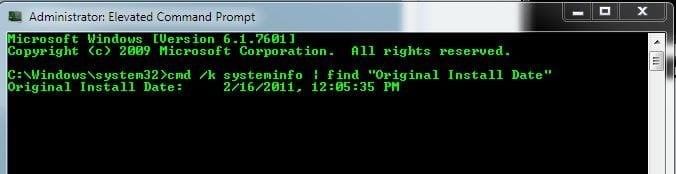
Capture5.JPG


OR:


1. Open up a command prompt in Windows 7 or Windows 8.

2. Type systeminfo and press enter.

3. Scroll down to about the 10th line, and you will see the line - Original Install Date:

Capture.JPG


That's it.

Airbot


Last edited by a moderator:
TY Aaron,
The information shown, with the systeminfo command, is important and I never knew that it was there.
 

My Computer

Computer type
PC/Desktop
Computer Manufacturer/Model Number
Dell XPS 420
OS
Windows 10, Home Clean Install
CPU
Intel Core2 processsor Q8200(2.33Ghz 1333FSB) Quad Core Tech
Motherboard
Dell
Memory
6 gb
Graphics Card(s)
ATI Radeon 256MB HD3650
Sound Card
Intergrated 7.1 Channel Audio
Monitor(s) Displays
Dell SP2009W 20"
Hard Drives
640 GB Serial ATA Hard drive
Cooling
Fan
Keyboard
Dell USB Keyboard
Mouse
Dell Premium Optical USB
Internet Speed
DSL 2.85
nice
 

My Computer

Computer Manufacturer/Model Number
Asus/
OS
Windows 7 Ultimate x64 SP1
CPU
Intel(R) Core(TM)2 Duo CPU E7200 @ 2.53GHz
Motherboard
Gigabyte Technology Co., Ltd. EP35-DS3L
Memory
4.00 GB RAM
Graphics Card(s)
NVIDIA GeForce 9500 GT (Microsoft Corporation - WDDM v1.1)
Monitor(s) Displays
SAMSUNG NWX1943
Hard Drives
SAMSUNG 500 GB

MAXTOR 160 GB
Case
Porsche
Nice, Airbot.

This can also be used to know your System Specs, I think.
 

My Computer

Computer Manufacturer/Model Number
Acer Aspire One 722 (AO722)
OS
Windows 7 Home Premium Service Pack 1 32-bit Build 7601
CPU
AMD C-50 Processor 1.0 Ghz
Memory
2 GB DDR3 RAM (1.73 usable in System Properties)
Graphics Card(s)
AMD Radeon HD 6200 series Graphics
Sound Card
High Definition Audio Device
Monitor(s) Displays
Generic PnP Monitor
Screen Resolution
1366 x 768 (recommended)
Hard Drives
320 GB HDD storage
298.09 GB in Disk Management (REAL)
Keyboard
Built-in on my laptop
Mouse
External mouse
Other Info
Installed Windows 7 Service Pack 1 by 9/9/2012
Thanks, Airbot :)
 

My Computer

OS
Windows 7 Ultimate x64
CPU
Intel Core i5 3.20 GHz
Memory
4,00 GM RAM.
Graphics Card(s)
Nvidia GTX 250
Monitor(s) Displays
27
Screen Resolution
1980x1080
Keyboard
Logitech K750
Mouse
Logitech
Internet Speed
76.60 Mbps.
hello
how do i change install date windows xp, 7
 

My Computer

OS
Windows 7 Home Premium 32bit.
Back
Top