
Take Ownership Shortcut

Add "Take Ownership" to Context Menu of Files, Folders, and Drives in Windows


   Information
This tutorial will show you how to add Take Ownership to the context menu of all files, folders, and drives for all users in Windows.

This will allow you to be able to instantly take ownership of a file, folder (and all contents), or drive (and all contents) by changing the owner to the current user and grant the Owner_Rights SID (current owner) full access permission.

You must be an administrator to be able to add, remove, and use the "Take Ownership" context menu.

   Note
Application files (ex: EXE, CMD, MSI) will continue to have Run as administrator instead of Take Ownership in their context menu.


When you right click or press and hold on a file, folder, or drive, and click/tap on Take Ownership, you may be prompted by UAC for permission to do so first.

If a user is logged in as an administrator, then the user would just click/tap on Yes to approve and take ownership. The owner of the file, folder, or drive would be changed to the current administrator user account. Permissions would be set to allow the Owner_Rights SID (current owner) full control of the file, folder, or drive.

If a user is logged in as a standard user, then the user would need to enter a selected administrator's password to approve and take ownership. The owner of the file, folder, or drive would be changed to the selected administrator account, and not the standard user. Permissions would be set to allow the Owner_Rights SID (current owner) full control of the file, folder, or drive.


The Take Ownership context menu will not be available when you right click on the C: drive, C:\Program Files folder, C:\Program Files (x86) folder, C:\ProgramData folder, C:\Users folder, and C:\Windows folder. This was done because taking ownership of these system folders can make Windows unstable since it would also take ownership of all the folder's content at the same time.

You will still be able to use the Take Ownership context menu of files inside the folder locations above.

If you would like to have a custom location(s) of your own to not have the context menu, then please feel free to post a request in this tutorial thread. I'll be happy to post back with a custom .reg file for it.

   Warning
This context menu will only work with English Windows installations.

If you have a different language, then please post a reply with what language you have instead. I'll be happy to post back a translated version for you.


EXAMPLE: Take Ownership in Context Menu
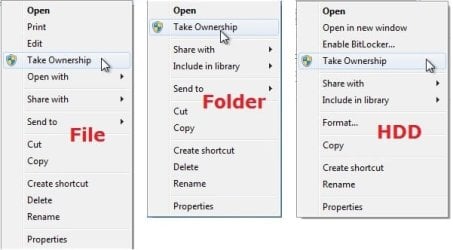
example.jpg


Here's How:

1. Do step 2, 3, or 4 below for what you would like to do.


2. To Add "Take Ownership" to Context Menu

   Note
Application files (ex: EXE, CMD, MSI) will still have Run as administrator instead of Take Ownership in the context menu when you use this step.

A) Click/tap on the Download button below to download the file below, and go to step 5 below.

Add_Take_Ownership_to_context_menu


Download


3. To Add "Take Ownership" with Pause to Context Menu

   Note
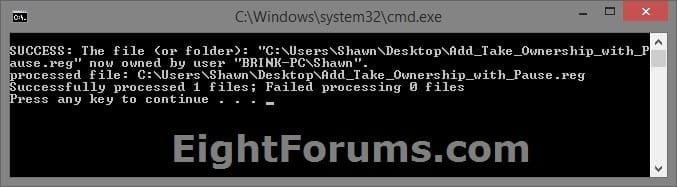
This option pauses the command when you use the "Take Ownership" context menu to be able to see the command results. This can be handy to verify setting ownership and permissions was successful or not.

Application files (ex: EXE, CMD, MSI) will still have Run as administrator instead of Take Ownership in the context menu when you use this step.


Take_Ownership_Pause.jpg


A) Click/tap on the Download button below to download the file below, and go to step 5 below.

Add_Take_Ownership_with_Pause_to_context_menu.reg


Download


4. To Remove "Take Ownership" from Context Menu

   Note
This is the default setting, and will also restore the default Run as administrator for .exe files.


A) Click/tap on the Download button below to download the file below, and go to step 5 below.

Remove_Take_Ownership_from_context_menu.reg


Download


5. Save the .reg file to your Desktop.

6. Double click on the downloaded .reg file to merge it.

7. If prompted, click on Run, Yes (UAC), Yes, and OK to approve the merge.

8. When finished, you can delete the downloaded .reg file if you like.


That's it,
Shawn


Attachments

Last edited:
If the owner of the System32 folder is not "TrustedInstaller", then you took ownership of it.
 

My Computer

Computer type
PC/Desktop
Computer Manufacturer/Model Number
Self built custom
OS
64-bit Windows 11 Pro for Workstations
CPU
Intel i7-8700K OC'd to 5 GHz
Motherboard
ASUS ROG Maximus XI Formula Z390
Memory
64 GB (4x16GB) G.SKILL TridentZ RGB DDR4 3600 MHz
Graphics Card(s)
ASUS ROG-STRIX-GTX1080TI-O11G-GAMING
Sound Card
Integrated
Monitor(s) Displays
2 x Samsung Odyssey G7 27"
Screen Resolution
2560x1440
Hard Drives
1TB Samsung 990 PRO M.2,
4TB Samsung 990 PRO PRO M.2,
TerraMaster F8 SSD Plus NAS
PSU
Seasonic Prime Titanium 850W
Case
Thermaltake Core P3
Cooling
Corsair Hydro H115i
Keyboard
Logitech wireless K800
Mouse
Logitech MX Master 4
Internet Speed
2 Gb/s Download and 100 Mb/s Upload
Antivirus
Malwarebyte Anti-Malware Premium
Browser
Google Chrome
Other Info
Logitech Z625 speaker system,
Logitech BRIO 4K Pro webcam,
HP Color LaserJet Pro MFP M477fdn,
APC SMART-UPS RT 1000 XL - SURT1000XLI,
Galaxy S23 Plus phone
Are you saying the trusted installer SHOULDN'T appear anymore in security tab?
 

My Computer

OS
Ultimate x86 & x64
I'm saying the System32 folder should have "TrustedInstaller" as the owner. If it doesn't, then you changed the owner of it.

Don't change it back to "TrustedInstaller" if it has been changed though. You do not want to change the owner of all files and subfolders in System32 to "TrustedInstaller". This is why it's not recommended to do this since it's impossible to reset the owner back to default with as many files and subfolders in System32 without breaking something.
 

My Computer

Computer type
PC/Desktop
Computer Manufacturer/Model Number
Self built custom
OS
64-bit Windows 11 Pro for Workstations
CPU
Intel i7-8700K OC'd to 5 GHz
Motherboard
ASUS ROG Maximus XI Formula Z390
Memory
64 GB (4x16GB) G.SKILL TridentZ RGB DDR4 3600 MHz
Graphics Card(s)
ASUS ROG-STRIX-GTX1080TI-O11G-GAMING
Sound Card
Integrated
Monitor(s) Displays
2 x Samsung Odyssey G7 27"
Screen Resolution
2560x1440
Hard Drives
1TB Samsung 990 PRO M.2,
4TB Samsung 990 PRO PRO M.2,
TerraMaster F8 SSD Plus NAS
PSU
Seasonic Prime Titanium 850W
Case
Thermaltake Core P3
Cooling
Corsair Hydro H115i
Keyboard
Logitech wireless K800
Mouse
Logitech MX Master 4
Internet Speed
2 Gb/s Download and 100 Mb/s Upload
Antivirus
Malwarebyte Anti-Malware Premium
Browser
Google Chrome
Other Info
Logitech Z625 speaker system,
Logitech BRIO 4K Pro webcam,
HP Color LaserJet Pro MFP M477fdn,
APC SMART-UPS RT 1000 XL - SURT1000XLI,
Galaxy S23 Plus phone
very cool. Is there a utility that manages ownerships and permissions? i spend so much time screwing with them when transferring files between my own 3 computers. So frustrating at times. i imagine i should create a new user name and add it as an owner to all 3 comps.
 

My Computer

Computer Manufacturer/Model Number
home built
OS
Windows 7 Ultimate 64-bit
CPU
AMD Athlon 64 X2 6400+ 3.2GHz
Motherboard
ASUS Crosshair I
Memory
Corsair Dominator DDR2 1066 4GB
Graphics Card(s)
Gigabyte ATI Radeon HD 4890 1GB GDDR5
Sound Card
on mobo
Monitor(s) Displays
Samsung SyncMaster 245BW 24" LCD
Hard Drives
(2) Western Digital Blue 80GB SATA in RAID 0
(1) Hitachi DeskStar 250GB SATA
PSU
Corsair 850W
Case
Silverstone Temjin
Cooling
lots of fans
I'm saying the System32 folder should have "TrustedInstaller" as the owner. If it doesn't, then you changed the owner of it.

Don't change it back to "TrustedInstaller" if it has been changed though. You do not want to change the owner of all files and subfolders in System32 to "TrustedInstaller". This is why it's not recommended to do this since it's impossible to reset the owner back to default with as many files and subfolders in System32 without breaking something.
And how I know it's the owner? It has this right only now "site file content" USERS got same as well as reading. Rest seems to have nothing.
 

My Computer

OS
Ultimate x86 & x64
very cool. Is there a utility that manages ownerships and permissions? i spend so much time screwing with them when transferring files between my own 3 computers. So frustrating at times. i imagine i should create a new user name and add it as an owner to all 3 comps.

Hello Chazcon,

OPTION THREE in the tutorial below can show you how to manually set ownership and permission of items.
Take Ownership of file
I would recommend that you create a restore point first. This way if you make a mistake, you could do a system restore to quickly undo it.

Hope this helps, :)
Shawn
 

My Computer

Computer type
PC/Desktop
Computer Manufacturer/Model Number
Self built custom
OS
64-bit Windows 11 Pro for Workstations
CPU
Intel i7-8700K OC'd to 5 GHz
Motherboard
ASUS ROG Maximus XI Formula Z390
Memory
64 GB (4x16GB) G.SKILL TridentZ RGB DDR4 3600 MHz
Graphics Card(s)
ASUS ROG-STRIX-GTX1080TI-O11G-GAMING
Sound Card
Integrated
Monitor(s) Displays
2 x Samsung Odyssey G7 27"
Screen Resolution
2560x1440
Hard Drives
1TB Samsung 990 PRO M.2,
4TB Samsung 990 PRO PRO M.2,
TerraMaster F8 SSD Plus NAS
PSU
Seasonic Prime Titanium 850W
Case
Thermaltake Core P3
Cooling
Corsair Hydro H115i
Keyboard
Logitech wireless K800
Mouse
Logitech MX Master 4
Internet Speed
2 Gb/s Download and 100 Mb/s Upload
Antivirus
Malwarebyte Anti-Malware Premium
Browser
Google Chrome
Other Info
Logitech Z625 speaker system,
Logitech BRIO 4K Pro webcam,
HP Color LaserJet Pro MFP M477fdn,
APC SMART-UPS RT 1000 XL - SURT1000XLI,
Galaxy S23 Plus phone
I'm saying the System32 folder should have "TrustedInstaller" as the owner. If it doesn't, then you changed the owner of it.

Don't change it back to "TrustedInstaller" if it has been changed though. You do not want to change the owner of all files and subfolders in System32 to "TrustedInstaller". This is why it's not recommended to do this since it's impossible to reset the owner back to default with as many files and subfolders in System32 without breaking something.
And how I know it's the owner? It has this right only now "site file content" USERS got same as well as reading. Rest seems to have nothing.

While in the "Security" tab, click on the "Advanced" button and "Owner" tab. You'll see who the owner is under "Current owner" like below. This is from OPTION THREE in the tutorial below to help give more details.

Take Ownership of file

118d1202368968-take-ownership-file-owner.jpg
 

My Computer

Computer type
PC/Desktop
Computer Manufacturer/Model Number
Self built custom
OS
64-bit Windows 11 Pro for Workstations
CPU
Intel i7-8700K OC'd to 5 GHz
Motherboard
ASUS ROG Maximus XI Formula Z390
Memory
64 GB (4x16GB) G.SKILL TridentZ RGB DDR4 3600 MHz
Graphics Card(s)
ASUS ROG-STRIX-GTX1080TI-O11G-GAMING
Sound Card
Integrated
Monitor(s) Displays
2 x Samsung Odyssey G7 27"
Screen Resolution
2560x1440
Hard Drives
1TB Samsung 990 PRO M.2,
4TB Samsung 990 PRO PRO M.2,
TerraMaster F8 SSD Plus NAS
PSU
Seasonic Prime Titanium 850W
Case
Thermaltake Core P3
Cooling
Corsair Hydro H115i
Keyboard
Logitech wireless K800
Mouse
Logitech MX Master 4
Internet Speed
2 Gb/s Download and 100 Mb/s Upload
Antivirus
Malwarebyte Anti-Malware Premium
Browser
Google Chrome
Other Info
Logitech Z625 speaker system,
Logitech BRIO 4K Pro webcam,
HP Color LaserJet Pro MFP M477fdn,
APC SMART-UPS RT 1000 XL - SURT1000XLI,
Galaxy S23 Plus phone
Good. No worries then. :)
 

My Computer

Computer type
PC/Desktop
Computer Manufacturer/Model Number
Self built custom
OS
64-bit Windows 11 Pro for Workstations
CPU
Intel i7-8700K OC'd to 5 GHz
Motherboard
ASUS ROG Maximus XI Formula Z390
Memory
64 GB (4x16GB) G.SKILL TridentZ RGB DDR4 3600 MHz
Graphics Card(s)
ASUS ROG-STRIX-GTX1080TI-O11G-GAMING
Sound Card
Integrated
Monitor(s) Displays
2 x Samsung Odyssey G7 27"
Screen Resolution
2560x1440
Hard Drives
1TB Samsung 990 PRO M.2,
4TB Samsung 990 PRO PRO M.2,
TerraMaster F8 SSD Plus NAS
PSU
Seasonic Prime Titanium 850W
Case
Thermaltake Core P3
Cooling
Corsair Hydro H115i
Keyboard
Logitech wireless K800
Mouse
Logitech MX Master 4
Internet Speed
2 Gb/s Download and 100 Mb/s Upload
Antivirus
Malwarebyte Anti-Malware Premium
Browser
Google Chrome
Other Info
Logitech Z625 speaker system,
Logitech BRIO 4K Pro webcam,
HP Color LaserJet Pro MFP M477fdn,
APC SMART-UPS RT 1000 XL - SURT1000XLI,
Galaxy S23 Plus phone
Hello Chazcon,

OPTION THREE in the tutorial below can show you how to manually set ownership and permission of items. Take Ownership of file
I would recommend that you create a restore point first. This way if you make a mistake, you could do a system restore to quickly undo it.

Hope this helps, :)
Shawn

Thanks Brink, I'm using a reg tweak (Mark's from these forums) to take ownership. But it's more than that.

Background info: I have (3) computers, work desktop, personal desktop, and a laptop for travel. One has Windows 8 (which is horrible and I will be changing out to Windows 7 this week), the other two Windows 7. I work variously off all three computers. So I use Synchronize It! and sync to a flash drive that I pack around with me.

I've used this 3rd party app and my flash drive system for years. Our company currently does not operate off a MS Exchange server which would make our lives easier, all working off central files but I am working on that.

Anyway, my problem is I'll sync my work PC to my flash drive, go to my home computer, attempt a sync and it won't open some files that have the ownership of my work login and not my personal login. Or, vice versa, i'll work from my home PC and sync, go to the office and I can't access my changed files. It's becoming hell and I'm wondering what has changed recently for me, I rarely had this issue in the past.

I'm scowling at Windows 8 but truly it must be a user issue. One thing I've changed recently is to format my flash drive from FAT32 to NTFS in order to be able to sync my Outlook.pst file, which is very large and over the FAT32 allowable size limit for a single file. I suspect that my flash drive formatted in NTFS now is also carrying over NTFS permissions where it didn't before on FAT32 - does that sound like a possible cause?

Also in Synchronize It! there is an option to 'Copy NTFS Permissions', I'm in a quandry now whether I should or should not be copying permissions.

How I wish I could turn permissions and permission checks completely off! I have the UAC off but that is a separate thing.

Each time I sync I have to go through my files and take ownership, it's a time killer and I have no time to do this.

I'd love to know of a 3rd party app that can manage permissions across all files and multiple computers.
 

My Computer

Computer Manufacturer/Model Number
home built
OS
Windows 7 Ultimate 64-bit
CPU
AMD Athlon 64 X2 6400+ 3.2GHz
Motherboard
ASUS Crosshair I
Memory
Corsair Dominator DDR2 1066 4GB
Graphics Card(s)
Gigabyte ATI Radeon HD 4890 1GB GDDR5
Sound Card
on mobo
Monitor(s) Displays
Samsung SyncMaster 245BW 24" LCD
Hard Drives
(2) Western Digital Blue 80GB SATA in RAID 0
(1) Hitachi DeskStar 250GB SATA
PSU
Corsair 850W
Case
Silverstone Temjin
Cooling
lots of fans
Hello Chazcon,

OPTION THREE in the tutorial below can show you how to manually set ownership and permission of items.
Take Ownership of file
I would recommend that you create a restore point first. This way if you make a mistake, you could do a system restore to quickly undo it.

Hope this helps, :)
Shawn

Thanks Brink, I'm using a reg tweak (Mark's from these forums) to take ownership. But it's more than that.

Background info: I have (3) computers, work desktop, personal desktop, and a laptop for travel. One has Windows 8 (which is horrible and I will be changing out to Windows 7 this week), the other two Windows 7. I work variously off all three computers. So I use Synchronize It! and sync to a flash drive that I pack around with me.

I've used this 3rd party app and my flash drive system for years. Our company currently does not operate off a MS Exchange server which would make our lives easier, all working off central files but I am working on that.

Anyway, my problem is I'll sync my work PC to my flash drive, go to my home computer, attempt a sync and it won't open some files that have the ownership of my work login and not my personal login. Or, vice versa, i'll work from my home PC and sync, go to the office and I can't access my changed files. It's becoming hell and I'm wondering what has changed recently for me, I rarely had this issue in the past.

I'm scowling at Windows 8 but truly it must be a user issue. One thing I've changed recently is to format my flash drive from FAT32 to NTFS in order to be able to sync my Outlook.pst file, which is very large and over the FAT32 allowable size limit for a single file. I suspect that my flash drive formatted in NTFS now is also carrying over NTFS permissions where it didn't before on FAT32 - does that sound like a possible cause?

Also in Synchronize It! there is an option to 'Copy NTFS Permissions', I'm in a quandry now whether I should or should not be copying permissions.

How I wish I could turn permissions and permission checks completely off! I have the UAC off but that is a separate thing.

Each time I sync I have to go through my files and take ownership, it's a time killer and I have no time to do this.

I'd love to know of a 3rd party app that can manage permissions across all files and multiple computers.


Chazcon,

Yep, if it's NTFS formatted, then permissions will be applied to it as well.

You might give using "Synchronize It" a try without the 'Copy NTFS Permissions' option. It may be replacing any previous permission settings you made for it.

You might also add the "Everyone" group and set it's permissions to "Full Control" to see if that may help.
 
Last edited:

My Computer

Computer type
PC/Desktop
Computer Manufacturer/Model Number
Self built custom
OS
64-bit Windows 11 Pro for Workstations
CPU
Intel i7-8700K OC'd to 5 GHz
Motherboard
ASUS ROG Maximus XI Formula Z390
Memory
64 GB (4x16GB) G.SKILL TridentZ RGB DDR4 3600 MHz
Graphics Card(s)
ASUS ROG-STRIX-GTX1080TI-O11G-GAMING
Sound Card
Integrated
Monitor(s) Displays
2 x Samsung Odyssey G7 27"
Screen Resolution
2560x1440
Hard Drives
1TB Samsung 990 PRO M.2,
4TB Samsung 990 PRO PRO M.2,
TerraMaster F8 SSD Plus NAS
PSU
Seasonic Prime Titanium 850W
Case
Thermaltake Core P3
Cooling
Corsair Hydro H115i
Keyboard
Logitech wireless K800
Mouse
Logitech MX Master 4
Internet Speed
2 Gb/s Download and 100 Mb/s Upload
Antivirus
Malwarebyte Anti-Malware Premium
Browser
Google Chrome
Other Info
Logitech Z625 speaker system,
Logitech BRIO 4K Pro webcam,
HP Color LaserJet Pro MFP M477fdn,
APC SMART-UPS RT 1000 XL - SURT1000XLI,
Galaxy S23 Plus phone
Chazcon,

Yep, if it's NTFS formatted, then permissions will be applied to it as well.

You might give using "Synchronize It" a try without the 'Copy NTFS Permissions' option. It may be replacing any previous permission settings you made for it.

You might also add the "Everyone" group and set it's permissions to "Full Control" to see if that may help.

Will try those options.

To be clear, if my flash drive is formatted as FAT32, it will basically 'scrub' permissions from files that are copied to it? That is how my syncing 'system' used to work, I seems I didn't have this permission hell when it was formatted FAT32. If that's true I'll go back to FAT32 on my flash drive and use a different solution for my large files that are over the FAT32 single file size limit.
 

My Computer

Computer Manufacturer/Model Number
home built
OS
Windows 7 Ultimate 64-bit
CPU
AMD Athlon 64 X2 6400+ 3.2GHz
Motherboard
ASUS Crosshair I
Memory
Corsair Dominator DDR2 1066 4GB
Graphics Card(s)
Gigabyte ATI Radeon HD 4890 1GB GDDR5
Sound Card
on mobo
Monitor(s) Displays
Samsung SyncMaster 245BW 24" LCD
Hard Drives
(2) Western Digital Blue 80GB SATA in RAID 0
(1) Hitachi DeskStar 250GB SATA
PSU
Corsair 850W
Case
Silverstone Temjin
Cooling
lots of fans
Yep, that's correct.
 

My Computer

Computer type
PC/Desktop
Computer Manufacturer/Model Number
Self built custom
OS
64-bit Windows 11 Pro for Workstations
CPU
Intel i7-8700K OC'd to 5 GHz
Motherboard
ASUS ROG Maximus XI Formula Z390
Memory
64 GB (4x16GB) G.SKILL TridentZ RGB DDR4 3600 MHz
Graphics Card(s)
ASUS ROG-STRIX-GTX1080TI-O11G-GAMING
Sound Card
Integrated
Monitor(s) Displays
2 x Samsung Odyssey G7 27"
Screen Resolution
2560x1440
Hard Drives
1TB Samsung 990 PRO M.2,
4TB Samsung 990 PRO PRO M.2,
TerraMaster F8 SSD Plus NAS
PSU
Seasonic Prime Titanium 850W
Case
Thermaltake Core P3
Cooling
Corsair Hydro H115i
Keyboard
Logitech wireless K800
Mouse
Logitech MX Master 4
Internet Speed
2 Gb/s Download and 100 Mb/s Upload
Antivirus
Malwarebyte Anti-Malware Premium
Browser
Google Chrome
Other Info
Logitech Z625 speaker system,
Logitech BRIO 4K Pro webcam,
HP Color LaserJet Pro MFP M477fdn,
APC SMART-UPS RT 1000 XL - SURT1000XLI,
Galaxy S23 Plus phone
Hey Hi Brink,

Just wanted to run this by you.
Using your ditty I was just going to take ownership of a single folder inside of
C:\Windows\System32\DriverStore\FileRepository
...and delete it, but it's late and in a hurry I mistakenly right clicked on the whole FileRepository folder instead and took ownership of that whole folder instead, LoL, and it went through and did exactly that. I didn't delete anything at that point.

My question is I don't think it really matters and won't hurt anything taking ownership of that entire FileRepository folder will it?

If yes I can easily restore the OS partition image back to yesterday if it does matter, that's no big deal, but I wanted to ask you about the specifics just to make sure.

Thanks
 

My Computer

Computer type
PC/Desktop
Computer Manufacturer/Model Number
..all towers built from scratch
OS
Vista/Win7/8/10/11 (x86/x64)
CPU
i7
Hey mate,

It's not going to make any difference other than that folder and it's contents being less secured now that anything running while you are logged on to your account will also have access to it.

If you happen to have a restore point dated right before you did it, then a system restore using it could quickly undo it.

I don't see a need to do a system image recovery unless you just wanted to though.
 

My Computer

Computer type
PC/Desktop
Computer Manufacturer/Model Number
Self built custom
OS
64-bit Windows 11 Pro for Workstations
CPU
Intel i7-8700K OC'd to 5 GHz
Motherboard
ASUS ROG Maximus XI Formula Z390
Memory
64 GB (4x16GB) G.SKILL TridentZ RGB DDR4 3600 MHz
Graphics Card(s)
ASUS ROG-STRIX-GTX1080TI-O11G-GAMING
Sound Card
Integrated
Monitor(s) Displays
2 x Samsung Odyssey G7 27"
Screen Resolution
2560x1440
Hard Drives
1TB Samsung 990 PRO M.2,
4TB Samsung 990 PRO PRO M.2,
TerraMaster F8 SSD Plus NAS
PSU
Seasonic Prime Titanium 850W
Case
Thermaltake Core P3
Cooling
Corsair Hydro H115i
Keyboard
Logitech wireless K800
Mouse
Logitech MX Master 4
Internet Speed
2 Gb/s Download and 100 Mb/s Upload
Antivirus
Malwarebyte Anti-Malware Premium
Browser
Google Chrome
Other Info
Logitech Z625 speaker system,
Logitech BRIO 4K Pro webcam,
HP Color LaserJet Pro MFP M477fdn,
APC SMART-UPS RT 1000 XL - SURT1000XLI,
Galaxy S23 Plus phone
Hi Brink,

During work today I had decided I was just going to do a partition restore, luckily I just had made an image the very day before so it's no big deal and takes just a few minutes.
My local System Restore is always turned off.

It wouldn't hurt anything to leave it I know that, but it's just the principle I guess, and that I had only meant to do it on a single folder inside the FileRepository folder not the whole darn thing.

------

I had downloaded my reg at the Vista forum previously, but I see you have it here on 7 too.
fwiw, the screenshot of it on page 1 is a little different than reality, and so must of been the first builds screenshot from Mark where you hadn't yet added in the context icon via imageres.dll yet. Okay but I see you have the icon'd screenshot over at the Vista forum.

Anyway, nice to say hello again and thanks for the reply
 

My Computer

Computer type
PC/Desktop
Computer Manufacturer/Model Number
..all towers built from scratch
OS
Vista/Win7/8/10/11 (x86/x64)
CPU
i7
Screenshot now updated. :)
 

My Computer

Computer type
PC/Desktop
Computer Manufacturer/Model Number
Self built custom
OS
64-bit Windows 11 Pro for Workstations
CPU
Intel i7-8700K OC'd to 5 GHz
Motherboard
ASUS ROG Maximus XI Formula Z390
Memory
64 GB (4x16GB) G.SKILL TridentZ RGB DDR4 3600 MHz
Graphics Card(s)
ASUS ROG-STRIX-GTX1080TI-O11G-GAMING
Sound Card
Integrated
Monitor(s) Displays
2 x Samsung Odyssey G7 27"
Screen Resolution
2560x1440
Hard Drives
1TB Samsung 990 PRO M.2,
4TB Samsung 990 PRO PRO M.2,
TerraMaster F8 SSD Plus NAS
PSU
Seasonic Prime Titanium 850W
Case
Thermaltake Core P3
Cooling
Corsair Hydro H115i
Keyboard
Logitech wireless K800
Mouse
Logitech MX Master 4
Internet Speed
2 Gb/s Download and 100 Mb/s Upload
Antivirus
Malwarebyte Anti-Malware Premium
Browser
Google Chrome
Other Info
Logitech Z625 speaker system,
Logitech BRIO 4K Pro webcam,
HP Color LaserJet Pro MFP M477fdn,
APC SMART-UPS RT 1000 XL - SURT1000XLI,
Galaxy S23 Plus phone
Quick update: All is well, after going back to a FAT32 format on my flash drive. Also I realize we are able to set a different (larger) file allocation size, so now I have what I needed, a flash drive file sync solution that handles my large files as well, with no NTFS permission hell.

Brink, thank you for your help.
 

My Computer

Computer Manufacturer/Model Number
home built
OS
Windows 7 Ultimate 64-bit
CPU
AMD Athlon 64 X2 6400+ 3.2GHz
Motherboard
ASUS Crosshair I
Memory
Corsair Dominator DDR2 1066 4GB
Graphics Card(s)
Gigabyte ATI Radeon HD 4890 1GB GDDR5
Sound Card
on mobo
Monitor(s) Displays
Samsung SyncMaster 245BW 24" LCD
Hard Drives
(2) Western Digital Blue 80GB SATA in RAID 0
(1) Hitachi DeskStar 250GB SATA
PSU
Corsair 850W
Case
Silverstone Temjin
Cooling
lots of fans
That's great news Chazcon. Thank you for posting back with your results. :)
 

My Computer

Computer type
PC/Desktop
Computer Manufacturer/Model Number
Self built custom
OS
64-bit Windows 11 Pro for Workstations
CPU
Intel i7-8700K OC'd to 5 GHz
Motherboard
ASUS ROG Maximus XI Formula Z390
Memory
64 GB (4x16GB) G.SKILL TridentZ RGB DDR4 3600 MHz
Graphics Card(s)
ASUS ROG-STRIX-GTX1080TI-O11G-GAMING
Sound Card
Integrated
Monitor(s) Displays
2 x Samsung Odyssey G7 27"
Screen Resolution
2560x1440
Hard Drives
1TB Samsung 990 PRO M.2,
4TB Samsung 990 PRO PRO M.2,
TerraMaster F8 SSD Plus NAS
PSU
Seasonic Prime Titanium 850W
Case
Thermaltake Core P3
Cooling
Corsair Hydro H115i
Keyboard
Logitech wireless K800
Mouse
Logitech MX Master 4
Internet Speed
2 Gb/s Download and 100 Mb/s Upload
Antivirus
Malwarebyte Anti-Malware Premium
Browser
Google Chrome
Other Info
Logitech Z625 speaker system,
Logitech BRIO 4K Pro webcam,
HP Color LaserJet Pro MFP M477fdn,
APC SMART-UPS RT 1000 XL - SURT1000XLI,
Galaxy S23 Plus phone
ohhhh yyyyyyyyyes !!!!
thanks so much...
 

My Computer

Computer type
Laptop
Computer Manufacturer/Model Number
Dell
OS
widows 7 ultimate x86
Motherboard
dell
Graphics Card(s)
intel
Antivirus
avast
Browser
maxthon
Back
Top