
How to Delete Paint "Recent Pictures" from List in Windows 7 and Windows 8
Information
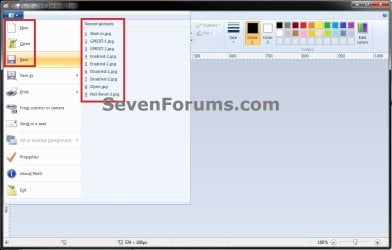
This tutorial will show you how to delete all or specific Recent pictures from the file button -> New, Open, and Save drop down menus in Paint (mspaint) for your user account in Windows 7 and Windows 8.
Note
This can be handy if a recent file in the "Recent pictures" list is no longer available but still listed, or if you just wanted to clear the recent file history in your user account's Paint from any prying eyes.
EXAMPLE: "Recent Pictures" in Paint (mspaint.exe)
OPTION ONE
To Delete Specific "Recent pictures" in Paint
1. Press the Windows + R keys to open the Run dialog, type regedit, and press Enter.
2. If prompted by UAC, then click/tap on Yes.
NOTE: Standard users will not be prompted for this.
3. In regedit, navigate to the location below. (see screenshot below)
Code:
HKEY_CURRENT_USER\Software\Microsoft\Windows\CurrentVersion\Applets\Paint\Recent File List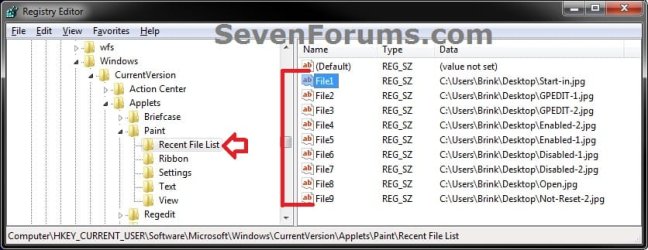
4. In the right pane of Recent File List, look for a listed File# string value that has the recent picture path that you wanted to delete. When found, right click on the File# (ex: File1), and click/tap on Delete. (see screenshot above)
5. Click/tap on Yes to appove deleting it. (see screenshot below)
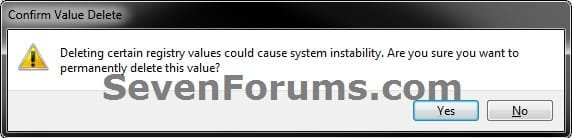
6. Repeat steps 4 and 5 if you would like to delete any other "Recent pictures" from the list in Paint.
7. When finished, close regedit.
8. If Paint is open, then close and reopen it to apply.
OPTION TWO
To Reset and Clear All "Recent pictures" in Paint with a REG File
1. Click/tap on the Download button below to download the file below.
Reset_and_Clear_Paint_Recent_Pictures_List.reg
Download
2. Save the .reg file to your Desktop.
3. Double click/tap on the downloaded .reg file to merge it.
4. If prompted, click/tap on Run, Yes (UAC), Yes, and OK to approve the merge.
5. If Paint is open, then close and reopen it to apply.
6. When done, you can delete the downloaded .reg file if you like.
OPTION THREE
To Reset and Clear All "Recent pictures" in Paint with a VBS File
1. Click/tap on the Download button below to download the file below.
Reset_and_Clear_Paint_Recent_Pictures_List.vbs
Download
2. Save the .vbs file to your Desktop.
3. Double click/tap on the downloaded .vbs file to run it.
4. If prompted, click/tap on Run to approve.
NOTE: If you like, unblock the .vbs file to no longer get the Run prompt.
5. If Paint is open, then close and reopen it to apply.
6. When done, you can delete the downloaded .reg file if you like.
That's it,
Shawn
Related Tutorials
- How to Open Paint in Windows 7
- How to Change Default Size of Paint White Background in Windows
- How to Delete "Recent documents" from List in Windows 7 WordPad
- How to Enable or Disable Common Dialog Boxes Dropdown List of Recent Files
- How to Reset and Clear Common Dialog Boxes Dropdown List of Recent Files History
- How to Delete Typed URLs in Internet Explorer Auto Suggest Drop Down List
Attachments
Last edited:
