Windows Update Shortcut - Create in Windows 7

How to Create a "Windows Update" Shortcut in Windows 7


   Information
This will show you how to create or download a Windows Update shortcut in Windows 7.


EXAMPLE: Windows Update
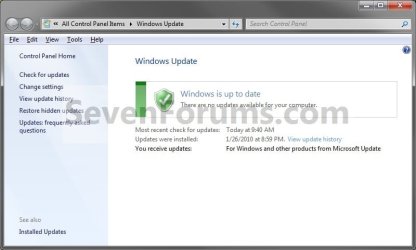
Windows_Update.jpg


OPTION ONE

To Download a "Windows Update" Shortcut

1. Click on the Download button below to download the file below. Windows_Update.zip


Download


2. Click on Save, and save the .zip file to the desktop.

3. Open the .zip file and extract the Windows Update shortcut to the desktop.

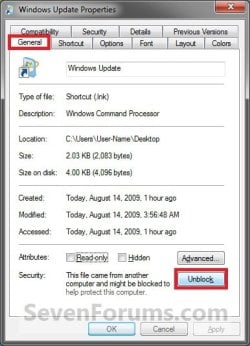
4. Right click on the Windows Update shortcut, and click on Properties, General tab, and on the Unblock button. (see screenshot below)
NOTE: If you do not have a Unblock button under the General tab, then the shortcut is already unblocked and you can continue on to step 5. Unblock.jpg
5. You can now Pin to Taskbar or Pin to Start Menu this shortcut, assign a keyboard shortcut to it, or move it where you like for easy use.

6. When done, you can delete the downloaded .zip file on the desktop if you like, or save it to use again.


OPTION TWO

To Manually Create a "Windows Update" Shortcut

1. Right click on a empty area on the desktop, and click on New and Shortcut.

2. Copy and Paste either location below into the location area, and click on the Next button. (see screenshot below) %windir%\System32\rundll32.exe url.dll,FileProtocolHandler wuapp.exe

OR

%windir%\explorer.exe shell:::{36eef7db-88ad-4e81-ad49-0e313f0c35f8}
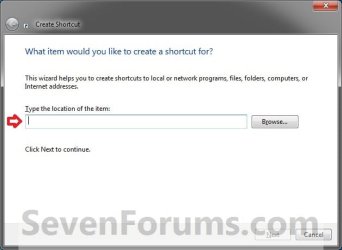
Step1.jpg
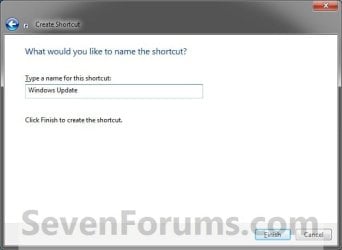
3. Type Windows Update for the name, and click on the Finish button. (see screenshot below)
NOTE: You can name this anything you would like though. Step2.jpg
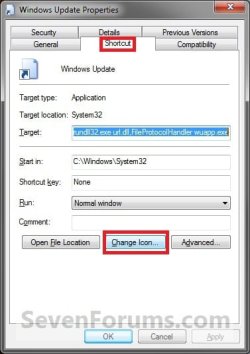
4. Right click on the new Windows Update shortcut on the Desktop and click on Properties.

5. Click on the Change Icon button. (see screenshot below) Step3.jpg
6. In the line under "Look for icons in this file", type the location below and press Enter. (see screenshot below) %windir%\system32\wucltux.dll

Step5.jpg
7. Select the icon highlighted in blue above and click on OK. (see screenshot above)
NOTE: You can use any icon that you would like instead though.

8. Click on OK. (see screenshot below) Step6.jpg
9. You can now Pin to Taskbar or Pin to Start Menu this shortcut, assign a keyboard shortcut to it, or move it where you like for easy use.
That's it,
Shawn


Attachments

Last edited:
Perfect!

Perfection through simplicity!

If you look at the blogs on this "issue" ..... I find it amazing that your solution was/is so simple. Works perfectly!

I also find it interesting that yesterday when I dragged "Windows Update" from the Start Menu to the desktop the resulting shortcut did not have the pin options, yet yours does. I have no idea what the difference is.

You might want to change the title of the tutorial to add "pinning" to the Start Menu as well as the Taskbar....... that's where I put it.

Thanks once again.

Charlie
 

Attachments

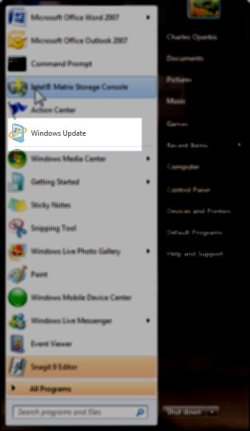
  • Windows UpdateStartMenu.jpg
    Windows UpdateStartMenu.jpg
    22.2 KB · Views: 6,364

My Computer

OS
7 rtm
You're welcome Charlie. :)
 

My Computer

Computer type
PC/Desktop
Computer Manufacturer/Model Number
Self built custom
OS
64-bit Windows 11 Pro for Workstations
CPU
Intel i7-8700K OC'd to 5 GHz
Motherboard
ASUS ROG Maximus XI Formula Z390
Memory
64 GB (4x16GB) G.SKILL TridentZ RGB DDR4 3600 MHz
Graphics Card(s)
ASUS ROG-STRIX-GTX1080TI-O11G-GAMING
Sound Card
Integrated
Monitor(s) Displays
2 x Samsung Odyssey G7 27"
Screen Resolution
2560x1440
Hard Drives
1TB Samsung 990 PRO M.2,
4TB Samsung 990 PRO PRO M.2,
TerraMaster F8 SSD Plus NAS
PSU
Seasonic Prime Titanium 850W
Case
Thermaltake Core P3
Cooling
Corsair Hydro H115i
Keyboard
Logitech wireless K800
Mouse
Logitech MX Master 4
Internet Speed
2 Gb/s Download and 100 Mb/s Upload
Antivirus
Malwarebyte Anti-Malware Premium
Browser
Google Chrome
Other Info
Logitech Z625 speaker system,
Logitech BRIO 4K Pro webcam,
HP Color LaserJet Pro MFP M477fdn,
APC SMART-UPS RT 1000 XL - SURT1000XLI,
Galaxy S23 Plus phone
Excellent - thanks!
 

My Computer

Computer Manufacturer/Model Number
Office & Home(Vista, Business) Dell, Portable Acer Netbook
OS
Windows 7
Screen Resolution
Highest possible
Mouse
MS Wireless
You're welcome Ron, and welcome to Seven Forums.

Shawn
 

My Computer

Computer type
PC/Desktop
Computer Manufacturer/Model Number
Self built custom
OS
64-bit Windows 11 Pro for Workstations
CPU
Intel i7-8700K OC'd to 5 GHz
Motherboard
ASUS ROG Maximus XI Formula Z390
Memory
64 GB (4x16GB) G.SKILL TridentZ RGB DDR4 3600 MHz
Graphics Card(s)
ASUS ROG-STRIX-GTX1080TI-O11G-GAMING
Sound Card
Integrated
Monitor(s) Displays
2 x Samsung Odyssey G7 27"
Screen Resolution
2560x1440
Hard Drives
1TB Samsung 990 PRO M.2,
4TB Samsung 990 PRO PRO M.2,
TerraMaster F8 SSD Plus NAS
PSU
Seasonic Prime Titanium 850W
Case
Thermaltake Core P3
Cooling
Corsair Hydro H115i
Keyboard
Logitech wireless K800
Mouse
Logitech MX Master 4
Internet Speed
2 Gb/s Download and 100 Mb/s Upload
Antivirus
Malwarebyte Anti-Malware Premium
Browser
Google Chrome
Other Info
Logitech Z625 speaker system,
Logitech BRIO 4K Pro webcam,
HP Color LaserJet Pro MFP M477fdn,
APC SMART-UPS RT 1000 XL - SURT1000XLI,
Galaxy S23 Plus phone
thanks m8!!!! i got tired of using docks... hehehe.... now my desktop is neat and clean... :D
 

My Computer

Computer Manufacturer/Model Number
ASUSTeK Computer INC.
OS
Windows 7 Ultimate 64bit
CPU
Intel Core i5 750
Motherboard
Maximus III Formula
Memory
2 x 4GB Corsair Dominator ddr3 1600mhz dual channel
Graphics Card(s)
XFX 5850
Sound Card
SupremeFX X-Fi
Monitor(s) Displays
Acer G235H
Screen Resolution
1920x1080
Hard Drives
60GB OCZ Vertex SSD
160GB WD Cav Blue
PSU
Silverstone DA650
Case
Bitfenix Shinobi
Cooling
Swiftech Apogee XT
Keyboard
Microsoft X6
Mouse
Razer Salmosa Korean Tournament Ed.
Internet Speed
3 MBPs
You're welcome Nomadgamer. :)
 

My Computer

Computer type
PC/Desktop
Computer Manufacturer/Model Number
Self built custom
OS
64-bit Windows 11 Pro for Workstations
CPU
Intel i7-8700K OC'd to 5 GHz
Motherboard
ASUS ROG Maximus XI Formula Z390
Memory
64 GB (4x16GB) G.SKILL TridentZ RGB DDR4 3600 MHz
Graphics Card(s)
ASUS ROG-STRIX-GTX1080TI-O11G-GAMING
Sound Card
Integrated
Monitor(s) Displays
2 x Samsung Odyssey G7 27"
Screen Resolution
2560x1440
Hard Drives
1TB Samsung 990 PRO M.2,
4TB Samsung 990 PRO PRO M.2,
TerraMaster F8 SSD Plus NAS
PSU
Seasonic Prime Titanium 850W
Case
Thermaltake Core P3
Cooling
Corsair Hydro H115i
Keyboard
Logitech wireless K800
Mouse
Logitech MX Master 4
Internet Speed
2 Gb/s Download and 100 Mb/s Upload
Antivirus
Malwarebyte Anti-Malware Premium
Browser
Google Chrome
Other Info
Logitech Z625 speaker system,
Logitech BRIO 4K Pro webcam,
HP Color LaserJet Pro MFP M477fdn,
APC SMART-UPS RT 1000 XL - SURT1000XLI,
Galaxy S23 Plus phone
Tanks very appreciated ;)
 

My Computer

Computer Manufacturer/Model Number
Assemblato
OS
Windows 7 Home Premium 64 bit
CPU
Intel core due duo E8500
Motherboard
Asus Maxymus Formula
Memory
Corsair Dominetor 4 Gb
Graphics Card(s)
Nvidia GTS 260
Monitor(s) Displays
Samsung Sync Master 21"
Hard Drives
Hitachy 500 Gb
Western Digital 360 GB
Case
Cooler Master 840
Cooling
Zalman cs 9500
You're welcome Jedy, and welcome to Seven Forums. :)
 

My Computer

Computer type
PC/Desktop
Computer Manufacturer/Model Number
Self built custom
OS
64-bit Windows 11 Pro for Workstations
CPU
Intel i7-8700K OC'd to 5 GHz
Motherboard
ASUS ROG Maximus XI Formula Z390
Memory
64 GB (4x16GB) G.SKILL TridentZ RGB DDR4 3600 MHz
Graphics Card(s)
ASUS ROG-STRIX-GTX1080TI-O11G-GAMING
Sound Card
Integrated
Monitor(s) Displays
2 x Samsung Odyssey G7 27"
Screen Resolution
2560x1440
Hard Drives
1TB Samsung 990 PRO M.2,
4TB Samsung 990 PRO PRO M.2,
TerraMaster F8 SSD Plus NAS
PSU
Seasonic Prime Titanium 850W
Case
Thermaltake Core P3
Cooling
Corsair Hydro H115i
Keyboard
Logitech wireless K800
Mouse
Logitech MX Master 4
Internet Speed
2 Gb/s Download and 100 Mb/s Upload
Antivirus
Malwarebyte Anti-Malware Premium
Browser
Google Chrome
Other Info
Logitech Z625 speaker system,
Logitech BRIO 4K Pro webcam,
HP Color LaserJet Pro MFP M477fdn,
APC SMART-UPS RT 1000 XL - SURT1000XLI,
Galaxy S23 Plus phone
Tanks are happy to have you discovered while I understand the language I just arranged with a translator;)
 

My Computer

Computer Manufacturer/Model Number
Assemblato
OS
Windows 7 Home Premium 64 bit
CPU
Intel core due duo E8500
Motherboard
Asus Maxymus Formula
Memory
Corsair Dominetor 4 Gb
Graphics Card(s)
Nvidia GTS 260
Monitor(s) Displays
Samsung Sync Master 21"
Hard Drives
Hitachy 500 Gb
Western Digital 360 GB
Case
Cooler Master 840
Cooling
Zalman cs 9500
Great right up but i foubnd a easyer way

If you click on all programs you shouild see Windows Update. Hold the Shift Key down and then right click on Windows Update you will see the Pin To Start Menu

If you dont see Windows Update type in Windows Update in the search filed and then do the above on Windows Update
 

My Computer

OS
Vista Ultimate 64
Hello Cookiemonster,

That's a great option if you just want to "Pin to Start Menu", but you would not be able to "Pin to taskbar" with the one from the Start Menu though.

Thank you for sharing, :)
Shawn
 

My Computer

Computer type
PC/Desktop
Computer Manufacturer/Model Number
Self built custom
OS
64-bit Windows 11 Pro for Workstations
CPU
Intel i7-8700K OC'd to 5 GHz
Motherboard
ASUS ROG Maximus XI Formula Z390
Memory
64 GB (4x16GB) G.SKILL TridentZ RGB DDR4 3600 MHz
Graphics Card(s)
ASUS ROG-STRIX-GTX1080TI-O11G-GAMING
Sound Card
Integrated
Monitor(s) Displays
2 x Samsung Odyssey G7 27"
Screen Resolution
2560x1440
Hard Drives
1TB Samsung 990 PRO M.2,
4TB Samsung 990 PRO PRO M.2,
TerraMaster F8 SSD Plus NAS
PSU
Seasonic Prime Titanium 850W
Case
Thermaltake Core P3
Cooling
Corsair Hydro H115i
Keyboard
Logitech wireless K800
Mouse
Logitech MX Master 4
Internet Speed
2 Gb/s Download and 100 Mb/s Upload
Antivirus
Malwarebyte Anti-Malware Premium
Browser
Google Chrome
Other Info
Logitech Z625 speaker system,
Logitech BRIO 4K Pro webcam,
HP Color LaserJet Pro MFP M477fdn,
APC SMART-UPS RT 1000 XL - SURT1000XLI,
Galaxy S23 Plus phone
Maybe an even better way of doing this!

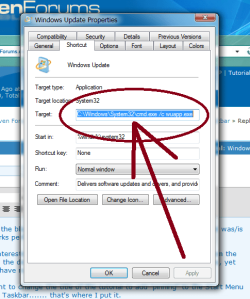
I have noticed that a Windows Update shortcut pinned to the taskbar using cmd /c wuapp.exe momentarily pops up a command window on the screen.

While this doesn't really matter I think I have found an even more elegant way of making the pinnable shortcut.

Try C:\Windows\System32\rundll32.exe url.dll,FileProtocolHandler wuapp.exe in the shortcut.

As scytheer says (Pinnable Shortcuts by ~scytheer on deviantART) the use of rundll32.exe can stop multiple spawning of explorer.exe if that is in your shortcut or in this case the cmd.exe popping up.

I hope this helps.
 

My Computer

OS
Vista x32
Thank you Zaphire. Tutorial updated. :)
 

My Computer

Computer type
PC/Desktop
Computer Manufacturer/Model Number
Self built custom
OS
64-bit Windows 11 Pro for Workstations
CPU
Intel i7-8700K OC'd to 5 GHz
Motherboard
ASUS ROG Maximus XI Formula Z390
Memory
64 GB (4x16GB) G.SKILL TridentZ RGB DDR4 3600 MHz
Graphics Card(s)
ASUS ROG-STRIX-GTX1080TI-O11G-GAMING
Sound Card
Integrated
Monitor(s) Displays
2 x Samsung Odyssey G7 27"
Screen Resolution
2560x1440
Hard Drives
1TB Samsung 990 PRO M.2,
4TB Samsung 990 PRO PRO M.2,
TerraMaster F8 SSD Plus NAS
PSU
Seasonic Prime Titanium 850W
Case
Thermaltake Core P3
Cooling
Corsair Hydro H115i
Keyboard
Logitech wireless K800
Mouse
Logitech MX Master 4
Internet Speed
2 Gb/s Download and 100 Mb/s Upload
Antivirus
Malwarebyte Anti-Malware Premium
Browser
Google Chrome
Other Info
Logitech Z625 speaker system,
Logitech BRIO 4K Pro webcam,
HP Color LaserJet Pro MFP M477fdn,
APC SMART-UPS RT 1000 XL - SURT1000XLI,
Galaxy S23 Plus phone
Perfection through simplicity!

If you look at the blogs on this "issue" ..... I find it amazing that your solution was/is so simple. Works perfectly!

I also find it interesting that yesterday when I dragged "Windows Update" from the Start Menu to the desktop the resulting shortcut did not have the pin options, yet yours does. I have no idea what the difference is.

You might want to change the title of the tutorial to add "pinning" to the Start Menu as well as the Taskbar....... that's where I put it.

Thanks once again.

Charlie

you dont have to do this,just do this
 

Attachments

  • Capture1.PNG
    Capture1.PNG
    31.6 KB · Views: 873

My Computer

Computer type
PC/Desktop
OS
Windows 7 X64 Bit
CPU
Intel(R) Core(TM)i7-4771 CPU @ 3.50GH
Motherboard
Asus Sabertooth Z87
Memory
Corsair 4x8 Vengeance (32GB)
Graphics Card(s)
NVIDIA GeForce GTX780
Monitor(s) Displays
LG
Screen Resolution
1920x1080
PSU
Corsair CX750
Case
Corsair 200 series
Cooling
H80i Liquid Cooler
Keyboard
Microsoft
Mouse
Microsoft
Internet Speed
good times-500-850 kbs bad times-50-100 kbs
Hello Gaz,

True, either one will open Windows Update. However, using cmd.exe /c wuapp.exe instead will give you that quick flash of the command prompt first if you did not set to "run" Minimized under the Shorcut tab in it's properties page.
 

My Computer

Computer type
PC/Desktop
Computer Manufacturer/Model Number
Self built custom
OS
64-bit Windows 11 Pro for Workstations
CPU
Intel i7-8700K OC'd to 5 GHz
Motherboard
ASUS ROG Maximus XI Formula Z390
Memory
64 GB (4x16GB) G.SKILL TridentZ RGB DDR4 3600 MHz
Graphics Card(s)
ASUS ROG-STRIX-GTX1080TI-O11G-GAMING
Sound Card
Integrated
Monitor(s) Displays
2 x Samsung Odyssey G7 27"
Screen Resolution
2560x1440
Hard Drives
1TB Samsung 990 PRO M.2,
4TB Samsung 990 PRO PRO M.2,
TerraMaster F8 SSD Plus NAS
PSU
Seasonic Prime Titanium 850W
Case
Thermaltake Core P3
Cooling
Corsair Hydro H115i
Keyboard
Logitech wireless K800
Mouse
Logitech MX Master 4
Internet Speed
2 Gb/s Download and 100 Mb/s Upload
Antivirus
Malwarebyte Anti-Malware Premium
Browser
Google Chrome
Other Info
Logitech Z625 speaker system,
Logitech BRIO 4K Pro webcam,
HP Color LaserJet Pro MFP M477fdn,
APC SMART-UPS RT 1000 XL - SURT1000XLI,
Galaxy S23 Plus phone
pin to task bar

Hello Gaz,

True, either one will open Windows Update. However, using cmd.exe /c wuapp.exe instead will give you that quick flash of the command prompt first if you did not set to "run" Minimized under the Shorcut tab in it's properties page.

your right brink and thanks,i wondered how to get rid of the CMD screen flash
 

My Computer

Computer type
PC/Desktop
OS
Windows 7 X64 Bit
CPU
Intel(R) Core(TM)i7-4771 CPU @ 3.50GH
Motherboard
Asus Sabertooth Z87
Memory
Corsair 4x8 Vengeance (32GB)
Graphics Card(s)
NVIDIA GeForce GTX780
Monitor(s) Displays
LG
Screen Resolution
1920x1080
PSU
Corsair CX750
Case
Corsair 200 series
Cooling
H80i Liquid Cooler
Keyboard
Microsoft
Mouse
Microsoft
Internet Speed
good times-500-850 kbs bad times-50-100 kbs
No problem Gaz. Thank you for adding it. :)
 

My Computer

Computer type
PC/Desktop
Computer Manufacturer/Model Number
Self built custom
OS
64-bit Windows 11 Pro for Workstations
CPU
Intel i7-8700K OC'd to 5 GHz
Motherboard
ASUS ROG Maximus XI Formula Z390
Memory
64 GB (4x16GB) G.SKILL TridentZ RGB DDR4 3600 MHz
Graphics Card(s)
ASUS ROG-STRIX-GTX1080TI-O11G-GAMING
Sound Card
Integrated
Monitor(s) Displays
2 x Samsung Odyssey G7 27"
Screen Resolution
2560x1440
Hard Drives
1TB Samsung 990 PRO M.2,
4TB Samsung 990 PRO PRO M.2,
TerraMaster F8 SSD Plus NAS
PSU
Seasonic Prime Titanium 850W
Case
Thermaltake Core P3
Cooling
Corsair Hydro H115i
Keyboard
Logitech wireless K800
Mouse
Logitech MX Master 4
Internet Speed
2 Gb/s Download and 100 Mb/s Upload
Antivirus
Malwarebyte Anti-Malware Premium
Browser
Google Chrome
Other Info
Logitech Z625 speaker system,
Logitech BRIO 4K Pro webcam,
HP Color LaserJet Pro MFP M477fdn,
APC SMART-UPS RT 1000 XL - SURT1000XLI,
Galaxy S23 Plus phone
Awesome solution, but does anyone know how to make the shortcut immediately look for updates when I open it?

Because there is a shortcut already in Windows 7 called "Check for updates", but it's unpinnable (a Control Panel item that one can see if you write "check" in the Start menu search field). This shortcut checks for updates as soon as the Windows Update app is shown.
 

My Computer

OS
Windows 7 x64
Back
Top