
“Test Mode Windows 7 Build 7601" Watermark - Remove from Desktop
“Test Mode Windows 7 Build 7601" Watermark - Remove from Desktop

How to Remove “Test Mode Windows 7 Build 7601" Watermark from Desktop

   Information
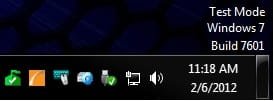
This tutorial will show you how to remove the Test Mode Windows 7 Build 7601 (with SP1 installed) or Test Mode Windows 7 Build 7600 (without SP1 installed) watermark from the lower right corner of the Windows 7 desktop by turning off test mode.

You must be logged in as an administrator to be able to do the steps in this tutorial.

   Note
According to Microsoft, the test mode watermark can appear if the test signing mode is started on the computer. This test mode may occur if an application whose drivers are not digitally signed by Microsoft is installed and still in the test phase. Microsoft added test mode to Windows so that users can test programs without having to provide an authentication certificate.

The TESTSIGNING boot configuration option determines whether Windows Vista and later versions of Windows will load any type of test-signed kernel-mode code. This option is not set by default, which means test-signed kernel-mode drivers will not load by default on 64-bit versions of Windows Vista and later versions of Windows.

For 64-bit versions of Windows Vista and later versions of Windows, the kernel-mode code signing policy requires that all kernel-mode code have a digital signature. However, in most cases, an unsigned driver can be installed and loaded on 32-bit versions of Windows Vista and later versions of Windows.


EXAMPLE: "Test Mode Windows 7 Build 7601" Watermark
Example.jpg


Here's How:
1. Open an elevated command prompt.

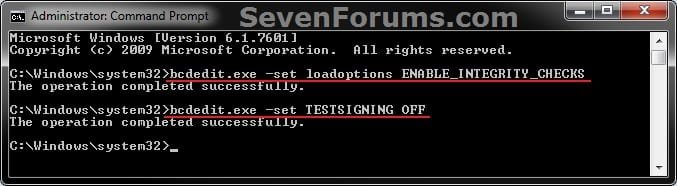
2. In the elevated command prompt, copy and paste the command below and press Enter. (see screenshot below step 3)
bcdedit.exe -set loadoptions ENABLE_INTEGRITY_CHECKS
3. In the elevated command prompt, copy and paste the command you want to use below, and press Enter. (see screenshot below)

(Turn Off test mode and remove watermark)
bcdedit.exe -set TESTSIGNING OFF

OR

(Turn On test mode and add watermark)
bcdedit.exe -set TESTSIGNING ON

CMD.jpg
4. Close the elevated command prompt.

5. Restart the computer to apply.
That's it,
Shawn


Last edited:
Just wanted to say thanks for this thread/tutorial Brink.

I posted a pic in the "show us your desktop" thread a short while ago, had a look at it myself and noticed the test mode thing in the bottom right corner, it must have occurred very recently as I had not even noticed it :o

I don't know why it appeared, but I quickly did a search on google and the first link was to good old Seven forums and this thread. I followed your instructions and it was gone as quick as it appeared :)

Paul.
 

My Computer

OS
Windows 7 Professional 64 bit
You're welcome Paul. I'm glad that it could help. :)
 

My Computer

Computer type
PC/Desktop
Computer Manufacturer/Model Number
Self built custom
OS
64-bit Windows 11 Pro for Workstations
CPU
Intel i7-8700K OC'd to 5 GHz
Motherboard
ASUS ROG Maximus XI Formula Z390
Memory
64 GB (4x16GB) G.SKILL TridentZ RGB DDR4 3600 MHz
Graphics Card(s)
ASUS ROG-STRIX-GTX1080TI-O11G-GAMING
Sound Card
Integrated
Monitor(s) Displays
2 x Samsung Odyssey G7 27"
Screen Resolution
2560x1440
Hard Drives
1TB Samsung 990 PRO M.2,
4TB Samsung 990 PRO PRO M.2,
TerraMaster F8 SSD Plus NAS
PSU
Seasonic Prime Titanium 850W
Case
Thermaltake Core P3
Cooling
Corsair Hydro H115i
Keyboard
Logitech wireless K800
Mouse
Logitech MX Master 4
Internet Speed
2 Gb/s Download and 100 Mb/s Upload
Antivirus
Malwarebyte Anti-Malware Premium
Browser
Google Chrome
Other Info
Logitech Z625 speaker system,
Logitech BRIO 4K Pro webcam,
HP Color LaserJet Pro MFP M477fdn,
APC SMART-UPS RT 1000 XL - SURT1000XLI,
Galaxy S23 Plus phone
Well I feel like a dummy. I have never seen one until now. Didn't even know they existed.
 

My Computer

Computer type
PC/Desktop
Computer Manufacturer/Model Number
Home made Desktop
OS
Windows 10 Pro. 64/ version 1709 Windows 7 Pro/64
CPU
Intel i7-6800K @ 4.3
Motherboard
ASUS X-99 Deluxe II
Memory
Corsair Platinum 16 gig @2400
Graphics Card(s)
EVGA GTX 1070 OC
Monitor(s) Displays
Asus 27" LED LCD/VE278Q
Screen Resolution
1920-1080 or 1280-720 HDMI
Hard Drives
INTEL SSD 730-240 Gb Sata 3.0/
PSU
EVGA Platium 1200W
Case
Phanteks Luxe Tempered Glass 8 fans/ one radiator
Cooling
XSPC/ Water Cooled CPU
Keyboard
Das 4 Professional
Mouse
Logitech M705/MX Anywhere 2-S
Internet Speed
100 mbits
Antivirus
Microsoft Security Essentials/ Malwarebytes Premium 3.0/ SAS
Browser
I.E. 11 default/Firefox/ ISP Time Warner Cable/Spectrum
Other Info
LG BluRay Burner/
Sound system-KLipsch-THX/
Icy Dock ssd Hot Swap bays.
Thank You Sir........:)
 

My Computer

Computer Manufacturer/Model Number
Tykpee Jurassic PC
OS
Windows 7 Ultimate 32bit
CPU
Intel Pentium D 945 Presler 65nm Technology
Motherboard
MICRO-STAR INTERNATIONAL CO.,LTD MS-7360
Memory
2.00 GB Dual-Channel DDR2
Graphics Card(s)
NVidia GeForce 7300 GS
Sound Card
Realtek High Definition Audio
Monitor(s) Displays
AOC 936W
Screen Resolution
(1366x768)
Hard Drives
320GB SAMSUNG HD322HJ ATA Device (SATA)
PSU
Rise 600watts Made In China
Case
Ovation Case Made In China
Cooling
Fan Based
Keyboard
A4Tech KRS-8520D
Mouse
A4Tech KRS-8520D
Internet Speed
Download: 1.95 Mb/s Upload: 0.49 Mb/s
You're welcome Gabb, and welcome to Seven Forums. :)
 

My Computer

Computer type
PC/Desktop
Computer Manufacturer/Model Number
Self built custom
OS
64-bit Windows 11 Pro for Workstations
CPU
Intel i7-8700K OC'd to 5 GHz
Motherboard
ASUS ROG Maximus XI Formula Z390
Memory
64 GB (4x16GB) G.SKILL TridentZ RGB DDR4 3600 MHz
Graphics Card(s)
ASUS ROG-STRIX-GTX1080TI-O11G-GAMING
Sound Card
Integrated
Monitor(s) Displays
2 x Samsung Odyssey G7 27"
Screen Resolution
2560x1440
Hard Drives
1TB Samsung 990 PRO M.2,
4TB Samsung 990 PRO PRO M.2,
TerraMaster F8 SSD Plus NAS
PSU
Seasonic Prime Titanium 850W
Case
Thermaltake Core P3
Cooling
Corsair Hydro H115i
Keyboard
Logitech wireless K800
Mouse
Logitech MX Master 4
Internet Speed
2 Gb/s Download and 100 Mb/s Upload
Antivirus
Malwarebyte Anti-Malware Premium
Browser
Google Chrome
Other Info
Logitech Z625 speaker system,
Logitech BRIO 4K Pro webcam,
HP Color LaserJet Pro MFP M477fdn,
APC SMART-UPS RT 1000 XL - SURT1000XLI,
Galaxy S23 Plus phone
Is there a way of removing the watermark just from an aesthetic point of view. I'm trying out modded drivers so that I can SLI two different GTX cards.

I tried the fix. It removed the watermark but it also removed the video card drivers.
 

My Computer

OS
Windows 7 Ultimate x64
CPU
intel 2500k
Motherboard
Asus Maximus iv gene-z
Memory
16 gb (8gb Crucial, 8gb G.Skill)
Graphics Card(s)
PNY GTX 580, EVGA GTX 480
PSU
Antec 850W Modular
Hello Materix, and welcome to Seven Forums.

Sorry, but no. It removes the watermark by taking you out of test mode and back to normal mode. :(
 

My Computer

Computer type
PC/Desktop
Computer Manufacturer/Model Number
Self built custom
OS
64-bit Windows 11 Pro for Workstations
CPU
Intel i7-8700K OC'd to 5 GHz
Motherboard
ASUS ROG Maximus XI Formula Z390
Memory
64 GB (4x16GB) G.SKILL TridentZ RGB DDR4 3600 MHz
Graphics Card(s)
ASUS ROG-STRIX-GTX1080TI-O11G-GAMING
Sound Card
Integrated
Monitor(s) Displays
2 x Samsung Odyssey G7 27"
Screen Resolution
2560x1440
Hard Drives
1TB Samsung 990 PRO M.2,
4TB Samsung 990 PRO PRO M.2,
TerraMaster F8 SSD Plus NAS
PSU
Seasonic Prime Titanium 850W
Case
Thermaltake Core P3
Cooling
Corsair Hydro H115i
Keyboard
Logitech wireless K800
Mouse
Logitech MX Master 4
Internet Speed
2 Gb/s Download and 100 Mb/s Upload
Antivirus
Malwarebyte Anti-Malware Premium
Browser
Google Chrome
Other Info
Logitech Z625 speaker system,
Logitech BRIO 4K Pro webcam,
HP Color LaserJet Pro MFP M477fdn,
APC SMART-UPS RT 1000 XL - SURT1000XLI,
Galaxy S23 Plus phone
Access Denie at Elevated Comd Promt

Dear Sir,

I have the Test Mode, Windows 7, Build 7601 message on my desktop and I followed the instructions to get rid of it. Each time I accessed the Elevated Command Prompt and entered the instructed string, I got the following error message: The Boot Configuration Data Store Could Not Be Opened. Access is Denied.

I am the administrator and only user and I do not know how to get access. Can you help?

Thanks in advanced,
Clancy31
 
Last edited:

My Computer

Computer type
PC/Desktop
Computer Manufacturer/Model Number
DELL
OS
Windows 7 Pro 64-bit
Hello Clancy, and welcome to Seven Forums.

It sounds like you may not have opened an elevated command prompt. Be sure that you right click on the command prompt shortcut or "cmd.exe" file, and click on Run as administrator.

Hope this helps, :)
Shawn
 

My Computer

Computer type
PC/Desktop
Computer Manufacturer/Model Number
Self built custom
OS
64-bit Windows 11 Pro for Workstations
CPU
Intel i7-8700K OC'd to 5 GHz
Motherboard
ASUS ROG Maximus XI Formula Z390
Memory
64 GB (4x16GB) G.SKILL TridentZ RGB DDR4 3600 MHz
Graphics Card(s)
ASUS ROG-STRIX-GTX1080TI-O11G-GAMING
Sound Card
Integrated
Monitor(s) Displays
2 x Samsung Odyssey G7 27"
Screen Resolution
2560x1440
Hard Drives
1TB Samsung 990 PRO M.2,
4TB Samsung 990 PRO PRO M.2,
TerraMaster F8 SSD Plus NAS
PSU
Seasonic Prime Titanium 850W
Case
Thermaltake Core P3
Cooling
Corsair Hydro H115i
Keyboard
Logitech wireless K800
Mouse
Logitech MX Master 4
Internet Speed
2 Gb/s Download and 100 Mb/s Upload
Antivirus
Malwarebyte Anti-Malware Premium
Browser
Google Chrome
Other Info
Logitech Z625 speaker system,
Logitech BRIO 4K Pro webcam,
HP Color LaserJet Pro MFP M477fdn,
APC SMART-UPS RT 1000 XL - SURT1000XLI,
Galaxy S23 Plus phone
Worked fine, thanks Shawn.
 

My Computer

Computer type
PC/Desktop
Computer Manufacturer/Model Number
DELL
OS
Windows 7 Pro 64-bit
You're welcome Clancy. That's great news. :)
 

My Computer

Computer type
PC/Desktop
Computer Manufacturer/Model Number
Self built custom
OS
64-bit Windows 11 Pro for Workstations
CPU
Intel i7-8700K OC'd to 5 GHz
Motherboard
ASUS ROG Maximus XI Formula Z390
Memory
64 GB (4x16GB) G.SKILL TridentZ RGB DDR4 3600 MHz
Graphics Card(s)
ASUS ROG-STRIX-GTX1080TI-O11G-GAMING
Sound Card
Integrated
Monitor(s) Displays
2 x Samsung Odyssey G7 27"
Screen Resolution
2560x1440
Hard Drives
1TB Samsung 990 PRO M.2,
4TB Samsung 990 PRO PRO M.2,
TerraMaster F8 SSD Plus NAS
PSU
Seasonic Prime Titanium 850W
Case
Thermaltake Core P3
Cooling
Corsair Hydro H115i
Keyboard
Logitech wireless K800
Mouse
Logitech MX Master 4
Internet Speed
2 Gb/s Download and 100 Mb/s Upload
Antivirus
Malwarebyte Anti-Malware Premium
Browser
Google Chrome
Other Info
Logitech Z625 speaker system,
Logitech BRIO 4K Pro webcam,
HP Color LaserJet Pro MFP M477fdn,
APC SMART-UPS RT 1000 XL - SURT1000XLI,
Galaxy S23 Plus phone
Work's fine

Thanks alot :)
 

My Computer

Computer type
PC/Desktop
Computer Manufacturer/Model Number
Gigabyte
OS
Windows 7 Ultimate x64
CPU
Intel Core i3
Motherboard
Gigabyte
Memory
Kingston
Graphics Card(s)
Intel HD Graphic
Hard Drives
WDC
Antivirus
BullGuard
Browser
Google Chrome
Dear Brink,
Thank you very much for this informative post. I was able to get rid of the watermark without much hassle with the help of above post.
PP Kakkar
 

My Computer

Computer type
PC/Desktop
Computer Manufacturer/Model Number
custom built
OS
windows 7 64bit
CPU
Inel quad core

My Computer

Computer type
PC/Desktop
Computer Manufacturer/Model Number
Custom Asus Build
OS
Microsoft Windows 8.1 Pro 64-bit
CPU
Intel(R) Core(TM) i3-4130 CPU @ 3.40GHz
Motherboard
B85M-E
Memory
8.00 GB
Graphics Card(s)
None
Sound Card
Realtek High Definition Audio
Monitor(s) Displays
Asus 23.6" Monitor
Screen Resolution
1920 x 1080 x 32 bits (4294967296 colors) @ 60 Hz
Hard Drives
INTEL SSDSC2BW180A4
Samsung SSD 840 PRO Series
PSU
Seasonic S12II-380Bronze
Case
Lian Li
Cooling
Fan, Passive
Keyboard
Logitech K120
Mouse
Microsoft Touch Mouse
Internet Speed
4ms Ping, 19.0 Mbps Download, 19.0 Mbps Upload
Antivirus
Eset Endpoint
Browser
Internet Explorer, Chrome
Thank you

I used the information you posted and it worked very well. Thank you so very much, it is scary to see stuff like that when you don't know how or where it came from. All you can think about is being hacked by a virus.
 

My Computer

Computer type
PC/Desktop
OS
Windows 7 64 bit
After troubleshooting an issue where my computer kept cutting off (after a long time of having several system issues possibly relating to drivers, but also unknown happenings - even cutting off in safe mode [without networking]) and finally getting back to some kind of normality I noticed this appeared. So I've followed this tutorial (thanks) but I'm curious about if doing this should come with any particular questions/warnings or perhaps thoughts about why it was there (I understand about the drivers) or if one should look out for anything in particular.

I have limited understanding, but am I right in thinking that now that I'm out of test mode, that any unsigned drivers will no longer be allowed to run (probably a good thing) or have I misunderstood what is going on perhaps with my hasty troubleshooting activities.

Thanks, it's been such a long time away from this forum having resorted to just working on my Win 8 laptop, but reviving my workhorse of a desktop machine has brought me back here along with a real love and appreciation of Win 7 :)
 

My Computer

Computer type
PC/Desktop
Computer Manufacturer/Model Number
Dell
OS
Windows 7 Professional 64bit
CPU
Intel Core i5-3320M @ 2.60GHz
Memory
8GB
Graphics Card(s)
Intel HD Graphics 4000 (integrated)
Sound Card
IDT Audio (integrated)
Monitor(s) Displays
generic dual monitors (various brands)
Screen Resolution
1366 x 768
Hard Drives
500GB built in 5400RPM
various externals (Lacie 4TB, WD 3TB)
PSU
pretty standard.. no sparks or melting
Case
mainly consists of plastic, metal and a few screws
Cooling
there is a fan... somewhere... I can hear it.
Mouse
Microsoft Intellimouse Explorer 3.0
Internet Speed
50 down / 10 up
Antivirus
Avast
Browser
Chrome
Other Info
I have a secondary laptop (replaced due to multiple issues):
- Zoostorm i5, 16GB RAM

I also have desktops:
- AMD Bulldozer, 8GB RAM - keeps turning off - currently unusable
- Acer Core 2 Duo, 2GB RAM - won't boot - currently unusable

I have various other ancient desktops that I don't seem to want to get rid of.
Hello Andreas,

Yeah, test mode is basically for users to be able to test programs/drivers without having to provide an authentication certificate. :)
 

My Computer

Computer type
PC/Desktop
Computer Manufacturer/Model Number
Self built custom
OS
64-bit Windows 11 Pro for Workstations
CPU
Intel i7-8700K OC'd to 5 GHz
Motherboard
ASUS ROG Maximus XI Formula Z390
Memory
64 GB (4x16GB) G.SKILL TridentZ RGB DDR4 3600 MHz
Graphics Card(s)
ASUS ROG-STRIX-GTX1080TI-O11G-GAMING
Sound Card
Integrated
Monitor(s) Displays
2 x Samsung Odyssey G7 27"
Screen Resolution
2560x1440
Hard Drives
1TB Samsung 990 PRO M.2,
4TB Samsung 990 PRO PRO M.2,
TerraMaster F8 SSD Plus NAS
PSU
Seasonic Prime Titanium 850W
Case
Thermaltake Core P3
Cooling
Corsair Hydro H115i
Keyboard
Logitech wireless K800
Mouse
Logitech MX Master 4
Internet Speed
2 Gb/s Download and 100 Mb/s Upload
Antivirus
Malwarebyte Anti-Malware Premium
Browser
Google Chrome
Other Info
Logitech Z625 speaker system,
Logitech BRIO 4K Pro webcam,
HP Color LaserJet Pro MFP M477fdn,
APC SMART-UPS RT 1000 XL - SURT1000XLI,
Galaxy S23 Plus phone
Hey, thanks. Taking it out of test mode can certainly only be a good thing then whilst I trouble shoot potential problems with the system (potentially caused by drivers).
 

My Computer

Computer type
PC/Desktop
Computer Manufacturer/Model Number
Dell
OS
Windows 7 Professional 64bit
CPU
Intel Core i5-3320M @ 2.60GHz
Memory
8GB
Graphics Card(s)
Intel HD Graphics 4000 (integrated)
Sound Card
IDT Audio (integrated)
Monitor(s) Displays
generic dual monitors (various brands)
Screen Resolution
1366 x 768
Hard Drives
500GB built in 5400RPM
various externals (Lacie 4TB, WD 3TB)
PSU
pretty standard.. no sparks or melting
Case
mainly consists of plastic, metal and a few screws
Cooling
there is a fan... somewhere... I can hear it.
Mouse
Microsoft Intellimouse Explorer 3.0
Internet Speed
50 down / 10 up
Antivirus
Avast
Browser
Chrome
Other Info
I have a secondary laptop (replaced due to multiple issues):
- Zoostorm i5, 16GB RAM

I also have desktops:
- AMD Bulldozer, 8GB RAM - keeps turning off - currently unusable
- Acer Core 2 Duo, 2GB RAM - won't boot - currently unusable

I have various other ancient desktops that I don't seem to want to get rid of.
How do you find the program and/or driver that is causing the watermark to appear? I went through the tutorial which worked (thanks) but I ended up crashing and not even able to do anything. I had to undo the watermark removal in order to do anything on my computer. Is there a way to find the culprit!??!?!
 

My Computer

Computer type
PC/Desktop
Computer Manufacturer/Model Number
HP HDX 18T
OS
District of Columbia
Antivirus
Norton 360
Back
Top