Safe Mode with Command Prompt - Add to Windows Boot Manager Screen

How to Add Windows 7 "Safe Mode with Command Prompt" to Windows Boot Manager Screen

   Information
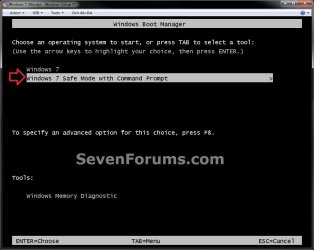
This will show you how to add Windows 7 Safe Mode with Command Prompt to the Windows Boot Manager to be able to easily select to startup into Safe Mode with Command Prompt, Windows 7, or any other installed OS at boot from the Windows Boot Manager screen.

This can be handy to have as another option to be able to start Windows 7 in Safe Mode with Command Prompt as needed.

You must be logged in as an administrator to be able to do the steps in this tutorial.


EXAMPLE: "Windows 7 Safe Mode with Command Prompt" added to Windows Boot Manager Example.jpg


OPTION ONE

Add Windows 7 "Safe Mode with Command Prompt" to Windows Boot Manager

1. Open a elevated command prompt or a command prompt at boot.

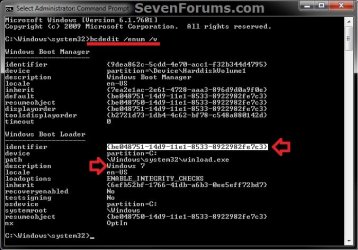
2. In the command prompt, copy and paste the command below and press Enter. (see screenshot below) bcdedit /enum /v

Step-1.jpg
3. From under a Windows Boot Loader section, look for the description that has Windows 7 listed, and make note of it's identifier number (ex: {be048751-14d9-11e1-8533-8922982fe7c3} ) . (see screenshot above)

4. In the command prompt, type the command below and press Enter. (see screenshot below)
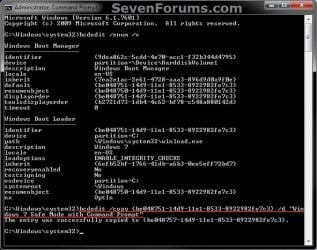
NOTE: Substitute identifier number in the command below with your actual Windows 7 identifier number from step 3. bcdedit /copy {identifier number} /d “Windows 7 Safe Mode with Command Prompt”
For example: I would type this command below exactly for my identifier number {be048751-14d9-11e1-8533-8922982fe7c3}.

Code:
bcdedit /copy {be048751-14d9-11e1-8533-8922982fe7c3} /d “Windows 7 Safe Mode with Command Prompt”
Step-2.jpg
5. If successfully copied, close the elevated command prompt.
NOTE: If you did this from a command prompt at boot, then restart the computer into Windows 7 instead.

6. Open the Start Menu in Windows 7, type msconfig in the search box, and press Enter.

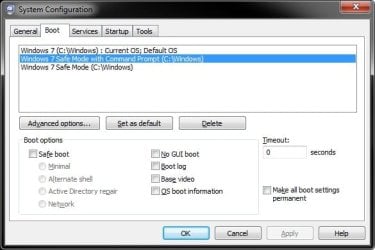
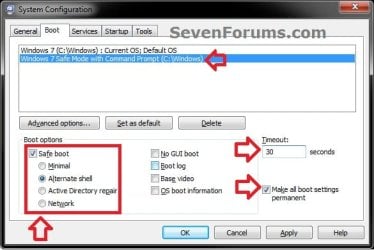
7. Click on the Boot tab, select Windows 7 Safe Mode with Command Prompt, check the Safe boot box and select (dot) Alternate shell, have enough seconds (ex: 30) entered under Timeout to be able to have enough time to select a OS at boot, check the Make all boot settings permanent box, and click on OK. (see screenshot below) Step-3.jpg
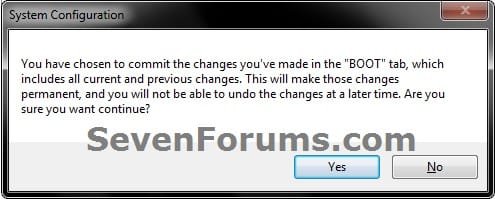
8. Click on Yes. (see screenshot below) Step-4.jpg
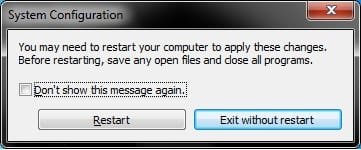
9. Click on Restart. (see screenshot below) Step-5.jpg
10. You will now be able to select to startup into Safe Mode with Command Prompt, Windows 7, or any other installed OS at boot from the Windows Boot Manager screen.


OPTION TWO

To Remove "Safe Mode with Command Prompt" from Windows Boot Manager

1. Boot into Windows 7, and not the Windows 7 Safe Mode with Command Prompt option.

2. Using either option in the tutorial below, delete the Windows 7 Safe Mode with Command Prompt entry like in the screenshots below. How to Delete a Operating System Listed in Windows Boot Manager in Windows 7
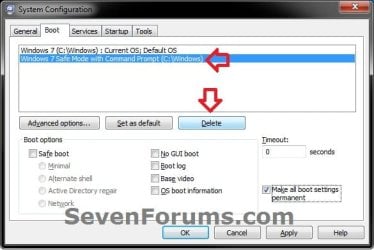

Step-6.jpgStep-7.jpg

That's it,
Shawn


Last edited:
I tried doing this, it successfully copied, but it would not add to msconfig, I assume you can only have 1 Safe Mode version at a time.
 

My Computer My Computer

Computer type
PC/Desktop
Computer Manufacturer/Model Number
Novatech iRush Pro
OS
Windows 7 Ultimate SP1 - 64 Bit
CPU
Intel Core i5 2500k
Motherboard
Foxconn H67M-S/H67M-V/H67
Memory
2x4GB DDR3 1333Hz
Graphics Card(s)
Ati Radeon 6770
Sound Card
None
Monitor(s) Displays
Samsung S22B150
Screen Resolution
1920x1080
Hard Drives
2x500GB
PSU
500W
Cooling
Fan
Keyboard
HP KU0316
Mouse
Wireless Logitech M185
Internet Speed
20MB/s
Antivirus
Avast Free
Browser
Google Chrome
Other Info
Logitech M185 Mouse
KU-M316 Keyboard

My Computer My Computer

Computer type
PC/Desktop
Computer Manufacturer/Model Number
Self built custom
OS
64-bit Windows 11 Pro for Workstations
CPU
Intel i7-8700K OC'd to 5 GHz
Motherboard
ASUS ROG Maximus XI Formula Z390
Memory
64 GB (4x16GB) G.SKILL TridentZ RGB DDR4 3600 MHz
Graphics Card(s)
ASUS ROG-STRIX-GTX1080TI-O11G-GAMING
Sound Card
Integrated
Monitor(s) Displays
2 x Samsung Odyssey G7 27"
Screen Resolution
2560x1440
Hard Drives
1TB Samsung 990 PRO M.2,
4TB Samsung 990 PRO PRO M.2,
TerraMaster F8 SSD Plus NAS
PSU
Seasonic Prime Titanium 850W
Case
Thermaltake Core P3
Cooling
Corsair Hydro H115i
Keyboard
Logitech wireless K800
Mouse
Logitech MX Master 4
Internet Speed
2 Gb/s Download and 100 Mb/s Upload
Antivirus
Malwarebyte Anti-Malware Premium
Browser
Google Chrome
Other Info
Logitech Z625 speaker system,
Logitech BRIO 4K Pro webcam,
HP Color LaserJet Pro MFP M477fdn,
APC SMART-UPS RT 1000 XL - SURT1000XLI,
Galaxy S23 Plus phone
I did, I did the original a week ago, tried this but it wouldn't add it to msconfig.
 

My Computer My Computer

Computer type
PC/Desktop
Computer Manufacturer/Model Number
Novatech iRush Pro
OS
Windows 7 Ultimate SP1 - 64 Bit
CPU
Intel Core i5 2500k
Motherboard
Foxconn H67M-S/H67M-V/H67
Memory
2x4GB DDR3 1333Hz
Graphics Card(s)
Ati Radeon 6770
Sound Card
None
Monitor(s) Displays
Samsung S22B150
Screen Resolution
1920x1080
Hard Drives
2x500GB
PSU
500W
Cooling
Fan
Keyboard
HP KU0316
Mouse
Wireless Logitech M185
Internet Speed
20MB/s
Antivirus
Avast Free
Browser
Google Chrome
Other Info
Logitech M185 Mouse
KU-M316 Keyboard
Oh, my apologies. I thought you were trying to do the network and command prompt one together. :o

Yes, you will be able to add as many different ones as you want to the Windows Boot Manager like in the msconfig screenshot below.
msconfig.jpg
Could you post screenshots of your command prompt doing the tutorial to see if anything (error messages, mistakes, etc...) may stand out as a cause for you?

If you had msconfig opened while doing the command prompt, then close and reopen msconfig to see if it's there afterwards.
 

My Computer My Computer

Computer type
PC/Desktop
Computer Manufacturer/Model Number
Self built custom
OS
64-bit Windows 11 Pro for Workstations
CPU
Intel i7-8700K OC'd to 5 GHz
Motherboard
ASUS ROG Maximus XI Formula Z390
Memory
64 GB (4x16GB) G.SKILL TridentZ RGB DDR4 3600 MHz
Graphics Card(s)
ASUS ROG-STRIX-GTX1080TI-O11G-GAMING
Sound Card
Integrated
Monitor(s) Displays
2 x Samsung Odyssey G7 27"
Screen Resolution
2560x1440
Hard Drives
1TB Samsung 990 PRO M.2,
4TB Samsung 990 PRO PRO M.2,
TerraMaster F8 SSD Plus NAS
PSU
Seasonic Prime Titanium 850W
Case
Thermaltake Core P3
Cooling
Corsair Hydro H115i
Keyboard
Logitech wireless K800
Mouse
Logitech MX Master 4
Internet Speed
2 Gb/s Download and 100 Mb/s Upload
Antivirus
Malwarebyte Anti-Malware Premium
Browser
Google Chrome
Other Info
Logitech Z625 speaker system,
Logitech BRIO 4K Pro webcam,
HP Color LaserJet Pro MFP M477fdn,
APC SMART-UPS RT 1000 XL - SURT1000XLI,
Galaxy S23 Plus phone
OK I managed to add all three:
Example.png
 

My Computer My Computer

Computer type
PC/Desktop
Computer Manufacturer/Model Number
Novatech iRush Pro
OS
Windows 7 Ultimate SP1 - 64 Bit
CPU
Intel Core i5 2500k
Motherboard
Foxconn H67M-S/H67M-V/H67
Memory
2x4GB DDR3 1333Hz
Graphics Card(s)
Ati Radeon 6770
Sound Card
None
Monitor(s) Displays
Samsung S22B150
Screen Resolution
1920x1080
Hard Drives
2x500GB
PSU
500W
Cooling
Fan
Keyboard
HP KU0316
Mouse
Wireless Logitech M185
Internet Speed
20MB/s
Antivirus
Avast Free
Browser
Google Chrome
Other Info
Logitech M185 Mouse
KU-M316 Keyboard
That's great news. :party:

Did you have msconfig open while doing the command prompt?
 

My Computer My Computer

Computer type
PC/Desktop
Computer Manufacturer/Model Number
Self built custom
OS
64-bit Windows 11 Pro for Workstations
CPU
Intel i7-8700K OC'd to 5 GHz
Motherboard
ASUS ROG Maximus XI Formula Z390
Memory
64 GB (4x16GB) G.SKILL TridentZ RGB DDR4 3600 MHz
Graphics Card(s)
ASUS ROG-STRIX-GTX1080TI-O11G-GAMING
Sound Card
Integrated
Monitor(s) Displays
2 x Samsung Odyssey G7 27"
Screen Resolution
2560x1440
Hard Drives
1TB Samsung 990 PRO M.2,
4TB Samsung 990 PRO PRO M.2,
TerraMaster F8 SSD Plus NAS
PSU
Seasonic Prime Titanium 850W
Case
Thermaltake Core P3
Cooling
Corsair Hydro H115i
Keyboard
Logitech wireless K800
Mouse
Logitech MX Master 4
Internet Speed
2 Gb/s Download and 100 Mb/s Upload
Antivirus
Malwarebyte Anti-Malware Premium
Browser
Google Chrome
Other Info
Logitech Z625 speaker system,
Logitech BRIO 4K Pro webcam,
HP Color LaserJet Pro MFP M477fdn,
APC SMART-UPS RT 1000 XL - SURT1000XLI,
Galaxy S23 Plus phone

My Computer My Computer

Computer type
PC/Desktop
Computer Manufacturer/Model Number
Novatech iRush Pro
OS
Windows 7 Ultimate SP1 - 64 Bit
CPU
Intel Core i5 2500k
Motherboard
Foxconn H67M-S/H67M-V/H67
Memory
2x4GB DDR3 1333Hz
Graphics Card(s)
Ati Radeon 6770
Sound Card
None
Monitor(s) Displays
Samsung S22B150
Screen Resolution
1920x1080
Hard Drives
2x500GB
PSU
500W
Cooling
Fan
Keyboard
HP KU0316
Mouse
Wireless Logitech M185
Internet Speed
20MB/s
Antivirus
Avast Free
Browser
Google Chrome
Other Info
Logitech M185 Mouse
KU-M316 Keyboard
Eh, it happens to all of us. :)
 

My Computer My Computer

Computer type
PC/Desktop
Computer Manufacturer/Model Number
Self built custom
OS
64-bit Windows 11 Pro for Workstations
CPU
Intel i7-8700K OC'd to 5 GHz
Motherboard
ASUS ROG Maximus XI Formula Z390
Memory
64 GB (4x16GB) G.SKILL TridentZ RGB DDR4 3600 MHz
Graphics Card(s)
ASUS ROG-STRIX-GTX1080TI-O11G-GAMING
Sound Card
Integrated
Monitor(s) Displays
2 x Samsung Odyssey G7 27"
Screen Resolution
2560x1440
Hard Drives
1TB Samsung 990 PRO M.2,
4TB Samsung 990 PRO PRO M.2,
TerraMaster F8 SSD Plus NAS
PSU
Seasonic Prime Titanium 850W
Case
Thermaltake Core P3
Cooling
Corsair Hydro H115i
Keyboard
Logitech wireless K800
Mouse
Logitech MX Master 4
Internet Speed
2 Gb/s Download and 100 Mb/s Upload
Antivirus
Malwarebyte Anti-Malware Premium
Browser
Google Chrome
Other Info
Logitech Z625 speaker system,
Logitech BRIO 4K Pro webcam,
HP Color LaserJet Pro MFP M477fdn,
APC SMART-UPS RT 1000 XL - SURT1000XLI,
Galaxy S23 Plus phone
Nicely Explained Shawn (As Always) :)
 

My Computer My Computer

Computer type
Laptop
OS
Windows 7 Home Premium
Back
Top