
Darik's Boot and Nuke - Use to Secure Wipe a Hard Drive

Darik's Boot and Nuke - Use to Wipe a Hard Drive

How to Securely Wipe a Hard Disk with "Darik's Boot and Nuke"

   Information
This tutorial will show you how to use Darik's Boot and Nuke to help you secure wipe a hard drive that has data that you need to have destroyed.

   Warning
Before we start:

Darik's Boot and Nuke will irrecoverably erase all data on the hard drive. It will also erase any hard drive/ flash drive that is connected to your computer, so be sure to unplug drives that you don't want to have erased before you use Darik's Boot and Nuke. Also, Darik's Boot and Nuke will take several hours depending on the options you choose, so be sure you have time to do this.


Let's begin:

1. You need to download Darik's Boot and Nuke. It can be downloaded from here:

Download


2. You will need to burn the iso file to a cd. This tutorial will show you how to if ou don't know how: http://www.sevenforums.com/tutorials/548-burn-disc-image-iso-img-file.html

3. Restart your computer, go into the BIOS and set it to boot from CD/DVD first.

4. Insert your Darik's Boot and Nuke CD so your computer can boot off of it.


5. Darik's Boot and Nuke will come up at a screen asking you what you want to do.
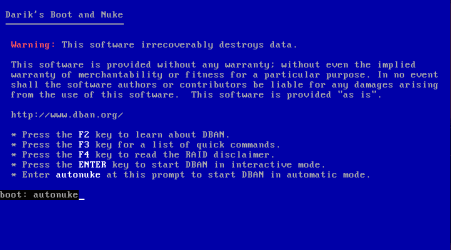
  • F2 to learn more about Darik's Boot and Nuke
  • F3 for a list of quick commands
  • F4 for the disclaimer
  • Enter to start Darik's Boot and Nuke in Interactive Mode
  • You can type in autonuke to automatically erase your hard drive with the DoD Short method which is a 3 pass secure erase on your hard drive. I recommend that you choose autonuke.
6. Type in the option that you want and press enter. I am going to type in autonuke.
user207523_pic5364_1339083241.png
7. The process will take several hours depending on the size of your drive. Once it has completed, you can hold down the power button on your computer to shut your computer off.


I would like to thank Shawn for making some adjustments to this tutorial and helping me with this tutorial. If you have any questions or comments, feel free to post them below.


Last edited by a moderator:
A few things to mention:
You can put DBAN on a USB key, but warning, if you use "autonuke", it will nuke all hard drives, including the USB. So when you get to the blue screen with text at the bottom saying that it recognized a USB drive, pull it out. DBAN is fully loaded.

To put DBAN on a USB, you just download the original ISO (currently at version 2.2.7). With my experience, many ISO writers do not work, and LinuxLive has worked wonders for me. It works with Ubuntu, Ophcrack, DBAN, Linux, and many others.

Please add this to the tutorial, because it is very useful for people with computers without DVD/CD drives.

Thanks!
 

My Computer My Computer

OS
N/A
What is "interactive mode"? Does that have other nuke options besides the DoD Short method?
 

My Computer My Computer

Computer Manufacturer/Model Number
me / #1
OS
windows 7 x64 Home Premium
CPU
intel q6600
Motherboard
gigbyte ga ep45 ud3l
Memory
g.skill 8gb ddr2 1066 (pc2 8500)
Graphics Card(s)
evga geforce 9800 gtx 512 mb
Screen Resolution
1680 x 1050
Hard Drives
wd caviar black 500 gb
wd caviar black 1tb
wd elements 1tb external hd x2
PSU
raidmax 500w
Case
smilodon (yes, t'was the pretty blue lites that got me!)

My Computer My Computer

Computer Manufacturer/Model Number
me / #1
OS
windows 7 x64 Home Premium
CPU
intel q6600
Motherboard
gigbyte ga ep45 ud3l
Memory
g.skill 8gb ddr2 1066 (pc2 8500)
Graphics Card(s)
evga geforce 9800 gtx 512 mb
Screen Resolution
1680 x 1050
Hard Drives
wd caviar black 500 gb
wd caviar black 1tb
wd elements 1tb external hd x2
PSU
raidmax 500w
Case
smilodon (yes, t'was the pretty blue lites that got me!)
Will DBAN erase both drives (C and D) even if drive D is empty?
 

My Computer My Computer

Computer type
PC/Desktop
Computer Manufacturer/Model Number
custom build
OS
Windows 7 Professional 64bit
CPU
Intel i7-5960X
Motherboard
EVGA X99 Classified
Memory
64GB Corsair Dominator 2400MHz
Graphics Card(s)
3 EVGA GTX980's
Sound Card
on board
Monitor(s) Displays
3 Dell E2715H 27"
Screen Resolution
1920x1080 (5760x1080)
Hard Drives
Samsung 950 Pro 1TB M.2 SSD,
Western Digital Black 2TB HDD's x5
Western Digital Black 1TB HDD's x3
PSU
Corsair AX1200i
Case
Corsair 750D
Cooling
Corsair H110i GT
Keyboard
Corsair K70
Mouse
Corsair M45
Internet Speed
250 down/10 up
Antivirus
Microsoft Security Essentials
Browser
IE 11, Google Chrome
If i use this method can i install w7 again on the same hdd ??
 

My Computer My Computer

Computer type
Laptop
Computer Manufacturer/Model Number
Acer Aspire 6930G
OS
windows 7 ultimate x 64bit
CPU
T9600 @ 2.80GHz
Memory
4Gig
Graphics Card(s)
Nvidia GeForce 9600M GT
Hard Drives
1 X 250 Gig
1 x 750 Gig
Other Info
Cd/Blue-ray drive
Hello Andrew,

Yes. This only secure deletes the HDD. Think of it as being the same as using the "Clean all" command, but much more thorough. :)
 

My Computer My Computer

Computer type
PC/Desktop
Computer Manufacturer/Model Number
Self built custom
OS
64-bit Windows 11 Pro for Workstations
CPU
Intel i7-8700K OC'd to 5 GHz
Motherboard
ASUS ROG Maximus XI Formula Z390
Memory
64 GB (4x16GB) G.SKILL TridentZ RGB DDR4 3600 MHz
Graphics Card(s)
ASUS ROG-STRIX-GTX1080TI-O11G-GAMING
Sound Card
Integrated
Monitor(s) Displays
2 x Samsung Odyssey G7 27"
Screen Resolution
2560x1440
Hard Drives
1TB Samsung 990 PRO M.2,
4TB Samsung 990 PRO PRO M.2,
TerraMaster F8 SSD Plus NAS
PSU
Seasonic Prime Titanium 850W
Case
Thermaltake Core P3
Cooling
Corsair Hydro H115i
Keyboard
Logitech wireless K800
Mouse
Logitech MX Master 4
Internet Speed
2 Gb/s Download and 100 Mb/s Upload
Antivirus
Malwarebyte Anti-Malware Premium
Browser
Google Chrome
Other Info
Logitech Z625 speaker system,
Logitech BRIO 4K Pro webcam,
HP Color LaserJet Pro MFP M477fdn,
APC SMART-UPS RT 1000 XL - SURT1000XLI,
Galaxy S23 Plus phone
thank you
 

My Computer My Computer

Computer type
Laptop
Computer Manufacturer/Model Number
Acer Aspire 6930G
OS
windows 7 ultimate x 64bit
CPU
T9600 @ 2.80GHz
Memory
4Gig
Graphics Card(s)
Nvidia GeForce 9600M GT
Hard Drives
1 X 250 Gig
1 x 750 Gig
Other Info
Cd/Blue-ray drive
You're welcome. :)
 

My Computer My Computer

Computer type
PC/Desktop
Computer Manufacturer/Model Number
Self built custom
OS
64-bit Windows 11 Pro for Workstations
CPU
Intel i7-8700K OC'd to 5 GHz
Motherboard
ASUS ROG Maximus XI Formula Z390
Memory
64 GB (4x16GB) G.SKILL TridentZ RGB DDR4 3600 MHz
Graphics Card(s)
ASUS ROG-STRIX-GTX1080TI-O11G-GAMING
Sound Card
Integrated
Monitor(s) Displays
2 x Samsung Odyssey G7 27"
Screen Resolution
2560x1440
Hard Drives
1TB Samsung 990 PRO M.2,
4TB Samsung 990 PRO PRO M.2,
TerraMaster F8 SSD Plus NAS
PSU
Seasonic Prime Titanium 850W
Case
Thermaltake Core P3
Cooling
Corsair Hydro H115i
Keyboard
Logitech wireless K800
Mouse
Logitech MX Master 4
Internet Speed
2 Gb/s Download and 100 Mb/s Upload
Antivirus
Malwarebyte Anti-Malware Premium
Browser
Google Chrome
Other Info
Logitech Z625 speaker system,
Logitech BRIO 4K Pro webcam,
HP Color LaserJet Pro MFP M477fdn,
APC SMART-UPS RT 1000 XL - SURT1000XLI,
Galaxy S23 Plus phone
ok just tried this but it came up with errors and push the power button to switch off the pc
 

My Computer My Computer

Computer type
Laptop
Computer Manufacturer/Model Number
Acer Aspire 6930G
OS
windows 7 ultimate x 64bit
CPU
T9600 @ 2.80GHz
Memory
4Gig
Graphics Card(s)
Nvidia GeForce 9600M GT
Hard Drives
1 X 250 Gig
1 x 750 Gig
Other Info
Cd/Blue-ray drive
What errors did you get?

You will not be able to do this on a Windows hard drive that you are currently running since Windows is in use.

What were you wanting to do? Perhaps there may be another or easier way to do it.
 

My Computer My Computer

Computer type
PC/Desktop
Computer Manufacturer/Model Number
Self built custom
OS
64-bit Windows 11 Pro for Workstations
CPU
Intel i7-8700K OC'd to 5 GHz
Motherboard
ASUS ROG Maximus XI Formula Z390
Memory
64 GB (4x16GB) G.SKILL TridentZ RGB DDR4 3600 MHz
Graphics Card(s)
ASUS ROG-STRIX-GTX1080TI-O11G-GAMING
Sound Card
Integrated
Monitor(s) Displays
2 x Samsung Odyssey G7 27"
Screen Resolution
2560x1440
Hard Drives
1TB Samsung 990 PRO M.2,
4TB Samsung 990 PRO PRO M.2,
TerraMaster F8 SSD Plus NAS
PSU
Seasonic Prime Titanium 850W
Case
Thermaltake Core P3
Cooling
Corsair Hydro H115i
Keyboard
Logitech wireless K800
Mouse
Logitech MX Master 4
Internet Speed
2 Gb/s Download and 100 Mb/s Upload
Antivirus
Malwarebyte Anti-Malware Premium
Browser
Google Chrome
Other Info
Logitech Z625 speaker system,
Logitech BRIO 4K Pro webcam,
HP Color LaserJet Pro MFP M477fdn,
APC SMART-UPS RT 1000 XL - SURT1000XLI,
Galaxy S23 Plus phone
i have 2 hdds in my pc one has been cleaned with diskpart and i want to clean my main hdd that has w7 on it then re install from fresh as i might be selling it so i want all sensitive info erased
 

My Computer My Computer

Computer type
Laptop
Computer Manufacturer/Model Number
Acer Aspire 6930G
OS
windows 7 ultimate x 64bit
CPU
T9600 @ 2.80GHz
Memory
4Gig
Graphics Card(s)
Nvidia GeForce 9600M GT
Hard Drives
1 X 250 Gig
1 x 750 Gig
Other Info
Cd/Blue-ray drive
What errors did you get?

Did you boot from the created Darik's Boot and Nuke DVD to do this with?
 

My Computer My Computer

Computer type
PC/Desktop
Computer Manufacturer/Model Number
Self built custom
OS
64-bit Windows 11 Pro for Workstations
CPU
Intel i7-8700K OC'd to 5 GHz
Motherboard
ASUS ROG Maximus XI Formula Z390
Memory
64 GB (4x16GB) G.SKILL TridentZ RGB DDR4 3600 MHz
Graphics Card(s)
ASUS ROG-STRIX-GTX1080TI-O11G-GAMING
Sound Card
Integrated
Monitor(s) Displays
2 x Samsung Odyssey G7 27"
Screen Resolution
2560x1440
Hard Drives
1TB Samsung 990 PRO M.2,
4TB Samsung 990 PRO PRO M.2,
TerraMaster F8 SSD Plus NAS
PSU
Seasonic Prime Titanium 850W
Case
Thermaltake Core P3
Cooling
Corsair Hydro H115i
Keyboard
Logitech wireless K800
Mouse
Logitech MX Master 4
Internet Speed
2 Gb/s Download and 100 Mb/s Upload
Antivirus
Malwarebyte Anti-Malware Premium
Browser
Google Chrome
Other Info
Logitech Z625 speaker system,
Logitech BRIO 4K Pro webcam,
HP Color LaserJet Pro MFP M477fdn,
APC SMART-UPS RT 1000 XL - SURT1000XLI,
Galaxy S23 Plus phone
What errors did you get?


i cant remember the errors

Did you boot from the created Darik's Boot and Nuke DVD to do this with?

yes i followed the tutorial
 

My Computer My Computer

Computer type
Laptop
Computer Manufacturer/Model Number
Acer Aspire 6930G
OS
windows 7 ultimate x 64bit
CPU
T9600 @ 2.80GHz
Memory
4Gig
Graphics Card(s)
Nvidia GeForce 9600M GT
Hard Drives
1 X 250 Gig
1 x 750 Gig
Other Info
Cd/Blue-ray drive
Ok, but we still need to know what errors you got when you tried to be able to try and figure out what may have happened.

If you like, you could boot to a command prompt at boot, and just run a "Clean All" command on the Windows hard drive to do a 1 pass secure delete of it instead. That will pretty much make any data that was on it unrecoverable as well. :) http://www.sevenforums.com/tutorials/52129-disk-clean-clean-all-diskpart-command.html
 

My Computer My Computer

Computer type
PC/Desktop
Computer Manufacturer/Model Number
Self built custom
OS
64-bit Windows 11 Pro for Workstations
CPU
Intel i7-8700K OC'd to 5 GHz
Motherboard
ASUS ROG Maximus XI Formula Z390
Memory
64 GB (4x16GB) G.SKILL TridentZ RGB DDR4 3600 MHz
Graphics Card(s)
ASUS ROG-STRIX-GTX1080TI-O11G-GAMING
Sound Card
Integrated
Monitor(s) Displays
2 x Samsung Odyssey G7 27"
Screen Resolution
2560x1440
Hard Drives
1TB Samsung 990 PRO M.2,
4TB Samsung 990 PRO PRO M.2,
TerraMaster F8 SSD Plus NAS
PSU
Seasonic Prime Titanium 850W
Case
Thermaltake Core P3
Cooling
Corsair Hydro H115i
Keyboard
Logitech wireless K800
Mouse
Logitech MX Master 4
Internet Speed
2 Gb/s Download and 100 Mb/s Upload
Antivirus
Malwarebyte Anti-Malware Premium
Browser
Google Chrome
Other Info
Logitech Z625 speaker system,
Logitech BRIO 4K Pro webcam,
HP Color LaserJet Pro MFP M477fdn,
APC SMART-UPS RT 1000 XL - SURT1000XLI,
Galaxy S23 Plus phone
thanks i was looking into that , i will give it a go
 

My Computer My Computer

Computer type
Laptop
Computer Manufacturer/Model Number
Acer Aspire 6930G
OS
windows 7 ultimate x 64bit
CPU
T9600 @ 2.80GHz
Memory
4Gig
Graphics Card(s)
Nvidia GeForce 9600M GT
Hard Drives
1 X 250 Gig
1 x 750 Gig
Other Info
Cd/Blue-ray drive
You're welcome. Please let us know how it went. :)
 

My Computer My Computer

Computer type
PC/Desktop
Computer Manufacturer/Model Number
Self built custom
OS
64-bit Windows 11 Pro for Workstations
CPU
Intel i7-8700K OC'd to 5 GHz
Motherboard
ASUS ROG Maximus XI Formula Z390
Memory
64 GB (4x16GB) G.SKILL TridentZ RGB DDR4 3600 MHz
Graphics Card(s)
ASUS ROG-STRIX-GTX1080TI-O11G-GAMING
Sound Card
Integrated
Monitor(s) Displays
2 x Samsung Odyssey G7 27"
Screen Resolution
2560x1440
Hard Drives
1TB Samsung 990 PRO M.2,
4TB Samsung 990 PRO PRO M.2,
TerraMaster F8 SSD Plus NAS
PSU
Seasonic Prime Titanium 850W
Case
Thermaltake Core P3
Cooling
Corsair Hydro H115i
Keyboard
Logitech wireless K800
Mouse
Logitech MX Master 4
Internet Speed
2 Gb/s Download and 100 Mb/s Upload
Antivirus
Malwarebyte Anti-Malware Premium
Browser
Google Chrome
Other Info
Logitech Z625 speaker system,
Logitech BRIO 4K Pro webcam,
HP Color LaserJet Pro MFP M477fdn,
APC SMART-UPS RT 1000 XL - SURT1000XLI,
Galaxy S23 Plus phone
Brink... I have a Dell computer that I want to give to a needy family for their son to finish school with. I want to remove my personal info before I do. Can I use DBAN to do this and still be able to reinstall Windows 7? Is this the easiest way to accomplish what I need it to do?
 

My Computer My Computer

Computer Manufacturer/Model Number
home built
OS
Windows 7 Professional x64
CPU
AMD Athlon 64 X2 6000 3.1GHz
Motherboard
Asus M3A78-EM
Memory
G.SKILL 4GB (2 x 2GB) 240-Pin DDR2 SDRAM DDR2 800 (PC2 6400)
Graphics Card(s)
ATI Radeon HD4350 512mb
Sound Card
on board
Monitor(s) Displays
Samsung SyncMaster 206bw
Screen Resolution
1680x1050
Hard Drives
Seagate 250gb
WD 160gb
WD 250gb USB
Maxtor 40gb (backup)
PSU
Thermaltake PurePower 500watt
Case
Apevia
Cooling
2x120 case fans
Keyboard
wireless Logitech
Mouse
wireless Logitech
Internet Speed
DSL (best I can do in the boonies)
Other Info
Lord make my word sweet, in case I have to eat them later...
Hello McLeod,

Yes, you could use this to secure erase everything on the computer to be basically unrecoverable, then reinstall Windows 7 on it again afterwards.

You could also use the "clean all" command at boot to do a 1 pass secure erase the HDD.

Be sure that you have Windows 7 installation media, and the product key number from the Dell first to be able to reinstall later of course.

http://www.sevenforums.com/tutorials/219487-clean-reinstall-factory-oem-windows-7-a.html

Hope this helps. :)
 

My Computer My Computer

Computer type
PC/Desktop
Computer Manufacturer/Model Number
Self built custom
OS
64-bit Windows 11 Pro for Workstations
CPU
Intel i7-8700K OC'd to 5 GHz
Motherboard
ASUS ROG Maximus XI Formula Z390
Memory
64 GB (4x16GB) G.SKILL TridentZ RGB DDR4 3600 MHz
Graphics Card(s)
ASUS ROG-STRIX-GTX1080TI-O11G-GAMING
Sound Card
Integrated
Monitor(s) Displays
2 x Samsung Odyssey G7 27"
Screen Resolution
2560x1440
Hard Drives
1TB Samsung 990 PRO M.2,
4TB Samsung 990 PRO PRO M.2,
TerraMaster F8 SSD Plus NAS
PSU
Seasonic Prime Titanium 850W
Case
Thermaltake Core P3
Cooling
Corsair Hydro H115i
Keyboard
Logitech wireless K800
Mouse
Logitech MX Master 4
Internet Speed
2 Gb/s Download and 100 Mb/s Upload
Antivirus
Malwarebyte Anti-Malware Premium
Browser
Google Chrome
Other Info
Logitech Z625 speaker system,
Logitech BRIO 4K Pro webcam,
HP Color LaserJet Pro MFP M477fdn,
APC SMART-UPS RT 1000 XL - SURT1000XLI,
Galaxy S23 Plus phone
Back
Top