
Desktop Icons - Custom Size

How to Change Desktop Icons Size in Windows

   Information
For those who have always wondered if you can get custom size icons on your desktop just like in your folders, there is a way! This will show you a quick and simple way to make the desktop icons smaller or larger than usual in Windows.


OPTION ONE

Change to Custom Size

1. While on your desktop, make sure you haven't selected any application(s) as active.

2. Press and hold the Control (controlkey.png) key, and move your mouse scroll wheel (Scroller.png) forward and backward to change the size. Moving the scroll button forward will make icons bigger, and moving it back will make icons smaller. Adjust the icons to your preference.


OPTION TWO

Change to Original Size
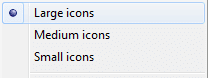
If at any time you wish to restore the icons to one of the three preset defaults, then right click or press and hold on your desktop, click/tap on View and on one of the three options: Presets.png
That's it! Hope I've helped, not everyone likes preset stuff, most people customize everything!
-DW96


Last edited by a moderator:
Nice tutorial, short & exactly to the point :D +rep man
 

My Computer

Computer Manufacturer/Model Number
Compaq Desktop
OS
Windows 7 Ultimate x64
CPU
AMD Sempron Dual Core
Memory
3GB
Graphics Card(s)
NVIDIA GeForce 6150SE nForce 430
Screen Resolution
1024x768
Hard Drives
150GB Sata
The same trick, CTRL+scroll, works in so many places.

Try it in Outlook and other email apps to increase/reduce font size.
 
Wow, thanks to all of you guys! I had no Idea something such as this simple trick would get me so much rep! I will continue making useful tips tutorials whenever I can, but now I'm busy, I have to get ready for school. I'll be 7th grade and I really need to do good on my exams this year. If I get into a good school I get a new monitor BTW so as much as I'd love to continue in the seven-forums, after 15th of September my visits will be as long as 25 minutes a day... Really sorry...
 

My Computer

Computer type
PC/Desktop
Computer Manufacturer/Model Number
Multirama PC Expert [Bulgaria]
OS
Windows 7 Home Premium [64-Bit]
CPU
Intel Core 2 Quad CPU Q8200 @ 2.33 GHz
Motherboard
GIGABYTE GA-G31M-S2C
Memory
4094 MB DDR2
Graphics Card(s)
SAPPHIRE Radeon HD 6970 (2 GB VRAM)
Sound Card
Realtek ALC883 @ Intel 82801GB ICH7 - High Definition Audio
Monitor(s) Displays
Samsung SyncMaster BX2235 [21.5" LCD with LED Backlight]
Screen Resolution
1920x1080
Hard Drives
Hitachi HDT721075SLA360 - 750 GB
PSU
Cooler Master GX750 - 750W
Case
Multirama (Black / 2010 Revision)
Cooling
Stock + Cooler Master
Keyboard
Logitech G510 (Gaming Keyboard)
Mouse
Razer Lachesis (4000 DPI, Blue Version)
Internet Speed
Vivacom Optical [100 Mbps]
Browser
Chrome [Windows]
I had NO CLUE and I thought I knew enough about win7! Thanks for this one, exactly what I was looking for.
 

My Computer

OS
Win 7 Ultimate x64
CPU
Intel i7 950 OC'd @ 4.0Ghz (SpeedStep ON)
Motherboard
ASUS P6X58D-E BIOS 0303
Memory
3x2GB Patriot Extreme Viper II Sector 7 DDR3 @ 1600mhz
Graphics Card(s)
ATI MSI 5870 900mhz/1300mhz
Sound Card
Onboard Realtek ALC889
Monitor(s) Displays
2 X 24" BenQ G2412HD
Screen Resolution
1920x1080p
Hard Drives
Intel X25-M 80 GB (SSD)
W.D. Caviar Black 1TB (SATA)
Seagate Barricuda 1TB (SATA)
Seagate Barricuda 80GB (SATA)
PSU
Corsair AX850
Case
Antec 1200
Cooling
Lots and Lots of Air!
Keyboard
Razer Lycosa
Mouse
Microsoft Sidewinder
Internet Speed
25Mbps/1Mbps
Thanks very much dude..
These big icons kinda suck in win7!
 

My Computer

Computer Manufacturer/Model Number
Gigabyte
OS
Win7 Ultimate 32bit
CPU
3Ghz /2MB L2
Motherboard
Gigabyte 945 S3P
Memory
2GB
Graphics Card(s)
1GB nVidia 5800 GT
Sound Card
built in
Monitor(s) Displays
Acer 17"
Hard Drives
320 GB
160 GB
PSU
400 W
Case
Discovery
Cooling
n/a
Wonderful!!!

:geek: Thank you so much for the post. These huge icons were driving me mad!:mad:
 

My Computer

Computer Manufacturer/Model Number
Lenovo 9979A11
OS
Windows Pro 7 64-bit
CPU
Intel Core 2 Duo
Motherboard
Lenovo
Memory
8 GB DDR2
Graphics Card(s)
Onboard; Intel(R) Q35 chipset
Sound Card
onboard... High Def Audio
Monitor(s) Displays
Acer V173
Screen Resolution
1280 X 1024
Hard Drives
160 GB WD (XP)
320 GB Samsung (7)
500 GB Samsung (storage)
320 Iomega External (backup & storage)
PSU
N/A onboard vid; Intel Q35 Chipset
Case
Mini
Cooling
Native Intel Core 2 Duo fan & Heatsink; 2 case fans
Keyboard
general
Mouse
general
Internet Speed
Cable
Other Info
Windows 7 Pro 64-bit
Brilliant, thanks
 

My Computer

Computer Manufacturer/Model Number
HP Compaq Presario CQ5222UK
OS
Windows 7
CPU
AMD Athlon X2 215
Motherboard
HP
Memory
4gb
Graphics Card(s)
XFX Nvidia Geforce 9600GSO
Sound Card
Realtek HD
Monitor(s) Displays
Generic 17" TFT
Hard Drives
WDC WD32 00AAJS-60MOA 320gb
Freecom USB 1tb external drive
PSU
Unknown
Case
HP
Cooling
Standard
Internet Speed
16214 kbps
adjusting icons

thanks very much! i now realize that i had hit control and mouse scroll which is why my icons suddenly got so large. super help! a frustrating hour or more trying to find solutions in online manuals... So glad that there is a Seven Forum.

again... many thanks

david
 

My Computer

Computer Manufacturer/Model Number
axxiv
OS
Windows 7 home premium 32bit
CPU
what's this
Motherboard
intel core 2
Memory
250 Giga
Graphics Card(s)
no idea
Sound Card
no idea
Monitor(s) Displays
no idea
Hard Drives
one
PSU
what's this?
Case
what's this
Cooling
has a little ventilator
How about independently changing the size of each icon? Does anyone have any clue?
 

My Computer

OS
Windows 7 Enterprise 32bit
Hello Maxvinus, and welcome to Seven Forums.

Sorry, but the icon sizes cannot be set on a per specific icon basis. :(
 

My Computer

Computer type
PC/Desktop
Computer Manufacturer/Model Number
Self built custom
OS
64-bit Windows 11 Pro for Workstations
CPU
Intel i7-8700K OC'd to 5 GHz
Motherboard
ASUS ROG Maximus XI Formula Z390
Memory
64 GB (4x16GB) G.SKILL TridentZ RGB DDR4 3600 MHz
Graphics Card(s)
ASUS ROG-STRIX-GTX1080TI-O11G-GAMING
Sound Card
Integrated
Monitor(s) Displays
2 x Samsung Odyssey G7 27"
Screen Resolution
2560x1440
Hard Drives
1TB Samsung 990 PRO M.2,
4TB Samsung 990 PRO PRO M.2,
TerraMaster F8 SSD Plus NAS
PSU
Seasonic Prime Titanium 850W
Case
Thermaltake Core P3
Cooling
Corsair Hydro H115i
Keyboard
Logitech wireless K800
Mouse
Logitech MX Master 4
Internet Speed
2 Gb/s Download and 100 Mb/s Upload
Antivirus
Malwarebyte Anti-Malware Premium
Browser
Google Chrome
Other Info
Logitech Z625 speaker system,
Logitech BRIO 4K Pro webcam,
HP Color LaserJet Pro MFP M477fdn,
APC SMART-UPS RT 1000 XL - SURT1000XLI,
Galaxy S23 Plus phone
but... can you make one or two larger than all the others?
 

My Computer

Computer Manufacturer/Model Number
HP Pavilion p6745f
OS
Microsoft Windows 7 Home Premium 64-bit 7601 Multiprocessor Free Service Pack 1
CPU
Intel(R) Core(TM) i5-2300 CPU @ 2.80GHz
Motherboard
PEGATRON CORPORATION 2AB6
Memory
6 GB
Graphics Card(s)
Radeon 6750 1gb
Sound Card
(1) IDT High Definition Audio CODEC (2) Intel(R) Display A
Monitor(s) Displays
Acer x193w
Hard Drives
(1) WDC WD15EARS-60MVWB0 (2) Generic- Compact Flash USB Device (3) Generic- MS/MS-Pro USB Device (4) Generic- SD/MMC USB Device (5) Generic- SM/xD-Picture USB Device (6) WD My Book 1110 USB Device
PSU
Internal 500W (100V-240V)
Case
Mid-size ATX
Cooling
unknown
Keyboard
HP usb multimedia keyboard
Mouse
HP usb compliant mouse
Internet Speed
256 kbps
Other Info
Ver: CHI_713.bin vCHI7.13

My Computer

Computer type
PC/Desktop
Computer Manufacturer/Model Number
Self built custom
OS
64-bit Windows 11 Pro for Workstations
CPU
Intel i7-8700K OC'd to 5 GHz
Motherboard
ASUS ROG Maximus XI Formula Z390
Memory
64 GB (4x16GB) G.SKILL TridentZ RGB DDR4 3600 MHz
Graphics Card(s)
ASUS ROG-STRIX-GTX1080TI-O11G-GAMING
Sound Card
Integrated
Monitor(s) Displays
2 x Samsung Odyssey G7 27"
Screen Resolution
2560x1440
Hard Drives
1TB Samsung 990 PRO M.2,
4TB Samsung 990 PRO PRO M.2,
TerraMaster F8 SSD Plus NAS
PSU
Seasonic Prime Titanium 850W
Case
Thermaltake Core P3
Cooling
Corsair Hydro H115i
Keyboard
Logitech wireless K800
Mouse
Logitech MX Master 4
Internet Speed
2 Gb/s Download and 100 Mb/s Upload
Antivirus
Malwarebyte Anti-Malware Premium
Browser
Google Chrome
Other Info
Logitech Z625 speaker system,
Logitech BRIO 4K Pro webcam,
HP Color LaserJet Pro MFP M477fdn,
APC SMART-UPS RT 1000 XL - SURT1000XLI,
Galaxy S23 Plus phone

My Computer

Computer Manufacturer/Model Number
HP Pavilion p6745f
OS
Microsoft Windows 7 Home Premium 64-bit 7601 Multiprocessor Free Service Pack 1
CPU
Intel(R) Core(TM) i5-2300 CPU @ 2.80GHz
Motherboard
PEGATRON CORPORATION 2AB6
Memory
6 GB
Graphics Card(s)
Radeon 6750 1gb
Sound Card
(1) IDT High Definition Audio CODEC (2) Intel(R) Display A
Monitor(s) Displays
Acer x193w
Hard Drives
(1) WDC WD15EARS-60MVWB0 (2) Generic- Compact Flash USB Device (3) Generic- MS/MS-Pro USB Device (4) Generic- SD/MMC USB Device (5) Generic- SM/xD-Picture USB Device (6) WD My Book 1110 USB Device
PSU
Internal 500W (100V-240V)
Case
Mid-size ATX
Cooling
unknown
Keyboard
HP usb multimedia keyboard
Mouse
HP usb compliant mouse
Internet Speed
256 kbps
Other Info
Ver: CHI_713.bin vCHI7.13
thank you

ty works well:sick:
 

My Computer

Computer type
PC/Desktop
Computer Manufacturer/Model Number
Custom - GigaByte Motherboard
OS
Windows 7 Home Premium 32bit.
CPU
amd athlon 62x2 duelcore 4200 2.2ghz
Motherboard
Gigabyte
Memory
2 gig
Graphics Card(s)
nvidia gforce 6400
Hard Drives
western digital
Antivirus
avg
Browser
mozilla
To make your icons larger or smaller you can also follow this steps:

1 Click the Start button, and then click Control Panel.

2 In Control Panel, make sure you are in Classic View, with all Control Panel icons showing. If not, click Switch to Classic View in the left pane of Control Panel.

3 Click Display to open the Display Properties dialog box. Click the Appearance tab, then click Effects.

4 In the Effects dialog box, select the Use large icons check box.

5 Click OK, click OK again, and then click the Close button.

Jonatan Grad - 12100942
 

My Computer

Computer type
PC/Desktop
OS
Windows 7 64 bit
To make your icons larger or smaller you can also follow this steps:

1 Click the Start button, and then click Control Panel.

2 In Control Panel, make sure you are in Classic View, with all Control Panel icons showing. If not, click Switch to Classic View in the left pane of Control Panel.

3 Click Display to open the Display Properties dialog box. Click the Appearance tab, then click Effects.

4 In the Effects dialog box, select the Use large icons check box.

5 Click OK, click OK again, and then click the Close button.

Jonatan Grad - 12100942

Hello Jonatan,

Could you post a screenshot showing this setting?

I don't have it in my visual effects below if that was what you were referring to?

http://www.sevenforums.com/tutorials/1908-visual-effects-settings-change.html
 

My Computer

Computer type
PC/Desktop
Computer Manufacturer/Model Number
Self built custom
OS
64-bit Windows 11 Pro for Workstations
CPU
Intel i7-8700K OC'd to 5 GHz
Motherboard
ASUS ROG Maximus XI Formula Z390
Memory
64 GB (4x16GB) G.SKILL TridentZ RGB DDR4 3600 MHz
Graphics Card(s)
ASUS ROG-STRIX-GTX1080TI-O11G-GAMING
Sound Card
Integrated
Monitor(s) Displays
2 x Samsung Odyssey G7 27"
Screen Resolution
2560x1440
Hard Drives
1TB Samsung 990 PRO M.2,
4TB Samsung 990 PRO PRO M.2,
TerraMaster F8 SSD Plus NAS
PSU
Seasonic Prime Titanium 850W
Case
Thermaltake Core P3
Cooling
Corsair Hydro H115i
Keyboard
Logitech wireless K800
Mouse
Logitech MX Master 4
Internet Speed
2 Gb/s Download and 100 Mb/s Upload
Antivirus
Malwarebyte Anti-Malware Premium
Browser
Google Chrome
Other Info
Logitech Z625 speaker system,
Logitech BRIO 4K Pro webcam,
HP Color LaserJet Pro MFP M477fdn,
APC SMART-UPS RT 1000 XL - SURT1000XLI,
Galaxy S23 Plus phone
Download ICONOID.

Hilarious, you can't pay Microslop (sic) to give back this functionality, but you can get it for free from somebody else.
 

My Computer

Computer type
PC/Desktop
OS
7 64
Back
Top