Windows Media Center Start Up - Customize

How to Customize How Windows Media Center Will Start Up

   Information
This will show you how to use a list of commands that allow you to change how Windows Media Center starts up including, no start up animations, force widescreen, start in screensaver, and more!

Windows Media Center is not available in the Windows 7 Starter and Windows 7 Home Basic editions.
   Note
This also works with the Media Browser shortcuts that are avaliable through the internet! Shortcut avaliable for download Here!


The N and KN editions of Windows 7 have all the features that normally come with each individual Windows 7 edition, except for Windows Media Player 12 and related programs, such as Windows Media Center or Windows DVD Maker.

The N editions of Windows 7 allow you to choose your own media player and software required to manage and play CDs, DVDs, and other digital media files. If you choose to use Windows Media Player 12, downloading it, along with related software, is free. Download Media Feature Pack for Windows 7 N with Service Pack 1 and Windows 7 KN with Service Pack 1 (KB968211) from Official Microsoft Download Center


Here's How : 1. Ok so first your going to navigate to your Windows Media Center shortcut you'd like to modify. icon.jpg
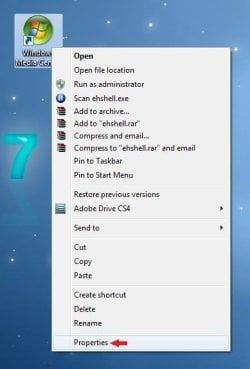
2. Right click on your shortcut and click on Properties. properties.jpg
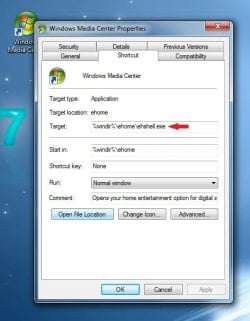
3. Find the "Target" box. shortcut.jpg
4. In the Target box at the end of the text put a space, then copy one of the following commands in bold below. Exactly like this.... (See screenshot below command list)
  • /homepage:VideoFullscreen.xml /PushStartPage:True - Live TV
  • /homepage:VideoGuide.xml /PushStartPage:True - TV Guide
  • /homepage:RecordedTV.BrowsePage.xml /PushStartPage:True - Recorded TV
  • /homepage:VideoToBeRecorded.xml/PushStartPage:True - Scheduled Recordings
  • /homepage:Radio.BrowsePage.xml /PushStartPage:True - Radio
  • /homepage:Radio.xml - FM Radio
  • /homepage:MusicBrowsePage.xml /PushStartPage:True - Music Library
  • /homepage:VideosBrowsePage.xml /PushStartPage:True - Video Library
  • /homepage:PhotosBrowsePage.xml /PushStartPage:True - Picture Library
  • /homepage:Options.Home.xml /PushStartPage:True - Settings Menu
  • /nostartupanimation – disables the startup animation
  • /noshutdownui – removes the shutdown item from Tasks
  • /mediamode – start in “media only mode” with no minimize/close buttons
  • /widescreen – force widescreen mode
  • /nochrome – launch windowed mode without the containing window
  • /playallmusic – Play all music at startup
  • /playfavmusic – Play favorite music at startup
  • /playfavslideshow – Play favorite slideshow at startup
  • /playfavslideshowwithmusic – Same as above with music
  • /playslideshow – Play all slideshows
  • /playslideshowwithmusic – Same as above with music
  • /screensaver – Start media center in screensaver mode
  • /configuress – Start media center at configuring screen saver menu
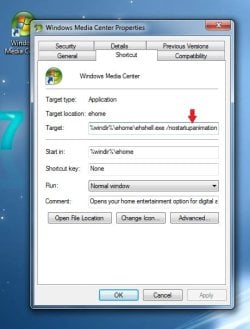
nostartupani.jpg
5. Click on Apply and Ok, then you should be good to go!
 
Last edited by a moderator:
Excellent work, I'm glad you made a tutorial of this :D
 

My Computer

Computer Manufacturer/Model Number
Compaq Desktop
OS
Windows 7 Ultimate x64
CPU
AMD Sempron Dual Core
Memory
3GB
Graphics Card(s)
NVIDIA GeForce 6150SE nForce 430
Screen Resolution
1024x768
Hard Drives
150GB Sata
No thank you :D really happy you like it and anyone else that finds it useful!

p.s - More tutorials to come soon!
 

My Computer

Computer Manufacturer/Model Number
Custom
OS
Windows 7
CPU
AMD Phenom II X4 940 3.0 Stock
Motherboard
Gigabyte GA-MA78GM-S2H
Memory
G.SKILL DDR2 800 PI Black 4GB+Corsair XMS2 Xtrm Gaming 2GB
Graphics Card(s)
ASUS EN8800GT TOP (Fact OC)
Monitor(s) Displays
Optiquest 20" Flatscreen
Screen Resolution
1680x1050
Hard Drives
Seagate 3.5' 7200RPM 750GB HDD
PSU
Antec NeoHE 550W
Cooling
Stock AMD Phenom HSF
Keyboard
Logitech G15
Internet Speed
Charter HighSpeed 10 Down / 5 Up
No thank you :D really happy you like it and anyone else that finds it useful!

p.s - More tutorials to come soon!

I hope so :p

All contributions are very welcome :D
 

My Computer

Computer Manufacturer/Model Number
Compaq Desktop
OS
Windows 7 Ultimate x64
CPU
AMD Sempron Dual Core
Memory
3GB
Graphics Card(s)
NVIDIA GeForce 6150SE nForce 430
Screen Resolution
1024x768
Hard Drives
150GB Sata
Here's a few more for you :D

/homepage:VideoFullscreen.xml /PushStartPage:True - Live TV
/homepage:VideoGuide.xml /PushStartPage:True - TV Guide
/homepage:RecordedTV.BrowsePage.xml /PushStartPage:True - Recorded TV
/homepage:VideoToBeRecorded.xml /PushStartPage:True - Scheduled Recordings
/homepage:Radio.BrowsePage.xml /PushStartPage:True - Radio
/homepage:Radio.xml - FM Radio
/homepage:MusicBrowsePage.xml /PushStartPage:True - Music Library
/homepage:VideosBrowsePage.xml /PushStartPage:True - Video Library
/homepage:PhotosBrowsePage.xml /PushStartPage:True - Picture Library
/homepage:Options.Home.xml /PushStartPage:True - Settings Menu

Enjoy! :D
 

My Computer

Computer Manufacturer/Model Number
HP Touchsmart IQ771.uk
OS
Windows 7 Ultimate x64
CPU
AMD Turion(tm) 64 X2 Mobile Technology TL-56
Motherboard
ASUS Pheonix
Memory
3GB Nanya PC2-6400 DDR2-SDRAM SO-DIM (400MHz)
Graphics Card(s)
NVIDIA GeForce Go 7600 256MB GDDR3 SDRAM
Sound Card
High Definition Intergrated NVIDIA MCP51
Monitor(s) Displays
46" Sony Bravia HDTV
Screen Resolution
1600x1200
Hard Drives
1.5TB Samsug
320GB Seagate ST3320820AS - SATA 3Gb/s 8MB
500GB Maxtor Basics STM305003EHD301-RK
Internet Speed
↓6.32 Mb/s ↑0.35 Mb/s ↔26ms
Other Info
BIOS - American Megatrends Inc. 5.07
Ethernet Port - NVIDIA nForce 10/100/1000 Mbps
DVD Drive - TSSTcorp DVDR/RW TS-T632L
Hi

I tried the "nostartaupanimation" but it only works if you are launching 7mc fom the icon, when I start with te green button of my remote control it does not work.

Any suggestion?
 

My Computer

OS
W7 x86 RTM Final
CPU
AMD Athlon X2 5200
Motherboard
MA78GM-USH
Memory
4Gb DDR800 Kingston
hi what command can i use to start in extras ? i mean i want my tv-catch extra up to start playing the tv which is in the extras section :confused:

http://www.tvcatchup.com/
 
Last edited:

My Computer

Computer Manufacturer/Model Number
packard bell IXTREME M5722
OS
Operating System : Windows 7 Home Premium Edition 6.01.7600 SP1 (x64)
CPU
Processor : Intel Core 2 Quad Q8300 @ 2500 MHz
Motherboard
Mainboard : Packard Bell (Acer EG43M )
Memory
Physical Memory :8GB Corsair4x 2GB 800MHz C5 DDR2
Graphics Card(s)
Video Card : XFX 6700 AMD
Monitor(s) Displays
Maestro 234DL - BenQ V2220 - BenQ VW2420H
Screen Resolution
Current Display :1920x1080p pixels at 60 Hz in HD LED
Hard Drives
Hard Disks : WDC (1000 GB)
Drive C: (Hard Disk) : 428 GB available on 491 GB
Drive D: (Hard Disk) : 426 GB available on 492 GB
SAMSUNG spinpoint HD103SJ 1000.2 GB
(X 2) KINGSTON SSD NOW V 30GB
PSU
XFX ProSeries 550W PSU
Case
PACKARD BELL IXTREME
Cooling
System Blower Current: 150mA Air Flow16CFM ;Akasa 90mm rear
Keyboard
Gigabyte Aivia K8100
Mouse
TRUST-Wireless Laser Mouse - Carbon edition MI-7770C
Internet Speed
TP-LINK > TL-WN951N / AV500 Gigabit Powerline Adapters
Browser
chrome dev
Other Info
EXTRA COOLING>(FAN CONTROLLER) PC Bay Cooler 3 x 40mm fans; Akasa AK-HD-BL Blue hard drive cooler 2 x 40 mm fan 4500 rpm 29.7 dBA
Bios> American Megatrends Inc.
Version : P01-A1
Date : 08/31/2009
Shortcut maker

Wrote these shortcuts into a little program I have for remotes. Also added Netflix direct shortcut and Media Browser.

Even if you don't have a remote, the shortcut bit will work for you. The program is standalone so if you just want it to create the shortcuts for you, run it, make shortcuts and then delete it.

Let me know if you guys like it, and i'll just make it into a separate little shortcut maker.

Remote Programs - Seabyrd Technologies
 
Last edited:

My Computer

Computer Manufacturer/Model Number
custom
OS
Win 7 Home Premium 32bit
CPU
Dual Core 3.2
Motherboard
intel
Memory
3.5
Graphics Card(s)
Nvidia GX465
Sound Card
onboard
Monitor(s) Displays
LG 42" plasma
Hard Drives
WD/Seagate = ~4tb
PSU
coolermaster
Case
antex
Cooling
fan
Awseome! thank you very much.
 

My Computer

Computer Manufacturer/Model Number
hp
OS
win 7
CPU
amd
Memory
4gb
How do i go about launching directly into My Movies? thanks, steve
 

My Computer

OS
windows 7 enterprise
Can We Take This A Step Further?

I'm using the WinTV-HVR-2250 (Media Center Kit), with a EVGA 01G-P3-N959-TR GeForce 9500 GT 1GB 128-bit DDR2 PCI Express 2.0 x16 HDCP Ready SLI Support Video Card that has an S-video out I use to connect to my Sony CRT TV. Now, with that out of the way...;) here's my dilemma:

My oh so lovely wide screen monitor is set to 1680x1050. You can probably guess where this is going. Obviously, an "old" CRT TV cannot/will not display at that resolution. My work around (so far) is calling up the Display Switch, then choosing "Duplicate" which I have configured to 1024x768. This displays WMC very nicely on the TV but the resolution on the monitor is thus lowered. This is not really a problem since I use my PC to watch movies and such on my TV. What I would like is one of the following:


  1. When WMC starts, it automatically sets the Display Switch to Duplicate.
  2. Somehow have the TV at 1024x768 and leave the monitor at 1680x1050. I've tried extending the desktop but then no audio comes from the TV.
Anyone...please....any suggestions? I am going to post an email address because for some reason I am not receiving notifications from here even though my setting apparently allow it to. Thank you all in advance!


Dr Talk
[email protected]
smileys13.gif
 

My Computer

Computer Manufacturer/Model Number
HP Pavilion a6658f
OS
Windows 7 Home Premium (64 bit)
CPU
Core 2 Quad Q6600 (K) 2.4 GHz (95W) 1066 MHz front side bus
Motherboard
ASUS IPIBL-LB HP/Compaq motherboard name: Benicia-GL8E
Memory
6 GB
Graphics Card(s)
EVGA 01G-P3-N959-TR GeForce 9500 GT 1GB 128-bit DDR2 PCI Exp
Sound Card
Realtek ALC 888S chipset
Monitor(s) Displays
HP w2007 21" Widescreen
Screen Resolution
1680x1050 @59Hz
Hard Drives
(after market) 1TB Western Digital SATA x 2 plus 4 externals of various sizes
Keyboard
Logitech 920-000914 Wired Ultra-thin Illuminated
Mouse
Logitech MX-510
Internet Speed
ping 23ms / ↓ 24.07Mbps / ↑ 2.02Mbps
Request the same help to launch WMC directly into MB

Greetings

Just returned to forum after many year absence

Would you be able to help with what’s required to have WMC start up opening Media Browser

Thank you
 

My Computer

OS
windows 7 64bit
CPU
Core i7 860
Motherboard
ASUS P55D
Memory
4GB Mushkin DDR3 1333
Graphics Card(s)
XFX Radeon 4770HD
Sound Card
NA
Monitor(s) Displays
Dell 24 in
Cooling
Noctua
Back
Top