How to Extract Windows 7 System Image Files Using Disk Management
Information
When you create a system image, Windows 7 creates a Virtual Hard Disk VHD file that contains all of your files. This will show you how to attach (mount) this VHD file using Disk Management to manually extract and restore specific files of your choice from the system image instead of doing the default full system image recovery.
Note
System images are saved in this format:
(selected backup location's drive letter)\WindowsImageBackup\(your computer name)\Backup (year-month-day) (time-hhmmss)
For example, if your computer name is Windows7-PC, your backup image location is on hard disk or partition (network or local) D: , and you backed up on September 14th 2008 at 4:39:45 AM (it uses 24 hour time), then that system image VHD file will be located in the D:\WindowsImageBackup\Windows7-PC\Backup 2009-09-14 043945 folder.
(selected backup location's drive letter)\WindowsImageBackup\(your computer name)\Backup (year-month-day) (time-hhmmss)
For example, if your computer name is Windows7-PC, your backup image location is on hard disk or partition (network or local) D: , and you backed up on September 14th 2008 at 4:39:45 AM (it uses 24 hour time), then that system image VHD file will be located in the D:\WindowsImageBackup\Windows7-PC\Backup 2009-09-14 043945 folder.
OPTION ONE
To Attach the VHD to Extract Files from System Image
1. Open the Control Panel (icons View).
A) Click on the Administrative Tools icon, and click on Computer Management.
B) Go to step 3.
OR
2. Open the Start Menu.
A) In the Search box, type compmgmt.msc and press Enter.
3. If prompted by UAC, then click on Yes.
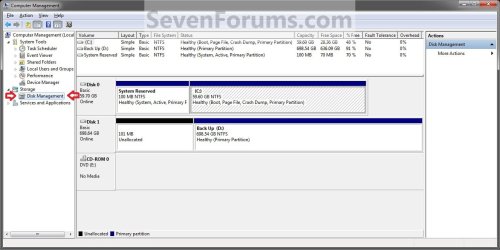
4. In the left pane, right click on Disk Management, and click on Attach VHD. (See screenshot below)
NOTE: You can also click on Disk Management, Action on the menu bar, and Attach VHD.
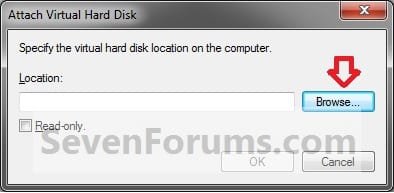
5. Click on the Browse button. (See screenshot below)
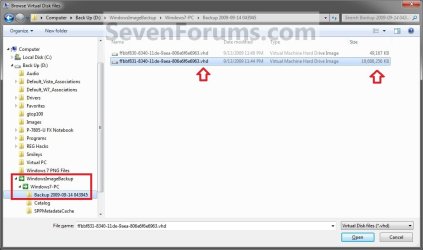
6. Navigate to the drive or partition that you selected to save the created system image to, then select a listed VHD file for the disk that you want to extract files from. (See screenshot below)
NOTE: See the NOTE box at the top of the tutorial to see where to find your system image VHD file at.
Note
There will be a VHD file for each hard disk that was included in the system image backup when it was created.
You will not be able to open the VHD for the 100 MB System Reserved partition if you had one created during the installation of your Windows 7.
You will not be able to open the VHD for the 100 MB System Reserved partition if you had one created during the installation of your Windows 7.
7. Click on OK. (See screenshot below)
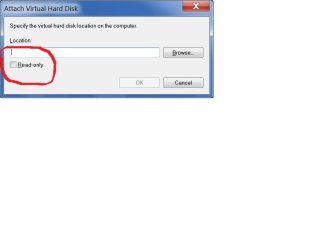
NOTE: Be sure to leave the Read only box unchecked if you wish to have more than read-only access.

8. You will now notice that the VHD file has been attached (mounted) as a separate virtual disk with it's own drive letter (ex: F: ) in Disk Management. Close Disk Management.(See screenshot below)
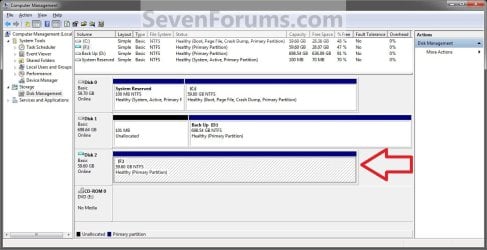
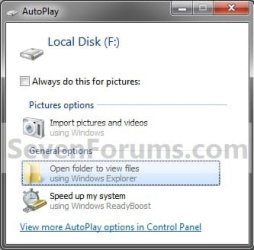
9. You may also get a AutoPlay pop-up window. Double click on the Open folder to view files option. (See screenshot below)
NOTE: If you did not get a AutoPlay pop-up, then you can open the new attached VHD virtual disk (ex: F) from the Computer window like any other hard drive or partition.
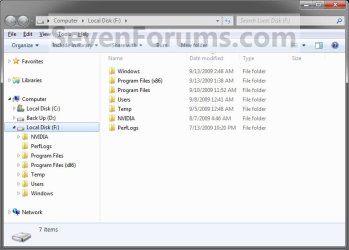
10. You can now copy any files that you want from the attached system image VHD disk (ex: F: ) to restore back to your Windows 7 C: drive. (See screenshot below)
OPTION TWO
To Detach the VHD in Disk Management
NOTE: This will show you to detach the VHD file in Disk Management from OPTION ONE above without affecting the system image.
1. Open the Control Panel (icons View).
A) Click on the Administrative Tools icon, and click on Computer Management.
B) Go to step 3.
OR
2. Open the Start Menu.
A) In the Search box, type compmgmt.msc and press Enter.
3. If prompted by UAC, then click on Yes.
4. In the middle pane, right click on the Disk # of the attached VHD (ex: F: ), and click on Detach VHD. (See screenshot below)
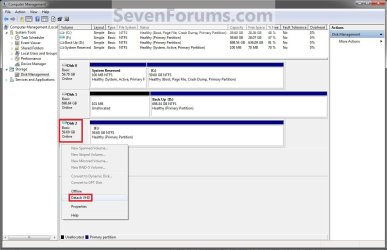
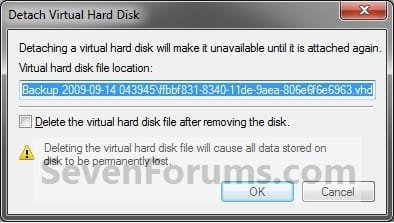
5. Click on OK. (See sreenshot below)
WARNING: DO NOT CHECK the Delete the virtual hard disk file after removing the disk box. If you do, you will destroy the created system image. Leaving this box unchecked will leave your created system image intact an unharmed so you can still be able to use it to do a full system image recovery.
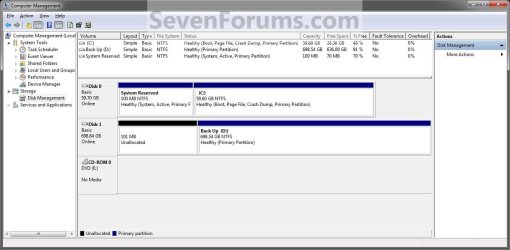
6. You will now notice that the VHD (ex: F: ) has been detached in Disk Management. (See screenshot below)
7. Close Disk Management.
That's it,
Shawn
Related Tutorials
- How to Extract Files from Windows 7 System Image using Virtual PC
- How to Manually Extract Files from a Backup in Vista and Windows 7
- How to Extract Files from the Windows 7 Installation DVD
- How to Restore your System with a Broken Windows 7 System Image
- How to Create a System Image Backup in Windows 7
- How to Backup User and System Files in Windows 7
- How to Do a System Image Recovery in Windows 7
- How to Enable or Disable the Ability to Create a System Image in Windows 7
- How to Unattach and Delete a Virtual Hard Disk in Windows 7
- How to Create and Attach a Virtual Hard Disk in Windows 7
- How to Restore Files and Folders in Windows 7 with Previous Versions
- How to Delete Windows 7 User Data and System Image Backup Files
- How to Extract Files and Folders from System Restore Points in Windows 7 and Vista
Last edited: