Firefox GPU Hardware Acceleration - Turn On or Off

How to Turn GPU "Hardware Acceleration" On or Off in Firefox

   Information
In computing, hardware acceleration is the use of computer hardware to perform some function faster than is possible in software running on the general-purpose CPU. Examples of hardware acceleration include blitting acceleration functionality in graphics processing units (GPUs) and instructions for complex operations in CPUs.

This tutorial will show you how to turn GPU Hardware Acceleration on or off in Firefox.


   Tip
You can revert to default settings by simply following the same steps on this tutorial.


Here's How:


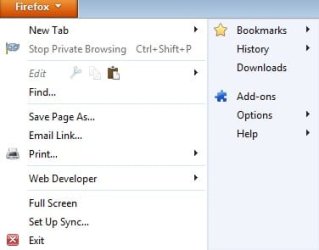
1. Click on the orange "Firefox" tab:
attachment.php

2. Click on "Options" and then click on "Options" again:
attachment.php

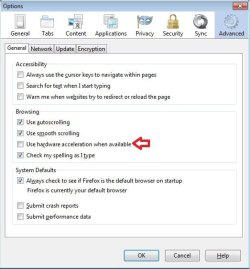
3. Go to the "Advanced" tab and Deselect "Use hardware acceleration when available":
attachment.php

4. Hit OK when you're done.
attachment.php

That's it :)


Attachments

  • FF1.jpg
    FF1.jpg
    11.7 KB · Views: 18,353
  • FF2.jpg
    FF2.jpg
    22.3 KB · Views: 18,439
  • FF3.jpg
    FF3.jpg
    37.4 KB · Views: 18,580
  • FF4.jpg
    FF4.jpg
    37.5 KB · Views: 19,409
Last edited:
Nice and elaborate tutorial :)

It will be very useful, for sure :thumbsup:
 

My Computer My Computer

At a glance

Microsoft Windows 10 Pro Insider Preview 64-bitIntel(R) Core(TM) i3-4130 CPU @ 3.40GHzCorsair Vengence 4GB x2 (8.00GB Dual-Channel ...2047MB GeForce GTS 450 (ZOTAC International)
Computer type
PC/Desktop
Computer Manufacturer/Model Number
Self Assembled
OS
Microsoft Windows 10 Pro Insider Preview 64-bit
CPU
Intel(R) Core(TM) i3-4130 CPU @ 3.40GHz
Motherboard
Gigabyte Technology Co., Ltd. B85M-D3H
Memory
Corsair Vengence 4GB x2 (8.00GB Dual-Channel DDR3 @ 798MHz)
Graphics Card(s)
2047MB GeForce GTS 450 (ZOTAC International)
Sound Card
Onboard (Realtek High Definition Audio)
Monitor(s) Displays
LG Flatron E2040T
Screen Resolution
1600x900
Hard Drives
Western Digital 1 TB
Seagate 500 GB
PSU
Corsair VS550
Case
Cooler Master K380
Cooling
Cooler Master Seidon 120V Plus
Keyboard
Logitech MK260r
Mouse
Logitech MK260r
Internet Speed
PMPL Broadband
Antivirus
Windows Defender + MBAM
Browser
Firefox
Other Info
Dell Studio 15" Laptop
Back
Top